SaaS PPC
The No-Nonsense Guide to Auditing Your SaaS PPC Account
Praveen Ravi
|
Last updated on 09 March, 2026
SaaS PPC
Praveen Ravi
|
Last updated on 09 March, 2026
We’ve all been there.
You’re staring at a Google Ads dashboard that looks like it was organized by a toddler. Or maybe you’ve just inherited an ad account from a previous agency, and you’re trying to figure out why they were bidding on keywords that have absolutely nothing to do with your product.
Whether you are trying to fix a broken funnel or just looking for efficiency in a chaotic account, you need a SaaS PPC audit. But not just a checklist of “did we use correct capitalization in headlines?”
Let’s walk through how to audit a SaaS PPC account the right way, from the high-level strategy down to the nitty-gritty settings.
Here’s a quick index of what you’ll be looking at in this blog:
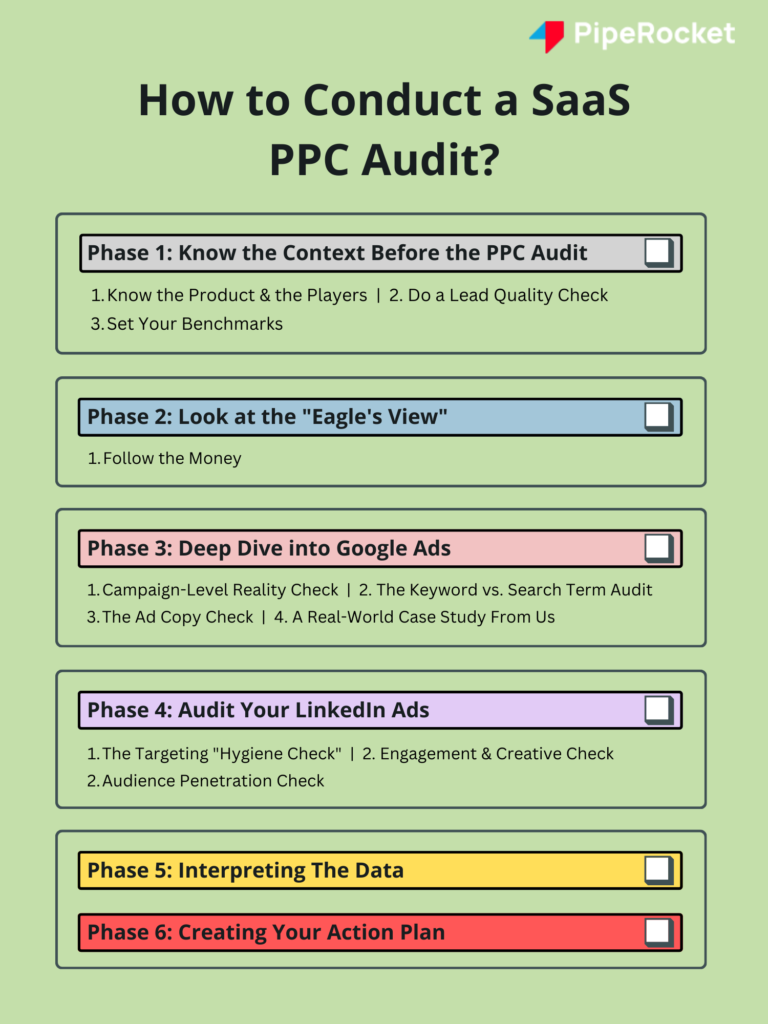
Before you even log into Google Ads or LinkedIn Campaign Manager, you need to step back. The biggest mistake marketers make is auditing the settings before auditing the strategy.
You cannot determine if a keyword is “good” or “bad” if you don’t know who is supposed to be searching for it.
You need to fundamentally understand what is being sold. This sounds obvious, but you’d be surprised how many audits skip this.
Why this matters:
This gives you the “overall picture” regarding messaging and positioning. If your ads are technically perfect (great Quality Score, low CPC) but the messaging doesn’t address the specific pain points of your ICP, you are just burning cash efficiently.
SaaS isn’t e-commerce. You aren’t selling $20 t-shirts where a click equals a sale. You have a funnel, and usually, it’s leaky. You need to understand the entire inbound flow before you judge the ads.
Audit Tip: If you can’t see this data, don’t go into the audit yet and fix your tracking. If you are optimizing for “Leads” but 90% of them are junk, your audit will lead you in the wrong direction.
You need a baseline. If your conversion rate is 2%, is that good? Bad? Terrible?
For your specific category, you should have a rough idea.
Once you have these numbers, you can spot the outliers immediately. If your Lead-to-MQL drop-off is 90%, you don’t have a traffic problem; you have a targeting (or product) problem.
Now that you know who you are targeting, it’s time to look at the data. But don’t dive into the weeds yet. We are going “top-down.”
Where is the budget actually going? Divide your spend by channel. Usually, for SaaS, this means Google, LinkedIn, Meta, and maybe Reddit.
Check the “Bare Minimum” metrics for each channel:
Ideally, you want to track revenue as well, but it’s not that important as a basic metric. However, it is good to have those numbers if possible.
Why this step is critical:
This highlights the “Bleeders.” You might find that LinkedIn is consuming 60% of the budget but generating 10% of the SQLs. Or that Google Ads has a high CPL but a fantastic conversion rate to Opportunity. This “Eagle’s View” tells you where to dig deeper.
Okay, now we roll up our sleeves. For most SaaS companies, Google Ads is the bread and butter because it captures intent. People are literally searching for your solution.
Here is how to audit Google Ads specifically:
Don’t look at all campaigns at once. Segment them.
Audit Action:
Look for “Budget Capping.” Are your best performing campaigns limited by budget? If your “Competitor” campaign has an amazing CPA (Cost Per Acquisition) but is losing 50% of impression share due to budget, that is the easiest win you will find all day.
This is where 80% of wasted-spend lives.
You might be bidding on the keyword “SaaS CRM”, but what are you actually paying for?
Go to the Search Terms Report.
If someone searches for “Healthcare CRM” and you dump them on a generic CRM page, they will bounce.
What are you actually saying to these people?
Let’s look at a real story to see how this audit process works when things go wrong. This is based on a recent audit we did for a Series A/B SaaS company doing $10M-$15M in revenue.
They were doing great, generating qualified leads consistently.
The problem:
The Audit Process:
We didn’t panic. We took the “Eagle’s View.”
The Root Cause:
Because the CPC (Cost Per Click) shot up, their daily budget was being exhausted after just a few clicks.
The Fix:
We slowly scaled it back up efficiently. This is why you audit data, not just settings. If we had just changed the ad copy, we would have never fixed the problem.
LinkedIn is a different beast. It’s not about capturing demand (search intent); it’s about generating demand (interruption).
This is the most important part of a LinkedIn audit.
Audit Action:
Go to the Demographics tab in Campaign Manager. It will show you exactly who is clicking. If you see “Entry Level” or “Interns” eating up your budget, you need to tighten your exclusions immediately.
Since this is an interruption channel, are people actually stopping to look?
Pro Tip: Segment your performance by ad format. You might find that Carousels drive high engagement but Video drives better brand recall (though harder to track). If your ads aren’t resonating well (low CTR, low engagement), you need to reiterate and come up with an actionable item for creative testing.
Are you reaching a significant percentage of your total addressable market (TAM) on LinkedIn? If your audience size is 50,000 and you’ve only reached 2,000 of them in 3 months, you aren’t penetrating the audience.
Read our dedicated blog to avoid the common SaaS LinkedIn Ads mistakes
An audit generates a lot of numbers. Your job is to tell a story with them.
When you are looking at your funnel, you will usually find three types of campaigns:
An audit is useless if it just sits in a Google Doc. You need to turn your “Eagle’s View” into a “Snake’s Strike” (okay, I made that up, but you get the point).
Group your findings into three buckets:
These are things that are actively burning money.
These are hypothesis-driven changes.
Where are we winning?
The goal of a SaaS PPC audit is to answer the big question: Are we going in the right direction?
You need to know:
When you audit from the top down, starting with the business goals, moving to the funnel, and then looking at the keywords, you stop being a “SaaS PPC mechanic” and start being a “Revenue Architect.”
And honestly? That’s where the fun (and the money) is.
A full SaaS PPC audit should happen every quarter, with lighter check-ins each month. Quarterly audits give enough data to spot patterns in lead quality, funnel drop-offs, and cost trends. Monthly reviews help catch budget leaks, tracking issues, and sudden performance shifts before they snowball. If you change pricing, ICP, or positioning, run an immediate audit. Major business changes always deserve a fresh look at how paid media supports revenue.
Most teams jump straight into keywords, bids, and ad copy without reviewing strategy first. They optimize settings before confirming who they are targeting and why. That leads to efficient spending on the wrong audience. A strong audit starts with product clarity, ICP definition, and funnel health. Without that context, even perfect Quality Scores or low CPCs can hide the real issue: traffic that never turns into revenue.
Yes, because they play very different roles in a SaaS funnel. Google Ads captures demand from people actively searching for solutions, so audits focus on intent, search terms, and conversion alignment. LinkedIn creates demand through interruption, which shifts the audit toward targeting hygiene, creative resonance, and audience penetration. Treating both platforms the same leads to bad conclusions, especially when judging performance only by CPL instead of sales impact.
Start by mapping leads to outcomes. If traffic looks relevant but MQL and SQL rates are weak, the issue usually sits in the funnel, landing page, or offer. If leads are clearly off-target, the problem lies in keywords, targeting, or messaging. A simple test helps: review the last 50 leads with sales. If most were never close to buying, traffic quality needs fixing before funnel tweaks matter.
Get fresh ideas, actionable insights and expert guidance for B2B events delivered
directly to your inbox!
Here’s the thing about SaaS marketing that most SaaS PPC agencies completely miss. You are...
Read More →
So, let’s talk about why most SaaS founders are essentially setting money on fire. I...
Read More →
Let’s be honest, most fixes to SaaS LinkedIn Ads mistakes are recycled and incomplete. “Define...
Read More →Please note that we only partner with 1-2 new clients per month
Book for Consultation