SaaS PPC
How do I Run LinkedIn Ads for SaaS (An Expert’s Take)
Praveen Ravi
|
Last updated on 09 March, 2026
SaaS PPC
Praveen Ravi
|
Last updated on 09 March, 2026
In my 10+ years of experience in B2B SaaS, I’ve seen too many SaaS marketers burning their budgets because they treat LinkedIn Ads exactly like Google Ads. They are not the same. If you take one thing away from this guide, let it be this: Google is for capture; LinkedIn is for influence.
If you expect a direct “click-to-close” attribution model on LinkedIn, you will fail. LinkedIn is the bridge. It influences the decision-makers—the VPs, the Directors, the CXOs—so that when they are ready to buy, they go to Google and search for your brand specifically.
In this guide, I’m going to walk you through the exact strategies, from ABM hierarchies to technical bidding nuances, that I use to run LinkedIn Ads for SaaS and turn it into a revenue-generating engine.
To master LinkedIn Ads for SaaS, you have to understand the user journey.
When a prospect searches for “Best CRM Software” on Google, they have high intent. They are looking to buy. But an IT Director doesn’t search for software every day. Most of their time is spent scrolling LinkedIn, catching up on industry news, or networking.
This is where we come in. We use LinkedIn Ads to interrupt their pattern and plant a seed. We act as the influencer.
I view LinkedIn as a bridge between a cold prospect and a high-intent search. You might run an ad for your software, and the user sees it. They might not click immediately. But the next time they need a solution, they won’t search for a generic term; they will search for your brand name on Google. That is the win for your SaaS PPC strategy.
If you look for direct attribution on every single dollar spent, you will miss the mark.
Whenever I audit a SaaS LinkedIn ad account, I look for three specific pillars. If you aren’t running all three, you are leaving money on the table.
This is straight-forward: You are targeting cold audiences who fit your demographic criteria but have zero affinity with your brand. This feeds the funnel for the more complex strategies below.
For B2B SaaS, ABM is non-negotiable. However, I see people doing this wrong by treating all accounts equally. I break ABM down into a tiered approach:
Why do we do this?
Because LinkedIn charges you based on Impressions, unlike Google who charges you for Clicks. If you run a broad campaign on LinkedIn without an account list, you are paying for impressions on irrelevant people.
By using an ABM list, even in a “1:Many” campaign, you ensure that every impression you pay for is served to a company that might actually need and can afford your product.
Remarketing as the name suggests, is where you target users who have interacted with your brand in some form. But, most marketers stop at “Website Visitors.” That is just the basics. To really drive revenue, I use advanced retargeting layers.
Google Ads relies on keywords, while LinkedIn Ads relies on Job Titles, Functions, and Companies.
Before I even touch an ad account, I sit down and define the ICP (Ideal Customer Profile) with precision. You need to understand the product deeply.
Here are the filters I consider mandatory:
If you sell Enterprise software, you must filter by company size (e.g., 1,000+ employees). If you sell to SMBs, you start at 50 employees. This single filter prevents wasted spend on companies that cannot afford your contract value.
I rarely target entry-level employees. I focus on the people who pay like CXOs, VPs, and Directors. Even if a manager is the user, the VP is often the buyer.
There is a difference. “Marketing” is a function; “PPC Specialist” is a title. I usually layer these. I might target the “Marketing” function and then overlay specific seniorities to ensure I’m hitting the leadership within that department.
Be specific here. If you sell cybersecurity software, you want to primarily target the Software/IT industry because that’s where the pain point is highest. If you sell HR software, your industry scope can be broader.
To make this practical, let me share a real example from a SaaS client I audited.
When I looked inside their ad account, I found two massive LinkedIn Ads mistakes that were effectively setting their budget on fire.
They had a modest budget, enough to reach maybe a few thousand people effectively. However, their targeting was set to “Broad.” They were targeting hundreds of thousands of people. If you’re running LinkedIn Ads for SaaS, this is the easiest way to burn cash.
The Result: Their Audience penetration was abysmal at around 2%. Audience penetration is the metric that shows you how much of your target audience you’ve reached through the ad. They were showing ads but influencing none. Because they didn’t use filters for Company Size or Seniority, they were paying for impressions on irrelevant junior employees and small businesses.
They were using Max Delivery bidding.
The Result: LinkedIn spent their budget as fast as possible. It didn’t care about cost efficiency, it just cared about speed. This led to high costs and poor lead quality.
The Result: By narrowing down the audience and controlling the bid, we effectively increased their audience penetration rate from almost 1.70% to 19.20% – A huge 1000% increase.
Here is the before and after data:
 August and September (before we onboarded): In this data, you can see that these two months have hundreds of thousands of impressions with just 1.7% audience penetration.
October and November (after we onboarded): You can see that the impressions have reduced a lot but the audience penetration shot up to 19.20%.
This is why you should always narrow down to who you want to target while running LinkedIn Ads for SaaS.
Now, let’s get into the LinkedIn Campaign Manager. The structure is: Campaign Group -> Campaign -> Ads.
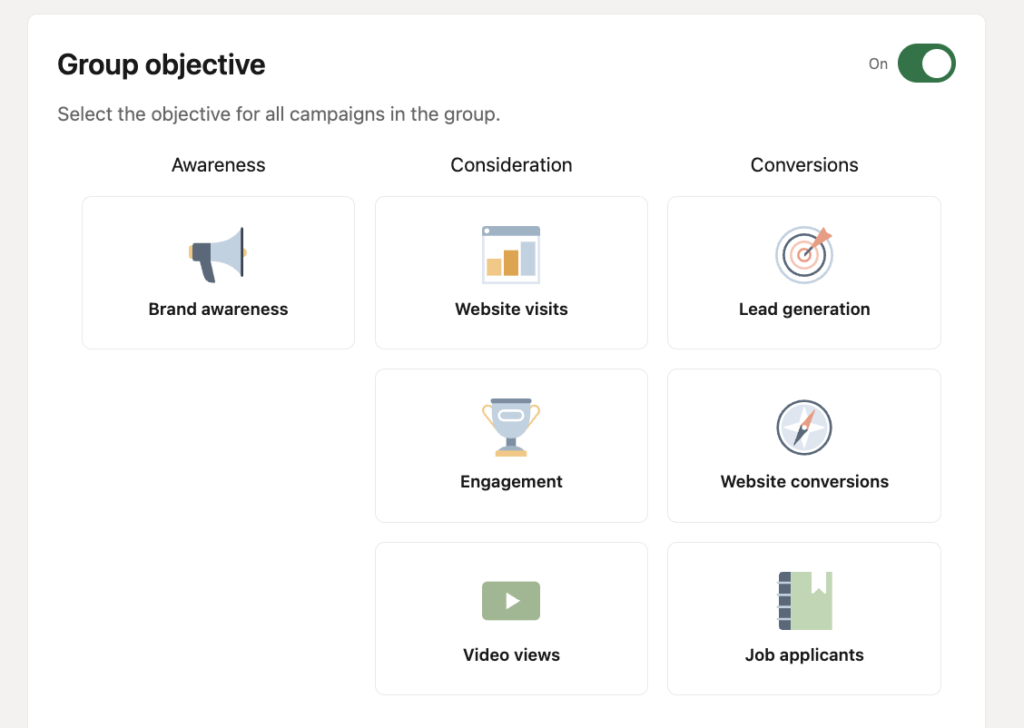
Your group objective dictates how the LinkedIn algorithm behaves and your campaigns in this group are locked to this objective. So, do not choose these randomly.
When creating a campaign, LinkedIn will offer you two modes: Accelerate (AI-driven) and Classic (Manual).
My Advice: Stick to Classic.
Accelerate is AI-based and currently in a learning phase. In my experience, it tends to spend budget inefficiently and doesn’t always optimize for the perfect ICP.
Classic gives you the control you need to ensure your budget is used wisely.
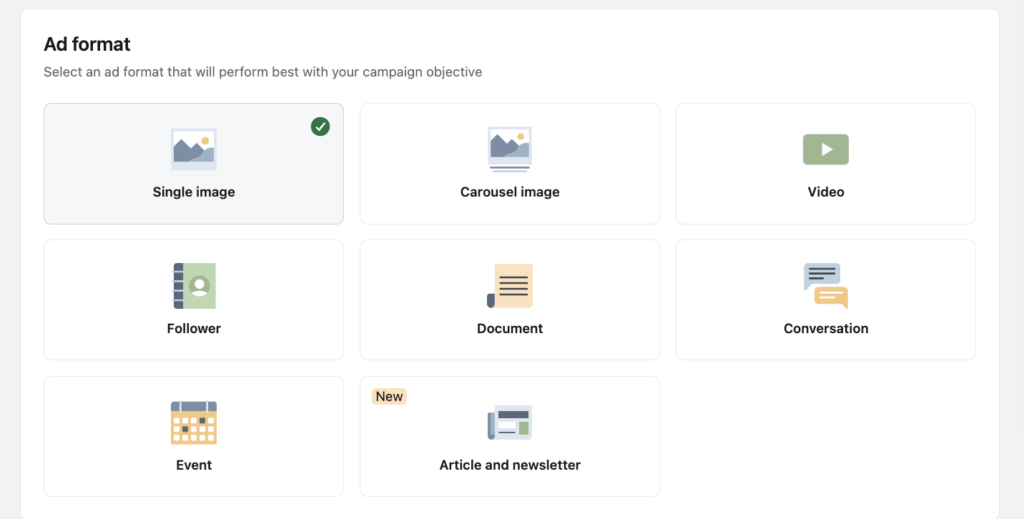
We have a variety of formats at our disposal:
I’ve audited SaaS PPC accounts where thousands of dollars were wasted on two specific settings. Here is how to avoid those traps.
By default, LinkedIn will try to show your ads on “Partner Attributes” or the Audience Network. This means your ad appears on third-party websites (like news sites or apps) rather than the LinkedIn feed.
My Rule: Turn this off. You pay a premium for LinkedIn’s professional context. Do not pay that premium to appear on a sidebar of a random website that you can’t even attribute or track.
Here’s the thing with LinkedIn Ads – Say you set the filters to target VPs of companies with 200 – 500 employees specifically for the U.S. If impressions saturate in the U.S, it can still show the ad to VPs in other countries.
So, I focus equally on who to exclude.
Even when you narrow down an audience (e.g., “Software Companies” + “Marketing Function”), LinkedIn might still show your ad to peripheral audiences.
This is the one of the biggest mistakes I see while auditing SaaS LinkedIn ad accounts.
Do not use Max Delivery.
Max Delivery gives LinkedIn permission to spend your budget as fast as possible. It often results in a high CPC (Cost Per Click) and inefficient delivery.
The Fix: Use Manual Bidding.
Start with a bid. If LinkedIn suggests a range, start at the lower end. If your daily budget isn’t spending, inch the bid up by $1 or $2 until it starts delivering. This ensures you never overpay for a click.
Attribution is the hardest part of LinkedIn Ads. Because it is an influence channel, your attribution software (like HubSpot or Google Analytics) will often credit “Direct Traffic” or “Organic Search” for a lead that actually originated from a LinkedIn ad impression.
So, how do I measure it?
I look for the Lift.
I analyze the correlation. If we launch a heavy LinkedIn campaign this month, I check:
Here is an example:
Running LinkedIn Ads for SaaS is not about throwing spaghetti at the wall. It requires a structured, disciplined approach. You need to shift your mindset from capturing demand to generating influence.
Start by building your ABM lists to ensure you are only paying for impressions on companies that matter. Define your ICP strictly by job title and seniority to avoid paying for eyeballs that can’t sign a check. And finally, take control of your settings—use Classic campaigns, exclude irrelevant audiences, and bid manually to protect your budget.
When you do this right, LinkedIn becomes an engine that drives awareness, trust, and ultimately, high-value pipeline for your SaaS business.
If this sounds too much to handle, we at PipeRocket Digital can manage your LinkedIn ad strategy end-to-end, so that you can focus on other pressing issues. If you want to explore how we can help you with LinkedIn Ads – reach out to us and let’s plan how to grow your pipeline.
In my honest opinion? Absolutely. But only if you have the right expectations. If you are selling a $20/month tool to freelancers, the high Cost Per Click (CPC) on LinkedIn will kill you. Stick to Meta or Google.
But if you are selling high-ticket SaaS with a decent Annual Contract Value (ACV), LinkedIn is non-negotiable. Why? Because your buyers—the VPs, the CTOs, the directors are on LinkedIn. You pay a premium here not for clicks, but to influence the people who actually have the authority to say “yes” to your deal.
Please don’t. This is a attribution trap. If you judge LinkedIn solely by “Last Click” attribution, you will almost always pause it prematurely.
Remember, this is an influence channel. The CEO seeing your ad isn’t going to interrupt their scroll to book a demo instantly. They are going to remember you, and two weeks later, they will tell their team to Google your brand. Instead of panic-pausing, look at your Lift. Has your traffic or lead spiking consistently? Are more people searching for your brand name on Google? If those arrows are green, your ads are doing their job.
Leaving the Audience Network enabled. It’s the default setting, and it’s a budget killer.
When this is on, LinkedIn takes your ad and shows it on third-party websites to get you “cheaper” impressions. But you aren’t paying premium LinkedIn prices to have your ad show up on a news site that you can’t even track. You want to be in the newsfeed, right next to industry news. Go to your “Placements” setting and uncheck that box immediately.
Get fresh ideas, actionable insights and expert guidance for B2B events delivered
directly to your inbox!
Let’s be honest, most SaaS Google Ads content out there is just recycled advice dressed...
Read More →
We’ve all been there. You’re staring at a Google Ads dashboard that looks like it...
Read More →
SaaS PPC can feel like gambling some days. You increase bids… CPC goes up. You...
Read More →Please note that we only partner with 1-2 new clients per month
Book for Consultation