
Google Ads for SaaS Guide: Based on 10+ Years of Experience
 Praveen Ravi
Last updated on
Praveen Ravi
Last updated on
I’ve sat in your chair. The pressure to fill the pipeline is real, and Google Ads often feels like the fastest lever to pull.
SaaS Google Ads offers a massive inventory with Performance Max, Demand Gen, YouTube, and more. While these have their place, today I’m focusing exclusively on Search Ads. Why? Because in my experience in the B2B SaaS world, Search Ads is where 90% of the budget is spent and where the strongest revenue is generated.
Unlike other formats, Search captures high intent exactly when your prospect feels the pain and is actively looking for a solution. I’m going to pull back the curtain and walk you through the exact, step-by-step process I use to build campaigns that actually close deals.
TL;DR
- I never start with keywords. When I set up Google Ads for SaaS, I start by grilling the product and sales teams. If you don’t know the specific pain points and the exact vernacular your customers use, you are just guessing.
- I prioritize high-intent terms first. I focus 100% of my energy on “Bottom of Funnel” terms, then expand to “Top of Funnel” awareness plays only after we have maxed out the high-intent traffic that drives revenue.
- I structure every account into four campaign types: brand, competitor, generic-problem, and feature. One blended account wastes budget on mismatched messaging.
- Broad Match is off-limits. When I launch a SaaS Google Ads account, I treat Broad Match like the enemy. I stick strictly to Phrase and Exact match (and use a heavy negative keyword list) to keep out junk clicks.
- I calculate budgets before launch. I run the math on search volume vs. conversion rates so I know exactly what I can afford to pay for a lead (CPA) based on what that customer is worth (LTV).
- I feed closed-deal data back into Google Ads. Offline Conversion Tracking lets bidding optimize toward SQLs and revenue instead of raw form fills.
What are the Questions You Need to Ask Before Touching Google Ads Manager?
Before you touch keywords, answer five questions: what problem the product actually solves, what its specific features are, what the market calls it, who the decision-maker is, and what triggers the search. Get these right and the ad copy and keywords write themselves, which is why every Google Ads for SaaS account I build starts here.
I see this mistake constantly. A SaaS founder or marketing manager decides to start running ads, logs into Google, and immediately starts typing in keywords.
Stop. Put the mouse down.
If you start with keywords, you have already lost. The first step in a successful campaign has nothing to do with the Google Ads interface.
Before we spend a single dollar of a client’s budget, we start by asking questions. We need to understand the product better than the people who built it. Why? Because if I don’t understand who I am talking to, I cannot write ad copies that compel them to click.
Here are the specific questions I ask during our discovery sessions, and why you need to ask them too:
1. What problem does it actually solve?
I don’t mean “it automates payroll.” That’s a feature. I mean, what is the underlying pain that automated payroll solves? The pain is that the HR director is staying up until midnight on the 30th of every month fearing a compliance lawsuit. That is the problem. Ads that speak to pain convert; ads that speak to features just inform.
2. What are the specific features?
Once we know the pain, we do need the technical specs. Here is where “it automates payroll” comes in. You can usually find the features through the product page, but it’s always better to have all the list of features directly given to you by the product team.
3. What does the market call this product?
This is the most critical question for Search. You might have branded your tool as a “Revenue Intelligence Architecture.” That sounds fancy. But if your prospects are sitting at their computers searching for “Sales Dashboard,” and you aren’t bidding on “Sales Dashboard,” you are invisible. You need to listen to sales calls and discovery calls to hear the exact vernacular your prospects use.
4. Who is the decision-maker?
Are you targeting the CTO or the CEO?
- The CTO cares about implementation time, security, and tech stack compatibility.
- The CEO cares about ROI, bottom line, and efficiency.
Knowing who clicks the ad determines what the headline says.
5. What are the “Triggers”?
What happens in a prospect’s life that makes them search for you today? Did they realize they have a problem with their current workflow? Are they evaluating options? Understanding triggers helps you understand intent.
When you nail the answers to these questions, everything downstream becomes easier. Your ad copy writes itself. Your landing page strategy becomes obvious. Your conversion rates go up because you are entering the conversation already taking place in the prospect’s mind.
How to Categorize Keywords for SaaS Google Ads?
In Google Ads for SaaS, keywords fall into six buckets: category, feature, competitor, integration, solution, and brand. Each carries different intent and cost, so I group them separately instead of dumping them into one campaign.
Once I have the answers from the discovery phase, I look at the market maturity.
If you are in a mature category (like CRM or Project Management), there is a lot of search volume, but it is highly competitive and expensive.
If you are creating a new category, the volume might be low, and we have to get creative to find traffic.
We usually sit down with the sales team to finalize which product category is the easiest for them to close. We want the path of least resistance. Once that is decided, we move to Keyword Research.
I don’t just dump a list of 1,000 keywords into a campaign. I segregate them strictly into “buckets” based on user psychology. Here is how I categorize them:
1. Category Keywords
These are the broad descriptions of what you do.
- Example*:* “HR Software,” “Marketing Automation Tool,” “Inventory Management System.”
- The Vibe*:* High volume, usually expensive, but necessary for growth.
2. Feature Keywords
This is where B2B SaaS shines. People often search for the specific thing they need to fix.
- Example*:* “Automated leave tracking,” “Gantt chart software,” “Multi-currency accounting.”
- The Vibe*:* Lower volume than category keywords, but generally higher conversion rates because the intent is specific.
3. Competitor Keywords
I love this category. This is where we bid on your rivals’ brand names.
- Example*:* If you are Monday.com, you bid on “Asana pricing” or “Trello alternatives.”
- The Vibe*:* High intent. The user is already educated on the solution; you just need to convince them you are better. It’s aggressive, but it works.
4. Integration Keywords
This is an often-overlooked goldmine. SaaS buyers live and die by their tech stack.
- Example*:* “CRM that integrates with Slack,” “Shopify accounting plugin.”
- The Vibe*:* Extremely high intent. If someone needs a tool that talks to their specific stack, and you have it, you have the deal.
5. Solution Keywords
These target the underlying problem rather than the software name.
- Example*:* “How to reduce employee churn,” “Fixing supply chain bottlenecks.”
6. Brand Keywords
Bidding on your own name.
- The Vibe*:* Protects your real estate from competitors who are trying to bid on your name.
How we Helped a 10M+ Revenue Generating SaaS Company Spend Less and Earn More
We recently audited a PPC account of a SaaS client and found a major flaw in their Google Ads campaign. Here’s what happened.
The Problem: Spending Without Focus
The company had a powerful platform with multiple use-cases for different industries, but their Google Ads account treated everything the same.
For example, someone searching for “best messaging app for teams” and another person searching for “Whatsapp alternative” would be seeing the same “Use Slack for Teams” ad.
This “one size fits all” approach meant they were paying for irrelevant traffic that had no intent to buy, with about 60% junk traffic.
The Fix: Intent-Led Restructuring
We rebuilt their Google Ads account based on intent:
- Understanding the different use-cases: We started by understanding the different ICPs and their pain points.
- Segmented by Use-case: We built dedicated campaigns for each use-case so the messaging matched the specific user pain point.
- Funnel Segmentation: We strictly grouped keywords by intent (ToFu vs MoFu vs BoFu) to ensure we weren’t paying premium prices for low-intent browsers.
- Message Alignment: We rewrote ad copy to align with specific search queries and optimized landing pages based on user behavior analysis.
The Results: Efficiency at Scale

The impact was immediate and compounding. Over three quarters, we reduced ad spend by roughly 27% while increasing revenue by nearly 59%.
- Total Spend: ~$250k
- Total Revenue: ~$1.3M
How to Structure Your SaaS Google Ads Campaigns (Brand, Competitor, Generic, Feature)
Structure a Google Ads strategy for SaaS into four separate campaign types: brand, competitor, generic-problem, and feature. Keeping them apart is how Google Ads for SaaS stays efficient: each intent gets the right budget, bids, and messaging instead of one blended ad.
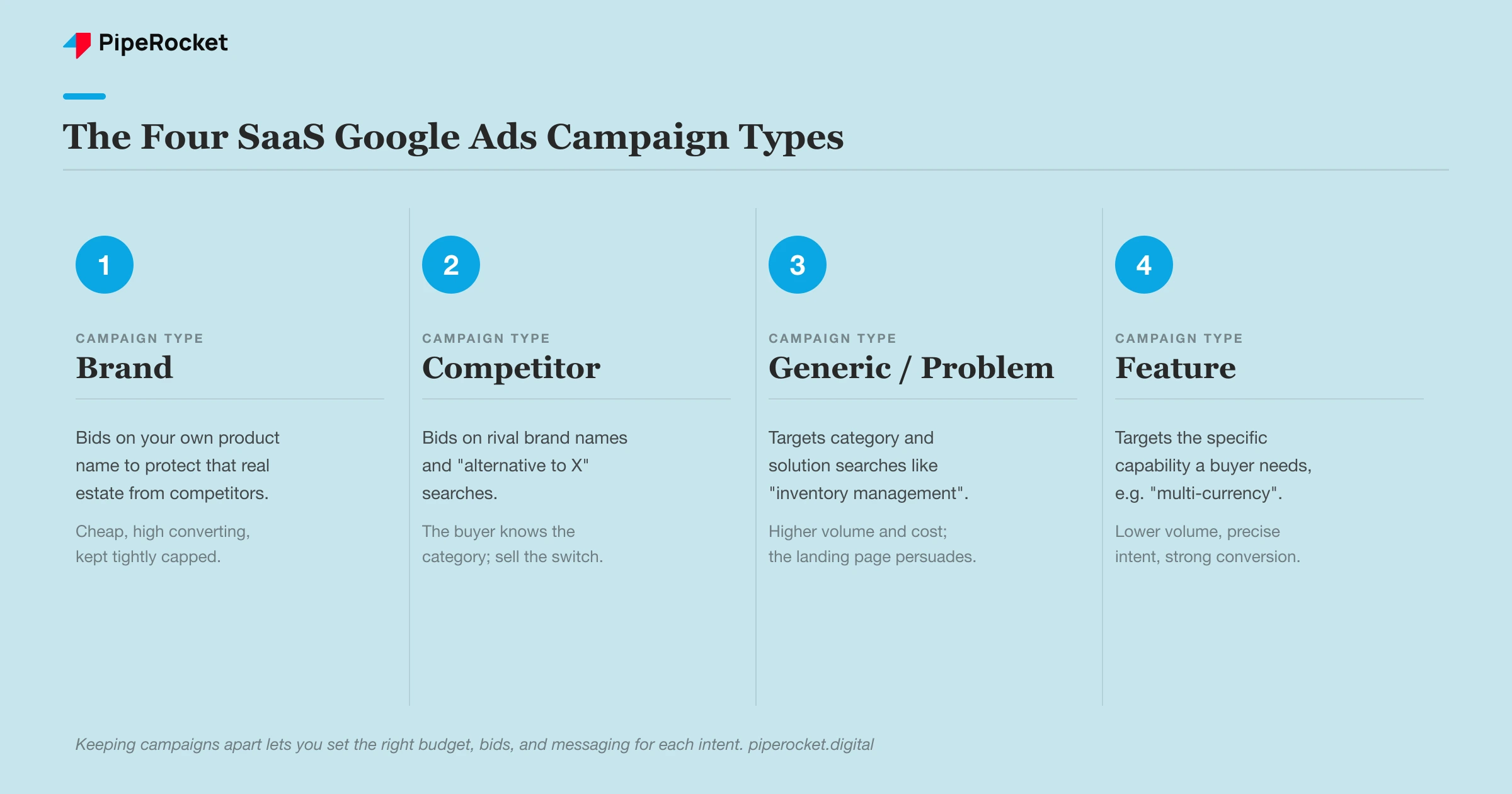
Once the keyword buckets from the last section are sorted, I map them onto four campaign types so no single ad has to speak to every audience at once:
- Brand campaigns. These bid on your own product name to protect that real estate from competitors targeting it. Cheap, high converting, and usually a small slice of the budget, so keep them tightly capped.
- Competitor campaigns. These bid on rival brand names and “alternative to X” searches. The user is already educated on the category, so the ad only has to show why you are the better switch.
- Generic-problem campaigns. These target category and solution searches (“inventory management system,” “how to reduce employee churn”). Higher volume and cost, so the landing page has to carry the persuasion.
- Feature campaigns. These target the specific capability a buyer needs (“automated leave tracking,” “multi-currency accounting”). Lower volume, but the intent is precise and conversion rates are strong.
Splitting the account this way is what turned the client account in the case study above around: separate campaigns per use-case meant each ad matched the exact search that triggered it.
How to Decide Which Keyword Intents to Target for SaaS Google Ads?
Start with BOFU and MOFU keywords, the ready-to-buy and comparison searches, and only expand to TOFU awareness terms once you have maxed out profitable spend on high-intent traffic. That order keeps Google Ads for SaaS budgets on the searches closest to a sale.
When it comes to spending money on Google Ads, I am ruthless about prioritization. I segregate keywords based on Intent:
- BOFU (Bottom of Funnel): High Intent. They are ready to buy.
- MOFU (Middle of Funnel): Consideration. They are comparing options.
- TOFU (Top of Funnel): Awareness. They are just learning.
Here is my rule: I generally do not suggest starting with TOFU for SaaS PPC.
Why? Because TOFU keywords (like “What is employee engagement?”) bring in students, researchers, and people who are either irrelevant or months away from buying. It burns the budget fast.
I start all my clients on BOFU and MOFU. I want the people searching for “Best employee engagement software” or “X vs. Y”.
Only when we have completely saturated the spending on those high-intent keywords, and we simply cannot spend any more money profitably, do I look at TOFU for scaling.
What are the Different Match Types and How to Avoid Irrelevant Matches?
Use Phrase and Exact match, never Broad, when you launch a new SaaS Google Ads account. Broad Match pulls in job seekers, students, and researchers who never convert, and it burns budget before you have data to guide it.
How you input these keywords into Google defines whether you make money or burn it.
The Different Match Types in Google Ads
Google gives us three match types. Here is what each does, with an example for a project management tool:
| Match Type | What it does | Example searches |
|---|---|---|
| Broad | Shows ads for searches loosely related to your keyword, even if the wording differs. | “workflow management tool”, “project tracking tool” |
| Phrase | Shows ads when the search includes your keyword phrase in the same order, with extra words before or after. | “best project management tool”, “project management tool for enterprises” |
| Exact | Shows ads only when the search has the same meaning or very close intent as your keyword. | “project management software”, “project management app” |
Let me give you a piece of advice that will save you thousands of dollars: Do not use Broad Match when you are launching a new account.
Broad Match is the match type Google pushes hardest, but it is the “loose cannon” of the three.
A 2026 shift makes this discipline even more important: Google now sets its AI Max option as the default for new Search campaigns, and AI Max leans on broad, AI-driven matching by design. So control your match types and negatives deliberately from day one.
One related housekeeping note: a Google Ads Terms of Service update effective July 1, 2026 spells out that URLs and text you feed into conversational and other AI-powered ad features can be used across those features to shape campaigns (Google’s policy). Be deliberate about what you hand the machine.
If you bid on the keyword CRM Software in Broad Match, Google might show your ad to someone searching for:
- “CRM jobs in Chicago”
- “What does CRM stand for?”
- “Customer relationship management classes”
These are irrelevant clicks that you pay for.
I stick to Phrase Match (using “quotes”, “project management tool”) and Exact Match (using [brackets], [project management tool]). This forces Google to respect the context of the keyword. It limits your reach slightly, but the quality of traffic is infinitely better.
Why Should Include Negative Keywords in Google Ads for SaaS
This is the shield that protects your budget. While we plan which keywords we want, we also plan the keywords we don’t want.
Before launch, I upload a standard SaaS Negative Keyword list. This ensures we don’t pay for junk traffic. Common negatives I always include:
- Open Source (if you are not open-source)
- Jobs / Career / Internship
- Company size like “startups” or “enterprises” if you don’t cater to them
- Similarly for industries like “education” or “healthcare”
- “Login” / “Support”
Think about that last one. If you don’t negative out “Login”, you shell out money every time your existing customers search for your login page and click your ad.
SaaS Google Ads Benchmarks: CPC and Conversion Rate
Across 65+ B2B SaaS accounts in our own research, the average Google Ads Search CPC is $6.81 and the average conversion rate is 2.57%. I use these as sanity-check anchors so a client’s early-stage forecast doesn’t drift far from what similar accounts actually see.
| Metric | Our benchmark (65+ B2B SaaS accounts) |
|---|---|
| Average CPC | $6.81 |
| Average conversion rate | 2.57% |
These are our own field numbers from the Google Ads benchmarks research, not third-party estimates. Individual keywords swing well above and below these averages, so treat them as a starting reference, then replace them with your account’s real data as it comes in.
How to Forecast the ROI from Google Ads for SaaS?
Forecast ROI by multiplying your keyword search volume by expected impression share, click-through rate, and conversion rate to land on a cost-per-lead, then compare that cost-per-lead against customer LTV. If a lead costs less than the customer is worth, Google Ads for SaaS pays for itself.
Clients often ask me, “How much budget do I need?” and “How many leads will I get?” Compared with SaaS LinkedIn Ads, Google Ads makes this easy to model. Once I understand the keyword volume, I sanity-check the assumed CPC and conversion rate against the benchmarks above, then build the model.
The process goes like this:
- Find out the total number of search volume collectively for all the keywords you want to target
- Then estimate the impressions you’ll get based on the total search volume.
- Then estimate the clicks you’ll get based on the impressions.
- Then estimate the number of conversions (leads) you’ll get based on the clicks.
- Then find out the average total cost you’ll be spending by multiplying the total clicks with the average CPC of the keywords.
- Now, divide the total cost with the number of conversions. This is the amount of money you’re spending to get one lead.
- This number should be less than your sale value.
Let me walk you through an example calculation so you can see how I derive these numbers.
The Scenario: Let’s say we are targeting the keyword category “Inventory Management SaaS.”
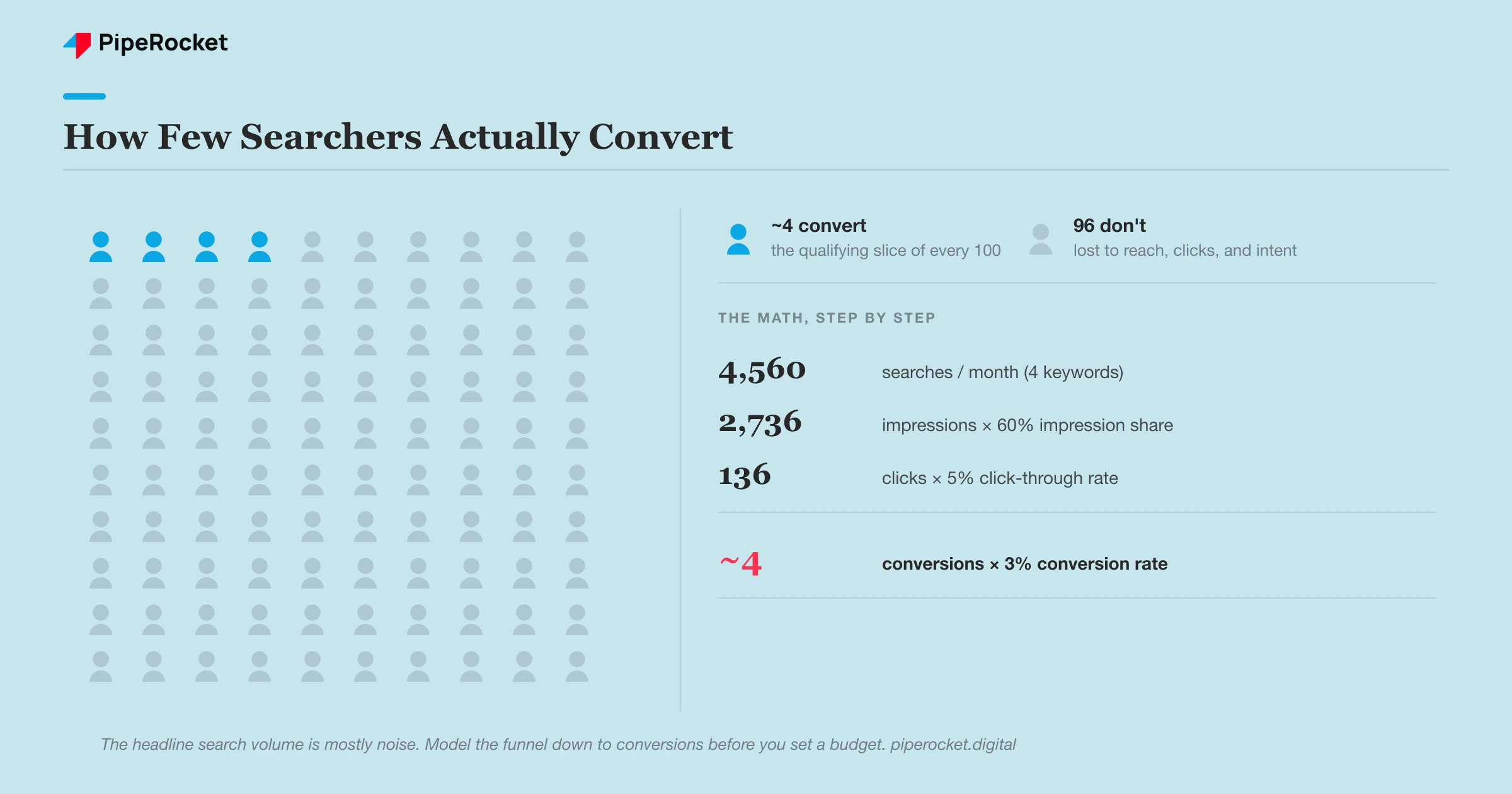
- Search Volume: Through tools like Google Keyword Planner (I prefer it over other tools since the data comes directly from Google), I see a total volume of 4,560 searches per month for the 4 keywords I want to target.
- Impression Share: We can’t capture 100% of the market (competitors exist). A healthy industry standard to aim for is 60%.
- Math: 4,560 × 60% = 2,736 Impressions.
- Clicks: How many of those people will click? I’ll assume a 5% Click-Through-Rate (CTR).
- Math: 2,736 × 5% = 136 Clicks.
- Conversions: How many of those clicks become a lead? I aim for a 3% conversion rate on the landing page.
- Math: 136 × 3% = ~4 Conversions.
- Cost: The average CPC of the 4 keywords I target comes around “$77”
- Math: 136 Clicks × $77 = $10,472 Total Cost.
- CPA: What is the Cost Per Acquisition?
- Math: $10,472 / 4 = $2,618 per Lead.
Now, you might look at that and say, “$2,600 for a lead?! That’s insane!”
But if your product costs $30,000 a year and the client stays for 3 years (LTV = $90,000), paying $2,600 to acquire them is a no-brainer.
I do this math before we launch so there are no surprises.
What to do After Launching a SaaS Google Ads Campaign?
After launch, review the Search Terms report weekly and cut irrelevant queries, cap CPC on keywords that spend without converting, feed closed-deal data back into Google Ads, and watch two 2026 mechanics: budget pacing and Bidding Target Optimization. This is the post-launch routine I run on the Google Ads for SaaS companies we manage.
Congratulations, you’ve finally launched your first campaign. Your ads are alive and well, here’s what you need to do next.
SaaS PPC is not “set it and forget it.” Auditing your SaaS PPC account regularly helps you spend every dollar more efficiently. I am always monitoring account for two things specifically to ensure we aren’t wasting the budget and I’d advise you to do the same.
1. The Search Terms Report
This is the most honest report in marketing. It shows you the actual words people typed before clicking your ad (not just the keywords you bid on). I review this weekly. If I see a term that is irrelevant, say someone searched for “Inventory management software for home use,” I immediately add “home use” to the Negative Keyword list.
This is how you refine your traffic. Over time, your wasted spend drops to near zero because you have blocked all the bad terms or maybe even found more relevant keywords. The bar for “relevant” is always your ICP; a cheap click from outside your ideal customer profile is still wasted spend.
2. CPC Monitoring
If I see a keyword that is costing an astronomical amount (high CPC) but isn’t bringing in conversions, I have to make a call. I will often put a CPC Bid Cap on that specific keyword.
I tell Google, “I am willing to bid on this, but I will not pay more than $50 for a click.” This keeps the algorithm from spending your whole budget on one expensive keyword.
3. Two 2026 Changes to Watch
Two 2026 Google Ads changes affect how your budget spends and how automated bidding behaves. Here is what changed and what to do about each:
| 2026 change | What changed | What to do |
|---|---|---|
| Budget pacing (effective June 1, 2026) | For campaigns using ad schedules, Google now paces toward the full monthly limit (30.4× your daily budget) instead of the old daily-budget × active-days math. On scheduled days it can spend up to 2× your daily budget. (Search Engine Land) | If you daypart, size your daily budget against the 30.4× monthly cap so spend doesn’t overshoot. A weekend-only campaign at $100/day (≈8 days) that used to spend ~$800/month can now pace toward ~$1,600. |
| Bidding Target Optimization (announced June 15, auto-applies from Aug 17, 2026) | Auto-applies to budget-limited, over-delivering campaigns and pulls them back toward your target (a Bid Target Adjustment Tool shipped July 6 to preview impact first). Google also renamed strategies: Target CPA and Target ROAS. (Google) | Preview the impact before it auto-applies, and don’t panic if inherited accounts show the renamed ROAS strategies. See our Smart Bidding for SaaS PPC guide for making these work on a SaaS sales cycle. |
4. Feed Offline Conversion Data Back Into Google Ads
Feed closed-deal data from your CRM back into Google Ads with Offline Conversion Tracking (OCT) so bidding optimizes toward qualified leads and revenue instead of raw form fills. This matters more now that Bidding Target Optimization leans harder on the conversion signal you send it.
SaaS sales cycles rarely close on the click. A form fill can be a tire-kicker or a six-figure deal, and Google can’t tell the difference unless you tell it. By importing which leads became SQLs and which became paying customers (via a GCLID stored at form submission), you let Smart Bidding chase the searches that actually produce revenue, not just the cheapest form fills.
5. Should You Use Remarketing?
Yes, run light remarketing to stay in front of visitors who didn’t convert on the first click, since SaaS buyers rarely decide in one session. Keep it as a supporting layer to Search, which stays the core of the account.
I keep remarketing lists tight: recent visitors to high-intent pages (pricing, demo, comparison), capped so you aren’t chasing bounced traffic. It’s a nudge for warm prospects already in the evaluation, not a channel to lean on for net-new demand.
Want to run this exact post-launch cadence yourself? Work through our interactive Google Ads optimization checklist.
Conclusion
Running Google Ads for SaaS is a specific skill. It requires a mix of deep product and ICP understanding, proper keyword planning, forecasting, and monitoring.
When you follow this process, you stop gambling with your marketing budget and start building a predictable revenue engine. You stop worrying about “clicks” and start focusing on what matters: pipeline and revenue.
I hope this “over-the-shoulder” look at our process helps you structure your own campaigns. It’s the exact playbook we use, and now it’s yours.
This looks like too much for me to handle: Does this process make sense, but you realize you don’t have the hours in the day to execute it? That’s where PipeRocket Digital comes in. If you want to skip the learning curve and hand your SaaS Google Ads management to a team of experts, reach out to us at PipeRocket. Let’s build your pipeline together.
Frequently Asked Questions
1. How can I run ads for my SaaS tool?
Connect three dots: a specific keyword, an ad that repeats that phrase, and a landing page about that exact thing. Match all three and you’re already ahead of most accounts.
For example, take the keyword “automated payroll software,” run a headline like “Best Automated Payroll Software,” and send the click to a page about automated payroll software. Don’t try to build a massive machine on day one. Get those three things to match perfectly first.
2. How do I know if I have enough budget to compete?
Budget for at least 10 clicks per day per keyword, so if your CPC is $50 you need $500/day to gather meaningful data.
If you only spend $100/day, you get 2 clicks, which isn’t enough to learn anything. Use the forecasting formula from this guide to find your CPC, multiply it by 10, and that is your minimum daily viable budget.
3. Why are you so against Broad Match keywords? Google recommends them.
Broad Match casts too wide a net for new SaaS accounts, pulling in job seekers, students, and researchers with no intent to buy. Google recommends it because it spends your budget faster.
I always advise starting with Phrase and Exact match so you only pay for people actively looking for your solution. Earn the right to use Broad Match later, once you have plenty of conversion data to guide the algorithm.
4. Is running Google Ads for SaaS costly?
It’s worth it as long as your cost per lead stays below your selling price, even if the CPC looks high. If a lead costs more than the customer is worth, it isn’t.
Lead quality drives this too. If your ads reach people outside your ICP or with a different intent, cost per lead climbs, so monitor lead quality and adjust the campaigns.
5. What is the average cost of Google Ads per 1,000 clicks?
Based on our research across 65+ B2B SaaS accounts, the average CPC is $6.81, so 1,000 clicks costs roughly $6,810.
That figure varies widely by keyword competitiveness. High-intent category and competitor terms can cost far more per click, while narrow feature keywords often cost less.
6. How do I advertise my SaaS?
Google Search Ads is one channel in a broader mix that can include LinkedIn, YouTube, and content, and this guide covers Search Ads specifically because that’s where most B2B SaaS budget earns its return.
Search captures high intent at the moment a prospect is looking for a solution. Start there with a tightly structured, intent-led account before layering on awareness channels.

