
What Is a Landing Page? A Practical Guide for SaaS Teams
 Vignesh Sampath
Last updated on
Vignesh Sampath
Last updated on
A landing page is a standalone web page built for a single campaign and a single action, like booking a demo or starting a trial. Visitors land on it from an ad or an email. Unlike a homepage, it strips away navigation so one offer gets the full attention.
TL;DR
- A landing page is a standalone page with one offer and one call to action, built for a specific campaign or audience.
- Sending paid traffic to your homepage wastes budget, because a homepage speaks to everyone and converts almost no one.
- The strongest SaaS landing pages match the exact intent of the ad or keyword that brought the visitor there.
- Landing pages can serve organic search too, but only if you let them get indexed and treat them like real pages.
- Test the message before the layout, since what you say moves conversion more than how it looks.
What Is a Landing Page?
A landing page is a page with one job. It takes a visitor who arrived with a specific intent (they clicked your ad or your email) and asks them to take one specific action. No menu of options. No “explore our platform” detours. One message, one button.
Most SaaS teams blur the line between a landing page and a website page. That blur is expensive. A website page serves many visitors with many goals. A landing page serves one campaign with one goal, and everything on it either supports the conversion or gets cut.
- Single focus: One offer and one call to action. Extra links and secondary CTAs leak attention away from the conversion.
- Campaign-matched: The headline continues the promise of the ad or email that sent the visitor. A mismatch and they bounce.
- Standalone: It often hides the main site navigation, so the visitor’s only real choices are convert or leave.
- Measurable: Because one page maps to one campaign and one action, you know exactly what worked and what didn’t.
- Disposable by design: You can spin one up for a launch or a single ad group, then retire it when the campaign ends.
Consider a payroll SaaS for restaurants running ads on “restaurant payroll software.” Sending that click to the homepage means the visitor sees generic positioning, an About link, and a blog. Sending it to a landing page about restaurant payroll, with one demo form, keeps the conversation the visitor started.
In practice, the test is simple: if you can’t name the one action this page exists to drive, it’s not a landing page yet.
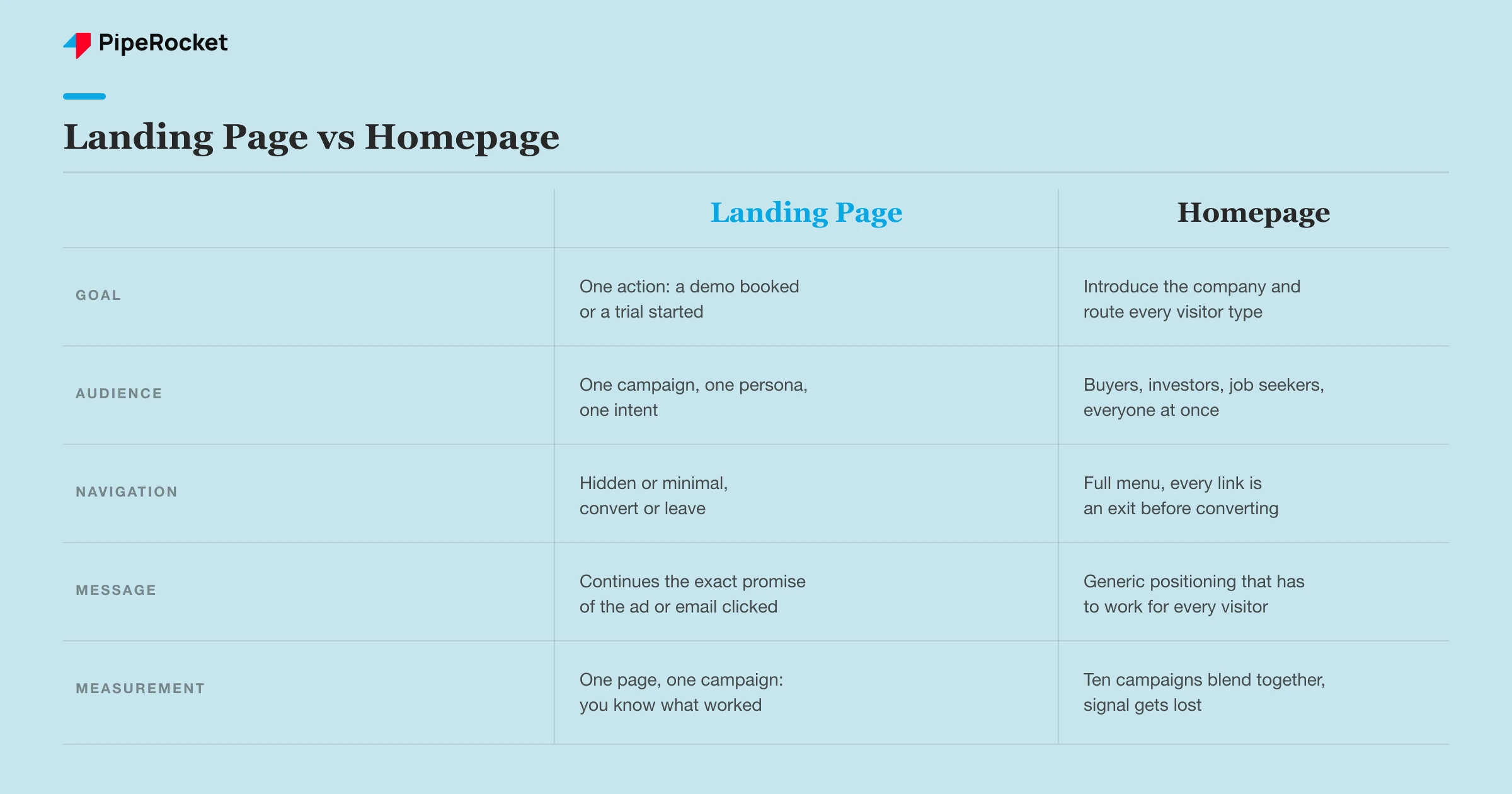
Why Shouldn’t You Send Paid Traffic to Your Homepage?
Because your homepage serves everyone, and a paid click is one specific person with one specific problem. The homepage has to introduce the company and route every visitor type, from investors to job seekers. A landing page only has to convince the person who clicked one ad.
Here’s the part that stings: most SaaS teams already know this and still default to the homepage, because building dedicated pages feels slow. That habit quietly drains SaaS PPC budgets every month. You paid for a high-intent click and then handed the visitor a brochure.
- Message match: The ad promised something specific. The homepage answers with something general, and the visitor feels the gap immediately.
- Too many exits: Every nav link on a homepage is a way to wander off before converting.
- Diluted measurement: When ten campaigns all land on one page, you can’t tell which message actually drove the signups.
- Quality Score : Google scores landing page relevance. A generic homepage drags it down, which raises your cost per click.
Now you might say, “our homepage converts fine.” Compared to what? Until you’ve run the same campaign against a dedicated page, you’re comparing against nothing. We’ve yet to see a SaaS homepage beat a well-matched landing page for a focused paid campaign.
Fast Fact: Organic search converts SaaS visitors at 0.92% — more than 3x the rate of AI-driven traffic at 0.26%.
What Makes a SaaS Landing Page Actually Convert?
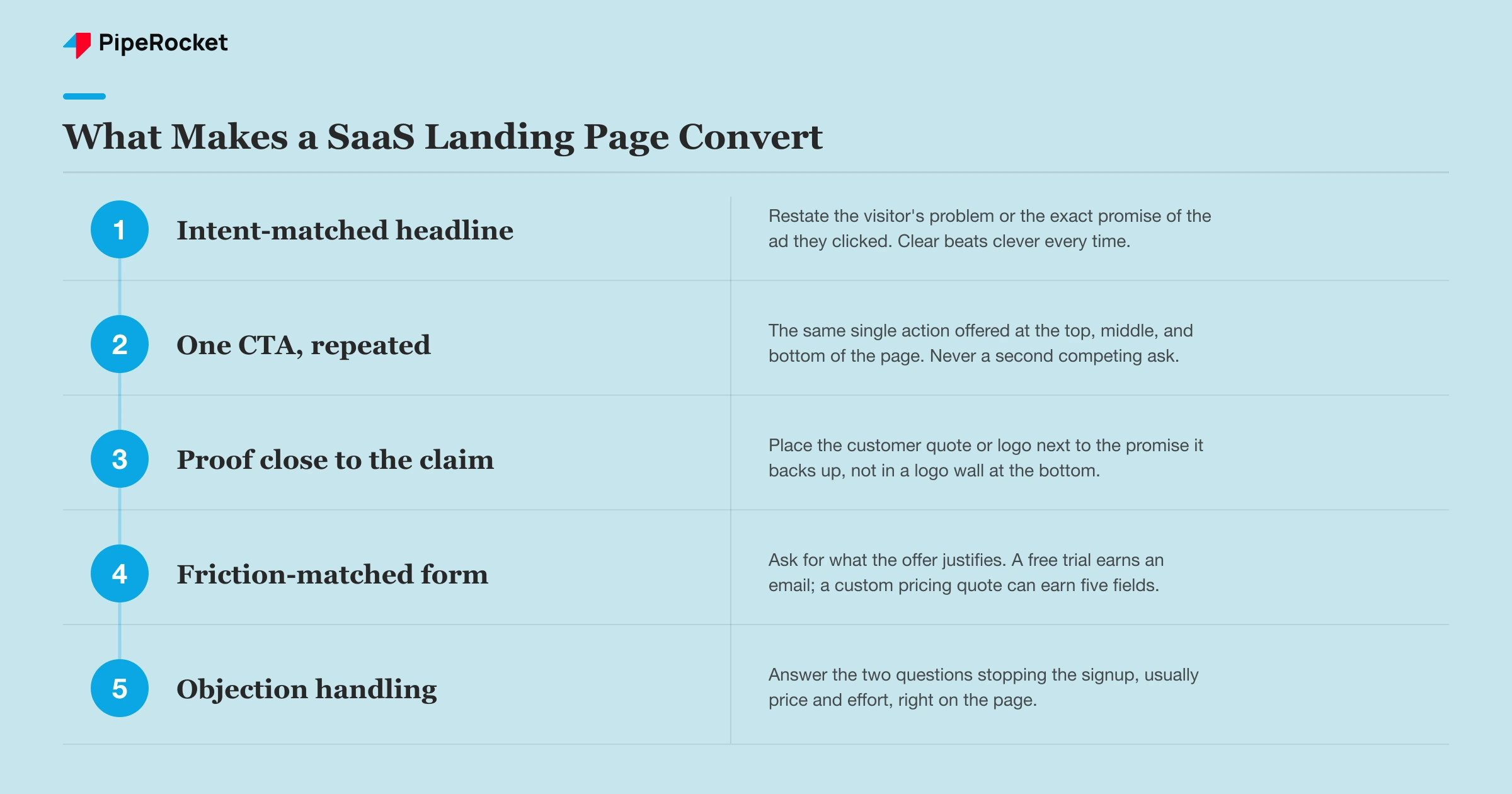
The message converts, the layout just carries it. A landing page works when the visitor reads the headline and thinks “this is exactly what I was looking for.” Everything else (social proof , button placement) is amplification on top of that match.
Most teams get this backwards. They obsess over hero images and button placement while the headline still describes the product instead of the visitor’s problem. Fix the message first. The layout debates can wait.
- Headline that mirrors intent: Restate the visitor’s problem or the promise of the ad they clicked. Clever loses to clear every time.
- One CTA, repeated: The same action offered at the top, middle, and bottom. Repetition of one ask, never a second ask.
- Proof close to the claim: A customer logo or quote placed next to the promise it backs up, instead of dumped in a logo wall at the bottom.
- Friction-matched form: Ask for what the offer justifies. A free trial earns an email; a custom pricing quote can earn five fields.
- Objection handling: Answer the two questions stopping the signup, usually price and effort, right on the page.
Imagine a compliance automation tool for fintech startups. Its ad says “SOC 2 in weeks, not months.” A headline reading “The Modern Compliance Platform” breaks the thread. “Get SOC 2 ready in weeks” keeps the visitor nodding, and the rest of the page has a much easier job.
Can Landing Pages Rank in Organic Search?
Yes, and for SaaS this is one of the most underused plays. Most teams build landing pages for paid campaigns, set them to noindex, and never think about organic. Meanwhile their competitors rank dedicated pages for “best X software for Y” queries and collect high-intent traffic without paying per click.
A landing page built for search intent looks a little different from a pure paid page. It needs enough real content for Google to understand and trust it, plus internal links so it isn’t an orphan. But the core stays the same: one audience, one offer, one action.
- Index it deliberately: Pure ad variants can stay noindexed, but your evergreen use-case and solution pages should be crawlable and linked.
- Write for the query: Match the page to what the searcher typed, the same message-match rule that governs paid.
- Give Google substance: Thin pages with a headline and a form rarely rank. Add the FAQ and the explanation a searcher actually needs.
- Link it into the site: Internal links from blogs and feature pages pass authority and keep the page out of orphan status.
The trade-off is real: an SEO -ready landing page carries more content and more links, which can soften conversion slightly compared to a stripped paid page. It’s worth it when the query has volume you’d otherwise pay for. For one-off promo campaigns, it isn’t.
Fast Fact: Organic search drives 91.3% of SaaS traffic — AI-referred visits account for less than 9%.
Also read: how to optimize SaaS landing pages for SEO
How Do You Build and Test Landing Pages Without Slowing Down?
Use a dedicated landing page builder, and stop routing every page through your engineering backlog. At most SaaS companies, marketing can’t ship a page without filing a ticket, so campaigns launch pointing at the homepage “just for now.” And just for now has a habit of never getting revisited.
A builder lets marketing own the loop: draft a page, launch the campaign, then revise on real data. When that loop takes days instead of sprints, you actually run the tests everyone keeps talking about.
- Pick a builder marketing can run: The deciding factor is who can publish without help, since speed of iteration beats feature lists.
- Start with one variable: Test the headline before anything else. It moves conversion more than anything else on the page.
- Wait for real sample sizes: Calling a test after 40 visitors is guessing with extra steps. Let the data accumulate.
- Keep a template library: A proven demo-page layout and a proven trial-page layout, cloned per campaign, beats designing from scratch each time.
A quick warning from experience: testing works when the page gets meaningful traffic. For a niche enterprise SaaS landing page seeing 200 visits a month, A/B tests won’t reach significance for months. In that situation, ship your best judgment and spend the energy interviewing lost prospects instead.
Also read: best landing page builders for SaaS
Frequently Asked Questions
1. How many landing pages does a SaaS company actually need?
More than most have, fewer than the “one per keyword” advice suggests. A workable starting set is one page per core campaign type: a demo page and a trial page, plus a page per major use case or persona you actively advertise to. Add competitor comparison pages as paid campaigns justify them. The real signal is your ad account: any ad group spending meaningful budget deserves a page that matches its message.
2. What’s a realistic conversion rate for a SaaS landing page?
It depends on the action and the traffic source, so treat any single benchmark with suspicion. Low-friction actions like free trials convert visitors at higher rates than demo requests, and warm email traffic converts far better than cold display ads. Rather than chasing a published average, baseline each page for two to four weeks, then work on beating your own number. A page that improves quarter over quarter is healthy regardless of where it started.
3. Should a landing page replace my product or feature pages?
No, they do different jobs and you need both. Product and feature pages live in your site navigation, serve visitors at every stage, and build your organic footprint over time. Landing pages serve specific campaigns with a single action and often live outside the main navigation. The mistake is making one do the other’s job: a feature page stuffed into an ad campaign converts poorly, and a stripped landing page can’t carry your site’s SEO.
The Bottom Line
A landing page is the cheapest fix for expensive traffic. Audit where your ads point this week and fix any campaign still landing on the homepage. Want help turning clicks into pipeline? Get in touch or see how the best SaaS PPC agencies approach it.