
How to Use Internal Linking to Boost SaaS Rankings
 Omar Sheriff
Last updated on
Omar Sheriff
Last updated on
A strong SaaS internal linking strategy connects your top-of-funnel blog content to the product, comparison, and pricing pages that close deals, passing link equity toward the pages that need to rank. Most SaaS sites have the links but not the strategy.
Here’s something I see on almost every SaaS content audit I run: there are internal links everywhere, and almost none of them are doing any real SEO work. The links exist. But they’re placed by convenience, not strategy.
That’s the difference between a site that grows organically and one that publishes for years and stays stuck on page two.
Internal linking is the most controllable ranking lever most SaaS teams have. You don’t need to wait for backlinks. You don’t need to publish new content. You just need to route the equity you already have toward the pages that need it. That is the whole SaaS internal link building strategy in one sentence.
TL;DR
- Stop linking by convenience: Most internal links go to the easiest destination while scattering equity across low-priority pages instead of the strategic ones.
- Build your architecture around the funnel: BOFU pages (pricing, alternatives, comparisons) should receive the most internal links; TOFU blogs should funnel readers toward them.
- Anchor text is signal: Descriptive anchors that reflect the destination page’s target keyword tell Google exactly what that page is about.
- Set a link budget per page: A page with 8-10 focused internal links passes more equity per link than one with 40 scattered ones.
- Keep priority pages shallow: Your most important conversion pages should never sit more than 3 clicks from the homepage, and your highest-authority pages should route equity inward toward them.
- Audit what you already have: Orphan pages, reversed equity flow, and broken links are costing you rankings right now, without you knowing.
- Fix common mistakes first: Linking only to your homepage, ignoring new pages, and using generic anchor text are the three patterns that kill otherwise solid strategies.
Step 1: Stop Linking by Convenience, Start Linking by Intent
Linking by convenience sends equity to the wrong pages. Most SaaS teams place internal links where they’re easiest to add: the first time a term is mentioned. You’re writing about keyword research, the word “anchor text” comes up, and you link it to your glossary page. Done. Move on.
The problem is that this approach scatters link equity across whatever pages happen to get mentioned first, not the pages that actually need ranking help.
The convenience trap
When you link every first-mention of a term to a definition page, you’re sending authority to pages that usually don’t convert anyone. Glossary pages and broad informational posts rarely close deals. Your pricing page, your alternatives page, your comparison content: those are the pages that move pipeline. And they’re usually receiving the fewest internal links.
Convenience-based linking feels thorough. It produces a site where the most important pages are the most isolated.
What linking by intent looks like
Linking by intent means asking two questions before placing any link. First: what should the reader do next? Second: which page on this site needs this authority most?
If someone’s reading a TOFU blog about SaaS content strategy , the useful next step is a MOFU comparison page or a listicle, not another awareness blog. That’s where you send them, and that’s where the link equity goes.
The test is simple: finish reading the paragraph where you’re placing a link, then ask what a genuinely interested reader would logically want to see next. That’s your destination.
Step 2: Build Your Link Architecture Around the Funnel
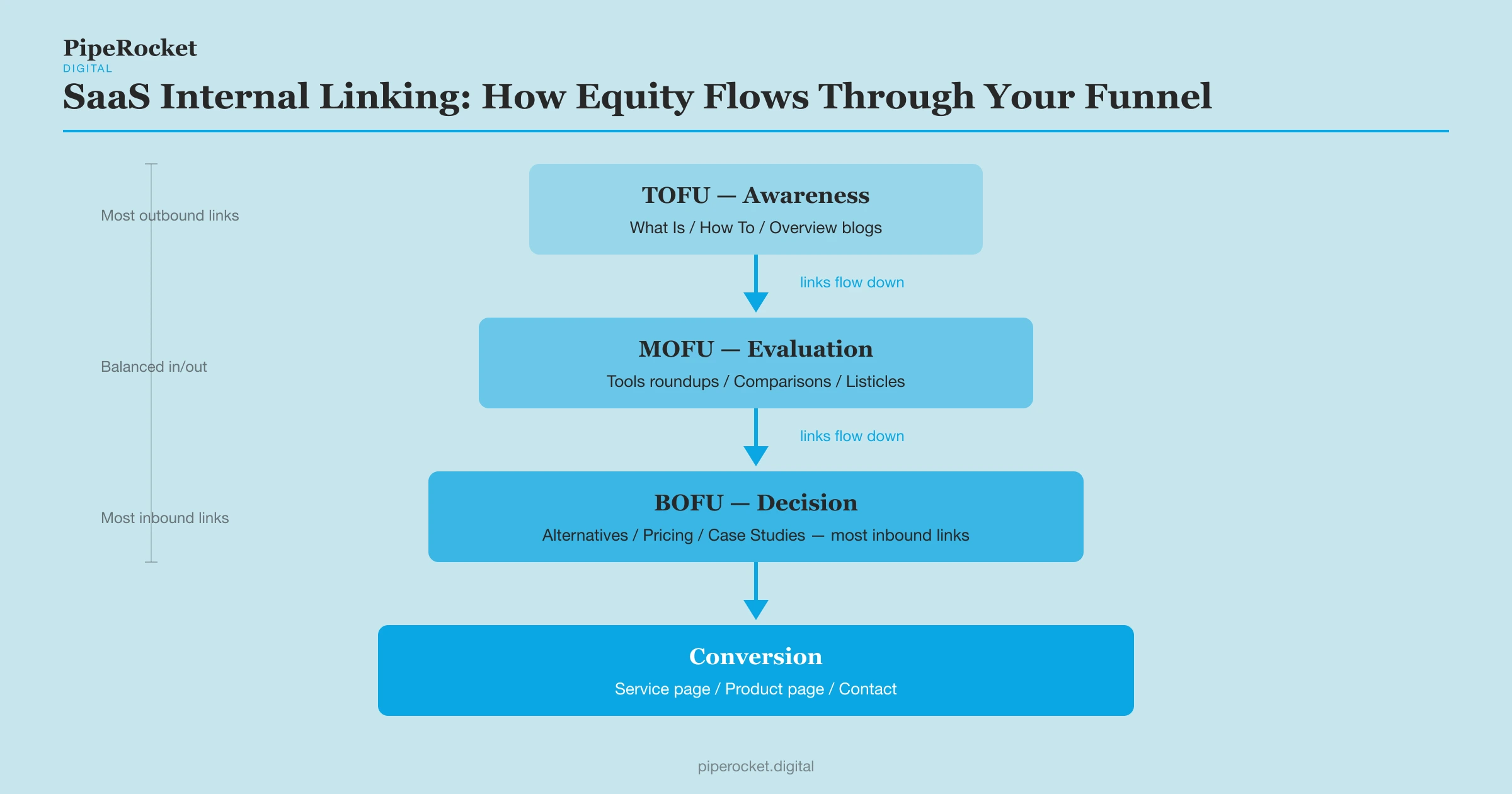
Your internal link architecture should mirror your funnel. BOFU pages receive the most links; TOFU blogs feed authority downward.
Map your cluster before you link
The way our team structures a SaaS content cluster starts from the conversion endpoint and works backward. Grouping content into a tight topic cluster (a pillar page plus the supporting posts around one theme) is what turns loose blog posts into a funnel that actually routes authority. The cluster shape looks like this:
| Stage | Content type | Role in the funnel |
|---|---|---|
| TOFU | What Is / Overview | Broad awareness; earns traffic |
| TOFU → MOFU | How To / Implementation guides | Sharpens reader intent |
| MOFU | Tools roundups / Listicles | Evaluation stage |
| MOFU → BOFU | Alternatives / Comparisons | Decision stage |
| BOFU | Pricing / Reviews / Case Studies | Conversion stage |
| Endpoint | Service page / Product page | Commercial endpoint |
The Alternatives, Pricing, and Case Studies pages are built first and receive the most internal links from everything above them. Every TOFU blog in the cluster should link to at least one BOFU page in addition to the pillar.
The direction of links matters as much as the volume
A TOFU blog linking sideways to another TOFU blog spreads link equity horizontally. It keeps readers in the awareness stage. It doesn’t push authority toward the pages that need to rank for commercial queries.
Links should flow downward through the funnel:
- TOFU awareness blog links to MOFU comparison or listicle
- MOFU comparison/listicle links to BOFU alternatives or pricing page
- BOFU page links to the conversion/service page
TOFU content earns the traffic, and the links carry that authority toward the pages that close deals.
Route authority inward from your strongest pages
Your homepage and top-ranking legacy posts hold the most authority on the site, so point some of it at revenue pages. Pricing, comparison, and demo pages rarely earn external backlinks on their own. Deliberate internal links from your strongest existing pages are how they get authority.
Find the pages that already rank well and earn links (your homepage, a couple of popular guides), then add contextual links from them toward the commercial pages that need ranking help. This is the positive version of the “don’t over-link to your homepage” rule: the homepage should be sending equity out to priority pages, not just collecting more of it.
Keep priority pages within 3 clicks of the homepage
Important conversion and product pages should never sit more than 3 clicks from your homepage. The deeper a page is buried, the less often Google crawls it and the less equity reaches it. A shallow hierarchy keeps your revenue pages in front of both crawlers and readers.
If a pricing or comparison page takes four or five clicks to reach, restructure your links so a high-authority page links to it directly. Click depth is one of the fastest audit wins because it needs no new content.
The trade-off: some of your TOFU blogs won’t link to each other much at all. That feels counterintuitive when you’re trying to build topical authority . But horizontal TOFU-to-TOFU linking is mostly content calendar navigation, not funnel architecture.
Step 3: Use Anchor Text That Describes the Destination Page’s Target Keyword
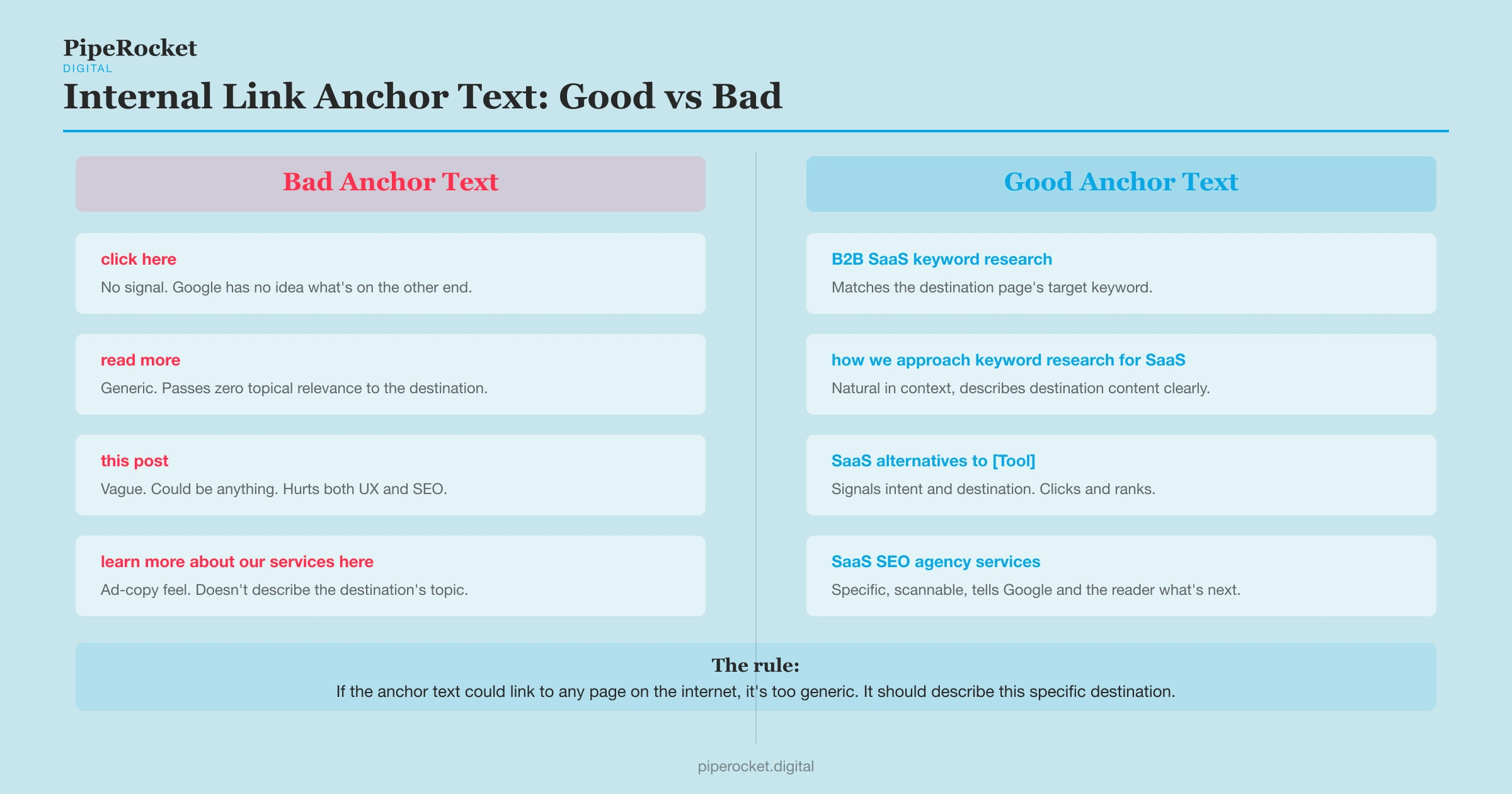
Generic anchor text is wasted signal. “Click here,” “read more,” and “this post” tell Google nothing about the destination page. Descriptive anchor text that reflects the destination page’s target keyword is how you reinforce relevance.
What good anchor text looks like
Good anchor text is a natural phrase in your sentence that describes what the destination page is actually about. If you’re linking to a page targeting “B2B SaaS keyword research,” your anchor might be “B2B SaaS keyword research process” or “how we approach keyword research for SaaS clients.” Both are natural in context and descriptive of the destination.
What to avoid:
- Generic phrases (“this article,” “learn more,” “here”)
- The full URL written out as text
- The exact page title word-for-word when it reads unnaturally
The goal is a phrase a reader would understand and click on that also signals keyword relevance to Google. Those two things almost always align.
| Avoid | Use instead |
|---|---|
| “click here”, “read more”, “here” | Phrase describing destination keyword |
| Exact page title word-for-word | Natural keyword variant in context |
The over-optimisation trap (and when to vary)
Internal links carry lower over-optimisation risk than external links, so exact-match anchors are fine. But if five different pages all link to your alternatives page with the exact same anchor text, that looks unnatural in aggregate.
Vary the phrasing across different linking pages while keeping the core keyword concept consistent. “SaaS alternatives to [Tool],” “[Tool] alternatives for SaaS teams,” and “comparing [Tool] alternatives” all point at the same intent without being robotically identical.
Why anchor text now matters for AI search too
Your internal link graph tells AI search engines how the topics on your site relate to each other. Engines like Google’s AI Overviews and ChatGPT traverse links and read anchor text to map the entities and relationships across your content, which shapes what they cite.
Descriptive anchors and a tight cluster structure make those relationships legible: a clean link graph reads as a coherent map of what your site knows, so priority pages are more likely to be understood and surfaced in AI answers. Loose, generic linking leaves that map ambiguous.
Step 4: Set a Link Budget Per Page (and Stick to It)
PageRank is diluted across every link on a page, so fewer focused links pass more equity per link. Adding 40 internal links to a blog post doesn’t mean the pages you link to each get more authority. It means each one gets less. A focused page with 8-10 relevant internal links passes more equity per link than one that links to everything.
How many internal links per page?
There’s no official rule from Google, but for a 2,000-word blog post, 6-10 in-body internal links is a working ceiling. That’s enough to signal topical relevance and pass authority to priority pages without diluting equity across too many destinations.
Navigation links (header, footer, sidebar) are different. They exist on every page and Google treats them with lower weight. Your in-body links are the ones doing the ranking work.
Which pages should you prioritise linking to?
Two categories earn priority:
- New pages (published within the last 90 days). New pages need crawling and initial authority to establish themselves. A handful of internal links from existing pages helps Google find them faster and gives them a baseline of equity.
- Pages sitting on page 2-3 for a target keyword. These are your biggest wins. A page that’s already close to page 1 often needs just a few more relevant internal links to break through. Check your Search Console position data for these candidates and build links toward them deliberately.
Don’t waste your link budget on pages already sitting in position 1-5. They don’t need more help.
Step 5: Audit Your Existing Internal Links
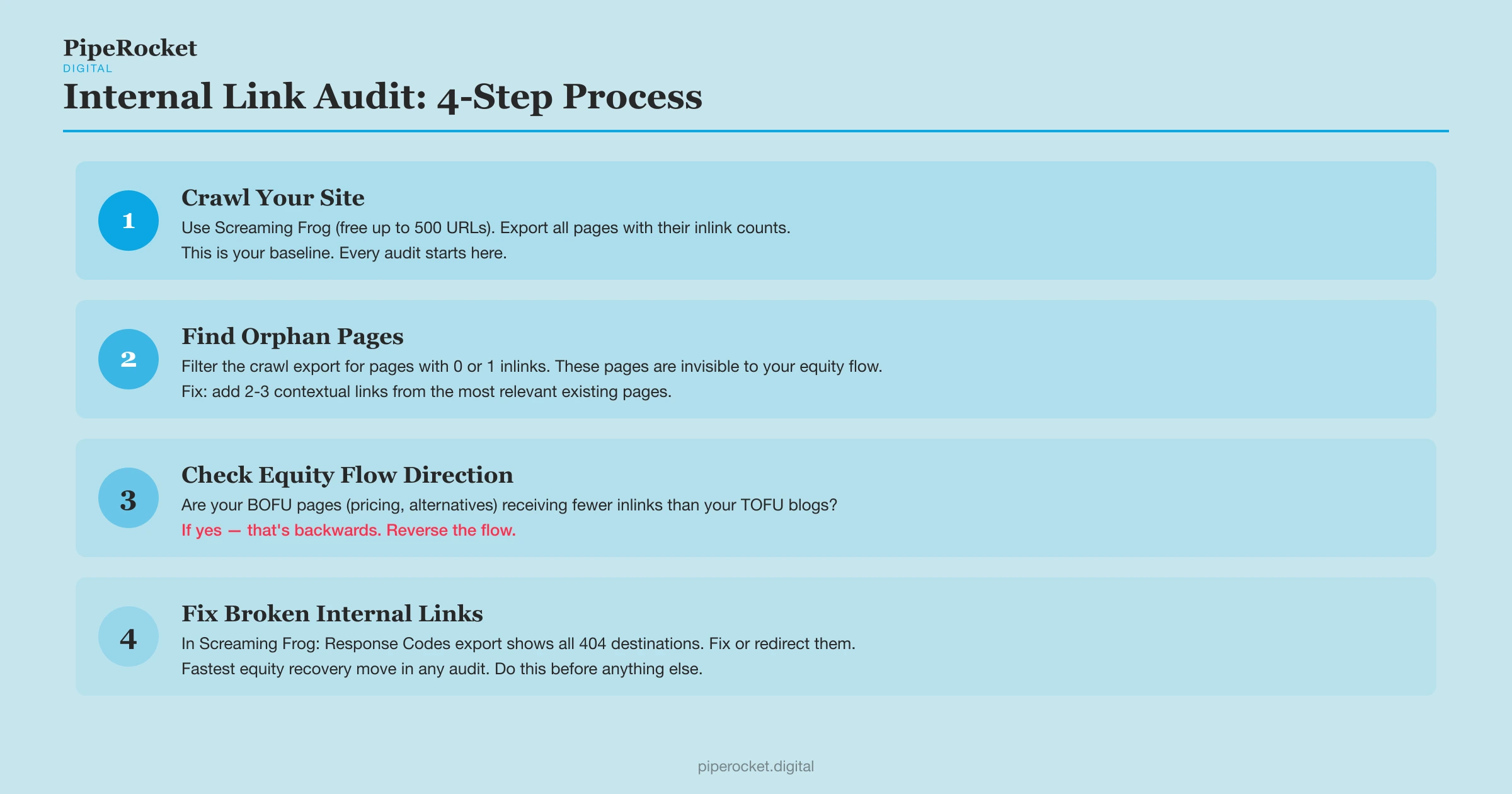
A useful internal link audit checks three things: orphan pages, the direction equity is flowing, and broken links pointing at 404s. Most teams focus on building new links and ignore the ones they already have. That’s a mistake. Your existing link structure might be sending equity in the wrong direction, leaving pages orphaned, or burning equity on 404s.
How to find orphan pages
An orphan page is a page on your site that receives zero or very few internal links. Google can technically index it if it’s in your sitemap, but it gets crawled infrequently and builds no equity over time.
To find them: crawl your site with Screaming Frog (free up to 500 URLs), export the full list of pages, and filter for pages with 0 or 1 inlinks.
Tip: Screaming Frog’s free plan crawls up to 500 URLs, enough to audit most early-stage SaaS content sites without paying.
Every page that shows up on that list is invisible to your internal equity flow. Fix it by finding the two or three most relevant existing pages and adding links from them.
The link equity reversal
Export your crawl data and look at which pages receive the most internal links. Compare it to your commercial intent map. In almost every audit I run, the pattern is the same: far more links point to TOFU blogs than to pricing or alternatives pages .
That’s backwards. Reverse it. Your BOFU pages should be receiving the most internal links from the cluster, not the fewest.
Run a content gap analysis while you audit
A content gap analysis finds topics and pages that have no logical linking home yet. As you crawl, note the priority pages that lack a natural source of relevant internal links, then decide what content should point to them.
Sometimes the fix is a new supporting post that gives a stranded BOFU page a relevant referrer. Sometimes it’s spotting that two existing posts should link to each other and never do. Either way, the gap analysis turns the audit from cleanup into planning.
Fix broken internal links first
A link pointing to a 404 page wastes every bit of equity from every page linking to it. It also signals a poorly-maintained site to Google’s crawlers.
Screaming Frog’s “Response Codes” export will surface all your broken internal links in a few minutes. Fix or redirect them before anything else.
Three Internal Linking Mistakes That Scatter Your Equity
Three mistakes scatter equity on almost every SaaS site: linking only to the homepage, ignoring new pages for their first 90 days, and using the same link placement every time. Each one shows up in audit after audit:
Linking only to the homepage
The homepage already has the most authority on the site. Adding more links to it from blog posts doesn’t meaningfully help it rank better, but it does mean those links aren’t helping anything else.
Ignoring new pages for the first 90 days
A new page with no internal links sits in a crawling dead zone. Even two or three links from existing relevant pages dramatically improves how quickly Google finds and ranks it. Build those links when you publish, not three months later.
Using the same link placement every time
If every blog post links to your alternatives page only in the final paragraph, that link carries less weight than a contextual link placed early in a relevant section. Vary placement based on where the content genuinely connects.
E-E-A-T trade-off worth naming: some link placements that are excellent for SEO (early, contextual, descriptive anchor) feel slightly aggressive to readers if overdone. Keep the reader experience as the tiebreaker. A link that feels natural in context earns more clicks and more equity than one that’s been forced in.
Internal linking decays as a site grows unless someone owns it, and the best SaaS SEO agency list covers teams that keep it maintained.
Why PipeRocket Fixes Internal Linking as Part of Every SEO Audit
Internal linking audits are part of every engagement we run at PipeRocket. We consistently find equity flowing the wrong direction: toward informational pages and away from conversion pages. Fixing that flow usually produces faster ranking movement than publishing new content.
The tactics above assume the architecture underneath them is already sound. If you’re still deciding how to model your hub-and-spoke structure and tier pages before you start placing individual links, see our SaaS internal linking strategy breakdown.
If your SaaS content program isn’t producing the pipeline results you expect, get in touch with our team or see how we approach it as a SaaS SEO agency .
Frequently Asked Questions
What does internal linking mean?
An internal link is a hyperlink connecting one page to another on the same domain. It’s how Google discovers pages and how link equity (PageRank) flows across a site. An example: a blog post linking to your pricing page is an internal link.
What is the difference between internal and external linking in SEO?
Internal links connect pages within your own domain and pass link equity internally; external links point to other domains and build authority through backlinks. Internal links carry much lower over-optimisation risk, so exact-match anchors are safe to use.
What are the best practices for internal linking for SEO?
Link by intent (not convenience) toward BOFU pages, use descriptive keyword-based anchors, cap in-body links at 6-10 per page, keep priority pages within 3 clicks of the homepage, and prioritise new pages and page-2/3 rankings when deciding where to add links.
How many internal links should a page have?
There’s no number Google has officially set, but for a typical 2,000-word blog post, 6-10 in-body internal links is a practical ceiling. Equity gets diluted across every link on a page, so fewer focused links pass more authority per destination. Prioritise new pages and pages hovering on page 2-3 over pages already performing well.
Does internal linking actually help SEO rankings?
Yes, and it’s one of the most underestimated ranking levers. Internal links help Google discover and crawl pages faster and pass PageRank from high-authority pages to lower-authority ones. For SaaS sites, fixing link flow from TOFU blogs toward BOFU pages often beats building new backlinks, and it’s fully in your control.
What is the best anchor text for internal links?
The best anchor text is a natural phrase that reflects the destination page’s target keyword. Avoid generic phrases like “click here” or “read more,” which give Google no signal about the destination. Exact-match anchors carry lower over-optimisation risk on internal links than external ones, but vary phrasing slightly when multiple pages all link to the same destination.

