
How to Build a SaaS Keyword Map and Content Calendar
 Sabari Rohith
Last updated on
Sabari Rohith
Last updated on
Most SaaS teams have a keyword list and a publishing schedule, and they treat those as the same thing. They aren’t. A keyword map decides which page owns which keyword. A content calendar decides when each of those pages gets built, by whom, and when it gets refreshed.
Here’s the process we use to go from a raw list of keywords to a map you can hand to a writer, and then to a calendar that survives contact with a real content team.
TL;DR
- A map and a calendar do two different jobs: the map answers “which URL owns this keyword”; the calendar answers “when does that URL ship and who builds it.”
- Cluster keywords into topics first: grouping the list into topics tells you how many pages you actually need, which is usually far fewer than the raw list implies.
- Give each cluster one owning URL and a funnel stage: this is the map’s core, and it’s where you kill cannibalization before two pages ever chase the same query.
- Assign one primary and a few secondaries per URL: the primary sets the page’s job; secondaries are variants the same page can rank for without a second page fighting it.
- Prioritize by intent times business value: the order you build in decides how fast the map turns into pipeline, so volume alone is a poor sort key.
- Sequence the map into a calendar with cadence, owner, and refresh date: an unsequenced map is a wish list, and a calendar without a refresh column decays.
Why a Keyword List Isn’t a Plan
A keyword list tells you what people search. It doesn’t tell you what to build. That gap is where most SaaS content programs stall, because the team starts publishing off a spreadsheet of 2,000 rows and ends up with 40 thin posts that all half-target the same handful of queries.
The map is the missing layer. It sits between the research and the writing, and its only job is to answer one question for every keyword: which single URL is responsible for ranking this?
Once you can answer that, the calendar becomes obvious. You know how many pages exist, you know which ones matter most, and you can put them in order.
We treat these as two artifacts on purpose. Collapse them into one “content plan” tab and you get a list of titles with dates and no logic underneath. Keep them separate and each one stays honest about its job.
Step 1: Cluster Keywords Into Topics, One Page Each
Group the raw list into topics before you do anything else. A topic is a set of keywords that a single page can satisfy. This is the move that shrinks a 2,000-row list into something buildable, because it exposes how many of those rows are the same intent worded three ways.
“What is GRC,” “GRC meaning,” and “GRC definition” are one page, not three. Our team’s rule is blunt here: group keywords into topics, not lists. A spreadsheet of 2,000 keywords is noise, while 250 topics is a plan. The topic count tells you how many pages the whole program actually needs.
If you’ve already run keyword research and built your topic clusters , you’re clustering inside those. The job here is to take the clusters you already have and lock each one to exactly one page before it can leak into three.
The test for a clean cluster is simple. If two keywords would make a searcher happy on the same page, they belong together. If satisfying one would clutter the answer to the other, they split.
Watch the edge cases. A compliance SaaS might see “SOC 2 checklist” and “SOC 2 audit cost” land in the same cluster. They feel related, but a checklist page and a pricing-context page answer different questions, so that’s two pages, not one.
Step 2: Map Each Cluster to a URL and a Funnel Stage
Give every cluster a real URL and tag its funnel stage. This is the map’s core, and it’s where you kill cannibalization before it happens instead of untangling it later.
For each cluster, write down four things:
- The URL that owns it (existing or planned)
- The funnel stage (TOFU, MOFU, or BOFU)
- The page type (blog, comparison, pricing, use-case, glossary)
- The cluster’s status (live, needs refresh, to build)
The funnel-stage tag does real work. It stops two pages from chasing the same query from different angles. If a “best X software” cluster is tagged BOFU and pointed at a listicle URL, no blog post gets to quietly target the same phrase later.
Here’s what a slice of the map looks like for that compliance SaaS:
| Cluster | Owning URL | Funnel stage | Page type | Status |
|---|---|---|---|---|
| What is SOC 2 | /glossary/soc-2 | TOFU | Glossary | Live |
| SOC 2 compliance checklist | /blog/soc-2-checklist | MOFU | Blog | To build |
| Best SOC 2 automation tools | /best-soc-2-software | BOFU | Listicle | To build |
| Vanta vs Drata | /vanta-vs-drata | BOFU | Comparison | To build |
| SOC 2 automation pricing | /pricing | BOFU | Product | Live |
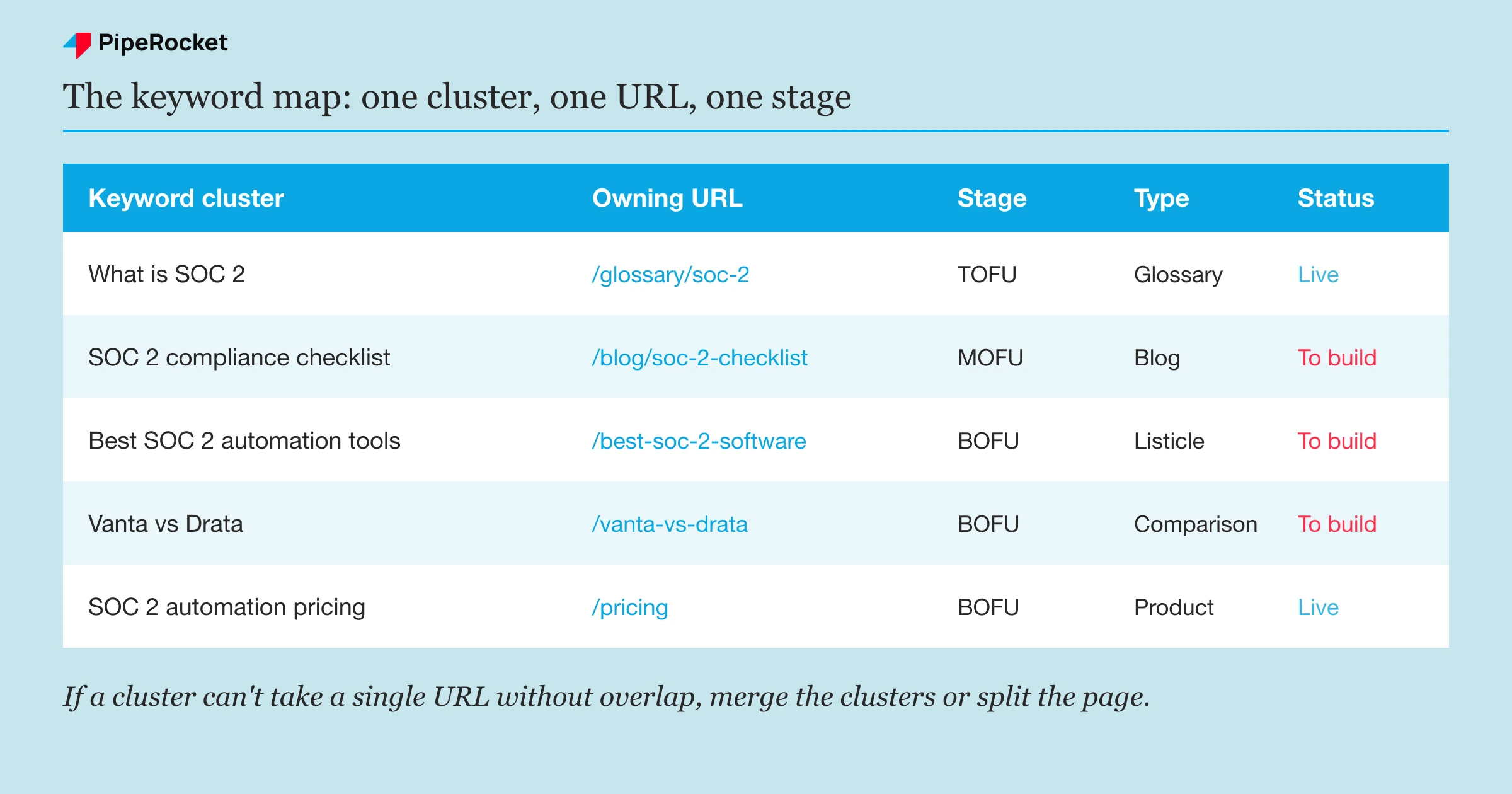
One cluster, one URL, one stage. If you can’t assign a cluster to a single URL without overlap, that’s the signal to merge clusters or split a page, and it’s far cheaper to catch it here than after both pages are live and stuck on page two.
Step 3: Assign a Primary and Secondary Keywords Per Page
Pick one primary keyword per URL and list the secondaries it can absorb. The primary is the page’s main job, usually the highest-intent or highest-volume term in the cluster. The secondaries are the variants the same page can rank for without needing its own URL.
Our team keeps this in a working sheet with a fixed set of columns so nothing gets lost between research and writing:
- Keyword
- Search volume
- Intent (informational, navigational, transactional)
- Cluster
- Topic (the grouping pillar)
- Primary or secondary
- Priority
The “primary or secondary” flag is the part that prevents the split. When you write the page, the primary drives the title, the H1, and the meta. The secondaries live in H2s and body copy. They share one URL’s authority instead of splitting it across two.
A good primary is the term that best describes what the page delivers. For a comparison page , that’s “Vanta vs Drata,” and the secondaries are “Vanta or Drata,” “Drata alternative,” and the feature-level questions people ask while comparing the two.
Don’t over-stuff secondaries. If a would-be secondary has genuinely different intent, it’s a primary for a different page. The clean line is intent: same intent, secondary; different intent, new URL.
Step 4: Prioritize by Intent and Business Value
Order the map by intent times business value, and treat search volume as a tiebreaker at most. Volume tells you how many people search. It doesn’t tell you how many of them buy, and for SaaS the highest-volume terms are usually the furthest from a purchase.
We start at the bottom of the funnel and work up. A BOFU comparison page with 200 monthly searches will out-earn a TOFU explainer with 8,000, because the comparison searcher is choosing a tool and the explainer searcher is writing a college assignment.
There’s a natural ceiling that makes this easier. Most single-product SaaS companies have a maximum of 40 to 60 BOFU pages : software pages, alternatives, comparisons, and pricing. Force more than that and you’re stretching. So the BOFU layer is finite, you build it first, and only then does the MOFU and TOFU sequencing question even matter.
Score each cluster on two axes and let the combination set the order:
| Low business value | High business value | |
|---|---|---|
| Low intent | Build last or skip | Build after high-intent layers |
| High intent | Build when capacity allows | Build first |
This is deliberately not a full prioritization method. Sequencing keywords by funnel stage has its own logic for capacity and ROI within a stage. Here you just need enough of a ranking to sort the map before it becomes a calendar.
The trap is letting a high-volume TOFU cluster jump the queue because the number looks impressive. It brings traffic that doesn’t convert and delays the pages that would. Rank on intent first, and business value breaks the ties.
Step 5: Turn the Map Into a Sequenced Content Calendar
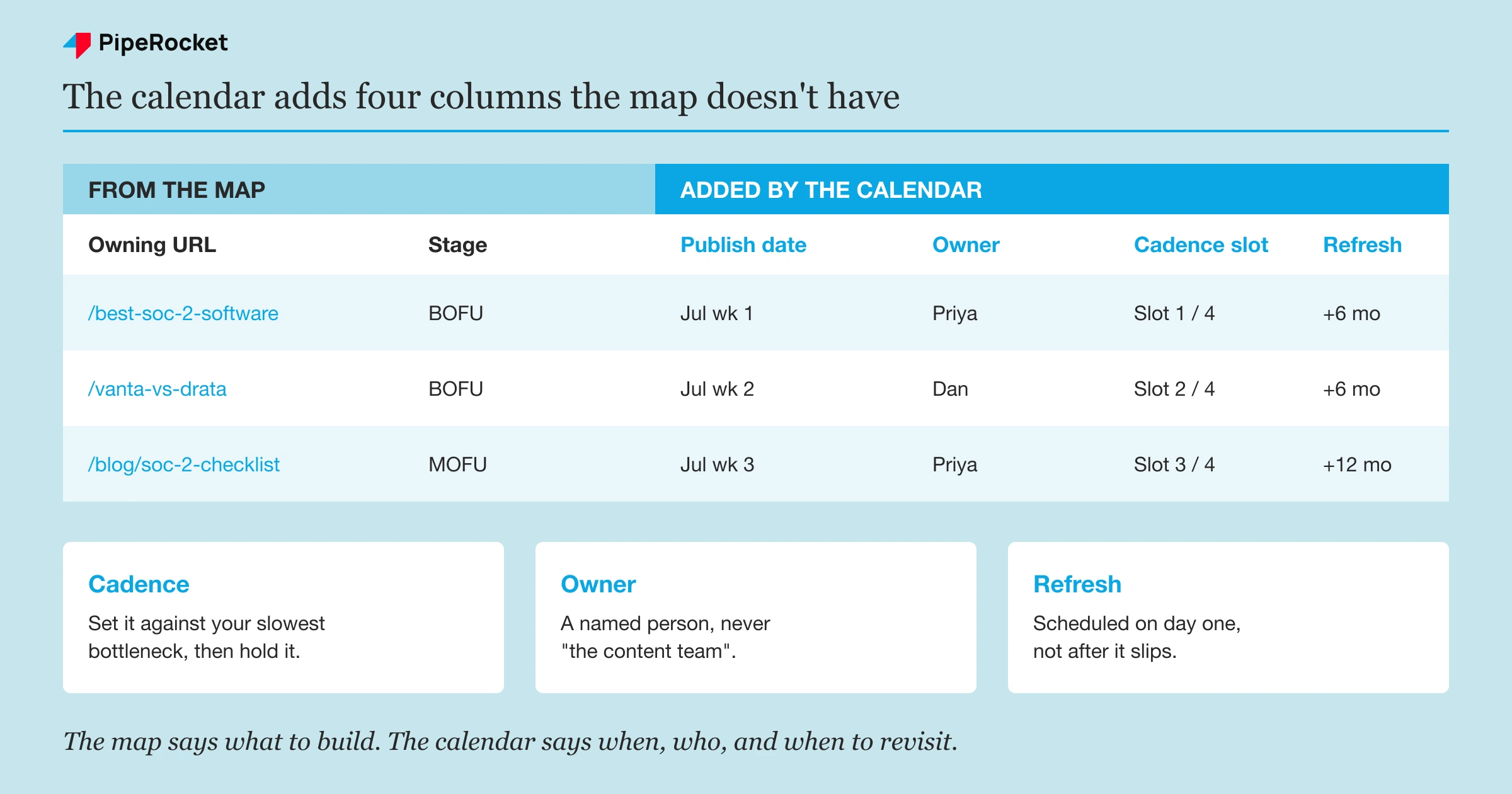
Convert the prioritized map into a calendar by adding four operational columns: publish date, owner, cadence slot, and refresh date. The map says what to build and in what order. The calendar says when it ships, who owns it, and when it comes back around for a refresh.
A calendar without an owner column is a list of good intentions. A calendar without a refresh column produces a library that quietly decays while everyone keeps publishing new posts.
Set a Cadence You Can Actually Hold
Pick a publishing rhythm your team can sustain, then protect it. A one-person content team holds three to four pages a month comfortably. A small pod can run one to two a week. Beyond that you need real headcount to back it up, and optimism won’t cover the gap.
Consistency beats volume here. Four pages a month that systematically build out a cluster will out-rank eight scattered posts, because the four reinforce each other with internal links and topical depth and the eight don’t.
Set the cadence against your slowest real bottleneck. For most SaaS teams the gate is design, dev handoff, or SME review rather than the writing itself. Size the calendar against whichever step actually holds a page back from going live, or the calendar will slip every month and everyone will pretend it didn’t.
Assign an Owner to Every Row
Put a named person on each page as its owner. “Content team” owns nothing, so nothing moves. One person is accountable for each page from brief to publish, and that person’s name sits in the calendar next to the URL.
Ownership also covers the handoffs. The owner isn’t writing every line, they’re responsible for the page clearing each stage: brief approved, draft done, SME review, design, live. On enterprise programs those handoffs, not the SEO , are what actually decides whether a page ships this quarter.
Build the Refresh Cycle In From Day One
Add a refresh date to every page when you first schedule it, not after it starts slipping. A refresh column turns your calendar from a build queue into a living system. Without it, the oldest pages rot silently and you find out from a ranking drop .
A workable default is a hard look every six to twelve months, sooner for BOFU pages where competitors move fast and pricing changes. Treat the refresh as a real re-check of intent match and content freshness , not a cosmetic date bump, and use it to ask whether the page still deserves its ranking.
Common Mistakes to Avoid
Mapping keywords to topics but never to a single URL
The most common failure is a beautiful topic map with no URLs attached. Topics without owning URLs still let two pages target the same query, because nothing has claimed it. The URL assignment in Step 2 is the whole point. Skip it and you’ve built a nicer keyword list, not a map.
Sequencing the calendar by volume instead of intent
Teams sort the calendar by search volume because the big numbers feel like the big wins. They aren’t. High-volume TOFU pages get published first, bring traffic that never converts, and push the BOFU pages that drive pipeline to the back of the queue. Sort by intent and business value, then let volume break ties inside a stage.
Building a calendar with no owner or refresh columns
A calendar that only has titles and dates works for about two months. Then a page slips because no one owned it, and an old page decays because nothing scheduled its refresh. The owner column makes the plan move. The refresh column keeps what you’ve published from rotting. Add both on day one, because retrofitting them means auditing every page you’ve already shipped.
How PipeRocket Digital Builds This for SaaS Teams
We build the map and the calendar as one connected system, not two disconnected spreadsheets. Every cluster gets a single owning URL and a funnel-stage tag before a word is written, then we sequence the whole thing by intent and business value so the pages that move pipeline ship first. We run this as part of our SaaS SEO service , and it’s the same operating model behind the programs on our list of best SaaS SEO agencies . If you want this built and run for you, reach out to us here .
Frequently Asked Questions
What is keyword mapping in SEO?
Keyword mapping assigns each target keyword to the single page responsible for ranking it. You group keywords into topic clusters, give each cluster one owning URL, and label that URL with a primary keyword plus a few secondaries. The point is to keep two pages from competing for the same query, which is the main cause of cannibalization on growing SaaS sites.
How do I build an SEO content calendar from a keyword map?
Start with a prioritized keyword map where every cluster already has an owning URL and a funnel stage. Then add the operational columns the map lacks: publish date, owner, cadence slot, and refresh date. The map decides what to build and in what order, so the calendar attaches a schedule and accountability. Sequence the highest-intent pages first, not the highest-volume ones.
How often should a SaaS team publish content for SEO?
Publish at whatever cadence your team can hold consistently, since consistency matters more than raw frequency. A single content person sustains roughly three to four pages a month, and a small pod manages one to two a week. Four pages that build out a cluster will out-rank eight scattered posts, so aim for coherence over volume. Size the cadence against your slowest bottleneck, usually review or design.

