
How to Do SaaS Keyword Research: An 8-Step Process
 Kamaraj Mathiarasan (Kim)
Last updated on
Kamaraj Mathiarasan (Kim)
Last updated on

SaaS keyword research refers to finding the searches your buyers make at every stage, from first noticing a problem to comparing tools, and picking the ones most likely to bring in signups and demos instead of just traffic.
At Sprinto in 2023, I sent a simple sheet to every team that talks to customers, and they came back with more than 900 keywords our tools had never shown us, taking our list from about 1,500 keywords to 2,400. That’s why I now start with people and only bring tools in later.
Summary of the 8 Steps of SaaS Keyword Research
- Step 1: Ask the teams that talk to buyers for the words customers actually use.
- Step 2: Pull the searches you already get from Search Console and Google Ads.
- Step 3: Read reviews, Reddit threads and Google’s suggestions to hear how buyers describe the problem.
- Step 4: Check what your competitors rank for and pay for.
- Step 5: Put everything in one Master Sheet and group the keywords into topics.
- Step 6: Map each topic to a funnel stage and the type of page it needs.
- Step 7: Score each topic and decide what to build first.
- Step 8: Check which searches bring up AI answers, and plan those pages to be quoted.
What Is SaaS Keyword Research?
SaaS keyword research is the work of finding the searches that potential buyers of a software product make, then choosing the ones that lead to signups, demos and recurring revenue (MRR and ARR).
Those searches fall into three stages, and each stage needs a different kind of page. Here’s what they look like for a scheduling tool competing with Calendly:
| Stage | What the buyer is doing | Example searches for scheduling software |
|---|---|---|
| Top of the funnel (TOFU) | Learning about a problem | “what is round robin scheduling”, “how to reduce meeting no-shows” |
| Middle of the funnel (MOFU) | Looking for a way to fix a workflow | “how to sync google calendar with outlook”, “appointment scheduling for clinics” |
| Bottom of the funnel (BOFU) | Comparing tools or ready to buy | “calendly alternatives”, “best scheduling software for teams”, “calendly pricing” |
From the clients we handle, most signups come from that last row, even though the first row has the biggest numbers in any keyword tool. So a list that’s mostly “what is” searches will bring you traffic and very little pipeline.
What Tools Do You Need for SaaS Keyword Research?
For SaaS keyword research, you need Google Search Console and Google Keyword Planner for Google’s own data, Ahrefs or Semrush for competitor research, review sites and Reddit for buyer language, AlsoAsked for the questions people ask, and ChatGPT or Claude to check AI answers.
Of all of these, Keyword Planner is the one I trust most for search volume, because its numbers come straight from Google and the other tools are estimating theirs.
| Tool | Pricing (checked Oct 2026) | Helps you to | Alternatives |
|---|---|---|---|
| Google Search Console | Free | See the searches your site already shows up for, with impressions, clicks and position | Semrush or Ahrefs, though their numbers are estimates and won’t match your Google data |
| Google Keyword Planner | Free, but only shows volume ranges without a verified account connected | Get search volume straight from Google, plus bid ranges that show how much advertisers value a search | Semrush or Ahrefs volumes, which are estimates |
| Ahrefs | From $29/mo (Starter), Lite $129/mo. No free trial | Find the keywords competitors rank for that you don’t, and check how hard each one is | Semrush, SE Ranking |
| Semrush | From $117.33/mo billed annually ($139 monthly). 7‑day free trial | Run a keyword gap against competitors and see the keywords they pay for in Google Ads | Ahrefs, SE Ranking |
| G2 and Capterra | Free to browse | Read what buyers like and dislike about competing tools, and see the official name of your category | TrustRadius, Gartner Peer Insights |
| Free | Read how buyers describe the problem in their own words | Quora, Slack and LinkedIn communities | |
| AlsoAsked | Free monthly searches, paid from $12/mo billed yearly | See the questions people ask around a search, pulled from People Also Ask | AnswerThePublic, Google’s own People Also Ask box |
| ChatGPT and Claude | Free plans are enough | Brainstorm seed terms and check which brands AI answers mention | Perplexity, Gemini |
How to Do SaaS Keyword Research in 8 Steps
To do SaaS keyword research, ask the teams that talk to buyers, pull the searches you already get, read how buyers talk online, check your competitors, build a Master Sheet of topics, map each topic to a page type, score the topics, and check which ones bring up AI answers.
The first four steps are about finding the words, and the last four are about deciding what to do with them.
| Step | What you do | Tools needed | Time needed |
|---|---|---|---|
| 1. Start with the people who talk to your buyers | Send one sheet to sales, customer success, product and marketing | A shared sheet | 1‑2 days |
| 2. Pull the searches you already get | Export Search Console queries and Google Ads search terms that converted | Search Console, Google Ads | 30 minutes |
| 3. Listen to how buyers talk about the problem | Read reviews, Reddit threads, autocomplete and People Also Ask | G2, Capterra, Reddit, AlsoAsked | 2 hours |
| 4. Check what competitors rank and pay for | Run a keyword gap and pull competitors’ paid keywords | Ahrefs or Semrush, G2 | 2 hours |
| 5. Build a Master Sheet and group into topics | Merge everything, add volume, group keywords into topics | Keyword Planner, a spreadsheet | 1 day |
| 6. Map each topic to a funnel stage and page type | Decide which page each topic needs | Google search, a spreadsheet | Same day as Step 5 |
| 7. Score and prioritize your topics | Score business value, intent and difficulty, then set P0 to P2 | Ahrefs or Semrush, a spreadsheet | 2 hours |
| 8. Check which searches trigger AI answers | Search your top topics and run buyer prompts in AI tools | Google, ChatGPT, Claude | 2 hours |
Step 1: Start With the People Who Talk to Your Buyers
The best keywords for a SaaS product usually come from the people who talk to your buyers every day, so start with them before you open any tool.
Most people do it the other way round. They write down the category terms they already know, list a few competitors, paste it all into Keyword Planner and call it research. We used to work exactly like that, and the trouble is you only ever find the keywords you already expected to find.
At Sprinto, I made a simple sheet and sent it to every team that touches the customer:
- Customer success: they talk to existing customers every day and hear how they describe what they use the product for.
- Sales: they hear the raw questions prospects ask on discovery calls.
- Product: they know the exact names of features and what’s on the roadmap.
- Marketing: the paid ads, events, webinar and social teams each hear buyers in a different setting.
I honestly expected them to send back the same terms Vanta and Drata were already ranking for. Instead we got more than 900 keywords we’d never found, because a prospect explaining their problem to a sales rep doesn’t talk the way an SEO person searches.
Keep the sheet simple and ask each team for the words buyers use for the problem and for your features, and the kind of customer that turned out to be a bad fit, which tells you which searches to leave alone however good the volume looks. Sales and customer success should also note the tools buyers were using before they switched to you, because those give you your “[competitor] alternatives” and “[old tool] vs [you]” searches.
Our free keyword research template has a separate tab for each team, so you can send Sales, Customer Success, Product and Marketing their own sheet. Here’s the Sales tab with a few example answers from a GRC company:
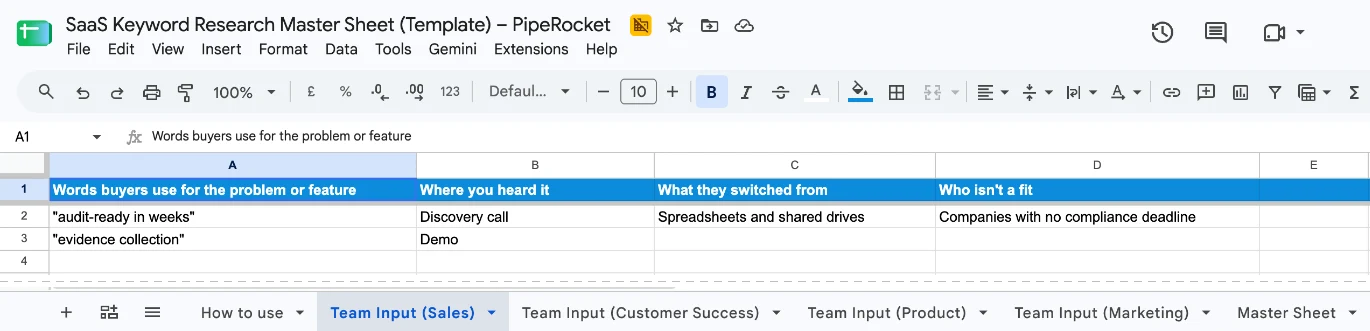
If your team records sales calls, read through a few of those too. We use them with our clients to hear what ICPs call a feature or a use case in their own words, which tells you what to name the page.
Step 2: Pull the Searches You Already Get
Skip if: you’re just getting started with marketing and your site doesn’t get much traffic or run ads yet. Come back to this step in a few months.
For keyword research for SaaS, your own data shows the searches people already use to find you, so pull your Search Console queries and, if you run ads, the Google Ads search terms that turned into signups or demos.
In Search Console:
- Open the Performance report.
- Set the date range to the last three to six months.
- Sort the queries by impressions.
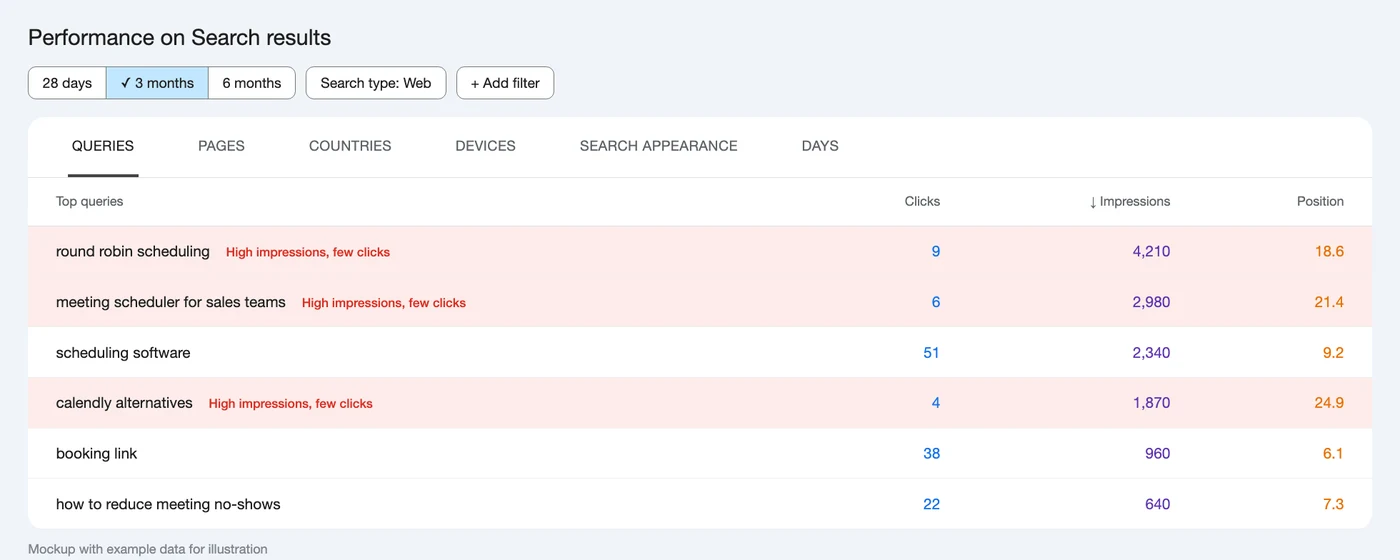
The ones with plenty of impressions and very few clicks are searches Google already connects with your site, where a better page has a real chance of ranking.
Here’s what that looks like for a scheduling tool. “round robin scheduling” and “calendly alternatives” get thousands of impressions on page two or three and hardly any clicks, which makes them the first pages to improve:
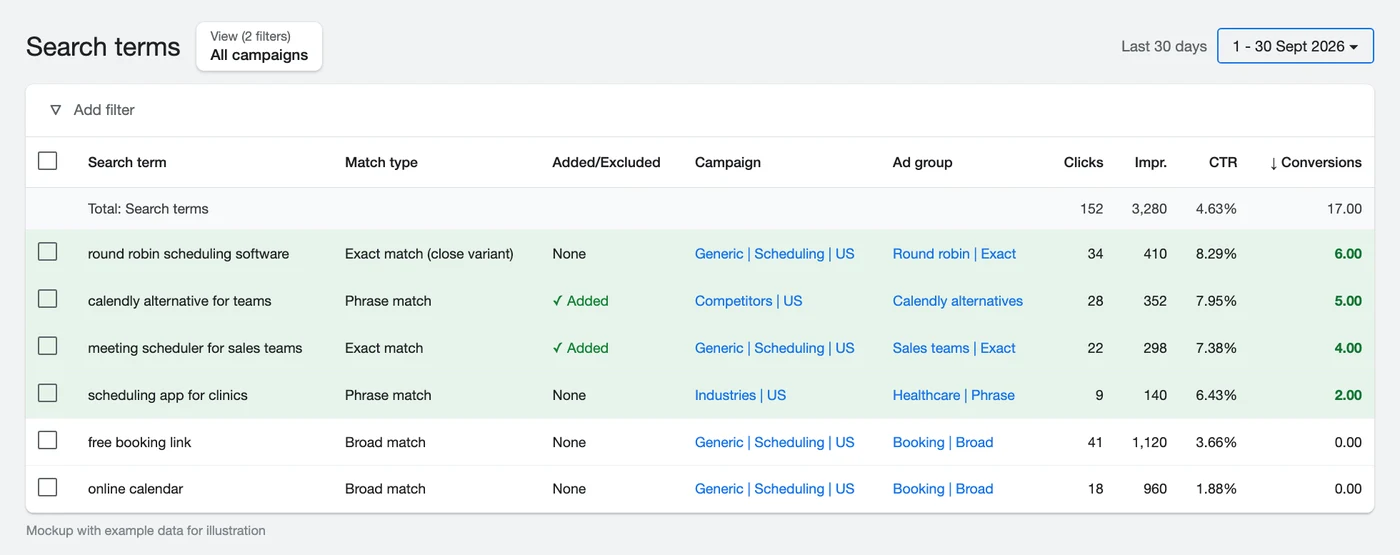
Google Ads is even more useful if you’ve been running it for a while, because the search terms report shows the exact words that turned into signups and demos. We use it with our clients for the same reason as sales calls: to see what ICPs call a feature or use case when they’re ready to buy, so those are the words to build pages around.
Here’s what that report looks like for a scheduling tool. Sorting by conversions shows which searches actually turned into signups, like “round robin scheduling software” and “calendly alternative for teams”, while broad ones like “free booking link” got clicks and nothing else:
Step 3: Listen to How Buyers Talk About the Problem
For SaaS keyword research, reviews, Reddit threads and Google’s own suggestions show how buyers describe the problem when nobody from your company is in the room, which makes them the best check on the words your teams gave you.
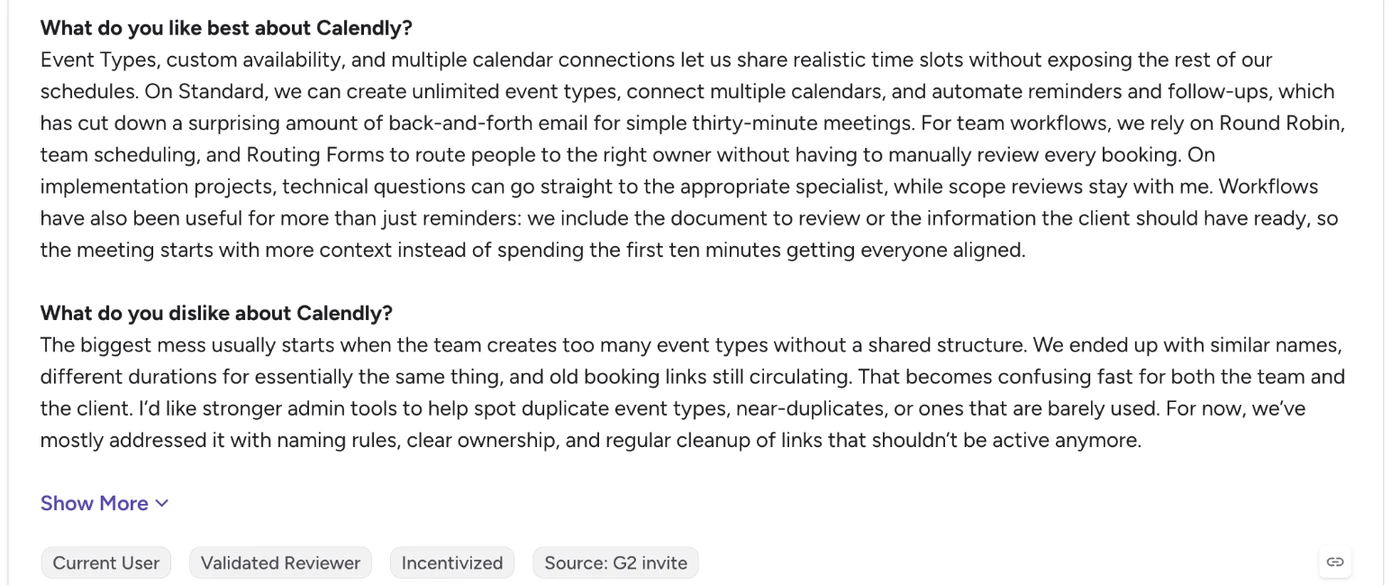
Start with your competitors’ reviews on G2 and Capterra, and read the answers to “What do you dislike?”. If several reviewers complain about the same missing feature or the same clunky workflow, that’s a search people are making, and if your product handles it better, then it’s an opportunity waiting for you to grab.
Here’s one of Calendly’s G2 reviews, and what it tells a competing scheduling tool:
- Common Issues: teams end up with duplicate event types, and old booking links keep circulating.
- Feature/Solution Page Opportunity: “Team Event Management: One Set of Event Types and Booking Links for Your Whole Team”
If a user is really fed up with that issue, a page like this sounds like a light at the end of the tunnel.
Then search Reddit for your category and the problem it solves. People there ask for recommendations and describe what they’ve already tried, in words no keyword tool will show you, so copy the phrases that keep coming up into your sheet.
If Reddit’s own search is slow going, Google’s Forums tab pulls the threads up quickly. For “calendly alternative reddit”, people describe what they want in their own words, like “solo-friendly, cheaper than calendly”:
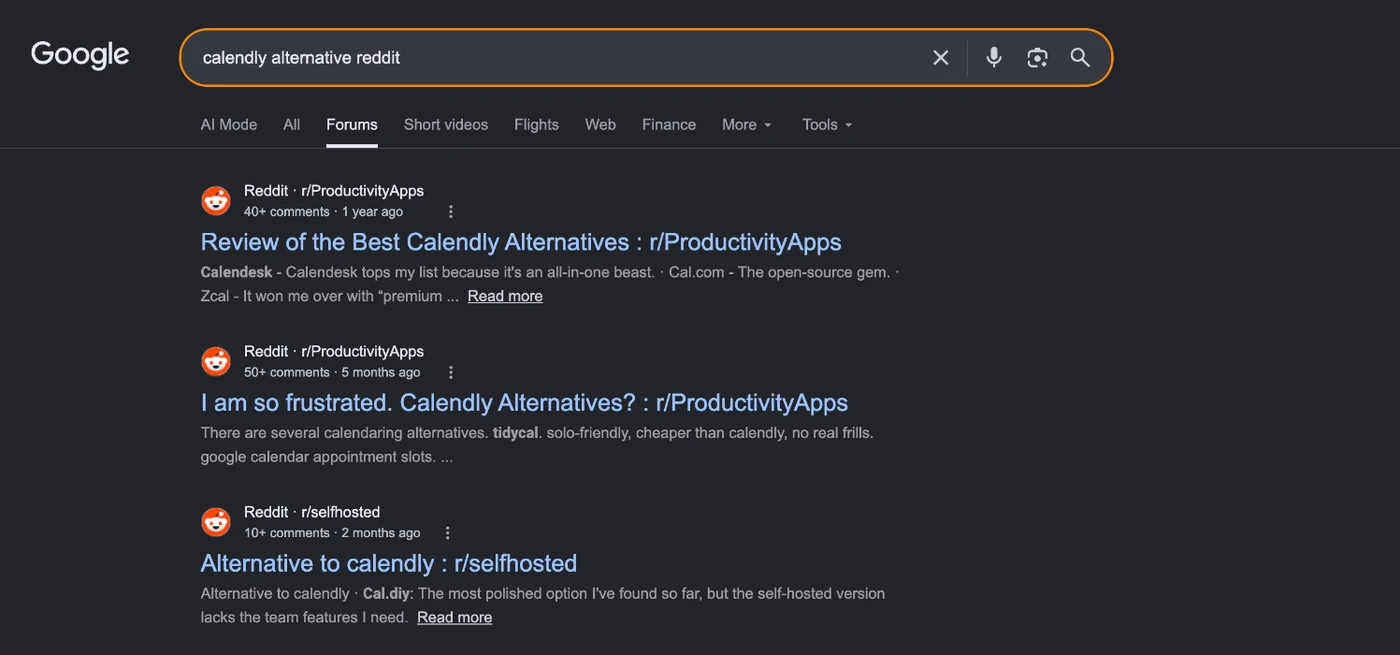
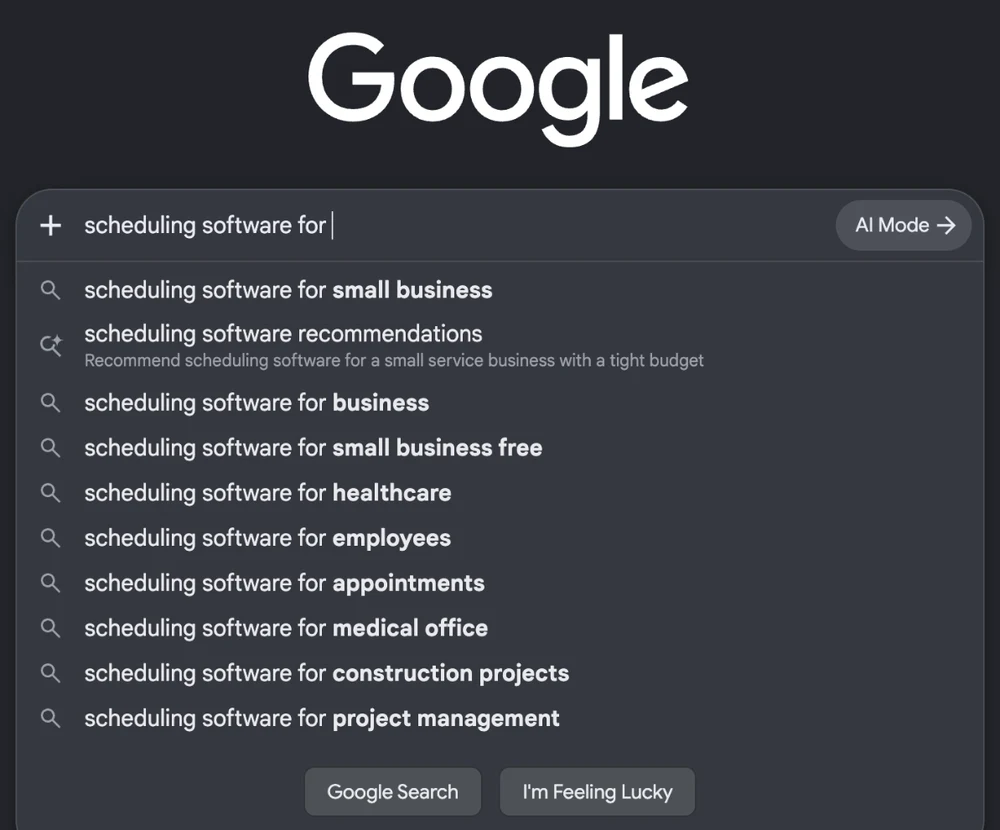
Finally, type your seed terms into Google and note what autocomplete suggests and what shows up in People Also Ask. It costs nothing, and AlsoAsked will pull the same questions into one tree if you want them all at once.
Typing “scheduling software for” into Google shows the segments people search for, from small businesses and healthcare to construction projects:
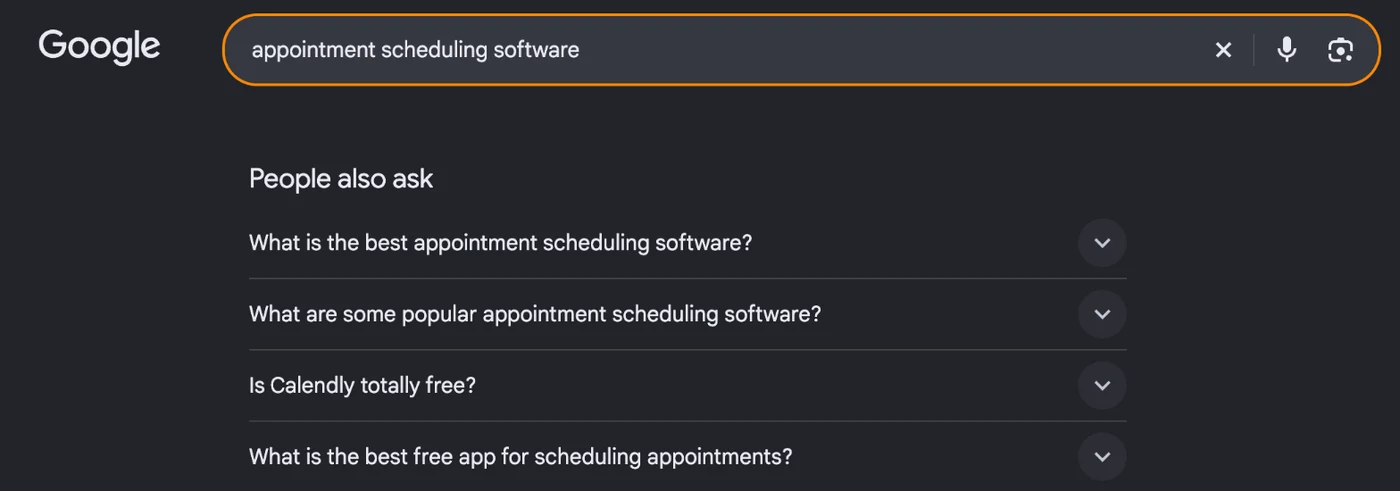
And People Also Ask shows the questions sitting underneath a search, like whether Calendly is free:
Step 4: Check What Competitors Rank and Pay For
Run a keyword gap against two or three competitors and look at the keywords they pay for in Google Ads.
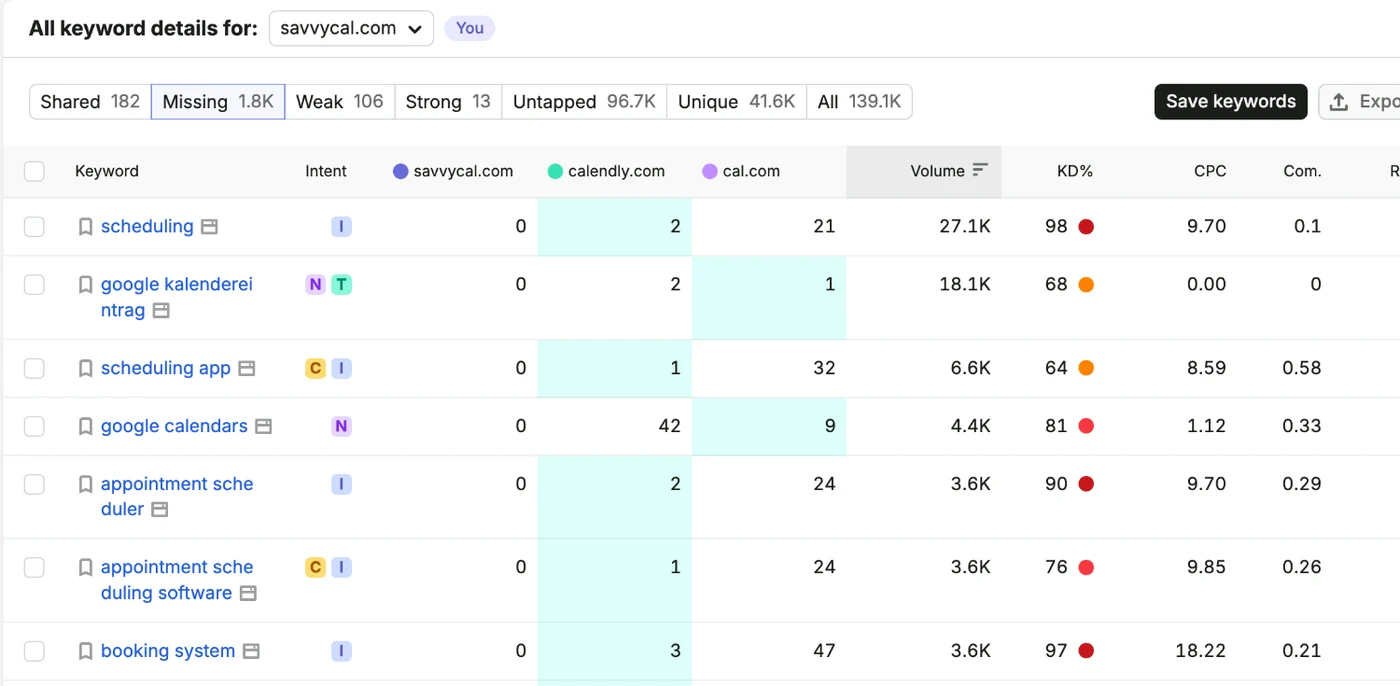
In SaaS keyword research, the competitors to put next to your domain in Semrush’s Keyword Gap or Ahrefs’ Content Gap are the ones you lose deals to. Then filter for the keywords they rank for and you don’t. That’s a keyword gap analysis, and most of the useful rows tend to be comparison, alternatives and integration searches.
Here’s SavvyCal compared with Calendly and Cal.com. SavvyCal doesn’t rank for 1,800 keywords that at least one of them does, including “scheduling app” and “appointment scheduling software”:
Then check what they’re paying for. A competitor that keeps bidding on the same keyword month after month is probably getting customers from it, which makes it worth a page of yours too, and Semrush’s Advertising Research shows those keywords for any domain.
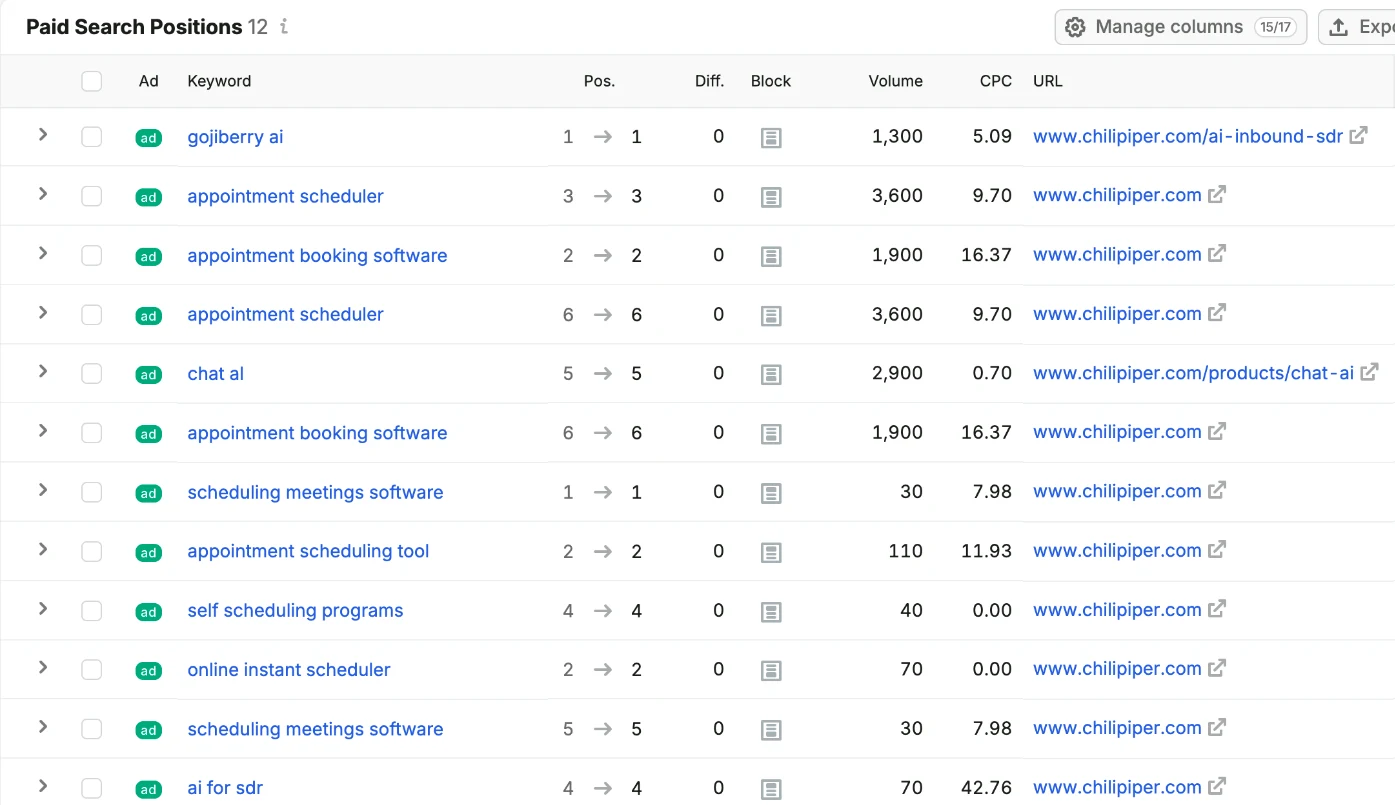
Chili Piper, which sells scheduling for sales teams, is bidding on searches like “appointment scheduler” and “appointment booking software”:
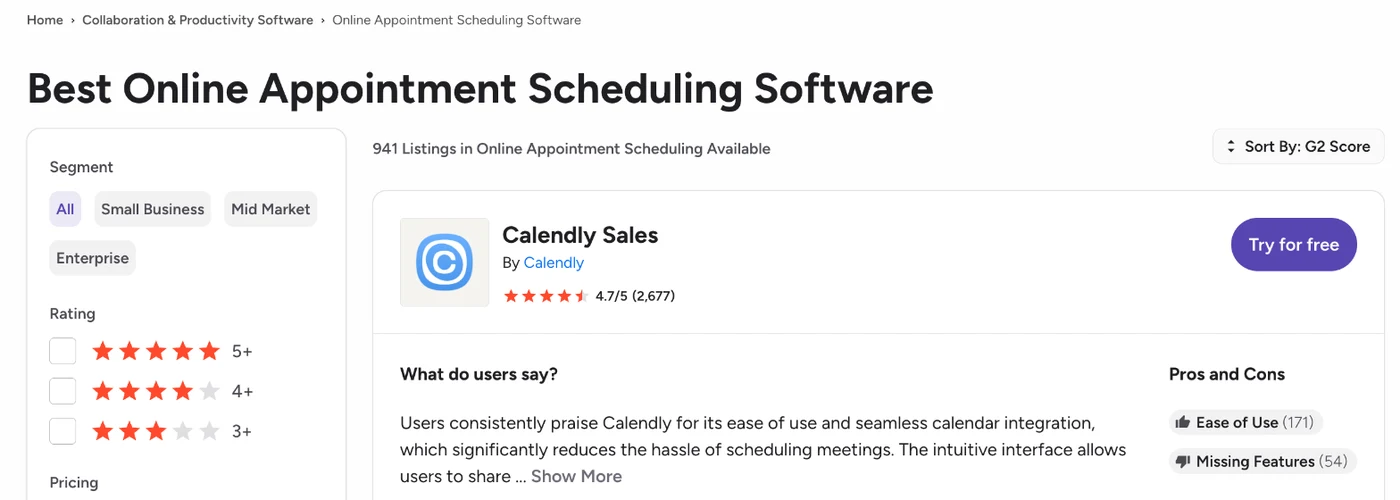
There’s one more check most people miss, and that’s what the industry officially calls your category. Look your product up on G2 and Gartner and see which category they put it in. You might call it “procurement management software”, but if G2 lists it under “procurement software”, that’s the term most buyers will search for.
For scheduling tools, G2’s category is “Online Appointment Scheduling Software”, with 941 products listed under it:
Step 5: Build a Master Sheet and Group Keywords Into Topics
Once you’ve got all your lists, the core of SaaS keyword research is merging them into one Master Sheet, adding search volume from Keyword Planner and grouping the keywords into topics, because the topics tell you how many pages you need. You can make a copy of our free Master Sheet template, which has these columns, the scoring formulas from Step 7 and a separate input tab for each team already set up.
This is the slow part. It normally takes us three to four days to close, but it’s the step that maps your whole market instead of the slice you already knew about. Here’s how to structure it:
| Column | What it holds | Example (GRC software) |
|---|---|---|
| Keyword | The search itself | “GRC software” |
| Search volume | Monthly searches from Keyword Planner, global or by country | 3,600 |
| Funnel stage | BOFU, MOFU or TOFU | BOFU |
| Category | The main umbrella | Governance, risk and compliance |
| Sub-category | The feature-level breakdown | Risk management software |
| Topic | The page this keyword belongs to | “GRC software” |
| Priority | P0, P1 or P2 (Step 7) | P0 |
Here’s the template filled in with GRC examples. Notice how “grc software”, “grc tools” and “grc platform” all point to one topic, and so do the three “what is GRC” searches:
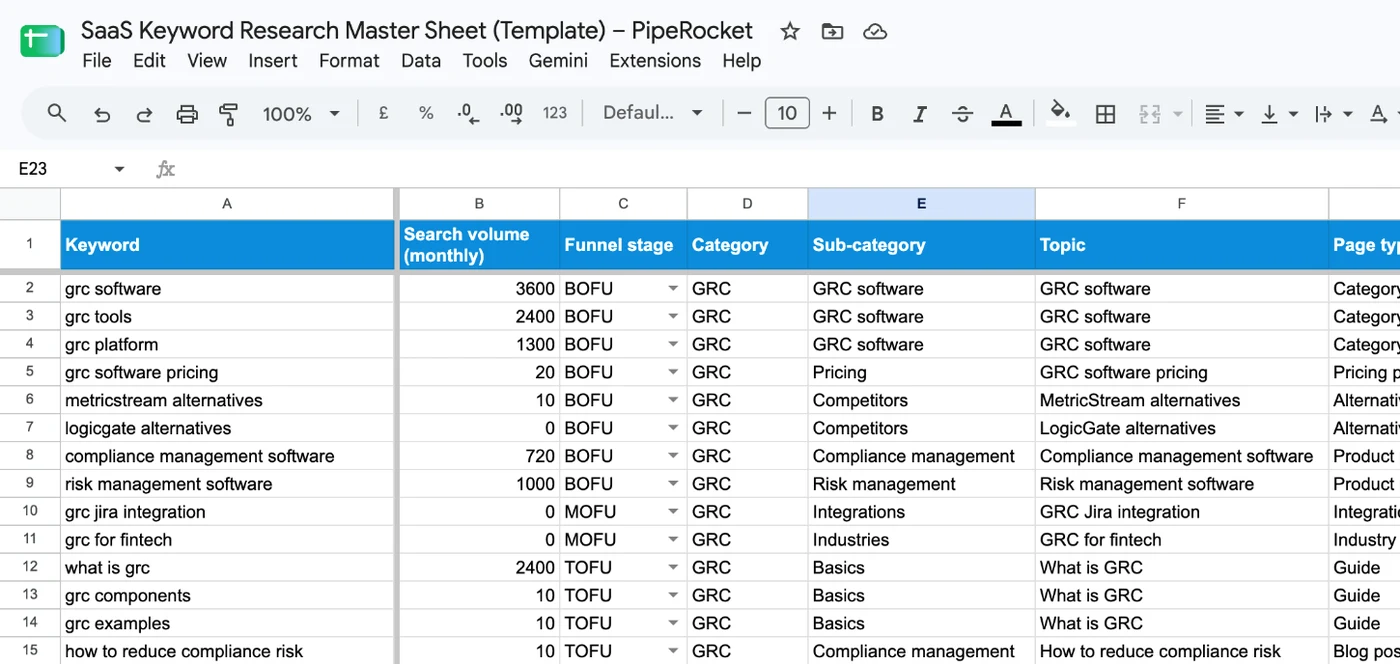
The Topic column is the one that matters most. If your sheet has “what is GRC”, “GRC components” and “GRC examples”, all three belong to one topic, “what is GRC”, which tells you to write one complete page that covers all of them instead of three thin ones. That’s also how you avoid keyword cannibalization, where two of your own pages compete for the same search, because every topic gets exactly one page.
Grouping this way pays off later too, since one strong page ranks for a whole set of related searches instead of a single keyword. If you’ve got thousands of rows, the quickest way to cluster keywords is by what Google shows on page one.
And don’t delete keywords that show zero volume. A lot of the searches your sales team hears are too specific for tools to measure, and a few visitors from one of those can be closer to buying than thousands from a broad term.
Step 6: Map Each Topic to a Funnel Stage and Page Type
Every topic needs one funnel stage and one page type, because a keyword won’t rank on the wrong kind of page however well it’s written.
Start by tagging the intent of each topic, using the types of keywords in SEO as your labels, then decide which page it needs:
| Funnel stage | Searches look like (scheduling software) | Page to build |
|---|---|---|
| TOFU | “what is round robin scheduling”, “how to reduce meeting no‑shows” | Guides and blog posts |
| MOFU | “scheduling tool with hubspot integration”, “appointment scheduling for clinics”, “how to automate meeting reminders” | Integration, use‑case and industry pages, how‑to guides |
| BOFU | “calendly alternatives”, “calendly vs acuity”, “scheduling software pricing”, “scheduling software” | Comparison and alternatives pages, pricing, product and category pages |
Here’s a benchmark I want you to remember. Most SaaS companies with a single product end up with 40 to 60 bottom-of-the-funnel pages at most, counting software pages, alternatives pages, comparisons and pricing. If your plan has more than that, you’re probably forcing it.
Build those decision-stage pages first, then the middle of the funnel, then the top. It’s the same order we follow across a whole SaaS SEO strategy, because the pages closest to a signup are the ones that pay for everything else.
Step 7: Score and Prioritize Your Topics
To prioritize the topics from your keyword research for SaaS, score each one on business value, intent and difficulty, then mark it P0, P1 or P2, and let intent win whenever it disagrees with volume.
Here’s a simple way to score them, with each factor out of 3:
| Factor | What to ask | Score |
|---|---|---|
| Business value | Would the people searching this buy our product, and is it a feature we want to be known for? | 1 to 3 |
| Intent | How close is the searcher to choosing a tool? | 1 to 3 |
| Ease | Can we realistically rank? Do we already rank for it, and how many links do the top pages have? | 1 to 3 |
In the template, the Score and Priority columns fill in on their own once you enter the three scores:
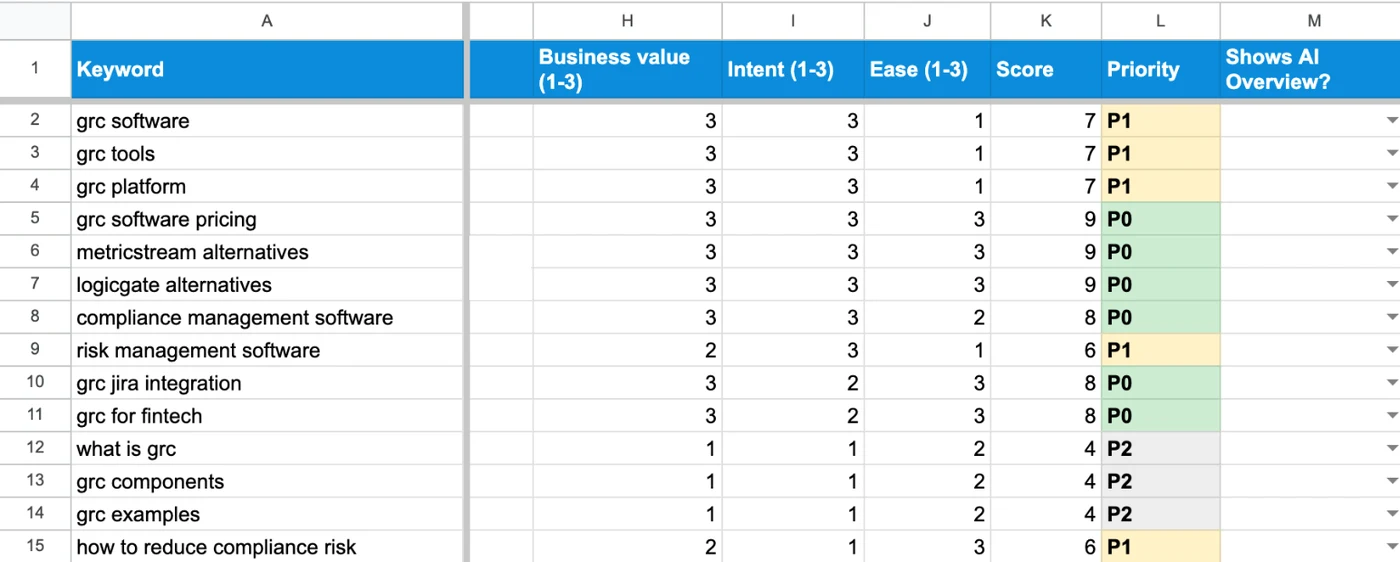
Add the three up. Topics scoring 8 or 9 are P0, 6 or 7 are P1, and anything lower is P2. Volume only breaks ties between topics with the same score, since search intent matters more than search volume for a SaaS buyer.
Step 8: Check Which Searches Trigger AI Answers
The last part of SaaS keyword research is to search your top topics in Google and note which ones show an AI Overview, then ask the same buyer questions in ChatGPT and Claude, because those are the searches where your page needs a direct answer near the top to get quoted.
You’ve probably heard that keywords are dead and everyone’s moving to AI tools. The way people search is changing, but around 90% of searches still happen on Google, and the same buyer language drives both, so the research you’ve just done is exactly what you need for AI answers too.
Add one more column to your Master Sheet for this. For each P0 and P1 topic, mark whether Google shows an AI Overview, and note which brands come up when you ask ChatGPT or Claude the question the way a buyer would.
Here’s Google’s AI Overview for “what is the best scheduling software for sales teams”. It names Calendly, Chili Piper and HubSpot, and the sources next to it are listicles from MarketBetter, Cirrus Insight and Cleverly:
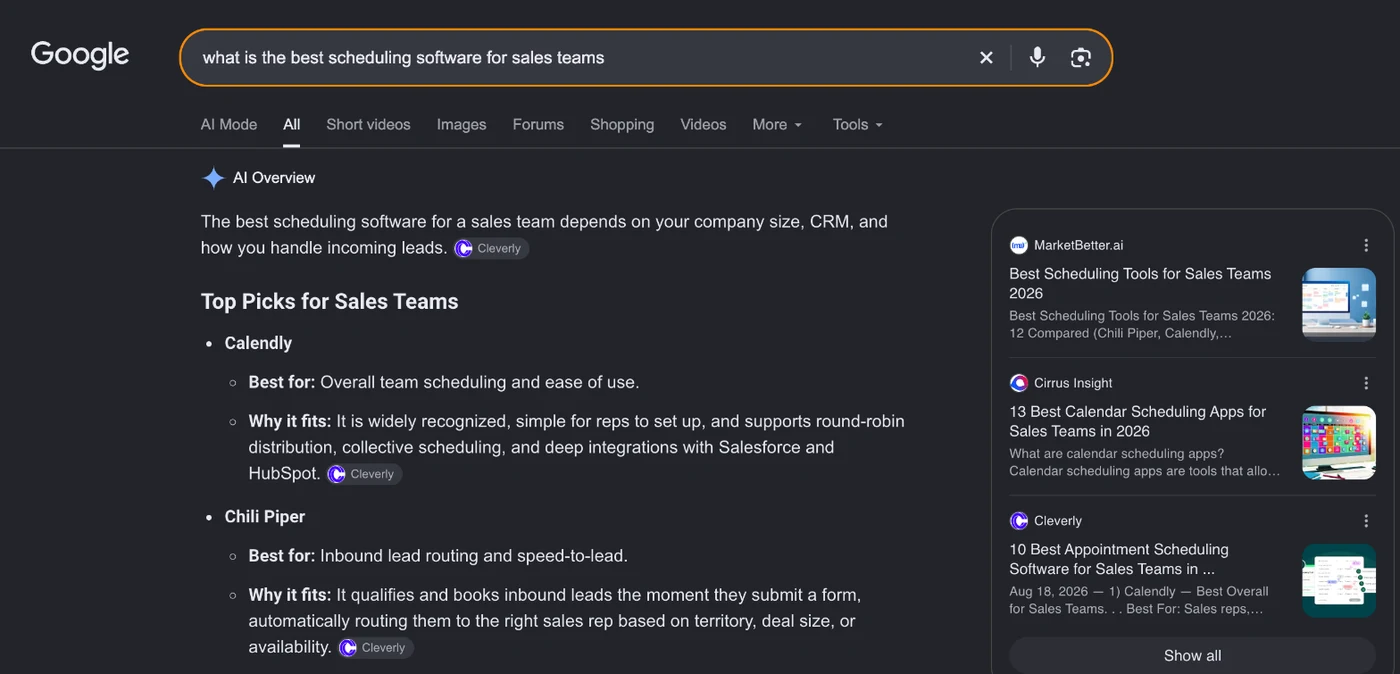
The pages for those topics should open with a short answer that makes sense on its own, followed by tables and lists an AI tool can lift. If one competitor keeps getting mentioned, look at the sources cited next to it, because those review sites and listicles are where you need to show up as well.
How to Turn Keyword Research Into a Content Plan and Budget
To turn your SaaS keyword research into a content plan and budget:
- Count the topics in each funnel stage, since every topic becomes one page.
- Add them up to get the total number of pages your category needs.
- Put the BOFU pages first in the plan, then MOFU, then TOFU.
- Use that page count to ask for the content budget.
The biggest struggle most marketers have is justifying the content budget, meaning how many pages to pay writers, designers and editors for. Management throws out a number, like 30 articles this quarter, and nobody can really say why it’s 30.
With a finished Master Sheet, you can walk into that meeting and say something like: “Our category has room for 330 pages: 60 BOFU, 70 MOFU and 200 TOFU, and we’ll build the 60 BOFU pages first.”
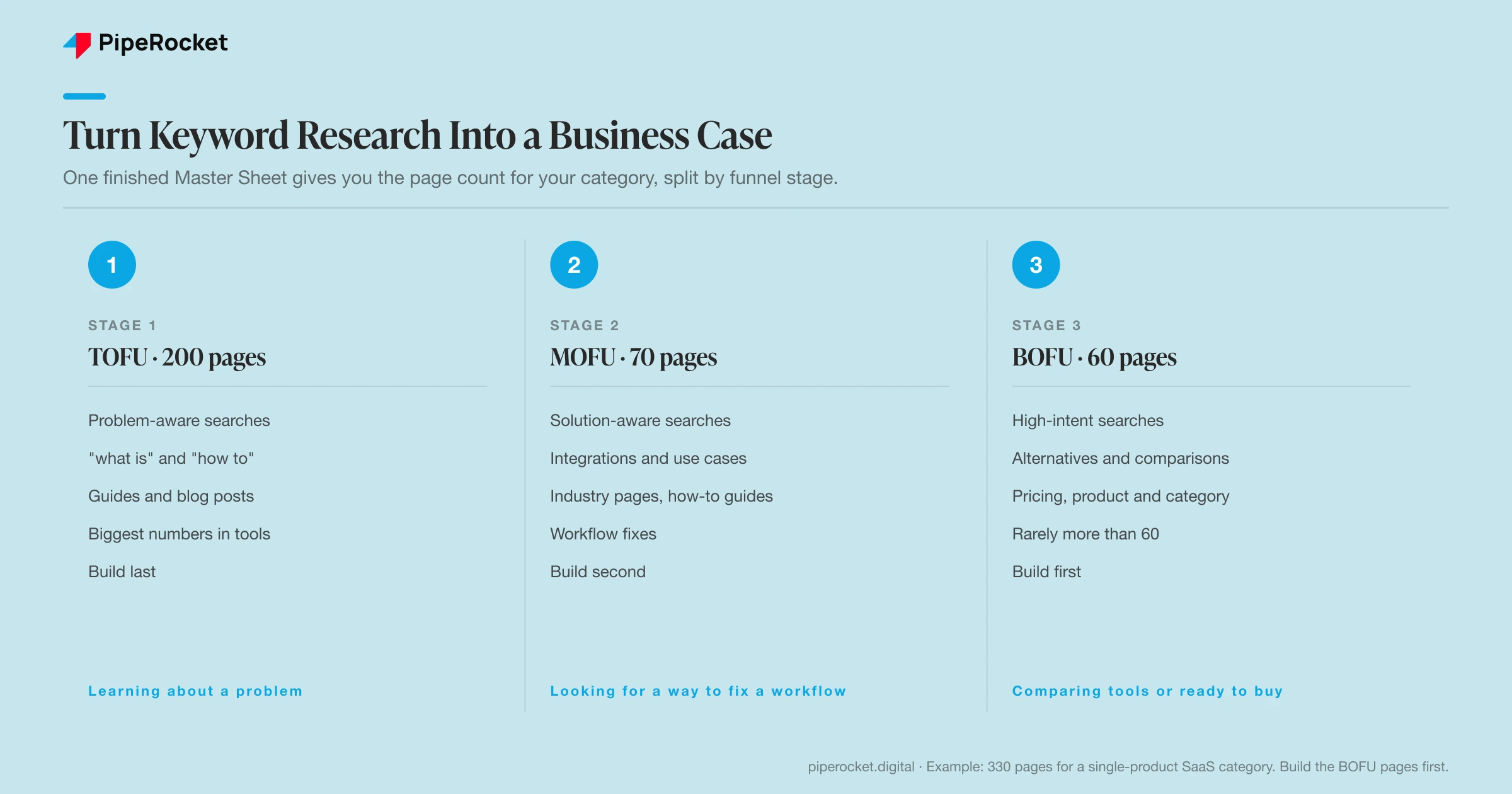
From there, lay the topics out on a keyword map and content calendar so everyone knows what’s being written and when, and use a TAM, SAM and SOM calculator to size the market those pages are going after.
How Do You Know Your SaaS Keyword Research Worked?
Your SaaS keyword research worked when the pages built from it move up in Search Console, show up in AI answers for your buyers’ questions, and bring in signups and demos.
Give new pages a few months, then check which target topics have moved from page two into the top five, how often your brand comes up for the buyer prompts you flagged in Step 8, and which pages are turning visits into trials or demos.
Redo the research every quarter, or sooner if you launch a big feature or start selling to a new type of customer, because the words buyers use change when your product and your market do.
How PipeRocket Does SaaS Keyword Research
This process works, but it’s a grind, and done properly it takes three to four days of spreadsheet work before anyone writes a page. If your team doesn’t have that time, we can run the whole research for you as part of our SEO work: we interview your sales and CS teams, build the Master Sheet, map your market and hand you a prioritized roadmap, so you get the plan without losing a week to it. Tell us about your category and we’ll show you what the research would look like for it.
Frequently Asked Questions
What is SaaS keyword research?
SaaS keyword research means finding and prioritizing the searches a software company’s buyers make, from learning about a problem to comparing tools, so the company builds the pages most likely to bring in signups and demos.
How do you do SaaS keyword research step by step?
Step by step, ask your sales, customer success and product teams for the words buyers use, pull your Search Console and Google Ads search terms, read reviews and Reddit, check what competitors rank for and pay for, build a Master Sheet of topics, map each topic to a page type, score the topics and check which ones trigger AI answers.
How long does SaaS keyword research take?
It takes about three to four days when it’s done properly, and most of that time goes into merging your team’s input, Search Console data and competitor gaps into one Master Sheet and grouping the keywords into topics.
Why can’t I just use Ahrefs or Semrush for keyword research?
Ahrefs and Semrush are great for checking keywords but poor at finding the best ones, because they only show you what competitors have already found. The specific phrases buyers use on sales calls often don’t have enough volume to show up in a tool yet, and those are usually the ones closest to a sale.
Can you use ChatGPT for keyword research?
Yes, ChatGPT helps with parts of it, like brainstorming seed terms and buyer language or checking which brands AI answers mention. It can’t give you real search volume or difficulty, so check every term in Keyword Planner and Ahrefs or Semrush before it goes on your sheet.
Should you target zero-volume keywords in SaaS keyword research?
Yes, when they come from real buyers. Many of the specific searches your sales team hears show zero volume because they’re too niche for tools to measure, but the few people who search them are often much closer to buying than visitors from a broad term.

