
How to Find and Fix Keyword Cannibalization on a SaaS Site
 Kamaraj Mathiarasan (Kim)
Last updated on
Kamaraj Mathiarasan (Kim)
Last updated on
Two pages on the same site, both targeting the same query, both stuck on page two. That’s not bad luck. That’s keyword cannibalization, and the moment I see it I stop thinking about new content and start thinking about which page has to go.
Most teams treat this as a writing problem. It’s really a consolidation problem, and the fix is almost always subtraction.
When two of your URLs fight for one keyword, Google can’t tell which one you actually want ranked, so it splits the signals and ranks neither. The work is deciding which page wins and what happens to the other.
To stop SaaS content cannibalization: find the competing pages in Search Console, pick one survivor per query, then merge and redirect, canonicalize, re-optimize the weaker page for a different keyword, or noindex it. Map each keyword to a single page so the overlap never comes back.
TL;DR
- Two pages fighting means both lose (split signals): When two URLs target one query, Google divides link equity and ranking signals between them, so neither breaks the top 10.
- Detect it in the data with a GSC query audit: Filter Search Console by query and flag any query returning two or more competing URLs, which at scale means exporting and sorting the whole library.
- The fix is a decision, merge, canonical, re-optimize, or delete: Every cannibalizing pair resolves to one of these moves, chosen by what each page is actually worth rather than by how much effort it took.
- Not every overlap needs merging: When both pages serve genuinely distinct goals, differentiate the weaker one for a new keyword instead of collapsing them; noindex the thin, low-value ones.
- Execution order matters (move value, then redirect): Pull unique content into the winner first, apply the fix with a 301, repoint internal links, then resubmit and watch the position recover.
Why Two Pages Targeting One Keyword Both Lose
When two of your pages chase the same query, you don’t get two chances to rank. You get half a chance, twice. Google picks one URL to show, and two candidates with overlapping content give it no clear preference. So it hedges, and both pages stall on page two.
Most people get this part wrong: they assume more content on a topic helps. It doesn’t, not when the content overlaps. A second post on a keyword you already cover mostly just means a larger index Google has less reason to crawl.
The split is the problem. Every internal link, every backlink, every bit of topical relevance gets divided across two URLs instead of stacked behind one. A single strong page beats two mediocre ones every time.
There’s a quieter cost too: crawl budget. Duplicate, overlapping pages make Googlebot spend crawls re-fetching near-identical content instead of discovering and refreshing the pages that matter. On a large SaaS library, that wasted crawl budget slows how fast your important updates get indexed.
So the goal of fixing cannibalization is to simply make one page absorb the other. The deeper fix is upstream: mapping every term to a single Topic during keyword research so two pages never chase the same query in the first place.
This matters more for SaaS than for most verticals because of where it bites. SaaS keywords are low-volume and high-intent. A comparison or alternatives query might get 80 searches a month, but those 80 are buyers.
When cannibalization keeps that page on page two, you’re not losing traffic. You’re losing the few searches that actually turn into pipeline.
Keyword cannibalization vs keyword stuffing
Keyword cannibalization and keyword stuffing are different problems. Cannibalization is a site-architecture issue: multiple pages competing for one query. Keyword stuffing is an on-page issue: cramming the same term into one page so many times it reads unnaturally.
The fixes have nothing in common. You fix cannibalization by consolidating or differentiating pages across your site. You fix stuffing by editing a single page’s copy for natural language. Don’t confuse the two, because rewriting one page’s density does nothing for two pages that split ranking signals.
How to Detect Cannibalization in a Large SaaS Content Library
Open Google Search Console, go to the Performance report, and filter by a single query. Then look at the Pages tab. If two or more URLs show up for that query, especially if positions are close, or swapping week to week, that’s cannibalization. The query has no clear home.
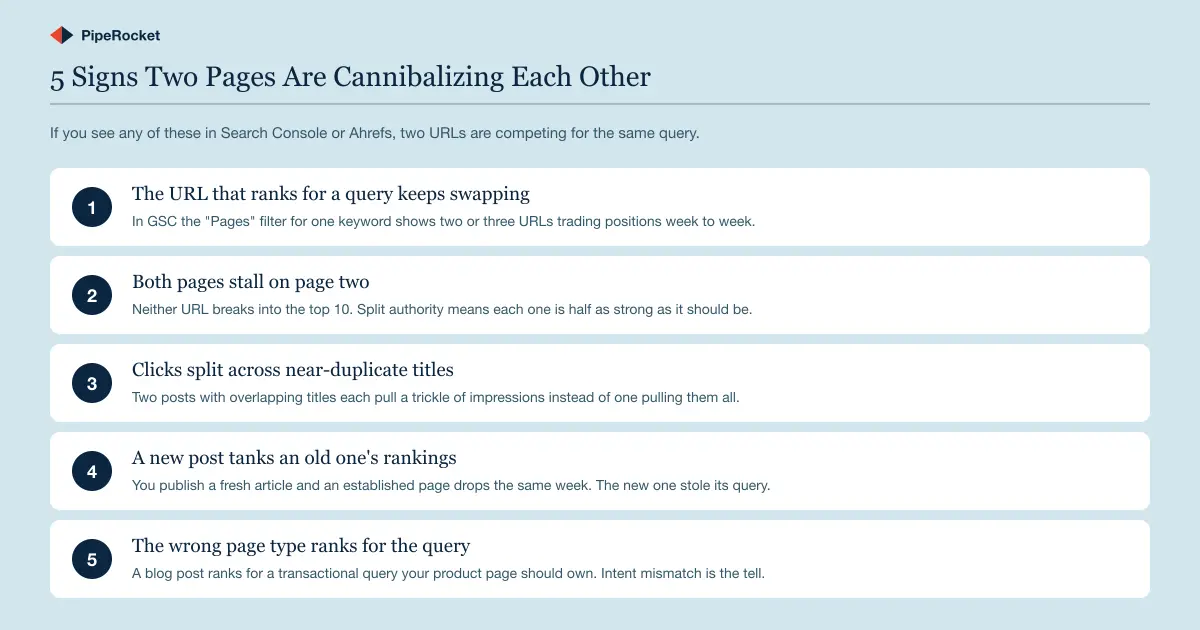
On a small site you can spot this by eye. On a library of 200+ posts, you can’t, which is exactly when it does the most damage. There are four signals I watch for when an audit is overdue:
- Rankings dropping consistently week-over-week for a page that used to be stable
- Organic traffic gone flat after months of growth
- A content library past 30 to 50 posts (the point where pages start competing with each other)
- A new post that knocked an older, established page down the SERP
Run the query-to-URL audit at scale
For a large library, I don’t check queries one at a time. I export the full GSC query-and-page data, sort by query, and flag any query that returns more than one URL above a position threshold. Those are your candidate pairs.
Most are harmless. A brand term will surface your homepage and a product page, and that’s fine. What you’re hunting for is two content pages competing for the same informational or commercial query.
A useful cross-check is the SERP itself. Search the query in an incognito window with site:yourdomain.com appended. If Google returns three of your own blog posts for one keyword, you’ve found a cannibalization cluster, not a pair.
Third-party tools speed this up on a big library. Semrush and Ahrefs both flag URLs that overlap for identical keywords, so you can spot competing pairs without exporting and sorting GSC by hand. Use them to confirm what the GSC audit surfaces.
Those clusters are common on SaaS blogs that published “what is X,” “X examples,” and “X guide” as three separate posts when they were always one topic .
When the wrong page type ranks, that’s cannibalization too
The trickiest version is a blog post outranking the product or comparison page that should own a query. Our team sees this constantly: a site ranks top-three for a high-intent keyword with an informational article instead of the page built to convert.
That’s still cannibalization, because two of your URLs are eligible for one query and the weaker-converting one is winning. Ranking with the wrong page type is almost as costly as not ranking. The traffic shows up, but lands on a page never designed to move anyone toward a demo.
The Consolidation Decision: Merge, Canonical, Re-optimize, or Delete
Once you’ve found a cannibalizing pair, the whole job comes down to one decision: which page survives, and what happens to the other. There are four moves, and the right one depends entirely on what each page is actually worth, not on which one you spent more time writing.
| Fix | When to use | What survives |
|---|---|---|
| Merge and redirect | Both pages have real equity (links, traffic, unique sections) | One combined page; weaker URL 301s to it |
| Canonical | Both pages must stay live for users (near-duplicates, variants) | Both URLs; signals point to the canonical |
| Re-optimize (differentiate) | Both pages serve genuinely different goals | Both pages, each targeting a distinct keyword |
| Delete and redirect | Weaker page has no links, no traffic, nothing unique | The survivor; weaker URL 301s to it |
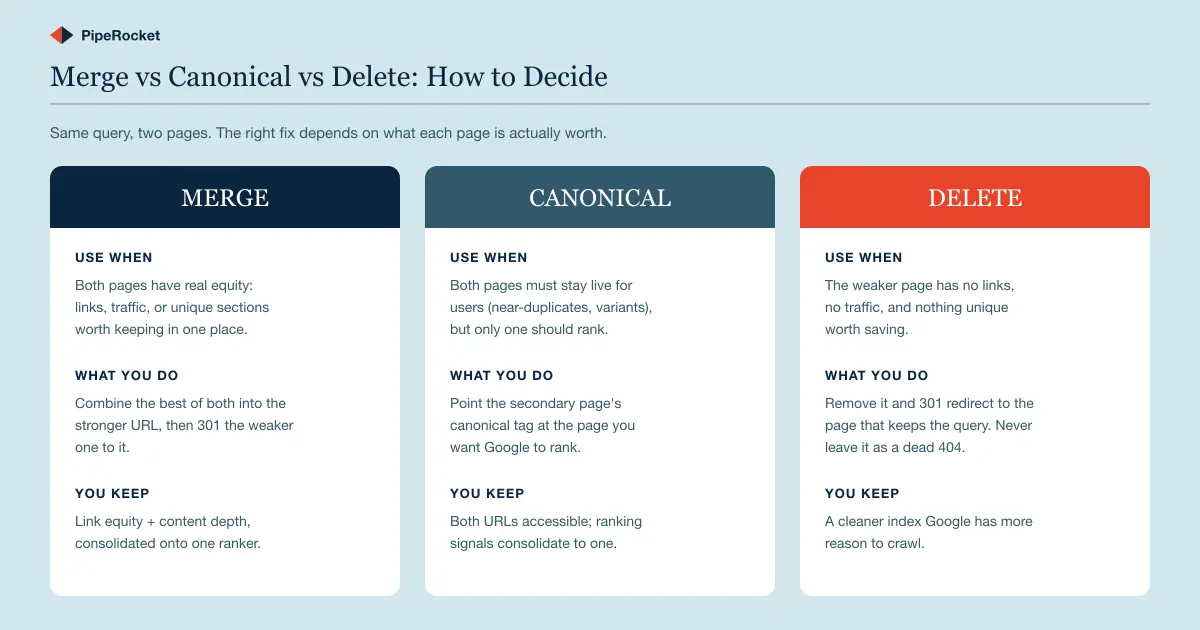
I work through it in this order, because most teams reach for the wrong move first. They keep both pages live and just “differentiate” them with new angles when the pages actually answer one query. If two pages genuinely answer the same search, differentiation only stalls the fix.
Merge when both pages have real equity
Merging is the right call when both pages have something worth keeping, like backlinks , steady traffic, or sections that genuinely add value. You’re not picking a winner and discarding a loser; you’re folding the best of both into the stronger URL, then 301 redirecting the weaker one to it.
The mechanics:
- Pick the survivor: the URL with stronger links, longer history, and the right intent.
- Fold the weaker page’s unique sections, FAQs, and secondary keywords into the survivor.
- 301 redirect the weaker URL to the survivor.
- Repoint every internal link and its anchor text to the survivor.
This is the most common fix on a mature SaaS blog, where two decent posts grew up next to each other and started overlapping. A compliance SaaS might have “SOC 2 checklist” and “SOC 2 requirements” as separate articles that answer 70% of the same questions.
Merge them into one definitive page, redirect the other, and the combined link equity plus the deeper content usually pulls the survivor from page two to page one.
The win here is also a secondary-keyword win. One consolidated page that ranks for 20 related terms does the work of two thin pages that ranked for two each, and that compounding is the most underrated lever in SaaS SEO .
Canonical when both pages must stay live
Sometimes you can’t delete or merge because both pages need to exist for users, like near-duplicate variants, a print version, or two product pages that look identical to Google. Here you keep both URLs accessible and add a canonical tag on the secondary page pointing at the one you want ranked.
The canonical tells Google “treat this page’s signals as belonging to that one.” It’s softer than a redirect. Nothing breaks for the user, and the ranking signals consolidate onto your preferred URL.
The mechanics:
- Keep both URLs live and accessible to users.
- Add a
rel="canonical"tag on the secondary page pointing at the URL you want ranked. - Confirm the pages are close to identical, or Google may ignore the hint.
The catch is that canonicals are a hint, not a command. If the two pages are too different, Google may ignore the tag and keep ranking the duplicate, so a canonical only works cleanly when the pages really are close to identical.
For thin, low-value near-duplicates that shouldn’t be indexed at all, noindex is the last-resort alternative. Add a noindex tag to the weaker page so it drops out of the index while staying live for any user who needs it. Use it when the page has no equity to preserve but you don’t want a redirect.
Re-optimize the weaker page for a different keyword
Re-optimize when both pages have real value but genuinely serve different user goals, so you keep them live and steer the weaker one at a distinct keyword instead of merging. This is the fix for pairs that only look like duplicates: two useful pages that drifted onto the same query.
The mechanics:
- Confirm the pages serve genuinely different intents before splitting them apart.
- Rewrite the weaker page’s title, headers, and body to target a unique related keyword.
- Update its internal link anchor text to match the new focus, so your own links stop pointing both pages at one query.
- Recheck GSC after a few weeks to confirm the two pages now rank for separate terms.
Done well, you turn one stalled pair into two pages that each own a query, instead of collapsing a ranking you were entitled to keep.
Delete when the weaker page has nothing to save
Delete is for the page with no backlinks, no meaningful traffic, and nothing unique on it. There’s no equity to preserve and no user need it serves that the survivor doesn’t serve better. Remove it, and 301 redirect the URL to the page that keeps the query.
The mechanics:
- Confirm the page has no links, no meaningful traffic, and nothing unique worth moving.
- Remove the page.
- 301 redirect its URL to the survivor (never leave it as a 404).
That redirect is non-negotiable. Deleting a page and leaving it as a 404 throws away whatever small authority it had and creates a dead end for any link still pointing at it.
I don’t obsess over PageSpeed scores, but I’m strict about the unglamorous technical hygiene. 404s, redirects, and canonicals are where consolidation quietly succeeds or fails. A clean 301 passes the signals forward; a 404 just deletes them.
The Consolidation Workflow, Step by Step
Once you’ve picked the move, execute in this order: confirm the winner, move the loser’s unique value across, apply the fix with a 301, repoint internal links, then resubmit and watch the position. Sequence matters as much as the decision.
Move things in the wrong order and you’ll redirect a page before you’ve pulled its useful content, or repoint links to a URL that isn’t finished yet.
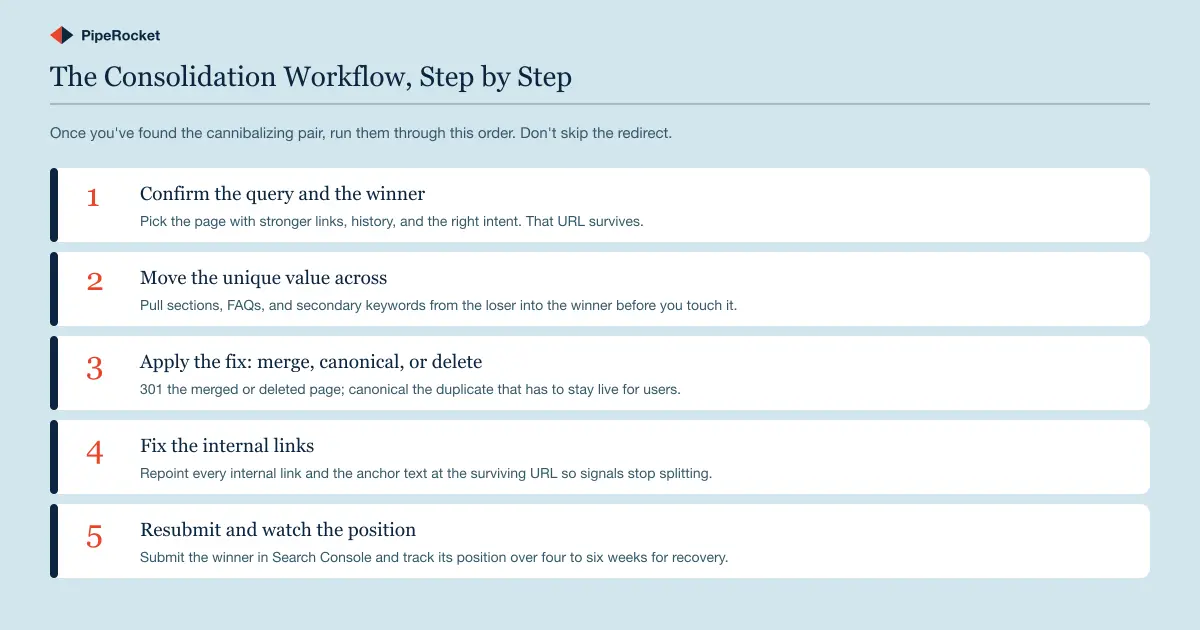
Here’s the sequence I follow on every pair:
- Confirm the winner. Pick the URL with stronger links, longer history, and the right intent for the query. That page survives.
- Move the unique value first. Pull useful sections, FAQs, and secondary keywords from the losing page into the winner before you redirect anything.
- Apply the fix. Merge, canonical, or delete based on the decision above. 301 redirect anything you merge or remove.
- Repoint internal links . Update every internal link and its anchor text to point at the surviving URL, so your own site stops splitting signals.
- Resubmit and watch. Submit the winner in Search Console and track its position for four to six weeks.
That internal-link step is the one teams skip, and it’s the one that quietly undoes the whole fix. Redirect a page but leave 15 internal links pointing at the old URL with the old anchor text , and you’re still telling Google two stories about which page owns the query.
Don’t consolidate pages that only look like duplicates
A real warning here: not every pair that shares a keyword is cannibalizing. Two pages can rank for the same term and serve different intents. A “CRM pricing” page and a “CRM pricing guide” post can coexist if one is transactional and one informational. They answer different searches.
Merging those would be a mistake. You’d collapse two distinct intents into one page that serves neither well, and lose a ranking you were entitled to keep.
The test is intent, not vocabulary: if both pages compete to answer the same search, consolidate; if they answer different searches that share keywords, leave them alone. SERP intent alignment is the highest-impact lever in most content audits, and it tells you what to merge and what to protect.
Consolidation across a large site is slow, unglamorous work, and the best SaaS SEO agency list covers teams that will actually do it.
Why PipeRocket Digital Fixes Cannibalization Instead of Just Auditing It
Most cannibalization audits stop at a spreadsheet of flagged pairs. We make the call on each one, merge, canonical, or delete, and execute the redirects, content moves, and internal-link repointing that actually recover the rankings.
Getting the surviving page onto page one often matters more to pipeline than any new post. You can see how we approach this as a SaaS SEO agency , or just reach out to us at PipeRocket and we’ll audit it with you.
Frequently Asked Questions
What does keyword cannibalization mean?
Keyword cannibalization is when two or more pages on the same site target the same query, splitting ranking signals so neither page ranks as well as a single consolidated page would. It’s a site-architecture problem, and the fix is almost always consolidation.
How do I know if keyword cannibalization is actually hurting my rankings?
Filter Google Search Console by a single query and check the Pages tab. If two or more of your URLs appear for that query and their positions swap week to week, cannibalization is the cause. The clearest tell is both pages sitting on page two while neither breaks top 10.
If only one URL ranks and it’s stable, you don’t have a problem worth fixing, even if another page mentions the keyword.
Should I delete cannibalizing pages or just redirect them?
Almost never delete without redirecting. When you remove a cannibalizing page, 301 redirect its URL to the page you’re keeping so its link equity transfers to the survivor. A bare deletion that leaves a 404 throws away whatever authority the page earned and orphans any links pointing at it.
The only time a redirect doesn’t apply is the canonical route, where both pages stay live and you point the canonical tag instead.
How often should I audit a SaaS site for cannibalization?
Treat it as a recurring audit rather than a one-time cleanup, because content libraries cannibalize themselves more as they grow. A useful trigger is crossing 30 to 50 published posts. That’s the point where pages reliably start competing with each other.
Beyond that, run the query-to-URL audit quarterly, and always before you fund a new content push. Fixing the underperforming pages you already have usually beats paying to publish 10 more on top of an unresolved overlap.
How do I avoid keyword cannibalization in the future?
Map every keyword to one page during keyword research , keep a topic map before publishing, and audit quarterly once your site passes 30 to 50 posts. Prevention upstream beats consolidation cleanup later.
The same discipline stops SaaS content cannibalization specifically: one keyword to one page, one topic to one cluster, checked before anything new goes live.

