
How to Recover From a Google Ranking Drop or Core Update
 Ranjeeth Kumar
Last updated on
Ranjeeth Kumar
Last updated on
Your traffic fell off a cliff last week and now you’re staring at a graph trying to reverse-engineer what went wrong. Before you rewrite a single page, you have to know what kind of drop this is, because a core update, a manual action , a technical break, and a seasonal dip all look identical in Search Console and every one of them needs a different fix.
TL;DR
- Diagnose the drop first: a core update, a manual action, a technical break, and a seasonal dip look the same in the graph but need opposite fixes, so guessing wastes the whole recovery.
- Isolate the damage: find out which pages and queries actually fell and whether the drop is sitewide or page-level, because that pattern tells you which cause you’re dealing with.
- Core-update recovery clears a quality bar: Google says there’s no specific action to take, so the work is making thin pages genuinely worth showing again.
- Rebuild E-E-A-T and depth where it’s thin: the pages that fall hardest in a core update are the ones with no real point of view, so add one, go deeper, and cut the filler.
- Recovery runs on Google’s clock: the biggest moves usually land at the next core update, so measure over months and don’t panic-edit in week one.
Step 1: Confirm It’s a Core Update
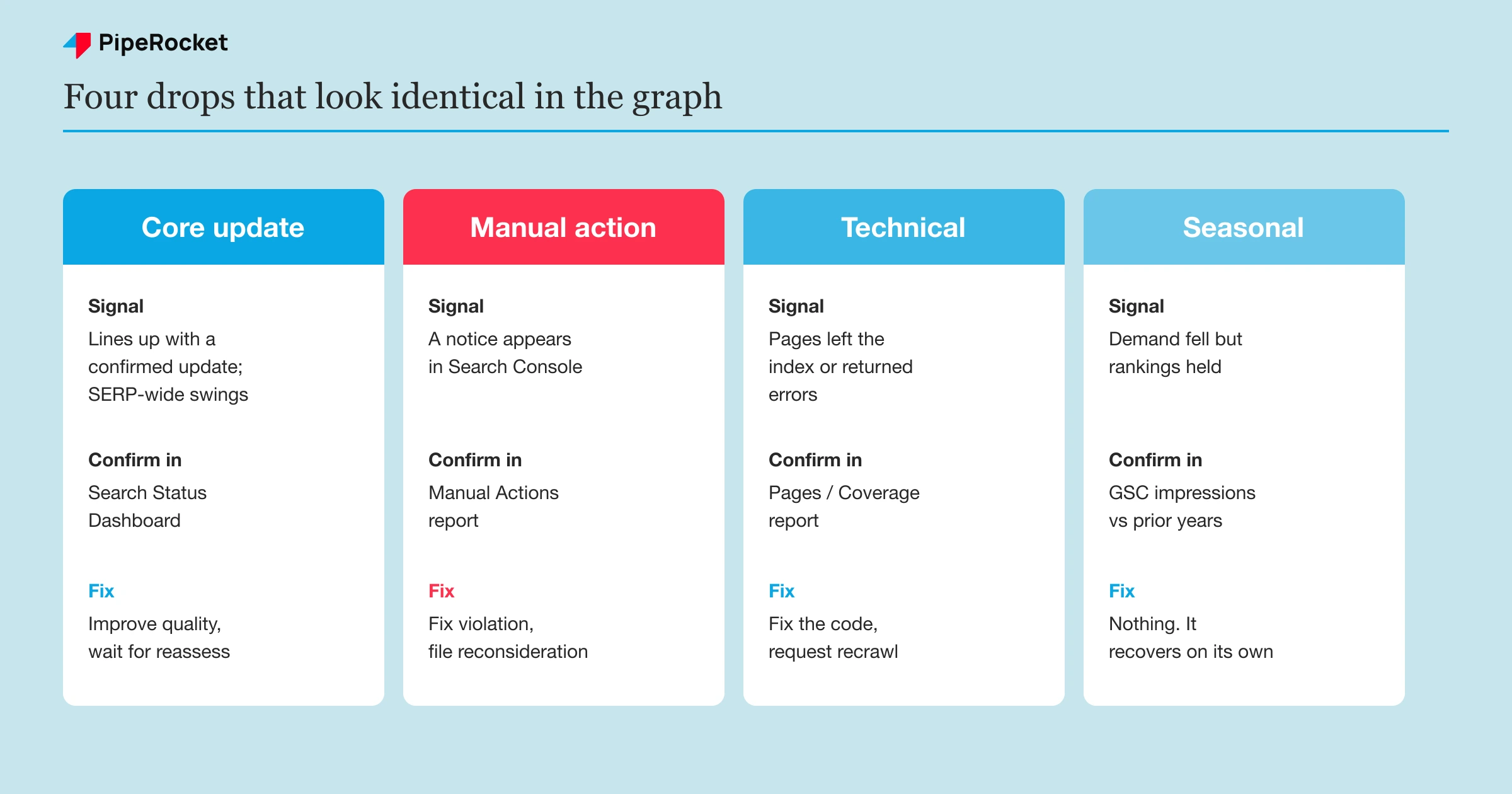
A traffic drop is one of four things: a core update (Google broadly re-evaluating quality), a manual action (a human penalty flagged in Search Console), a technical break (something on your side broke), or a seasonal dip (real demand fell). They look identical in the graph, so diagnose from timing and pattern, not the shape of the line.
Most teams assume every drop is a core update, and that assumption sends them rewriting content when the real problem was a broken robots.txt or a dip that would have corrected itself. Here’s the fastest way to tell the four apart:
| Type of drop | Telltale signal | Where you confirm it | The fix |
|---|---|---|---|
| Core update | Drop lines up with a confirmed update window; SERP-wide volatility | Search Status Dashboard + a SERP volatility tracker | Improve quality, then wait for reassessment |
| Manual action | A notice appears in Search Console | Search Console → Manual Actions | Fix the violation, file reconsideration |
| Technical | Pages dropped out of the index or returned errors | Search Console → Pages / Coverage | Fix the code, request recrawl |
| Seasonal | Demand fell but rankings held steady | GSC impressions vs position over prior years | Nothing. It recovers on its own |
The single most useful move is to match your drop date against Google’s Search Status Dashboard. If the fall lines up with a confirmed core update window and your average position slid while impressions held, you’re almost certainly looking at a core update and not a penalty.
Before you accept that, rule out the boring causes. A manual action leaves a message, so open the Manual Actions report first. A technical break shows up as pages leaving the index, so check the Pages report. If both are clean and the timing matches an update, now you can treat it as a core update.
Two caveats before you act. If the update is still actively rolling out, wait for Google to confirm the rollout is complete before you change anything, because rankings swing through a rollout and a mid-rollout edit tells you nothing. And gauge the scope: a minor slide of roughly one to three positions often needs no major fix, so save the deep work for pages that genuinely fell off a cliff.
Step 2: Isolate the Affected Pages and Queries
Open Search Console’s Performance report and compare the 28 days after the drop against the 28 days before, then sort by the pages and queries that lost the most clicks. This narrows the damage from “traffic is down” to “these specific pages lost these specific queries,” and the pattern often confirms your diagnosis from Step 1.
A sitewide drop and a page-level drop mean different things. What you’re looking for is the shape of the loss.
- If nearly every page lost a little, that points to a sitewide quality re-evaluation, which is the classic core-update pattern.
- If a handful of pages lost almost everything while the rest held, that points to those specific pages being judged thin or off-intent.
- If the pages that dropped left the index entirely, that’s technical, not a core update.
That last check is the one teams skip. When our team investigates a drop that followed an update, the first thing we do is open the Pages report and look at “Crawled but not indexed” and “Discovered but not indexed.” If those numbers are climbing, the pages didn’t get demoted, they got dropped, because Google decided they weren’t worth showing.
Demoted versus de-indexed is the distinction that changes your whole recovery. A demoted page still ranks somewhere and can climb back with better content. A de-indexed page has to earn its way back into the index first, which is a higher bar and usually means the page had no real reason to exist.
Write one sentence per affected cluster before you move on: “These pages lost these queries because ___.” If you can’t finish that sentence, you’re still guessing, and guessing is how teams edit twenty pages and recover none.
The Core-Update Recovery Playbook
There aren’t specific actions to take to recover from a core update, and a drop doesn’t necessarily mean anything is broken on your pages (Google Search Central ). A core update works as a re-scoring of quality across the index, so your pages simply came out lower relative to what else is ranking. There’s no penalty sitting on them to clear.
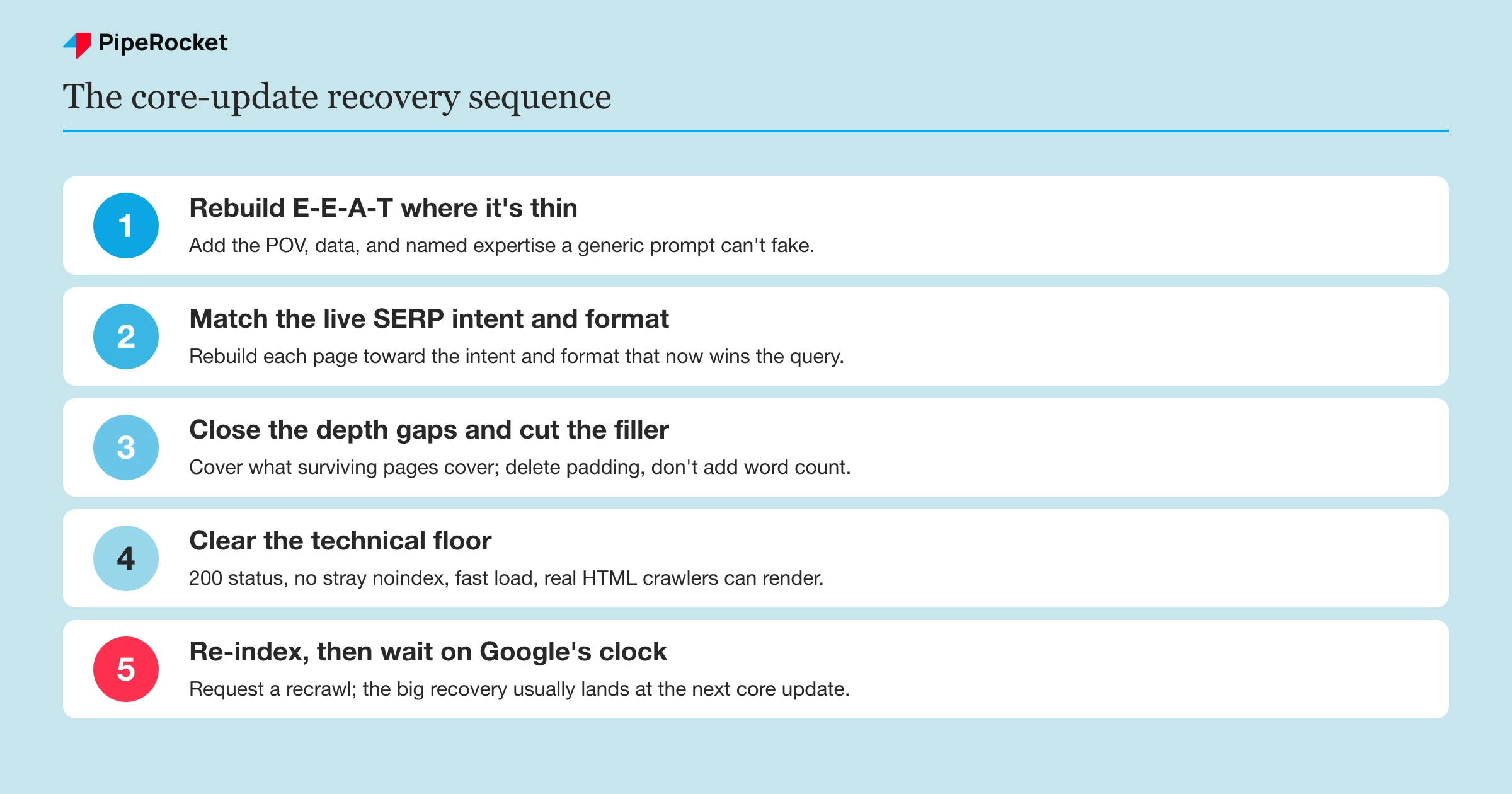
Recovery, then, is a bar you have to clear rather than a lever you pull. The work is making the pages that fell genuinely more helpful than the ones that took their place, then waiting for Google to reassess. Here’s how we sequence that, from Step 3 onward.
Step 3: Rebuild E-E-A-T Where It’s Actually Thin
Start with experience and expertise, because that’s what core updates keep re-weighting. The pages that fall hardest are usually the ones any competitor could have written: built off a keyword and a generic prompt, with no first-hand point of view and no signal that a real practitioner stood behind them.
We’ve watched this play out badly. When a SaaS brand scales content that reads identically to everything else on the SERP , it can hold up fine between updates and then fall off almost entirely when a core update lands, sometimes shedding the large majority of its organic traffic almost overnight. The problem was never that the content existed. It was that nothing about it was worth keeping.
Fixing that means adding what a model can’t fake:
- Your ICP ’s real situation, in their words
- Your own market take that goes beyond the rephrased consensus
- Data you actually have from client work or your own product
- Named author expertise, with a real bio and credentials
- The objections your buyers raise on sales calls
Even category leaders aren’t immune here. Our team has studied how a giant like HubSpot saw organic decline set in once its content strategy drifted, which is a useful reminder that scale doesn’t protect thin pages.
Step 4: Match the Live SERP Intent and Format
Re-read what’s ranking now for each query you lost, because a core update often rewards a different intent or format than the one your page was built for. If the SERP shifted from explainers to comparison pages and your page is still a pure “what is X” post, more paragraphs won’t recover it. The shape is wrong.
Read the current top five results and ask two things. Does your page do the job the searcher is actually trying to do, and does it match the winning format on the SERP? When the answer is no, the recovery move is to rebuild the page toward the intent that now wins, or to hand that query to a better-fit page and re-angle the old one at something it can still own.
Step 5: Close the Depth Gaps and Cut the Filler
List every subtopic the surviving pages cover that yours doesn’t, and treat that list as your edit plan. Depth here means coverage and genuine answers, not word count. A page padded from 1,200 words to 2,500 usually gets worse, because the answer the reader wanted is now buried under filler that was added to hit a length target.
Do the subtraction too. Cut sections that answer questions nobody on this SERP is asking, merge thin overlapping subsections, and pull the direct answer back up near the top where it’s scannable. A core update rewards pages that satisfy the query fast and cover it fully, which is a different thing from long.
Step 6: Clear the Technical and Off-Page Floor
Confirm the basics aren’t quietly holding you down, because a core update judges quality on top of a technical and off-page baseline. Work through the affected pages and check that they:
- Return a 200 status code (no 4xx or 5xx errors)
- Aren’t accidentally noindexed
- Load fast
- Serve real HTML that Google can render without waiting on heavy JavaScript
For SaaS sites, the usual suspect is a pricing or feature page rendered client-side that crawlers see as near-empty.
Then audit the backlink profile, because off-page signals are part of the same floor. Pull your links in Search Console or a backlink tool and look for spammy or manipulative patterns, sudden spikes of low-quality links, or the residue of a negative-SEO attack. Disavow genuinely toxic links only as a last resort, since Google largely ignores spam links on its own and an over-broad disavow can strip links you actually earned.
None of this recovers a page on its own. A perfectly crawlable thin page is still a thin page. But a genuinely good page held back by a rendering bug or a toxic link pattern won’t get the credit it earns, so clear the floor before you conclude the content is the problem.
Step 7: Re-Index, Then Wait on Google’s Clock
Request a recrawl of the pages you fixed, then measure recovery over months rather than days. Drop each URL into the URL Inspection tool and request indexing so Google sees the changes sooner than the normal crawl cycle. That speeds up crawling . It doesn’t speed up the re-scoring.
Recovery from a core update is rarely instant and rarely linear. You may see some movement between updates, but the meaningful recovery usually lands when the next core update rolls out and Google reassesses the whole index again, which commonly takes several months. Judge the trend across weeks, not a single Tuesday’s position. A page that flatlines after a genuine improvement is telling you the query is out of reach for now or the page should be consolidated, and both are honest outcomes.
Reduce Your Dependence on Any Single Update
The strongest recovery plan is to make the next core update matter less by diversifying where your traffic and demand come from. A site that gets every visit from one Google surface is one re-scoring away from a crisis, so build channels that a core update can’t touch.
Practical moves that lower your exposure:
- Grow an email list and community you own outright, so you can reach buyers without a SERP
- Invest in branded demand (podcast, newsletter, social) that sends people searching for you by name
- Spread acquisition across paid, partnerships, and referral so no single channel is a single point of failure
- Keep publishing genuinely useful content, since that is what survives every update anyway
This doesn’t reverse a drop you already took. It changes what a future drop costs you, which over a few update cycles is the difference between a bad week and an existential quarter.
Common Mistakes to Avoid
Assuming every drop is a core update
The most expensive mistake is skipping the diagnosis and treating a technical break or a manual action as a core update. If a broken tag de-indexed your pages and you respond by rewriting content, you’ve burned weeks on the wrong problem while the actual cause sat untouched. A spam update is a fifth cause worth ruling out too, since it targets specific manipulative tactics rather than broadly re-scoring quality, so it needs a different fix from a core update. Confirm the type of drop before you touch a draft.
Panic-editing in the first week
The second mistake is rewriting half the site three days after the drop. Core-update recovery runs on Google’s reassessment cycle, so changes you ship this week mostly won’t register until the next update anyway. Rushed, sweeping edits also destroy your ability to learn, because when the page moves you won’t know which change did it.
Chasing a fix Google says doesn’t exist
The third mistake is hunting for a single technical lever to “lift” the update, like a schema tweak or a speed fix, because Google has said plainly there’s no specific action that reverses a core update. Time spent looking for the magic fix is time not spent on the only thing that works, which is making thin pages genuinely worth showing.
Refreshing everything the drop touched
The fourth mistake is treating every affected page as worth saving. Some pages dropped because the query stopped mattering to your pipeline, some should be consolidated into a stronger page, and a few should be redirected or removed. Spreading effort evenly across the whole list is how teams work for a month and recover almost nothing. The flip side matters too: Google’s own guidance treats deleting content as a last resort, so prune deliberately rather than mass-deleting pages the moment they slip.
Why PipeRocket Digital Fixes Core-Update Drops This Way
We start by diagnosing what actually happened instead of assuming it’s a core update, because half the “core update” drops we see turn out to be technical or a query that stopped mattering. When it is a core update, we rebuild the pages worth saving around a real point of view and live-SERP intent, clear the technical floor, then measure recovery honestly against Google’s own timeline. If you want a SaaS SEO partner to run this properly, or you’re weighing the best SaaS SEO agencies , we’re open for a call .
Frequently Asked Questions
What is a Google core update?
A Google core update is a broad change to Google’s ranking systems that re-evaluates quality and relevance across the whole index. It carries no penalty; pages just rank higher or lower relative to everything else competing for the query.
How do I know if I was hit by a Google core update?
Match your drop date against Google’s confirmed core update windows on the Search Status Dashboard. If the fall lines up with a window while rankings slid but demand held, and the Manual Actions and Pages reports are clean, it’s a core update.
When was the last Google core update?
Core updates roll out several times a year on no fixed schedule. Check Google’s Search Status Dashboard for the live list of confirmed updates and their exact dates, since any specific date named here would quickly go stale.
How long does it take to recover from a Google core update?
Meaningful recovery usually takes several months, because Google re-evaluates quality on its own schedule. You may see some movement between updates once pages genuinely improve, but the biggest recoveries typically land when the next core update rolls out.
Can you recover from a core update before the next one?
Sometimes, but it’s the exception. Google reassesses content continuously to a degree, so a page you meaningfully improve can climb a little between updates. The larger recoveries usually arrive with the next core update, so treat any earlier movement as a bonus.

