
Google Ads Quality Score for SaaS: What Actually Moves It
 Sabarish Chandrasekar
Last updated on
Sabarish Chandrasekar
Last updated on
Quality Score gets treated like a grade you can’t change, a 1-to-10 number Google slaps on your keyword and moves on. In practice it works more like a bill. A low Quality Score means you pay more per click than the advertiser sitting right next to you in the auction, for the exact same position. On a SaaS account with $30k+ deal sizes, that gap quietly eats a chunk of every month’s budget.
Here’s what actually moves it, and what’s a waste of your time.
TL;DR
- It’s three separate inputs: expected CTR, ad relevance, and landing page experience are the three components Google scores, and each one is fixable.
- Ad relevance is the fastest win: get your target keyword into the ad copy and the headline, and a low Quality Score usually climbs within days.
- Landing page experience is where SaaS accounts leak: sending every campaign to a generic homepage is the single most common Quality Score killer we see.
- Expected CTR is earned over time: you raise it with tighter ad groups, job-title filtering in the copy, and pruning your weakest headlines.
- Ignore the account-level number: obsessing over the “6/10” in your dashboard is a trap; work the three inputs at the keyword level and the number follows.
Why Your Quality Score Is Really a CPC Problem
A low Quality Score doesn’t just look bad. It means you’re overpaying, and someone with a higher score is paying less for a better spot. Google rewards relevance with cheaper clicks because relevant ads keep searchers happy. So when your score is a 4, you’re being taxed for making the auction slightly worse.
The mistake most SaaS teams make is treating Quality Score as a report card to feel good or bad about. Treat it instead as a lever on CPC, because CPC is what decides how long your daily budget lasts before it runs dry.
We’ve watched this play out on real accounts. One Series A/B SaaS suddenly saw qualified leads drop 70% with CPL spiking. The team panicked and started changing creatives, landing pages, and bids all at once.
The real culprit our team found underneath the noise was CPC. It had climbed so high the daily budget was exhausted by noon, so their ads only showed for about 20% of searches. The fix was controlling CPC so the budget stretched across the whole day. New ads weren’t the answer. Quality Score sits upstream of exactly that problem.
So before you rebuild anything, understand the three inputs Google is actually scoring.
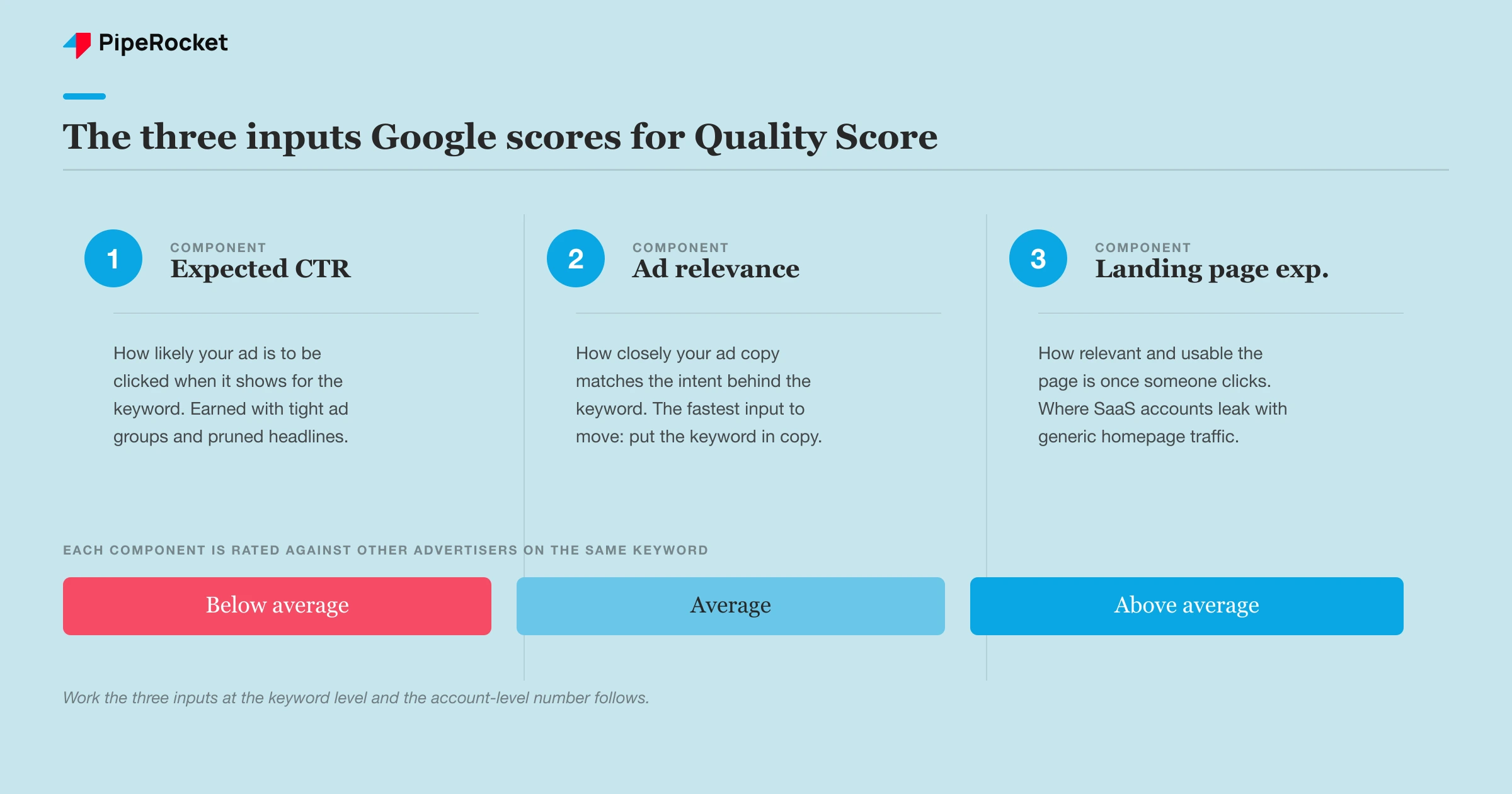
The three inputs Google scores
Quality Score is a rollup of three components, each rated “below average,” “average,” or “above average” against other advertisers on the same keyword:
- Expected click-through rate : how likely your ad is to get clicked when it shows for that keyword.
- Ad relevance: how closely your ad copy matches the intent behind the keyword.
- Landing page experience: how relevant and usable the page is once someone clicks.
You can see all three in the Google Ads interface by adding the “Qual. Score,” “Exp. CTR,” “Ad Relevance,” and “Landing Page Exp.” columns to your keyword view. That’s where the real work happens, at the keyword level. The account average won’t guide you.
Why the account-level number lies to you
The single “6/10” you glance at in the dashboard is close to useless on its own. Quality Score is scored per keyword, so a healthy account can carry a mediocre average while a handful of high-spend keywords quietly rack up a below-average score and drain budget. Judge the account by its average and you’ll optimise the wrong things.
Sort your keywords by cost, then look at Quality Score only on the ones actually spending money. A 3/10 on a keyword you spend $40 a day on matters. A 3/10 on a keyword that got two clicks last month doesn’t. Work top-down from spend, and the account number takes care of itself.
Fix Ad Relevance First, It’s the Fastest Win
Ad relevance is the quickest Quality Score input to move, and it comes down to one thing: is your target keyword actually in the ad? Keeping the keyword out of your copy is one of the most preventable Google Ads mistakes we see, and it directly drags Quality Score down, which raises CPC . Write the ad copy starting from the keyword. Your brand tagline is the wrong starting point.
When someone searches “SOC 2 compliance software” and your headline reads “Enterprise-Grade Security Platform,” Google sees a gap between the query and the ad. That gap is scored as below-average relevance. Rewrite the headline to say “SOC 2 Compliance Software” and the match becomes obvious to both Google and the searcher.
This is also where tight ad group structure pays off. If one ad group holds 30 loosely related keywords, no single ad can be relevant to all of them. Split them so each ad group holds a small cluster of keywords sharing one intent, then write copy that mirrors that exact intent.
Match the copy to the keyword the searcher used
Your marketing team may have branded the product as a “Revenue Intelligence Platform.” Nobody searches for that. They search “sales dashboard” or “pipeline forecasting tool.” If your ad leads with your invented category name while the searcher used the market’s plain language, ad relevance suffers and you pay for it.
We never start a SaaS account in the keyword box for this reason. Our team grills the product and sales teams first to learn the exact words prospects actually type, the vernacular from real discovery calls, then writes ad copy in that language. The keyword, the ad headline, and the search query should read like the same conversation.
Fill every headline slot and use them right
Responsive Search Ads give you 15 headline slots, and using five of them chokes the algorithm. Fill all 15. Our team’s working mix is to pin about four headlines to position 1 that match the target keyword almost exactly, assign a couple purely to the offer (book a demo, start a free trial), and use the rest for features, integrations, and social proof with real numbers.
One more move that lifts relevance and CTR at once: put the specific job title or industry in a headline. “Built for Healthcare HR” or “Built specifically for CFOs” tells the right person the ad is for them, and quietly repels the wrong-fit clicks you’d otherwise pay for.
A $10M SaaS account where relevance was the whole problem
We audited a Google Ads account for a SaaS client doing over $10M in revenue, and the core issue was relevance. Every use case saw the same ad: someone searching “best messaging app for teams” and someone searching for a named competitor alternative landed on identical copy, and roughly 60% of the traffic was junk. On a CPC channel that shows up as a soft Quality Score and a climbing cost per click , because the ad never matches the query behind the click.
We restructured around intent: dedicated campaigns per use case and ICP , strict top, middle, and bottom-funnel segmentation, and ad copy written to match each specific search. Over three quarters the account spent about 27% less and returned roughly 59% more revenue. None of that came from a bidding trick. It came from making each ad relevant to the exact search behind it, which is the same lever that moves Quality Score.
Landing Page Experience Is Where SaaS Accounts Leak
Landing page experience is the input SaaS teams neglect most, and it’s usually the biggest leak. The classic failure is routing every campaign to a generic homepage instead of a dedicated landing page that delivers exactly what the ad promised. When the ad says “SOC 2 compliance software” and the click lands on a homepage listing eight products, Google reads the mismatch as a poor experience, and the searcher bounces.
The rule is simple: the ad earns the click, the page earns the customer. If the two don’t line up, both your Quality Score and your conversion rate suffer.
Google weighs a few things on the page, and none of them are exotic:
- Relevance to the query: the page repeats the keyword and its intent in the headline and above the fold .
- Transparency and usefulness: clear what the product does, who it’s for, and what happens next.
- Load speed and mobile usability: slow or clunky pages score worse.
Build one page per campaign
Give every campaign its own landing page mapped to its keyword cluster. A campaign targeting “HR software for SMBs” needs a page whose headline says exactly that, because a title that reads “HR Software for SMBs” also acts as a filter that repels enterprise-junk traffic before it costs you.
We’ve seen the landing page decide the paid results more than the ads do. Four fixes our team has made repeatedly: kill the competing CTAs down to one clear ask, write the headline around the outcome the buyer wants, make the proof specific with named customers instead of “trusted by 500+ companies,” and repeat that single CTA above the fold, mid-page, and at the bottom. Same button, same copy, no alternatives.
Don’t chase a perfect PageSpeed score
Speed matters, but chasing a flawless PageSpeed number is a distraction. Landing page experience comes mostly from relevance and clarity rather than shaving 200 milliseconds off load time. A page that matches the query, states the outcome, and makes the next step obvious will out-score a lightning-fast page that’s generic. Fix the mismatch first, then optimise speed if there’s genuinely a problem.
Raise Expected CTR With Solid Structure
Expected CTR is the input you earn over time, and it climbs when your ads consistently get clicked by the right people. You build the conditions for it: tight ad groups, copy that speaks to one intent, and relentless pruning of your weakest headlines. Our Google Ads benchmarks put average B2B SaaS non-brand CTR at 3.60%, so treat that as the floor your ad groups need to clear before you call expected CTR solved.
Start with structure. A keyword buried in a bloated ad group can’t get a relevant ad, so its expected CTR stays low. Split ad groups until each one holds a small set of keywords sharing a single intent, then write ads specifically for that intent.
Then run a testing loop. Launch three distinct ads per ad group, each on a different angle like speed, security, or cost, and rotate them evenly for a week or two so you get clean data instead of letting Google crown a winner off a few random clicks. Cut to the best performers by CTR and Ad Rank.
Prune your weakest headline, then repeat
After the initial test, keep pruning continuously. Find the single lowest-CTR headline in the ad, weed it out, and replace it with a variation of your best-performing headline. That way the ad is always competing against its own best numbers, and expected CTR ratchets up instead of plateauing.
This beats any one-time “optimisation.” Quality Score is something you maintain on an ongoing basis, and a one-time fix won’t hold. The accounts that hold high scores are the ones running this prune-and-replace loop on a steady cadence, catching drift before it compounds on a channel that bills you by the click.
Ad extensions are free CTR, use them
Sitelinks, callouts, and structured snippets don’t directly change the three Quality Score inputs, but they enlarge your ad’s footprint and lift CTR, which feeds expected CTR over time. They’re free and take about 20 minutes to set up, so launching without them is leaving easy CTR on the table. Add the full set before you worry about anything fancier.
The Quality Score Mistakes That Cost SaaS Teams the Most
Most Quality Score damage on SaaS accounts comes from a short list of avoidable mistakes rather than anything Google is hiding. Here’s what to check first, in order of how much it usually costs:
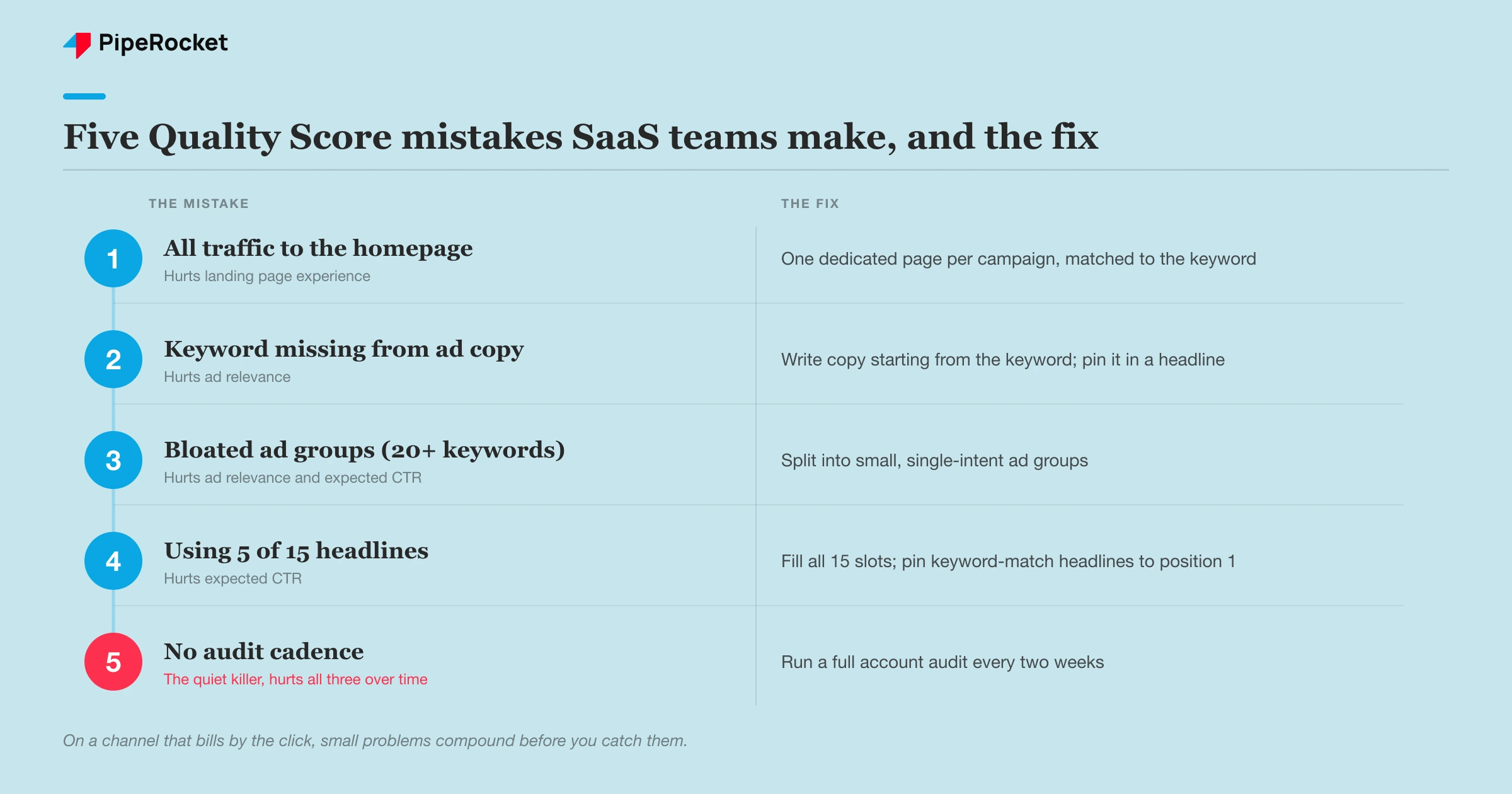
| Mistake | What it hurts | The fix |
|---|---|---|
| Sending all traffic to the homepage | Landing page experience | One dedicated page per campaign, matched to the keyword |
| Keyword missing from ad copy | Ad relevance | Write copy starting from the keyword; put it in a pinned headline |
| Bloated ad groups (20+ keywords) | Ad relevance and expected CTR | Split into small, single-intent ad groups |
| Using only 5 of 15 headlines | Expected CTR | Fill all 15 slots; pin keyword-match headlines to position 1 |
| No ad extensions | Expected CTR | Add sitelinks, callouts, structured snippets |
| No audit cadence | All three, over time | Full account audit every two weeks |
The last one is the quiet killer. On a CPC channel, small problems compound fast, so run a full account audit every two weeks. That’s long enough to gather real data and short enough that a slipping Quality Score doesn’t drain a month of budget before you catch it.
One warning: don’t over-rotate on Quality Score to the point of ignoring lead quality. A high Quality Score on a keyword that brings the wrong buyers is still a bad keyword. Quality Score lowers your cost per click; it doesn’t make a bad-fit click worth having. Fix relevance and the page, but keep judging keywords by whether they bring qualified pipeline.
How PipeRocket Helps SaaS Teams Fix Quality Score
We treat Quality Score as a CPC problem rather than a dashboard number to admire. On our SaaS PPC engagements, we restructure bloated ad groups into tight single-intent clusters, rewrite ad copy starting from the keyword, and build dedicated landing pages that match each campaign’s promise, then run the prune-and-replace loop on a two-week cadence so scores hold instead of slipping. The result is lower CPC, longer-lasting budget, and better-qualified clicks. If your account is overpaying for every click, get in touch and we’ll audit where the leaks are.
Frequently Asked Questions
What is a good Quality Score for a SaaS Google Ads account?
Aim for 7 or above on your highest-spend keywords; that’s where you’re paying a fair price for your position rather than being taxed. A 5 or 6 is workable but usually means one of the three inputs, most often landing page experience, is dragging you down. Scores of 3 or 4 on keywords that spend real money are the ones to fix first. Don’t chase a 10 across the board, because the effort to move a 7 to a 10 rarely pays for itself compared to fixing a 3.
How long does it take to improve Quality Score after making changes?
Ad relevance changes, like getting the keyword into the copy, often show up within a few days to a week once the ad accumulates impressions. Expected CTR takes longer because Google needs enough click data to re-evaluate, usually a couple of weeks of steady performance. Landing page experience can update within days of Google re-crawling the improved page. The whole thing moves faster on keywords with higher traffic because Google gathers signal quicker there.
Does Quality Score affect how much I pay per click?
Yes, directly. Quality Score is a core input to Ad Rank, and a higher score lets you win the same ad position at a lower cost per click than a competitor with a lower score. On a SaaS account with expensive category keywords, the difference between a 4 and an 8 can meaningfully change how far your daily budget stretches. That’s why we treat Quality Score as a lever on CPC and budget efficiency, a working control rather than a dashboard metric to admire.

