
How to Improve Organic CTR Without Changing Rankings
 Omar Sheriff
Last updated on
Omar Sheriff
Last updated on
Two pages can sit in the exact same spot on Google and pull completely different clicks. Same position, same query, one gets 3% of the clicks and the other gets 9%. Nothing about the ranking changed. The listing did.
That gap is the cheapest win in SEO, and most SaaS teams walk right past it. They pour effort into climbing from position 6 to position 4, when the faster money is sitting inside the positions they already hold.
Here’s the workflow I use to lift organic CTR on pages that already rank, without trying to move the ranking at all.
TL;DR
- Treat CTR as its own lever: you can pull more clicks out of a page holding position 5 without ever touching the ranking, so run it as a standalone project.
- Start in GSC: the queries with high impressions and low CTR are your shortlist, and Search Console hands them to you for free.
- Rewrite the listing for the query: the title and description are ad copy for one specific search, so match the words and the intent the searcher typed.
- Win the space around your link: rich results, FAQ, and sitelinks make your listing bigger on the page, and a bigger listing pulls more of the clicks.
- Match the SERP’s dominant intent: if Google is ranking guides and you wrote a sales page, your listing looks wrong no matter how good the copy is.
What is organic CTR?
Organic CTR is the percentage of people who click your result after seeing it in unpaid search, worked out as clicks divided by impressions. A page shown 1,000 times that earns 30 clicks has a 3% organic CTR.
Lifting that number wins more traffic from a search you already rank for, without needing a higher position. It’s why the same listing at position 5 can pull 3% of clicks for one team and 9% for another: the words in the title and description do the work while the rank stays put.
Why “just rank higher” is the wrong goal here
Improving CTR at your current position is the cheapest win in SEO: you can pull more clicks from a page holding position 5 or 6 in an afternoon of copy work, while climbing to a higher rank takes links, authority, and months.
Most teams treat every SEO problem as a ranking problem. Traffic’s flat, so the fix must be climbing higher. That’s often true. It’s not always the cheapest true thing.
Moving a page from position 6 to position 3 takes links, authority, and months. Lifting the CTR on that same position-6 page takes an afternoon of copy work. One of those you can ship this week.
CTR isn’t a direct ranking factor either, which is the part that makes this safe to isolate. Google’s own Gary Illyes has said clicks are used for evaluation and experimentation, not for ranking . So when you improve the listing, you’re not gaming position. You’re just winning more of the clicks that were already available at that position.
That framing matters because it changes what you measure. You’re not watching rank. You’re watching the ratio of clicks to impressions on pages whose rank you’re deliberately leaving alone.
Here’s the honest trade-off. This works brilliantly on pages that already rank on page one with real impression volume. It does almost nothing for a page stuck on page three, because there aren’t enough impressions to convert. Rank first, then optimise the click. Not the other way around.
Step 1: Find your low-CTR, high-impression queries in GSC
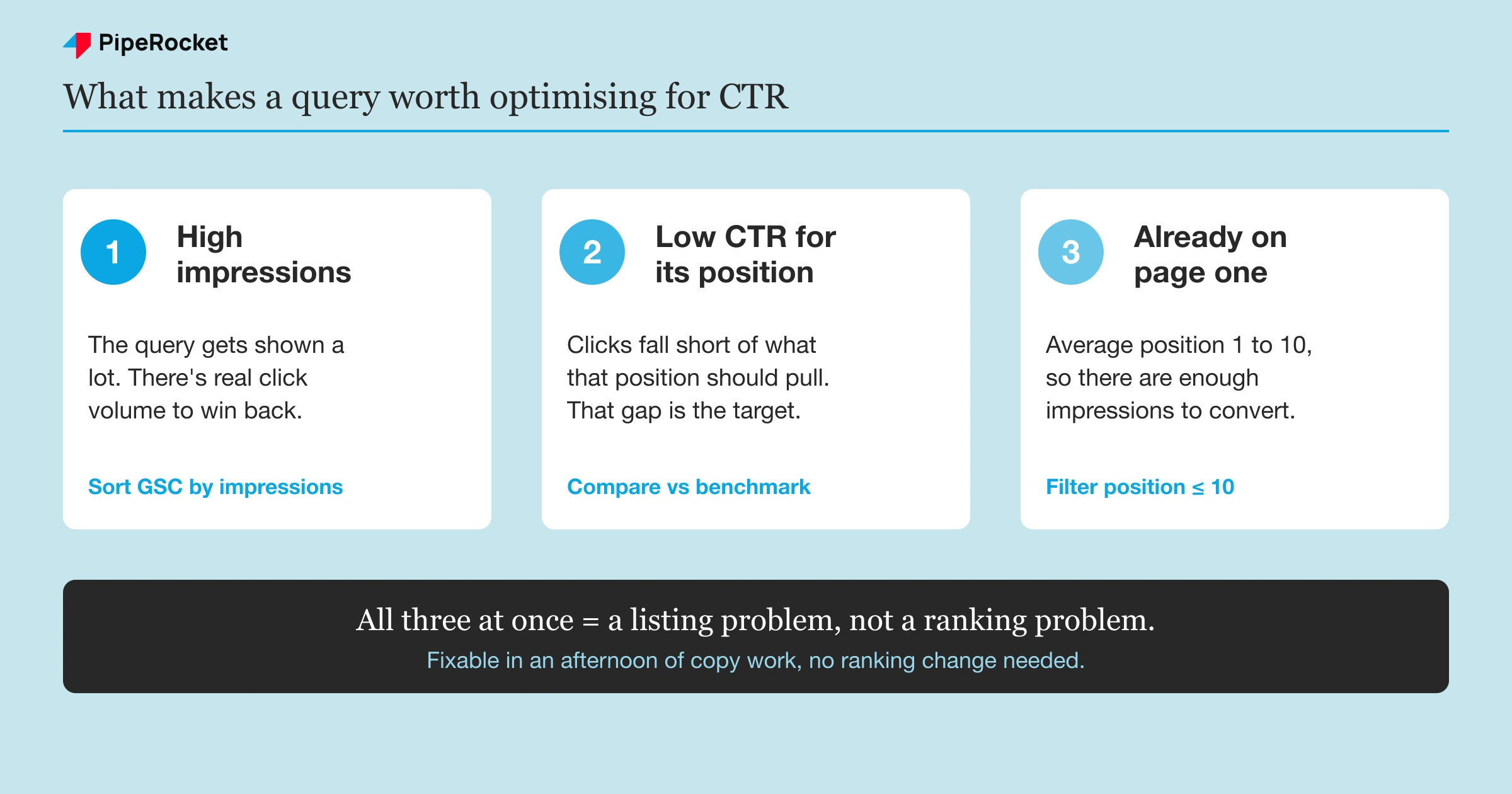
Your best targets are queries with high impressions and a low click-through rate while already ranking on page one. Google Search Console hands you this shortlist for free in the Performance report, so start there before you guess.
Open Google Search Console and go to the Performance report. This is where the whole thing starts, and it’s the step people skip because they’d rather guess.
Turn on all four metrics: clicks, impressions, CTR , and average position. Then set the date range to the last three months so you’ve got enough data to trust.
Before you rank anything, filter out branded queries, the searches that include your company name. Branded searches naturally pull a high CTR because people already know you, so leaving them in inflates your averages and hides the pages that actually need work.
Now go to the Queries tab and sort by impressions, high to low. You’re hunting for a specific pattern:
- High impressions (the query gets seen a lot)
- Low CTR relative to its position
- Average position already on page one (roughly 1 to 10)
A query sitting at position 4 with a 1.2% CTR is the exact thing you want. It’s getting shown constantly and almost nobody’s clicking. The ranking is fine; the listing is doing the losing, and listing problems are fixable in an afternoon.
Compare each query’s CTR against a rough expectation for its position. Position one typically pulls a much higher share of clicks than position five, so a page at position two with a weak CTR is underperforming even if the raw number looks okay. Advanced Web Ranking publishes organic CTR benchmarks by position you can sanity-check against.
Export the list. Sort by impressions. The queries at the top with the biggest gap between expected and actual CTR are your work order. Start there and work down.
Step 2: Rewrite titles and meta descriptions to match the query
Match the listing to the exact query: put the searcher’s own words in the title tag and name the outcome they want in the meta description. Treat your title tag and meta description as ad copy for one specific search rather than as page summaries, and that shift changes how you write them.
The most common miss I see is a title written for the whole page when the query is narrow. A page about “project management software” that ranks for “project management software for agencies” should say “for agencies” in the title. The searcher scans the results for their own words, and when they don’t see them, they scroll past you to the listing that mirrors what they typed.
Put the searcher’s exact words in the title
Pull the query from Step 1 and get its head phrase into the title tag, ideally near the front. This is about recognition, not keyword stuffing. When someone searches “SOC 2 compliance software” and your title reads “SOC 2 Compliance Software” back at them, their eye stops on you.
The job-title version of this trick works the same way we’ve seen it work in paid copy: naming the exact persona or use case in the headline acts as a magnet for the right searcher and a filter for the wrong one. “Built for Healthcare HR” pulls the healthcare HR buyer and lets everyone else scroll on, which is fine, because they weren’t going to convert anyway.
Once the query match is in place, a few title patterns reliably earn extra clicks:
- Lead with a number when the page is a list or count (“7 SOC 2 Tools”), because digits stop the eye mid-scroll.
- Add a bracket or parenthesis to flag the format, like “(2026 Guide)” or “[Free Template]”.
- Show a recent year or date so the listing reads as current rather than stale.
- Use one power word that names the payoff (proven, fast, complete) without stacking three in a row.
Keep the title inside roughly 40 to 60 characters so Google shows the whole thing instead of truncating it.
Write the meta description as the reason to click
Write the description as the reason a human picks you over the ten other links: name the outcome the searcher wants and lead with the payoff. It’s a CTR tool for the person deciding between results, so it never needs to please the algorithm.
- Write for the human deciding between ten blue links. Meta descriptions don’t feed rankings, so a description that names the outcome the searcher wants gives them a reason to pick you over the listing above.
- Keep it under about 155 characters so it doesn’t truncate on mobile, and lead with the payoff instead of a windup.
- Expect Google to rewrite descriptions more than half the time. Write a clear one anyway, because when Google keeps yours it earns the click, and a missing one leaves the crawler to scrape a random sentence off your page.
After you ship a new title or description, give Google two to four weeks to recrawl the page and gather enough impressions before you judge whether the change worked.
Step 3: Win the SERP features around your listing
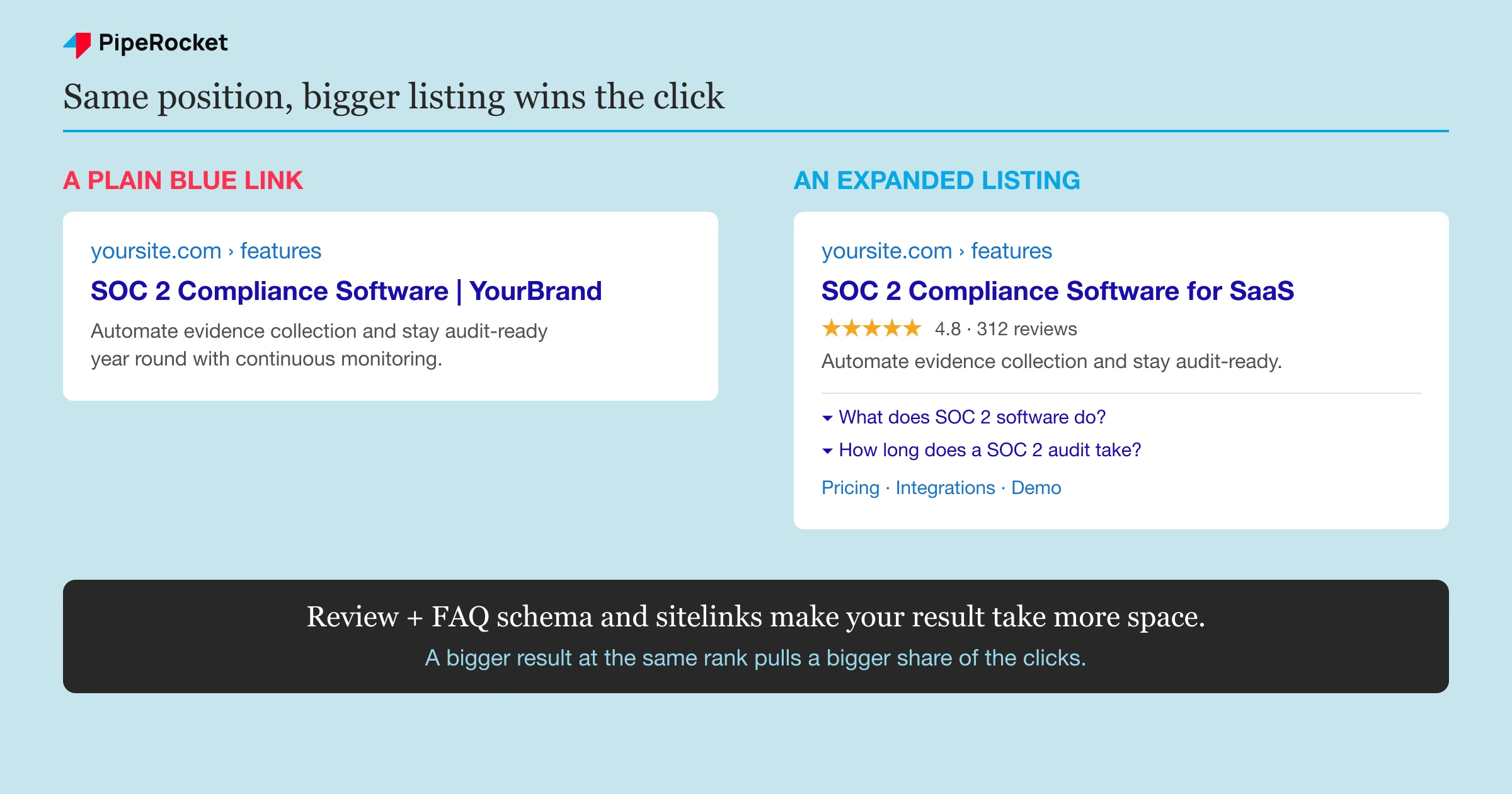
Make your listing physically bigger than the plain links around it: rich results, an FAQ dropdown, and sitelinks take up more of the screen at the same rank, and a bigger listing pulls a bigger share of the clicks.
A single blue link is the smallest thing you can be on a results page. The listings pulling outsized clicks at the same position are usually the ones taking up more room, so the play is to make your listing physically bigger.
Rich results are the most direct route. Structured data can qualify your page for enhancements that render extra detail under your link, and a listing with star ratings or an FAQ dropdown simply occupies more of the screen than a plain result.
On our own SaaS pages, adding Review and FAQ schema is the change that most reliably earns those visual extras. Review markup can surface star ratings, and FAQ markup can expand your listing with clickable questions right in the SERP . Both make the same position look more substantial than the competitor sitting beside you.
Aim for the featured snippet on question queries
Win the featured snippet by answering a question query in a tight block of roughly 40 to 50 words near the matching heading. That block renders above the standard results in what’s often called position zero, which puts you at the top of the page.
If one of your low-CTR queries is a question, structure the page to answer it directly near the relevant heading. Google pulls featured snippets from clean, direct answers, so put the plain answer first and save the detail for the paragraph below it.
There’s a catch worth naming. On some queries the snippet or AI Overview answers the question so completely that the searcher never clicks anyone. When that’s happening, chasing the snippet won’t lift your clicks, and you’re better off targeting queries where the searcher still needs to visit a page.
Earn sitelinks with clear internal structure
Sitelinks, the indented sub-links under a main result, mostly show for branded and navigational queries. You can’t force them, but you make them more likely with a clean site structure, descriptive internal links , and pages Google can confidently label. When they appear, your listing dominates a chunk of the page and the CTR follows.
Step 4: Match the SERP’s dominant intent
Match the page type Google already rewards for the query before you touch the copy. If the first page is guides and you’re ranking a product page, your listing reads wrong to that searcher however sharp the title is.
Before you rewrite a single word, look at what’s already ranking for the query. Google has already decided what kind of page satisfies that search, and if your page type fights that decision, no title tweak saves you.
Search your target query and read the top five results. Ask what format Google is rewarding:
- Guides and how-tos (the searcher wants to learn)
- Listicles and comparisons (the searcher wants options)
- Product or category pages (the searcher wants to buy)
If the whole first page is buying guides and your listing is a bare product page, your title reads wrong to that searcher even if it’s technically accurate. They’re in learning mode, and your listing sounds like a sales pitch, so they skip it.
This is the step that quietly caps everyone else’s CTR work. You can write the sharpest title in the world, but if it signals the wrong intent for that SERP, the click still goes to the listing that fits. Match the dominant intent first, then sharpen the copy inside that frame.
The fix is usually one of two things. Either reshape the listing’s angle to fit the intent Google’s rewarding, or accept that this query wants a different page than the one you’re ranking and point your effort at a query your page actually fits.
Step 5: Build brand familiarity so your name earns the click
A recognised brand earns the click because familiarity feels like lower risk than an unknown result beside it. Two listings can be equally relevant, and the searcher will still pick the name they have seen before.
That preference is quiet but consistent, and it shows up on every SERP where your buyer already knows one of the options.
This is the slowest lever here, and it’s the one you can’t fake with a copy edit. It compounds from everywhere your name shows up: other rankings on the same SERP, mentions across sites your buyers read, and consistent presence over months. The payoff is that your organic CTR quietly rises across every query, not just the one you optimised.
For a SaaS brand, the practical version is showing up more than once on the results your buyers run. When a compliance buyer sees your name on the guide, the comparison, and the category page, your listing stops being a stranger. It becomes the safe pick, and the safe pick gets the click.
You don’t manage this query by query. You build it as a byproduct of ranking broadly and being visible where your market already spends time.
Technical fixes that support a higher CTR
Three technical details shape your CTR at the same rank: a short readable URL, a fast-loading page, and no two of your own pages fighting for the same query. None of these replaces good title and snippet work, but each removes a quiet drag on your clicks.
Keep URLs short and readable
A short, readable URL earns more clicks because Google shows the URL in the listing and searchers read it as a trust signal. A clean path like /blog/organic-ctr beats a string of IDs, dates, and nested folders that looks messy in the result.
Keep the slug to the words that describe the page, drop stop words where you can, and avoid stacking three or four folders in front of it.
Speed up slow pages
A fast page protects the clicks you earn: a slow load pushes searchers back to the results to pick another listing, and Google can favour faster pages in the positions your buyers see. Page speed and healthy core web vitals sit underneath every other CTR fix.
If a target page is slow, treat that as its own fix before you spend an afternoon on the copy, because a quick title win still loses the visitor who bounces on a five-second load.
Fix keyword cannibalization
Keyword cannibalization splits your CTR when two of your own pages rank for the same query: Google shows one, or alternates them, so neither builds a strong, consistent listing. Search your own site for the target term and check whether you’re competing with yourself.
The fix is to consolidate the two pages into one, or to differentiate them clearly so each targets a distinct query and one clean result competes on the SERP.
Common mistakes to avoid
Chasing CTR on page-three queries
Optimising a listing that barely ranks is effort with no payoff, because there aren’t enough impressions to convert into clicks. Fix the ranking first and get the page onto page one, then come back and work the listing. On page three, the best title in the world still gets almost nobody.
Writing titles for Google instead of the searcher
Cramming the exact keyword in three times doesn’t help you, and it can make the title read like spam that people skip. Write for the human scanning ten results who’s deciding which one understands their problem. Recognition earns the click, repetition doesn’t.
Ignoring what already ranks
Rewriting a listing without checking the SERP’s dominant intent is guessing. If Google’s rewarding guides and you’re pushing a product page, the sharpest copy still loses to the listing that fits the search. Read the top five results before you touch a word.
Treating meta descriptions as a ranking play
Meta descriptions don’t move rankings, so writing them to please the algorithm wastes the space. Their entire job is to give a human a reason to click. Write them as the answer to “why should I pick this result,” and skip the keyword-density thinking.
CTR work is endless small edits across many pages, and the SaaS SEO agency shortlist covers teams that absorb that volume.
How PipeRocket Helps SaaS Teams Lift Organic CTR
At PipeRocket, we treat CTR as its own project, not an afterthought to ranking work. We pull the low-CTR, high-impression queries out of GSC, rewrite the listings to match the exact search, and add the schema that earns rich results, so pages you already rank pull a bigger share of the clicks. If you want this run properly across your organic pages, our SaaS SEO agency does exactly this, and you can reach out to us here .
Frequently Asked Questions
How can I improve organic CTR?
Find page-one queries with high impressions and low CTR in Search Console, then rewrite the title and description to match the exact search and add schema so your listing earns rich results. Leave the ranking alone.
Does CTR affect Google rankings?
Not directly. Google’s representatives, including Gary Illyes and John Mueller, have said organic click-through rate isn’t a direct ranking factor, and that clicks are used for evaluation and experimentation rather than for ranking positions. The SEO community still debates whether it acts as an indirect signal through user-behaviour systems, but for practical purposes you should treat CTR as a way to win more of the clicks available at your current position, not as a way to climb. That’s exactly why this workflow leaves the ranking untouched and optimises the listing instead.
What is a good organic CTR?
It depends entirely on position, because higher positions naturally pull a much larger share of clicks than lower ones. A page at position one might see well into double-digit CTR, while a page at position eight might sit in the low single digits and still be performing normally for its spot. The useful comparison isn’t against a universal number, it’s against the expected CTR for your specific position, which published benchmark studies estimate. If your page ranks well but sits far below the expected CTR for that position, that gap is your opportunity.
Do meta descriptions affect SEO?
Meta descriptions aren’t a ranking factor, so they don’t directly affect where you rank. What they affect is whether people click once you’re ranking, which makes them a CTR tool rather than an SEO ranking tool. Google rewrites them often, pulling text from the page when it thinks that serves the query better, so there’s no guarantee yours shows. It’s still worth writing a clear one for every important page, because when Google does keep it, a description that speaks to the searcher’s intent earns more clicks than a sentence scraped at random.

