
SaaS Google Ads Strategy: Campaign Structure, Intent Tiers, and Pipeline Attribution
 Ranjeeth Kumar
Last updated on
Ranjeeth Kumar
Last updated on
A SaaS Google Ads strategy means running Search and Performance Max as separate, intent-tiered systems, each campaign mapped to a buying stage, a matching landing page, and a pipeline metric, not a click count.
TL;DR
- Most SaaS Google Ads accounts fail because one campaign structure serves every buyer intent at once, and the fix is intent-tiered campaigns, not better keywords.
- Group keywords into tiers by buyer psychology, not match type, and fund BoFu and MoFu tiers before ToFu gets a dollar.
- Every ad group needs its own landing page built for that exact query, not a shared homepage that dilutes Quality Score and conversion rate.
- Performance Max works best as a discovery engine that feeds your manual Search campaigns new terms, not as a replacement for them.
- Judge the account on pipeline and SQLs generated per campaign, not on last-click CPA, or you’ll cut the tiers that are actually working.
Why Most SaaS Google Ads Accounts Are Structured Wrong
The standard advice for running Google Ads treats every SaaS company like an ecommerce store: one campaign, tight match types, watch the CPA. That advice breaks the moment your buyer isn’t one person clicking “buy now.”
A B2B SaaS deal usually isn’t one person clicking “buy now.” Depending on contract size, it can involve:
- A self-serve user who just wants to try the tool
- A champion who found you through search
- A VP who has to sign off on the spend
- A finance team that checks the security page before approving anything
Structuring an account as if only the first buyer exists is why so many SaaS Google Ads accounts spend efficiently against the wrong problem.
Our team once audited a $10M+ revenue SaaS company where every use case shared one campaign. A visitor searching “best messaging app for teams” and a visitor searching “Whatsapp alternative” saw the identical ad, and roughly 60% of the clicks were junk that never had a shot at converting. The account wasn’t broken on keywords. It was broken on structure.
The fix was intent-led restructuring: dedicated campaigns per use case and ICP, strict ToFu/MoFu/BoFu segmentation, and ad copy written for the specific query instead of a generic pitch.
Over three quarters, spend dropped roughly 27% and revenue rose roughly 59%, taking the account from about $250K in spend to about $1.3M in attributed revenue.
That’s the pattern worth building a strategy around: structure decides whether your budget buys pipeline or buys junk. If you also run paid across LinkedIn, Meta, or Microsoft Ads alongside Search, our SaaS paid media strategy piece covers how to sequence and budget across the full channel mix. This piece stays inside Google, on Search and Performance Max specifically.
Structure Campaigns Around Buyer Intent Tiers
The single highest-leverage decision in a SaaS Google Ads account is grouping keywords by buyer psychology, not by match type or topic. Six tiers cover almost every SaaS category, and each one earns a different budget, a different ad, and a different landing page.
Group Keywords Into Six Psychological Buckets
Match type is a targeting setting. Intent tier is a business decision, and it’s the one that actually changes what the searcher expects to see when your ad shows up.
- Category terms are broad, expensive, and necessary (“CRM software,” “project management tool”). High competition, but skipping this tier means ceding top-of-market visibility entirely.
- Feature terms carry lower volume and convert higher, and this is where B2B SaaS specifics usually win (“CRM with pipeline forecasting”).
- Competitor terms bid on rivals’ brand names. It’s aggressive, and it works because the searcher is already educated on the category, they just need convincing you’re the better pick.
- Integration terms are the most overlooked goldmine (“CRM that integrates with Slack”), because almost nobody bothers building campaigns around them.
- Solution terms target the underlying problem itself (“how to stop losing deals in follow-up”).
- Brand terms defend your own name. Skip this tier and a competitor will happily bid on it for you.
Fund BoFu and MoFu First, Then Open ToFu
Start every SaaS Google Ads account on BoFu and MoFu terms, not ToFu. A search like “what is employee engagement” pulls in students, researchers, and buyers who are months away from a purchase decision, and those clicks burn budget fast without moving pipeline.
BoFu terms like “best employee engagement software” and MoFu terms like “Culture Amp vs Officevibe” carry a buyer who already knows the category and is actively comparing. Fund those tiers to saturation first.
Only once high-intent spend is maxed out, and you genuinely can’t spend more profitably there, does opening ToFu terms make sense. Even then, treat it as a volume play, not a conversion play.
Not covered here is match-type strategy inside each tier (broad versus phrase versus exact). What matters at the structure level is that the tier, not the match type, decides the ad copy, the bid, and the landing page a click lands on.
Match Every Ad to a Landing Page Built for the Query
An ad that promises a specific answer and lands the click on a generic homepage is the single fastest way to waste an intent-tiered account. If the query said “CRM with pipeline forecasting” and the landing page is the general product homepage, you’ve paid for the click and then handed the visitor the wrong page to convert on.
The rule is simple: every ad group gets a landing page built for what that query already told you the visitor wants.
| Intent tier | What the searcher expects | Landing page should show |
|---|---|---|
| Category | A broad comparison of the category | Product overview page with clear positioning against the category |
| Feature | Proof this specific capability works | A dedicated feature page with a demo, not the homepage |
| Competitor | Confirmation you’re the better switch | A comparison page naming the competitor directly |
| Integration | Proof the integration exists and works | An integration-specific page with setup screenshots |
| Solution | Validation their problem is solvable | A use-case page framed around the problem, not the product name |
| Brand | Fast confirmation they found the right site | The homepage, this is the one tier where it’s the right destination |
A compliance SaaS for fintech teams running a “SOC 2 automation” feature campaign shouldn’t route that click to its pricing page. It should route to a page that shows the SOC 2 workflow screen, answers the audit-readiness question, and only then offers a demo CTA. The click already told you what they wanted to see.
Use Performance Max as a Discovery Engine, Not a Black Box
Performance Max isn’t a replacement for Search campaigns in a B2B SaaS account, and treating it that way is the fastest way to lose visibility into what’s actually converting. Its real job is surfacing high-intent search terms you’d never think to brainstorm manually, then feeding those terms into campaigns you fully control. Across the 65+ accounts in our Google Ads benchmarks, PMax posts a $25 cost per lead and 6.53% conversion rate against Search’s $143 and 3.27%, which is exactly why it’s worth mining for terms rather than dismissing as a black box.
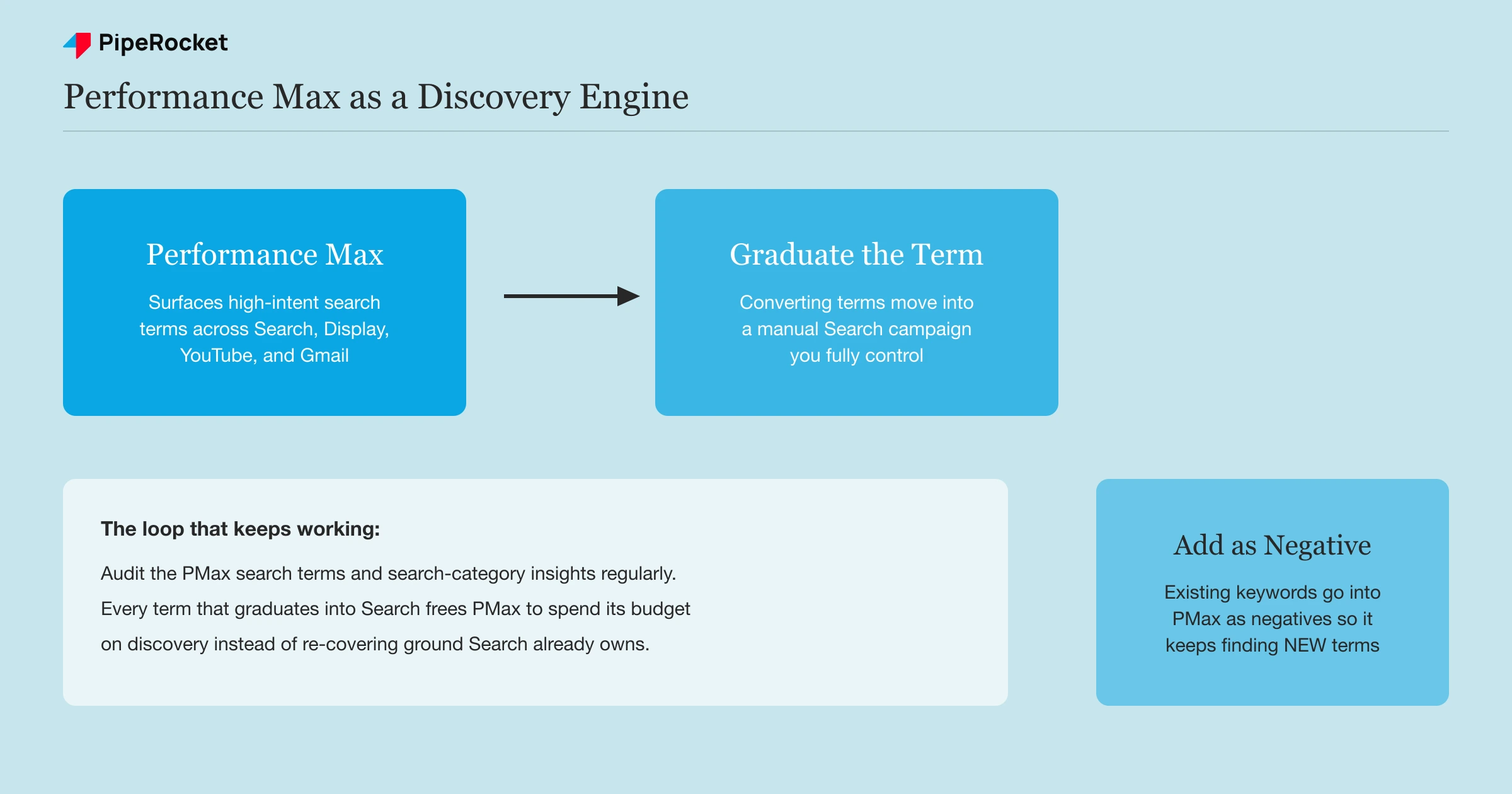
The workflow is straightforward. Audit the PMax Search Terms report on a regular cadence, the same discipline as a manual Search account. When a term shows up repeatedly and converts, “graduate” it into a manual Search campaign where you can control the bid and write copy specific to that exact query.
Then close the loop: add your existing target keywords as negatives inside PMax. Without that step, PMax keeps bidding on terms you’ve already claimed in Search, which just means you’re bidding against yourself and inflating your own CPCs. Negatives keep PMax focused on finding genuinely new opportunities instead of re-covering ground your Search campaigns already own.
This is also where the intent-tier structure pays off twice. A PMax term that maps cleanly to your Competitor tier gets graduated with competitor-specific copy and a comparison landing page, not a generic ad pointing at the homepage.
Attribute Spend to Pipeline and SQLs, Not Clicks
The account decision that breaks the most SaaS Google Ads programs isn’t a bidding mistake. It’s judging every campaign by last-click CPA, which rewards the tier that closes fastest and punishes the tier that’s actually building the pipeline you’ll close next quarter.
A Feature or Solution campaign can look expensive on a last-click basis while still producing the SQLs that turn into your best deals two months later. If you cut it because this month’s CPA looks weak, you’re cutting a tier that was doing its job on a timeline the dashboard doesn’t show.
Take the Eagle’s View Before You Touch a Bid
Before adjusting anything, our team pulls spend and cost-per-SQL by tier and campaign, not just by account total. That view surfaces the “bleeders,” tiers eating a disproportionate share of budget for a thin share of qualified pipeline, and the “starving winners,” tiers converting well that are still capped on budget.
Once you see the split, sort each campaign into one of three buckets:
- High spend, low return: usually wrong targeting or a landing page mismatch, and rarely a bidding problem.
- Low spend, high return: starve this and you’re leaving pipeline on the table. Feed it budget immediately.
- High spend, decent ROI but rising CPA: this is the optimization trap. Fix it with landing page or offer testing before touching bids again.
Forecast the Real CPA Before You Launch a Tier
Run the math before spending a dollar, so you know what a healthy CPA looks like for that tier rather than reacting to whatever number shows up in week one. Start with total search volume for the tier, then work down: volume to impressions, impressions to clicks, clicks to conversions, then cost divided by conversions gives you CPA.
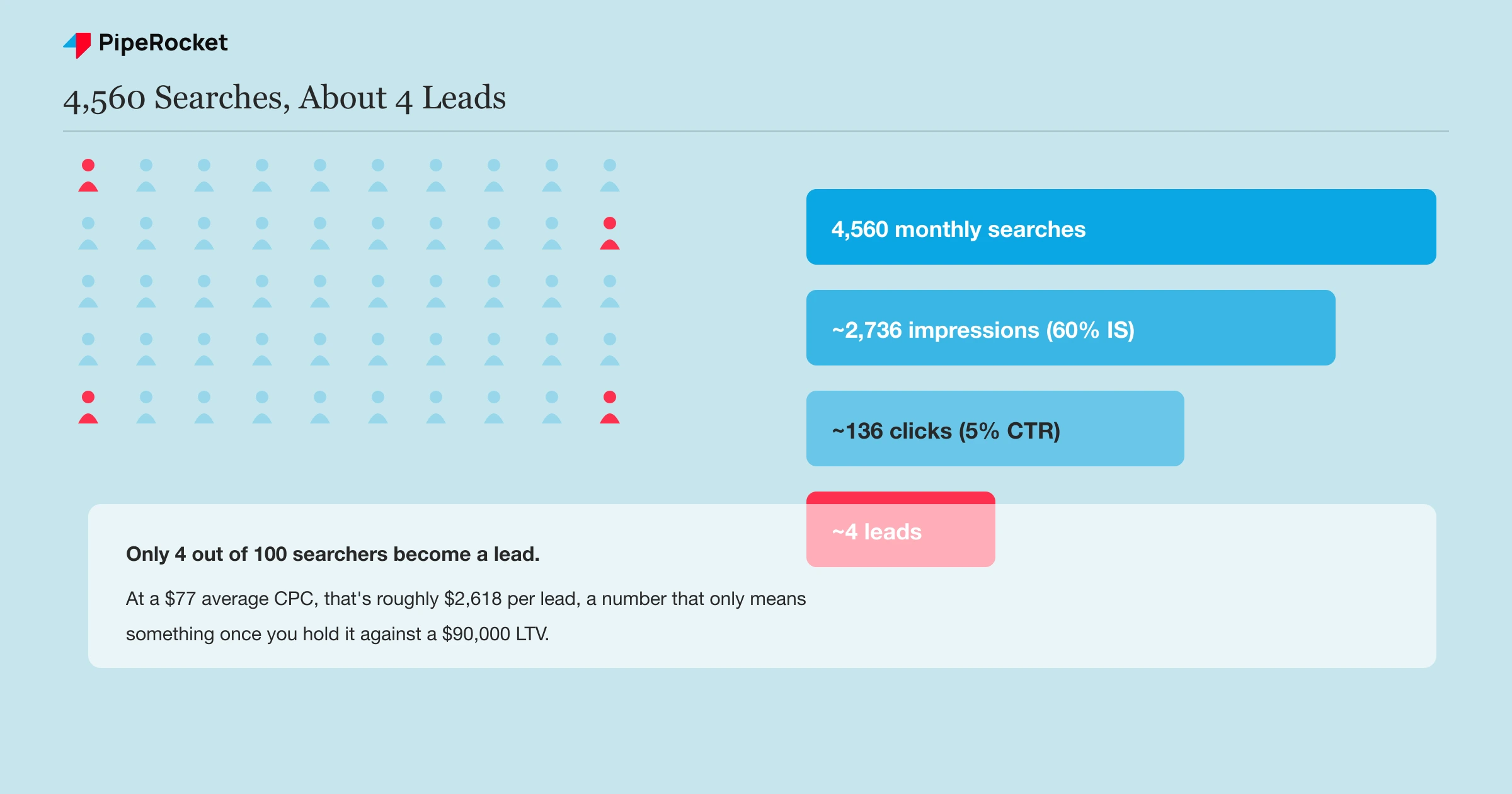
A worked example: 4,560 monthly searches produce about 2,736 impressions at roughly 60% impression share, about 136 clicks at roughly a 5% CTR, and around 4 leads at roughly a 3% landing page conversion rate. At a $77 average CPC, that’s roughly $2,618 per lead.
That number looks alarming in isolation. It’s a non-issue if your average contract value and LTV sit anywhere near $90,000. The CPA only means something once you hold it against what the sale is actually worth.
Common Mistakes That Break Google Ads Attribution for SaaS
A few specific attribution mistakes show up in almost every SaaS account we’ve audited, and they all share the same root cause: measuring the account like it’s a single-touch, single-day sale.
Judging Performance Max by Last-Click CPA Alone
PMax pools budget across Search, Display, and other placements, so its reported last-click CPA rarely reflects the assist work it’s doing across the funnel. Judging it purely on that number leads teams to pause a discovery engine that was quietly feeding their best Search terms.
Never Tagging Campaigns to CRM Stage
If your CRM can’t tell you which campaign, tier, or ad group a closed-won deal originally came from, you’re optimizing on lead volume while the sales team closes on gut feel about which source actually matters. Tag every campaign with UTM parameters that map to a CRM field, before launch, not after the first quarterly review.
Killing MoFu Keywords Before the Sales Cycle Closes
A 60 to 90-day enterprise sales cycle means a MoFu keyword’s lead won’t show up as a closed deal in the same month it converted as a click. Pulling budget from a tier because this month’s numbers look thin, when the sales cycle for that tier runs three months, cuts the exact campaigns building next quarter’s pipeline.
Letting Search and PMax Bid on the Same Query
Without negatives synced between the two, Search and PMax end up competing for the same auction, inflating your own CPC and splitting conversion credit between two campaigns that should be one clean funnel. Add your Search keywords as campaign-level negatives in PMax and use brand exclusions, then review the PMax search terms and search-category insights monthly to catch any terms slipping back through.
How PipeRocket Digital Runs SaaS Google Ads
We build intent-tiered Search and Performance Max structures for B2B SaaS accounts, matching every ad group to a purpose-built landing page and tracking spend against pipeline and SQLs instead of click volume. If your account is judged on last-click CPA and it’s showing, our SaaS PPC team can restructure it around what your sales team actually closes. Get in touch if you want a second set of eyes on your current campaign structure.
Frequently Asked Questions
What is a SaaS Google Ads strategy?
A SaaS Google Ads strategy is a plan for structuring Search and Performance Max campaigns around buyer intent tiers rather than generic keyword lists, matching each tier to a purpose-built landing page, and measuring results against pipeline and SQLs instead of clicks or last-click CPA. It accounts for the fact that B2B SaaS buying decisions often involve multiple stakeholders and a sales cycle measured in weeks, not minutes.
How much should a SaaS company budget for Google Ads?
There’s no universal number. The right budget depends on your average contract value, your close rate, and how many tiers you’re funding. Instead of picking a fixed dollar figure, forecast the CPA for your highest-intent tier first, then compare that number against your customer LTV. If a $2,500 CPA is a no-brainer against a $90,000 LTV, that tier deserves as much budget as it can profitably absorb before you fund a lower-intent tier.
Should SaaS companies use Performance Max or Search campaigns?
Both, but not as competitors for the same budget. Search campaigns give you control over bids, copy, and negatives for terms you already know convert. Performance Max is better used as a discovery layer that surfaces new high-intent search terms you didn’t think to target manually, which then get “graduated” into a manual Search campaign once they prove out. Running PMax alone means losing visibility into which specific queries are actually driving pipeline.

