
SaaS Marketing Automation: What It Actually Does and Where Teams Get It Wrong
 Vignesh Sampath
Last updated on
Vignesh Sampath
Last updated on
SaaS marketing automation refers to the software and workflows that let subscription businesses run lead scoring, lifecycle emails, and behavioral triggers without a person clicking send on every message.
TL;DR
- SaaS marketing automation helps teams to watch behavior, score leads, and group users so the right message reaches the right person automatically.
- Most setups underperform because no one mapped the workflows to real lifecycle stages before turning them on, not because the software itself is weak.
- Building your first workflow works best in order: define the stages, pick one trigger and one action, set an exit condition, then test on a small segment.
- Automation needs to change by lifecycle stage, from trial nudges to renewal flags, and it has to stay in sync with whatever the CRM says about a contact.
- The four processes worth automating first are lead generation, user onboarding, retention and churn reduction, and upselling. Retention and upsell automation should trigger off usage-drop and usage-growth signals, not a generic calendar campaign.
- The tool category you need depends on your motion. PLG products lean on behavioral, in-app triggers. Sales-led products lean on lead scoring tied to the CRM.
- The biggest mistakes are treating it as a bulk email tool, scoring leads on criteria sales never agreed to, skipping data hygiene, and never auditing workflows once they’re live.
- You know it’s working when it moves specific numbers: activation rate, MQL-to-SQL conversion, and time-to-first-response, rather than “emails sent.”
What Is SaaS Marketing Automation?
SaaS marketing automation means using software to run repeatable marketing actions, like sending an email, scoring a lead, or updating a segment, based on rules and triggers instead of a person doing it manually each time.
It sits on top of your product data, your CRM, and your email system, and it watches for signals: a trial sign-up, a pricing page visit, three logins in a week. When one of those signals fires, the platform acts on its own. It sends the follow-up, adds a tag, alerts a sales rep, or moves the record into a new segment.
That’s the mechanical definition. In practice, most SaaS teams buy the software for the automation part and only later realize the harder work is deciding what should trigger what, and for whom.
What Are the Core Capabilities of SaaS Marketing Automation?
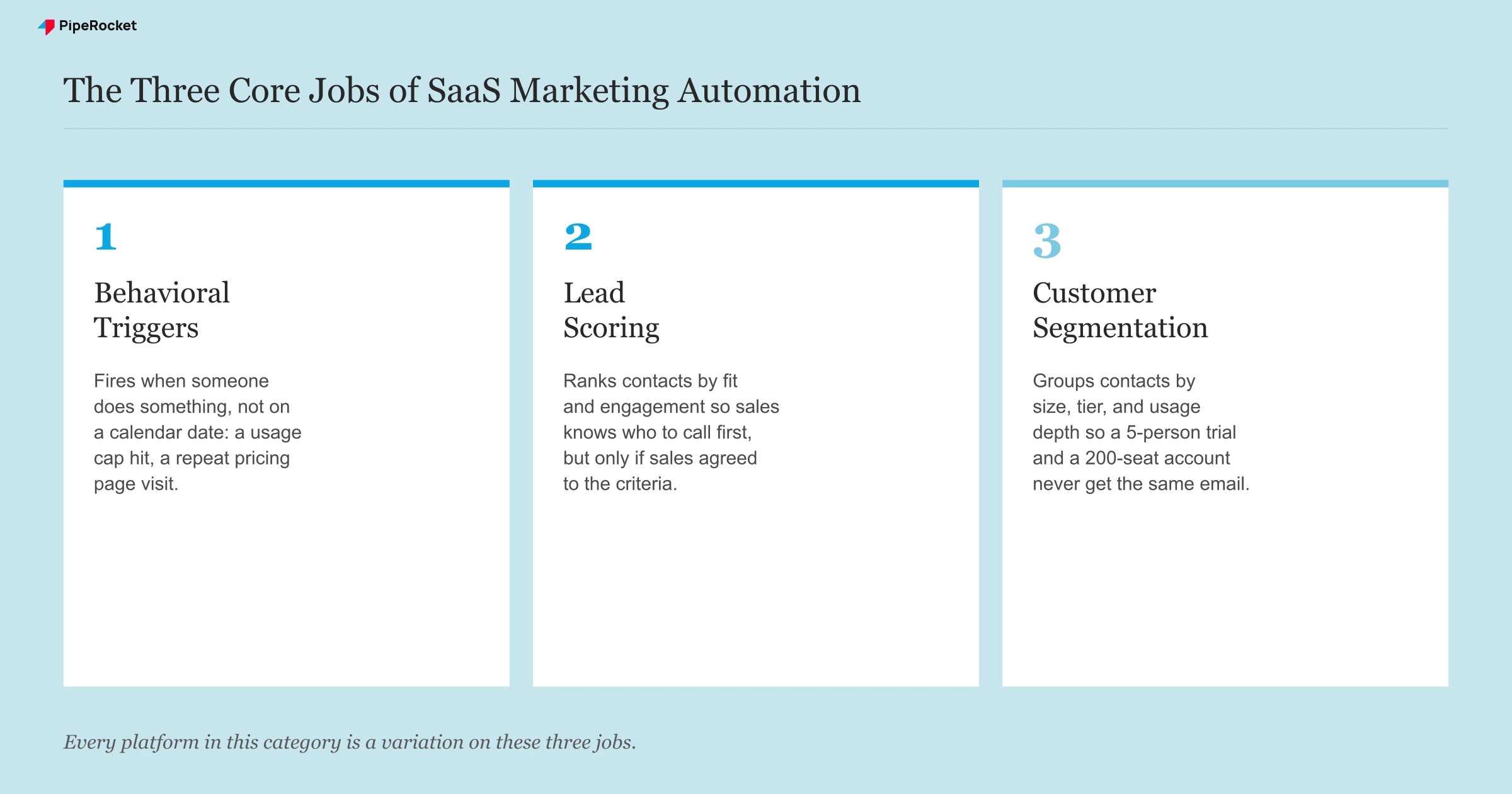
Every SaaS marketing automation platform is built around the same three core jobs: behavioral triggers that react to what users do, lead scoring that ranks who is close to buying, and segmentation that groups users by what matters. Platforms from Marketo to Customer.io to a HubSpot workflow all sit on those three. Everything else is a variation on them.
Behavioral triggers that react to what users actually do
A behavioral trigger fires an action based on what someone does on your site or in your product, not based on a calendar date. Visiting a pricing page three times in a week, abandoning a signup form, or hitting a usage limit are all common triggers.
This is the part that makes automation feel “smart” instead of scheduled. A drip campaign sends email 3 on day 3 no matter what. A behavioral trigger sends the upgrade nudge the moment someone actually hits their plan’s usage cap, which is a much more relevant moment to ask for the upgrade.
Lead scoring that ranks who’s actually close to buying
Lead scoring assigns points to a contact based on fit and engagement, so sales knows who to call first. Fit points come from firmographic data like company size or industry. Engagement points come from behavior like demo requests or repeat visits to a features page.
The mistake most teams make here isn’t the concept, it’s the criteria. If marketing sets the scoring thresholds alone and sales was never in the room, the “sales-ready” leads that automation hands off often aren’t ready at all, and reps stop trusting the queue within a month.
Customer segmentation that groups users by what matters
Segmentation automatically groups contacts by shared traits so each group gets a message that’s actually relevant to them, instead of one blast to everyone. Common segments include company size, industry, plan tier, and usage depth.
A 5-person startup on a free trial and a 200-seat enterprise account evaluating a security review are not the same conversation, and sending them the same nurture email is exactly why open rates on “one-size-fits-all” campaigns quietly decay over time.
Lifecycle sequences that nurture without a manual send
A lifecycle sequence is a set of emails or in-app messages tied to where someone sits in the customer relationship, from first sign-up through renewal, rather than to a single blast date. It’s the layer that actually uses the segmentation and triggers above instead of just collecting the data.
Take a compliance SaaS built for fintech teams. A trial user who’s never invited a teammate needs a different sequence than one who’s already added three colleagues and started building a workflow.
The first needs a nudge toward inviting a team. The second is close to activation and needs a nudge toward the feature that unlocks their next milestone.
Retention and churn-reduction automation that reacts to disengagement
Retention automation triggers a re-engagement sequence off real risk signals, like login frequency dropping or a user viewing the cancellation page, instead of a generic win-back blast sent to everyone on a schedule. The point is to catch an account while it is quietly slipping, not after it has already cancelled.
A drop from daily logins to once a fortnight is a churn signal worth acting on, and so is a visit to the billing or cancellation page. Each one can fire a different response: a check-in from a customer success rep, a targeted tip about an under-used feature, or a message that surfaces the value the account has already gotten. Tools like Intercom and Customer.io are built to watch these in-product signals and fire the matching message in the moment.
Upselling and cross-selling automation driven by usage
Upsell automation watches usage-pattern signals, like a plan-limit hit, repeated use of a gated feature, or seat growth, and serves a relevant upgrade prompt at that moment, rather than running one upgrade campaign to the whole base on a calendar. The signal is the whole point: someone bumping their plan’s usage cap is already telling you they need more.
Cross-sell works the same way but points sideways, toward a complementary product or add-on that fits how the account already uses the core product. A team leaning hard on one module is a natural candidate for the adjacent one. Automating this off usage keeps the offer relevant and stops it landing as noise.
Where Most SaaS Automation Setups Actually Break Down
The software rarely fails. The mapping between the software and the buyer’s actual journey does.
I’ve seen teams turn on a platform, import their contact list, and switch on five workflows in the first week, all built around a generic “awareness, consideration, decision” funnel they copied from a blog post. None of it matched how their specific buyer actually moved from trial to paid.
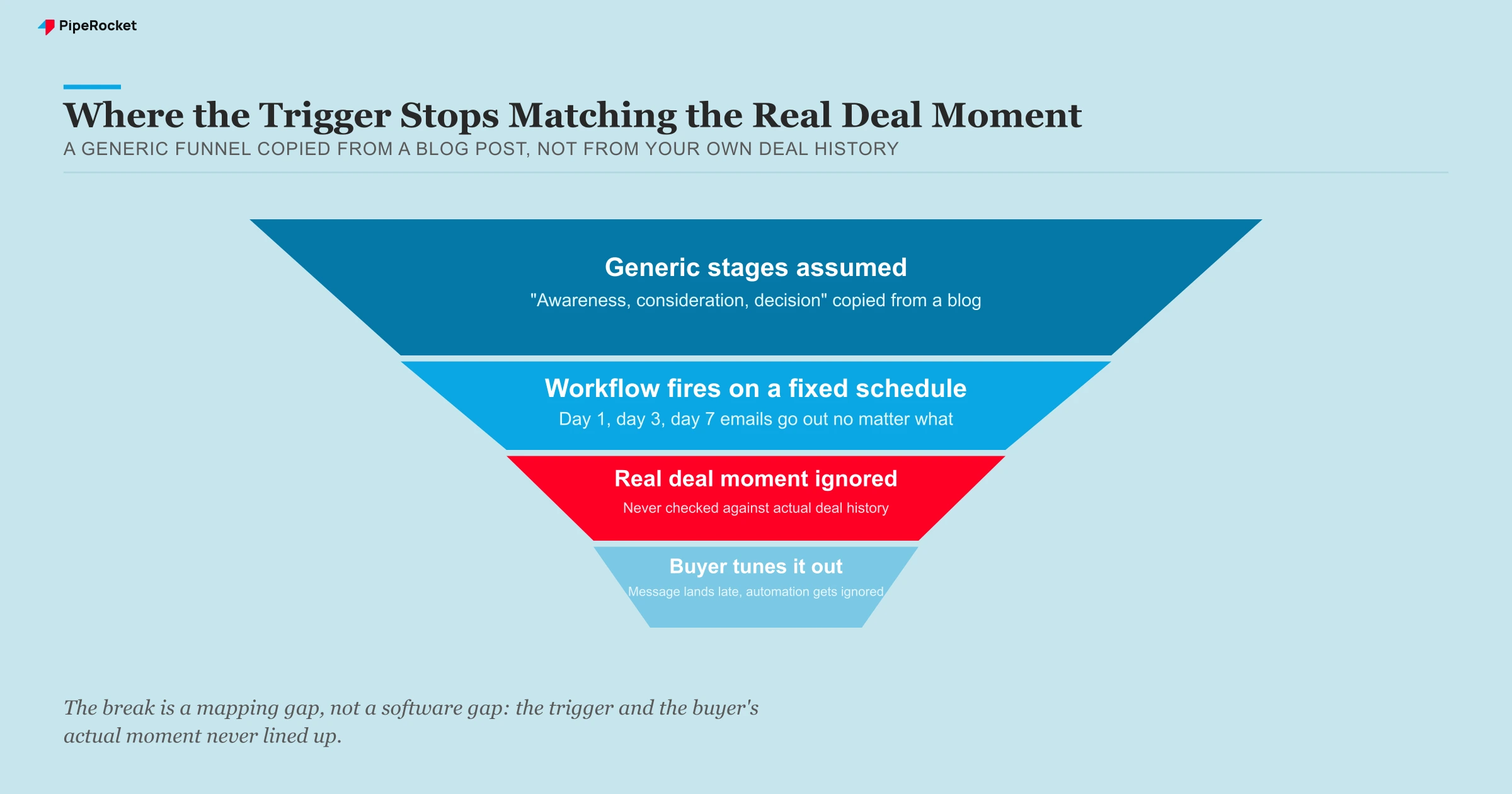
Marketing automation only works when the triggers reflect real behavior your product and sales team have already seen play out. Before building a single workflow, sit down with sales and support and check:
- What actually happens right before a deal closes, in the exact order it happens?
- What actually happens right before a trial churns, not what you assume happens?
- Which of your current triggers were copied from a generic funnel template versus verified against real deal history?
- Which workflows would you cut if you could only keep the three tied to a confirmed buying moment?
The platforms that get the most out of automation usually run far fewer workflows than the ones that struggle, but every workflow they do run is tied to a moment that’s been verified against real deal history, not assumed.
How to Build Your First SaaS Marketing Automation Workflow
Build your first workflow in this order: map the lifecycle stages, pick one high-confidence trigger and one action, define the exit condition that stops it, then test it on a small segment before rolling it out. Most teams skip straight to dragging in email blocks before they have decided what the workflow is for, and building it in the right order saves months of rework later.
Map the lifecycle stages before touching the software
Sit down with sales, support, and whoever owns onboarding, and agree on plain-language definitions for each stage: what counts as “trial,” “activated,” “sales-qualified,” and “onboarded.” Write them down. Every trigger you build later should map to one of these stages, not to a guess about what a stage should mean.
Start with a single trigger and a single action
Start with a single, high-confidence trigger, like hitting a specific usage milestone, and a single action, like alerting a rep or sending one targeted email. Resist the urge to build five workflows in week one. A platform running two well-targeted workflows beats one running ten generic ones.
Define what should stop the workflow
Every workflow needs an exit condition just as much as it needs a trigger. If a trial user converts to paid mid-sequence, the trial nurture needs to stop immediately, or you’ll keep pitching a signup discount to someone who already bought. Decide the exit rule before you launch, not after a customer complains.
Test it on a small segment first
Run the workflow on a limited slice of contacts, maybe one plan tier or one region, before rolling it out to everyone. A few weeks of real data will tell you whether the trigger actually fires when you think it does, and whether the message lands the way it read on the whiteboard.
How Automation Should Change Across the Customer Lifecycle
Automation should shift at every lifecycle stage: usage-based nudges during trial, fit-and-engagement scoring at sales qualification, adoption-milestone check-ins during onboarding, and usage-growth flags at expansion and renewal. A single strategy applied to every stage treats a first-time visitor and a three-year renewal candidate as the same problem, and the table below is where that distinction usually gets lost.
| Lifecycle stage | What automation should do | Common mistake |
|---|---|---|
| Trial / free sign-up | Trigger nudges based on product usage (empty state, first key action, usage limit) | Sending generic “day 1, day 3, day 7” emails regardless of what the user actually did |
| Sales qualification | Score and route based on fit + engagement, alert reps in real time | Letting marketing set scoring criteria without sales sign-off |
| Onboarding (post-purchase) | Automate check-ins tied to adoption milestones, not just a calendar | Treating onboarding emails as a copy of the trial nurture sequence |
| Expansion / renewal | Flag usage growth or plan-limit hits to trigger an upsell conversation | Running win-back campaigns on accounts that are actually healthy, because no one segmented by usage |
Getting this table right matters more for retention than for new logos. A SaaS demand generation program that stops at the sale and hands the account off with zero automated visibility into usage is leaving expansion revenue on the table every single quarter.
Which Tool Category Fits Your SaaS Motion?
The tool category depends on your motion: product-led SaaS uses in-app, behavioral platforms; sales-led SaaS uses CRM-tied lead scoring; enterprise SaaS uses account-based orchestration on top of the CRM. Picking on brand recognition alone usually means paying for capability you’ll never touch.
| SaaS motion | Tool category | Example platforms | When it fits |
|---|---|---|---|
| Product-led growth | In-app / product-usage automation | Customer.io, Iterable, Braze, Intercom | Users sign up and explore before ever talking to a human |
| Sales-led | CRM-tied automation and lead scoring | HubSpot, Marketo, ActiveCampaign | A rep is involved early and needs fit + engagement scoring |
| Lifecycle-email-heavy | Behavioral email and lifecycle triggers | ActiveCampaign, GetResponse | Most of the motion runs through segmented, behavior-triggered email |
| Enterprise, multi-stakeholder | Account-based orchestration + CRM automation | HubSpot/Marketo paired with an ABM layer | Long deals need coordination across every contact at a target account, not just individual leads |
None of these categories are wrong choices in the abstract. They’re wrong when they don’t match how your specific buyers actually move through the funnel, which is a question no vendor comparison page will answer for you.
Why Marketing Automation Has to Sync Cleanly With Your CRM
Marketing automation and the CRM need to agree on the same facts about a contact, or the two systems start contradicting each other within weeks.
If a rep manually marks a deal “closed lost” in the CRM but the marketing platform never hears about it, that contact keeps getting sales-focused emails for a product they already turned down. The workflow itself is fine. The problem is a sync gap between two systems that were never set up to talk to each other properly.
A dev-tools SaaS built for infrastructure teams ran into this after switching CRMs. Their old lead-scoring rules referenced a field the new CRM didn’t have, so every contact silently scored zero for a stretch before anyone noticed the sales queue had gone quiet.
A better scoring model would not have caught it. The fix was a simple checklist to re-verify field mappings every time either system changes.
Before adding a new automation workflow, check three things:
- Does the CRM field the workflow depends on still exist and get filled in consistently?
- Does a status change in the CRM (closed won, closed lost, churned) actually stop or redirect the matching marketing workflow?
- Is there one owner, not two teams assuming the other is watching, responsible for catching sync breaks before they run for weeks?
Common Mistakes to Avoid With SaaS Marketing Automation
Treating automation as a bulk email tool
The most common failure mode is buying a marketing automation platform and only ever using it to send scheduled newsletters. That’s what a basic email service already does for a fraction of the cost. If every “workflow” in your account is really just a broadcast on a schedule, you’re paying for triggers and segmentation you’ve never turned on.
Scoring leads on criteria sales never approved
If the scoring model was built in a marketing meeting sales wasn’t part of, the leads that get marked “sales-ready” often aren’t. Reps who get burned by a few bad “hot leads” stop working the automated queue at all, which quietly kills the entire point of scoring in the first place.
Letting workflows run without an audit
A workflow built two years ago for a pricing page that’s since changed will keep firing on the old trigger indefinitely unless someone checks. We’ve seen automated sequences still referencing a product tier that was sunset a year earlier, still going out to new trial users every week.
Automating before the lifecycle stages are actually defined
Turning on five workflows before agreeing on what “trial,” “activated,” and “sales-qualified” actually mean for your product guarantees the automation is built on assumptions instead of real behavior. Define the stages on a whiteboard first. Build the workflows second.
Ignoring data hygiene until it breaks a campaign
Marketing automation runs on whatever data sits in your CRM and product database, and duplicate contacts, stale job titles, or unmerged accounts don’t stay quiet forever. A segmentation rule built on messy company-size data will misfire, sending an enterprise sequence to a five-person team or the other way round.
We’ve seen this show up for a project management tool built for creative agencies, where duplicate contact records from a marketing import meant the same lead got two different lifecycle sequences at once, one welcoming them as a new trial and one already pitching a renewal. Fixing the dedupe rules mattered more than any workflow change.
How to Know If SaaS Marketing Automation Is Working
The honest answer sits in a handful of specific numbers, not a dashboard full of “emails sent” and “open rate” vanity metrics.
Track these instead:
- Activation rate: what percentage of new sign-ups hit your product’s key first action, and did that number move after you added a behavioral trigger around it?
- MQL -to-SQL conversion: are the leads your scoring model flags as sales-ready actually converting into real sales conversations at a rate reps trust?
- Time-to-first-response: how fast does a real person follow up after an automated alert fires, since a lead-scoring system that routes leads to a rep who checks the queue once a day defeats the purpose?
- Workflow-attributed pipeline: how much revenue in the CRM can actually be traced back to an automated sequence, versus how much automation is just running in the background while sales closes deals another way?
If none of those numbers are trending in the right direction after a quarter of running automation, look hard at the mapping between the triggers and your actual buyer journey before you blame the platform. That mapping is almost always where it breaks.
How PipeRocket Digital Helps SaaS Teams Fix Their Automation Strategy
We audit SaaS marketing stacks constantly, and the pattern is always the same: solid software running on workflows nobody’s revisited since setup. Our SaaS SEO and SaaS PPC work feeds directly into this, since the content and campaigns we build are exactly what your automation should be triggering off of. If you want a team to map your lifecycle stages properly before touching a single workflow, reach out to PipeRocket Digital .
Frequently Asked Questions
What is SaaS marketing automation?
SaaS marketing automation is the specialization of using rules-based software to run marketing actions, like a follow-up email, a lead score update, or a segment change, automatically based on triggers instead of manual work. It typically connects to your CRM, your email system, and your product’s usage data, so the triggers reflect real behavior. The goal is consistent, relevant follow-up at a scale no marketing team could manage by hand.
How does marketing automation work for SaaS companies?
For SaaS companies, automation watches product and CRM signals (a trial sign-up, a usage limit hit, a drop in logins) and fires the matching action automatically: a lifecycle email, a lead-score change, or a real-time rep alert. It works as a company-wide initiative only when marketing, sales, and support first agree on plain-language lifecycle stages, so every trigger maps to a real stage rather than a guess. Without that shared definition, the workflows run on assumptions and the leads handed to sales stop being trusted.
What are the top 10 marketing automation platforms?
There’s no single top-10 list that fits every SaaS company, because the right shortlist depends on your motion. Common picks include HubSpot and Marketo for sales-led teams, Customer.io, Braze, and Intercom for product-led teams, and ActiveCampaign or GetResponse for lifecycle-email-heavy stacks. The honest move is to map your lifecycle stages and triggers first, then shortlist the platforms that support the specific workflows you’ve defined.
What is the best marketing automation tool for a SaaS company?
There isn’t a single best tool, because the right platform depends on your motion. Product-led SaaS companies usually get more value from platforms built around in-app usage events, while sales-led SaaS companies tend to lean on platforms built tightly around CRM and lead scoring. The honest starting point is mapping your lifecycle stages and triggers first, then picking the platform that supports the specific workflows you’ve already defined, rather than picking a platform and hoping the workflows follow.
Is marketing automation worth it for an early-stage SaaS company?
It can be, but usually only once you have enough sign-up or trial volume that manual follow-up is genuinely falling behind. An early-stage team with a handful of trials a week often gets more value from a founder personally emailing each sign-up than from a platform running generic workflows on unverified triggers. Automation earns its cost once volume makes manual follow-up the actual bottleneck, not before.

