Here’s something I see in almost every SaaS PPC account I audit: the team switched on Max Clicks, let it run for a month, and watched their CPC quietly double. Nobody set a bid cap. The algorithm did exactly what it was designed to do: win as many clicks as possible, at whatever price it takes. That’s not a Google problem. That’s a setup problem.
Smart Bidding fails SaaS accounts constantly, and in almost every case, the account handed Google the wrong inputs and then blamed the algorithm when the output was wrong.
TL;DR
- Two failure modes kill most SaaS accounts from day one: Max Clicks without a bid cap lets CPC run unchecked, and Max Conversions without conversion history means the algorithm won’t spend a dollar.
- In practice, tCPA doesn’t stabilise until you’re seeing around 50 conversions in 30 days. Most SaaS accounts never hit that on a single event, so you have to give the algorithm more events by mapping every touchpoint and scoring each one for lead quality.
- The fix is a conversion event hierarchy: CTA click (score 1), pricing page visit (score 3), form submission (score 7), qualified conversion (score 10). This pools enough signal for Google’s model to learn without waiting on full conversions.
- tCPA with portfolio bidding pools signal across campaigns, solving the low-volume problem that keeps single-campaign tCPA in permanent learning mode. A SaaS cybersecurity client used this setup and doubled their MQL.
The Two Smart Bidding Mistakes SaaS Accounts Make
The first thing I check in a new SaaS PPC account isn’t the keyword list. It’s the bidding strategy and what conversion data is behind it. In most accounts I inherit, one of two things has gone wrong. Both stem from the same root cause: picking a bidding strategy before the account has the signals to support it.
Max Clicks without a bid cap: the CPC that runs away
Max Clicks is a traffic strategy. Google’s job, when you use it, is to get you as many clicks as possible within your daily budget. That sounds fine until you look at what “as many clicks as possible” actually means in a competitive SaaS category.
There’s no ceiling. The algorithm will bid whatever it takes to win the auction.
In SaaS, you’re buying on mixed-intent queries. Someone searching “project management software” might be a CTO at a 200-person company, a student doing a class project, or a freelancer who wants a free tool.
The algorithm doesn’t know who’s behind the click. It just bids to win. Over time, CPC creeps up because it’s competing against itself and against your competitors, with no floor, no cap, and no quality signal to anchor the bids.
The fix is simple: add a CPC bid cap. Or, better, treat Max Clicks as a temporary strategy while you build conversion data, then switch once you have the signal to support something smarter.
Max Conversions without past data: campaigns that don’t spend
Max Conversions sounds like a natural upgrade from Max Clicks. You’re telling Google to optimise for actual results, not just traffic. The problem is what happens when you turn it on before the account has any conversion history.
The algorithm needs to know what a converting user looks like. It builds that model from historical conversion data: what queries they came from, what devices they used, what time of day they searched. If your account has zero conversion history, you’ve handed the algorithm a blank slate. It has nothing to optimise toward.
So it doesn’t spend. Campaigns go quiet. The team panics and assumes something is broken technically. It’s not. The algorithm is working exactly as intended. It just has no information to act on.
The fix: build conversion data first. Run Max Clicks with a bid cap, get your first batch of conversions tracked, and then switch to Max Conversions once you have a learning base to draw from.
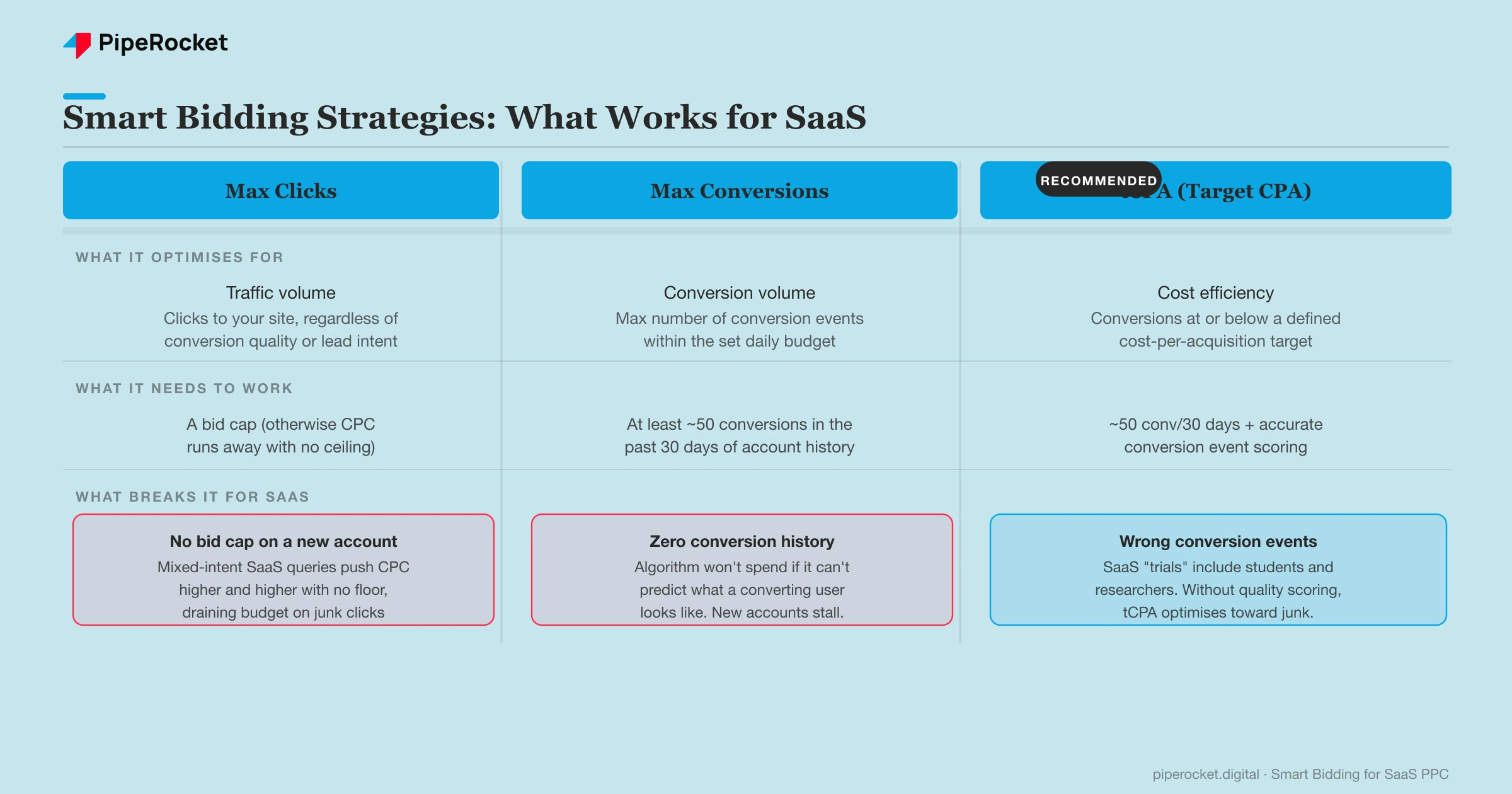
| Strategy | What it needs to work | What breaks it for SaaS |
|---|---|---|
| Max Clicks | A bid cap to prevent CPC blowout | No ceiling means unconstrained spend on mixed-intent traffic |
| Max Conversions | Conversion history to model from | New accounts with no history stall completely. Algorithm won’t bid. |
| tCPA | ~50 conv/30 days (practical threshold) + scored conversion events | Wrong event tracking means it optimises toward students and researchers, not buyers |
Why SaaS Conversion Events Break Smart Bidding’s Learning
Google’s AI was built in a world of high-volume, high-clarity purchase signals. An e-commerce store might fire 2,000 “purchase” conversion events a month. Each one is unambiguous: money changed hands, intent was real, the buyer was qualified by definition. The algorithm learns fast because the feedback loop is clear and constant.
SaaS doesn’t work that way.
A SaaS “trial signup” conversion event might represent a Series B CTO who’s been evaluating your tool for three weeks. It also represents a student doing a coursework assignment, a competitor doing a benchmark analysis, and a researcher building a feature comparison spreadsheet. Google’s model can’t tell the difference. Not unless you give it the signals to sort them out.
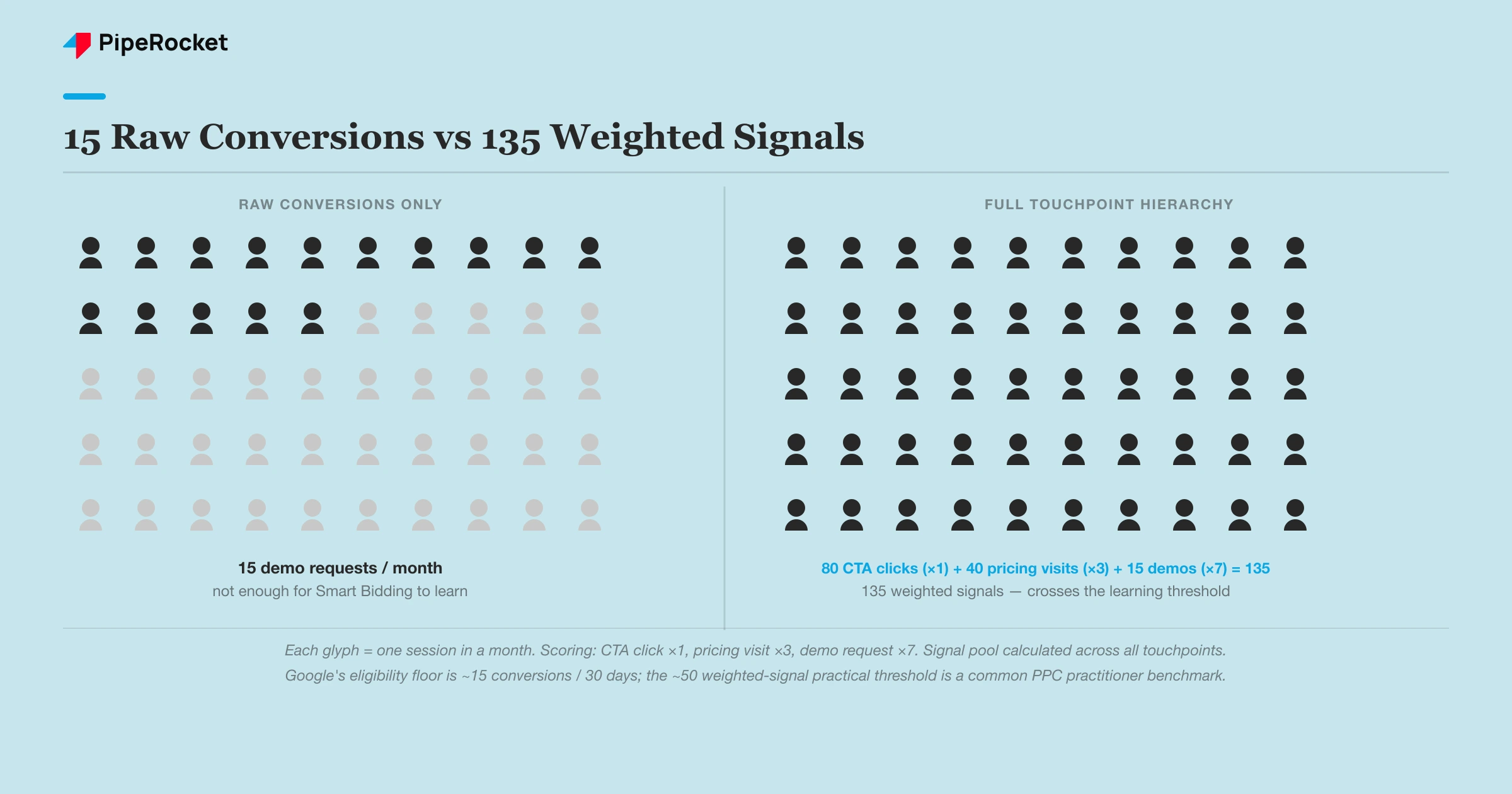
The practical consequence is the learning period. Google’s eligibility minimum is around 15 conversions in 30 days, but in practice tCPA doesn’t stabilise until you’re closer to 50. Most SaaS accounts, targeting a specific ICP , never come close to that on a single conversion event. A busy month might produce 15 demo requests. That’s 15 data points. Nowhere near enough for the algorithm to build a reliable model.
This isn’t a settings problem you can fix by toggling options in the Google Ads interface. It’s a fundamentally different signal environment compared to e-commerce. The high-volume strategies that work perfectly for online retail actively harm SaaS accounts, because the signal density that those strategies assume simply isn’t there.
The only way to close that gap is to give the algorithm more conversion events to learn from. Map every touchpoint in the buyer’s journey and treat each one as a weighted signal, not just the final form submission.
How to Build a Conversion Event Hierarchy for SaaS
The fix for Smart Bidding’s learning problem isn’t a different bidding strategy. It’s giving the algorithm more events to learn from by mapping every touchpoint on the path to conversion and scoring each one for lead quality. Here’s how I set this up for SaaS clients.
Map every touchpoint on the path to conversion
Start with the landing page and follow the buyer. From the moment someone clicks your ad to the moment they become a qualified lead, there are usually four or five meaningful moments you can track:
- CTA click on the landing page
- Pricing page visit
- Form start (when they begin filling in the demo request)
- Form submission (completion)
- Qualified conversion (confirmed ICP match, demo booked, or trial-to-paid)
Each of these becomes a Google Ads conversion action with its own value. You’re not just tracking the final form submission. You’re building a full signal picture of the buyer’s journey. This gives Smart Bidding substantially more data to work with, without requiring 50 completed demo requests a month.
Assign lead quality scores at each stage
Not all touchpoints carry the same weight, and the algorithm needs to understand that. A CTA click is valuable as a volume signal but tells you almost nothing about intent. A pricing page visit tells you a lot more. That person is actively evaluating cost vs. value. A form submission is where real pipeline starts.
Here’s a worked scoring example I use:
| Touchpoint | Score | What it signals |
|---|---|---|
| CTA Click | 1 | Browsing, lowest intent |
| Pricing Page Visit | 3 | Research and comparison mode |
| Form Submission | 7 | High intent. They raised their hand. |
| Qualified Conversion | 10 | Confirmed buying signal |
You input these as conversion values in Google Ads. The algorithm now has a 10-point range to optimise across instead of a binary yes/no on the final event. A month where you get 15 demo requests but 40 pricing page visits and 80 CTA clicks is a month with 135 weighted conversion signals, not 15. That’s enough for Smart Bidding to start learning.
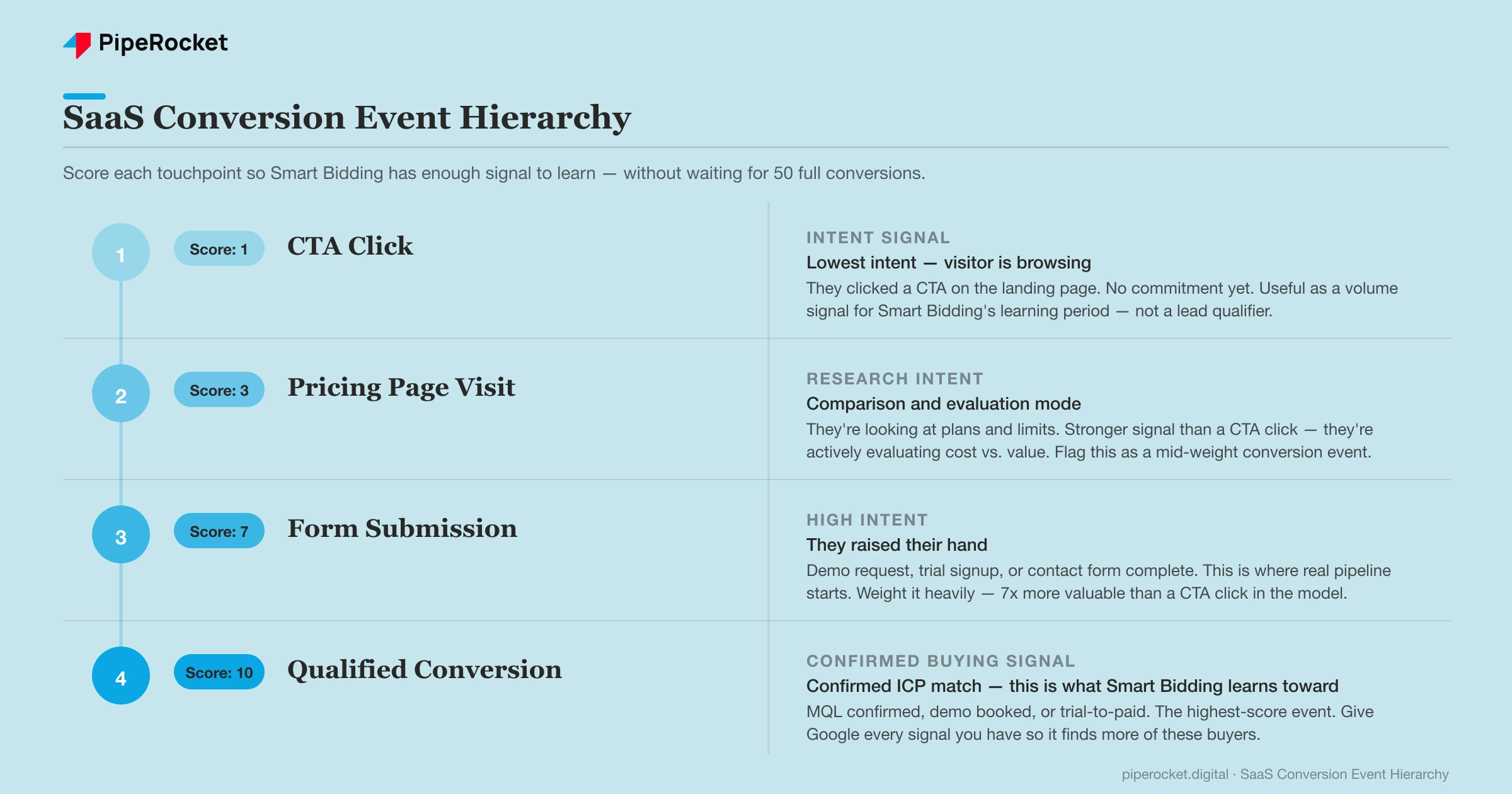
The key principle: you’re not inflating the conversion count with junk events. You’re reflecting the real shape of the buyer’s journey so Google’s model can find users who look like the ones who eventually convert at the top of the scoring range.
The Bidding Structure That Works: tCPA with Portfolio Bidding
Once the conversion hierarchy is in place, the bidding strategy question becomes clearer. tCPA (target cost-per-acquisition) is the right strategy for most SaaS accounts optimising for leads or demo requests. But there’s still a structural problem that kills single-campaign tCPA for most SaaS accounts, and it’s worth understanding before you turn it on.
Smart Bidding’s confidence also depends on which campaign type it’s feeding. Across the 65+ B2B SaaS accounts in our Google Ads benchmarks , Performance Max converts at 6.53% and lands a $25 cost per lead, well ahead of Search’s 3.27% and $143, so a portfolio that pools PMax signal alongside Search often stabilises faster than Search alone.
Why single-campaign tCPA fails for SaaS first
tCPA needs conversion data to function. The practical threshold most PPC practitioners work to is around 50 conversions in 30 days per campaign before bids stabilise. If you have five separate campaigns (brand, competitor, category, feature, integration), each campaign needs to hit that threshold on its own. A SaaS account generating 20 total monthly conversions across five campaigns means every campaign is permanently in learning mode. The algorithm never graduates.
That’s the situation most SaaS accounts are actually in.
Portfolio bidding pools the signal
The fix is portfolio bidding. Instead of setting a tCPA target at the individual campaign level, you create a portfolio bid strategy that sits across a group of campaigns. The ~50-conversion practical threshold applies to the combined total of the portfolio, not to each campaign separately.
Take that same account with 20 monthly conversions split across five campaigns. In single-campaign tCPA, each campaign is sitting at four conversions per month. In a portfolio, all 20 count together. You reach the learning threshold faster, the algorithm has more data to draw from, and bids stabilise across the whole account instead of thrashing in every individual campaign.
You still set one tCPA target for the portfolio. The algorithm distributes bids across campaigns within the group to hit that target efficiently. It’s particularly effective for SaaS accounts where one campaign might have a good conversion month while others don’t. The portfolio absorbs that variance instead of penalising the weaker campaigns.
The result
The setup that doubled MQL
How PipeRocket Sets Up Smart Bidding for SaaS PPC Clients
Before we touch a bidding strategy on any account, we run a conversion event audit. We map every touchpoint in the buyer’s journey, set up weighted conversion actions in Google Ads, and confirm the data is firing cleanly. Only then do we move to bidding strategy. For most SaaS accounts, that means tCPA with portfolio bidding across the campaigns that share a common conversion goal.
If you’re running SaaS paid search and Smart Bidding keeps underperforming, the conversion setup is almost always where the problem lives. You can see what this looks like in practice on our SaaS PPC service page, or reach out to us if you want us to audit your current setup.
Frequently Asked Questions
How many conversions does Smart Bidding need to work properly for SaaS?
Google’s eligibility minimum is around 15 conversions in 30 days, but in practice tCPA doesn’t stabilise until you’re closer to 50. Most SaaS accounts targeting a specific ICP fall somewhere in between on a single conversion event like a demo request or trial signup.
The practical solution is to build a conversion event hierarchy: track multiple touchpoints (CTA clicks, pricing page visits, form submissions, and final conversions) with different quality scores, so the algorithm has substantially more signal to work with. Aim for 30 to 50 weighted conversions before committing to tCPA, rather than waiting on 50 completed demo requests.
Should I use tCPA or tROAS for a SaaS Google Ads campaign?
For most SaaS accounts, tCPA is the better choice. tCPA optimises toward a lead or demo request, which is the actual goal for SaaS paid search.
tROAS (target return on ad spend) requires reliable revenue data attached to each conversion event, which means your CRM data needs to feed back into Google Ads accurately and consistently. Most SaaS accounts don’t have that plumbing in place, and SaaS deal sizes vary too much for a simple revenue-per-conversion figure to be meaningful. Start with tCPA, get the conversion hierarchy right, and revisit tROAS once you have clean pipeline-to-revenue data flowing through the account.
Why is my Max Conversions campaign not spending?
The most common reason is a lack of historical conversion data. Max Conversions uses your account’s past conversion history to predict which users are likely to convert. That’s how it decides what to bid in each auction. If the account is new, or if you recently switched to a different conversion action without much history behind it, the algorithm has no signal to bid on.
The fix is to run Max Clicks with a bid cap first, accumulate a base of conversion data (aim for at least a few weeks and 30 to 50 conversions), and then switch to Max Conversions once the algorithm has something to learn from.