So, let’s talk about why most SaaS founders are essentially setting money on fire. I see it every single week where someone comes to me and they’re treating Linkedin retargeting ads like it’s some basic B2C channel, just because they heard “retargeting” and thought it meant chasing people around the internet with the same generic ad they saw on Instagram.
But that’s the trap, because in our world, the B2B world, that prospect who clicked your site isn’t just a random shopper; they’re a professional with a very specific problem, and if you just blast them with a “Buy Now” button everywhere they go, they’re going to tune you out immediately.
You have to realize that LinkedIn is the only place where we can actually stay relevant in their professional feed without being annoying. We are going to break down exactly how we set up Linkedin retargeting ads and remarketing audiences step by step.
Key Takeaways
- LinkedIn retargeting ads target people who already visited your site or interacted with your brand rather than cold prospects.
- LinkedIn offers three Matched Audience types: Website Visitors (via the Insight Tag), Ad Engagers (video watch-percent tiers and Document Ads), and Form & Event Users.
- Build Matched Audiences from high-intent pages only (product, pricing, and demo pages) rather than full-site or homepage traffic.
- Set up an audience in Campaign Manager under Plan > Audiences > Create Audience > Matched Audience, pick a data source and a 30, 90, or 180-day window, then allow about 48 hours to build.
- LinkedIn requires a 300-member minimum for a Matched Audience, but 1,000 to 2,000+ members performs meaningfully better.
- Exclude current customers from prospecting pools, cap frequency to avoid ad fatigue, and analyze results to refine each audience.
What are LinkedIn retargeting ads?
LinkedIn Retargeting Ads are advertisements that track and target professionals who have already interacted with your brand and stay right in their feed until they book a demo. For example, if a prospect visits your pricing page or clicks your Google ad, but they do not convert immediately, you use LinkedIn’s tracking capabilities to identify that exact user and serve them highly specific content.
What are the core segments of a winning LinkedIn Ads strategy?
A winning LinkedIn ads strategy has three segments: prospecting, Account-Based Marketing (ABM), and retargeting. Retargeting is where the easiest, highest-ROI revenue lives, so that is the layer we take a deep dive into here.
When we map out LinkedIn ads, we only focus on these three important segments. You have your prospecting layer. You have your Account-Based Marketing (ABM) layer. You have your LinkedIn retargeting ads layer.
A prospect finds you by searching organically. They might find you through paid ads. They look around your website completely. If you are selling B2B SaaS, LinkedIn is your absolute best bet to stay in front of them. We are going to break down exactly how we set up audiences for LinkedIn retargeting ads audiences step by step.
What are the LinkedIn Matched Audience types?
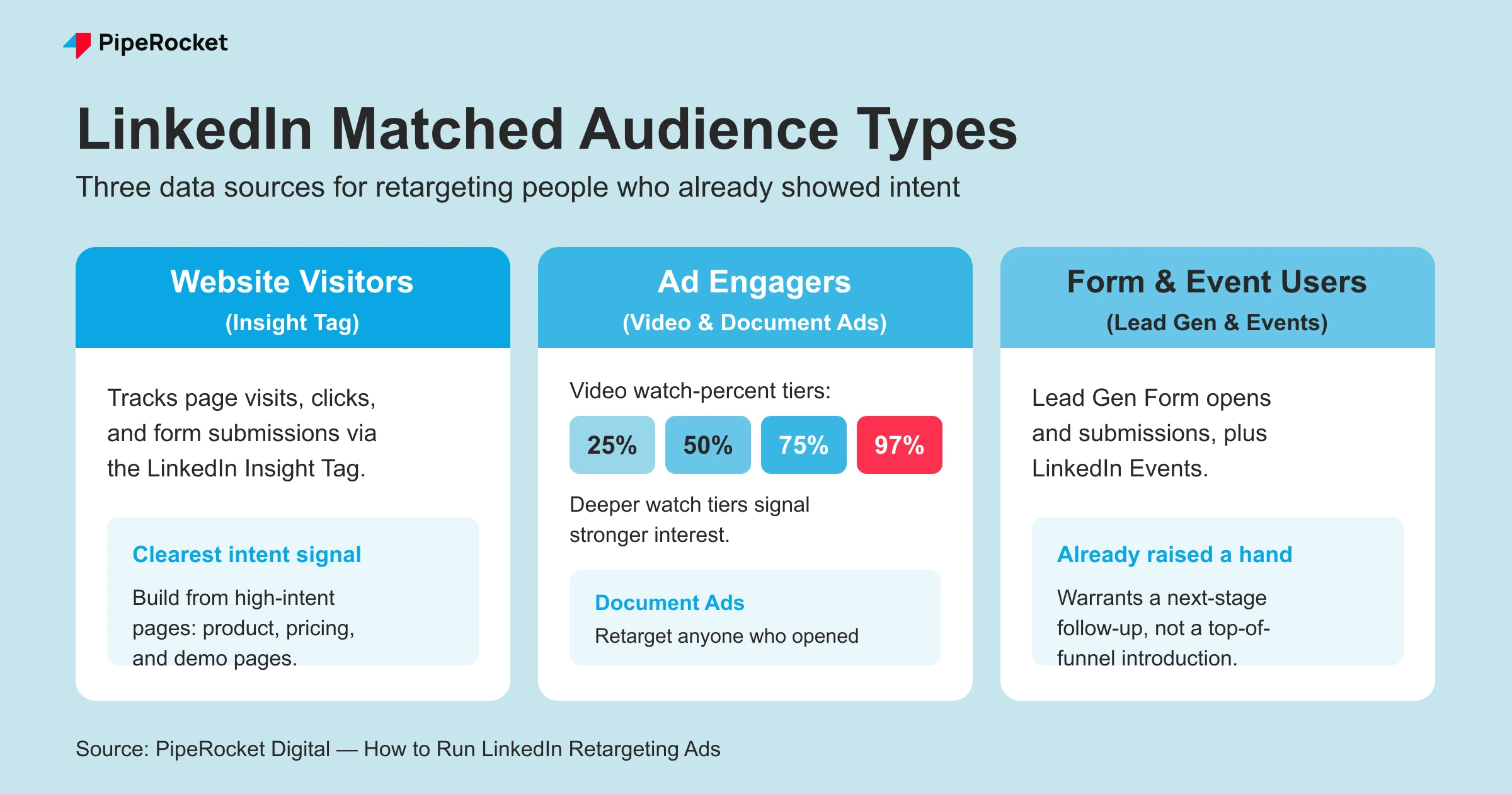
LinkedIn Matched Audiences let you retarget from three data sources: Website Visitors (tracked by the LinkedIn Insight Tag), Ad Engagers (people who watched a set percentage of your video or interacted with a Document Ad), and Form & Event Users (Lead Gen Form opens and submissions, plus LinkedIn Events).
These three sources are how LinkedIn reconnects past visitors and engaged users to real professional profiles. Here is what each one captures and when we reach for it.
- Website Visitors (Insight Tag): You install the LinkedIn Insight Tag on your site (directly or through Google Tag Manager ) and it tracks page visits, clicks, and form submissions. This is the clearest intent signal you have, and the source we start with almost every time.
- Ad Engagers (video and Document Ads): If you run video ads, you can build audiences from people who watched 25%, 50%, 75%, or 97% of the clip. Document Ads let you retarget anyone who opened or engaged with your gated asset. Deeper watch tiers signal stronger interest.
- Form & Event Users: You can retarget people who opened or submitted a Lead Gen Form, or who registered for or attended a LinkedIn Event. These users already raised a hand, so they warrant a next-stage follow-up rather than a top-of-funnel introduction.
How do you capture the right website visitors for LinkedIn Retargeting Ads?
Capture website visitors by splitting them into predictive audiences and matched audiences, then build the matched audience only from high-intent pages (product, pricing, and demo pages) rather than your full site. Every dollar spent on a careers-page visitor is a dollar taken from a real buyer.
Everyone tells you to just “retarget your visitors,” which sounds simple enough until you realize that your website is full of people who have zero intention of buying your software. You put the LinkedIn Insight Tag on through GTM and suddenly you have this massive LinkedIn retargeting audience building, but if you aren’t careful, you’re paying to show ads to people looking for jobs or students doing research for a paper.
That’s why we always split things up immediately between predictive audiences and matched audiences, because they serve two completely different purposes in a real growth strategy . It’s about being surgical with who sees your ads.
| Audience type | Data source | Best for |
|---|---|---|
| Predictive Audience | A seed list of your best customers (names and company emails from your CRM) | Expanding reach to new people who look like your closed customers |
| Matched Audience | Website visitors, ad engagers, and form/event users (your own first-party signals) | Re-engaging people who already showed intent |
Predictive Audiences
This is one of those things that feels a bit like magic when it works, because you’re essentially asking LinkedIn to do the heavy lifting for you. You feed a seed list into the system and it builds a lookalike audience:
- You take a list of your best customers, maybe a thousand names and company emails from your CRM.
- LinkedIn looks at the DNA of those people: their job titles, their industries, the size of their companies.
- It then finds people who look exactly like them but haven’t heard of you yet.
We see this work incredibly well because if you’ve already closed a deal with a director at Slack, there’s a high probability that a director at Microsoft Teams has the same headaches. It’s the first thing we look at when we want to expand our reach without just guessing who might be a good fit.
Matched Audiences
Now, matched audiences are where the real remarketing happens, and while there are a few LinkedIn retargeting options to do this, we almost always start with website visitors because that’s the clearest signal of intent you have. But here’s the thing that drives me crazy: I see people setting up their audiences to target “all website visitors” and then they wonder why their click-through rates are in the basement.
I’m telling you, you have to stop doing that because it’s just lazy marketing. You’ve got people hitting your blog from a random Google search who might never need your tool, so why would you pay the LinkedIn premium to reach them? What we do instead is we get very specific and only build audiences from what I call “high-intent” pages. We strictly focus on:
- Product pages: Because if they’re looking at your specific features, they’re trying to solve a problem right now.
- Pricing pages: Which is the ultimate signal that they’ve moved beyond “just looking” and are actually calculating the ROI.
- Demo pages: These are the people who were this close to signing up but maybe got a Slack message and closed the tab.
By doing it this way, we aren’t scooping up the noise from the homepage or the careers section. We are only putting our budget behind the people who have already shown us they are actually in the market for what we’re selling.
How do you set up a LinkedIn retargeting audience in Campaign Manager?
Set up a LinkedIn retargeting audience in Campaign Manager: open Campaign Manager, go to Plan > Audiences, click Create Audience > Matched Audience, choose your data source and time window (30, 90, or 180 days), then name and save it. Allow about 48 hours for the audience to build.
Here is the exact path we follow:
- Install the LinkedIn Insight Tag first. Grab the tag from Campaign Manager under Analyze > Insight Tag, then paste it before the closing body tag on every page, or fire it through Google Tag Manager. Website audiences only start building once the tag is live and collecting.
- Open Campaign Manager and select the account you want to build in.
- Go to Plan > Audiences and click Create Audience > Matched Audience.
- Choose your data source: website, company (contact/account list upload), or one of the engagement sources (video, Lead Gen Form, Event, Document Ads).
- Set the time window (30, 90, or 180 days). Shorter windows keep intent fresh; longer windows keep the pool large enough to deliver.
- Name and save the audience, then wait roughly 48 hours for it to populate.
- Check the size. LinkedIn needs a 300-member minimum to serve ads, but aim for 1,000 to 2,000+ members for reliable optimization (see the FAQ below).
Why should you ignore your LinkedIn company page visitors?
Ignore LinkedIn company page visitors as a retargeting source because that audience skews toward job-seekers, competitors, and students rather than buyers. Their intent is misaligned with a sales motion, so the budget is better spent on people viewing your product, pricing, or demo pages.
It’s tempting to want to target everyone who engages with your LinkedIn company page, but I’ve found that it’s almost always a waste of time and money. You have to think about who actually goes to a company page, it’s usually people looking for jobs, or competitors keeping tabs on you, or maybe even students.
I’ve never met a serious decision-maker who said, “I’m going to go browse this company’s LinkedIn feed to decide if I should spend fifty thousand dollars on their software.” It just doesn’t happen that way. Their intent is completely misaligned with a sales motion, so we make it a rule to never waste our remarketing budget there. We want people who are looking at the product, not people who are looking at our office photos or our latest hiring announcement.
And avoid the patterns in our list of SaaS LinkedIn Ads mistakes .
How do you use LinkedIn ad interactions and events for retargeting?
Build retargeting audiences from ad engagers: people who watched 25%, 50%, 75%, or 97% of a video ad, opened a Document Ad, or interacted with a Lead Gen Form. They already stopped their scroll to engage, so they read as high-intent and warrant a next-stage follow-up.
This is a layer that a lot of people miss, but it’s actually a goldmine because it’s targeting people who are already active on the platform. If you’re running video ads or document ads, you can actually see who is sticking around to watch the whole thing or who is downloading your whitepapers.
We treat those people as high-intent because they’ve already stopped their scroll to engage with you. We build specific audiences for anyone who interacted with our ads in the last 30 or 60 days, and that becomes this secondary remarketing loop. We don’t usually mess with event-based retargeting unless there’s a really specific reason, but those ad interactions? That’s pure signal. It tells us they’re interested in the topic, so we keep the momentum going with a follow-up ad that takes them to the next level of the funnel.
How do you group Google Ads traffic for LinkedIn retargeting?
Bridge Google Ads and LinkedIn retargeting by driving high-intent search traffic to dedicated landing pages, then building one LinkedIn audience per keyword Topic rather than per keyword. Grouping keeps each audience large enough to deliver while the LinkedIn ad matches the search intent.
Here is how we build that bridge:
- Bid on high-intent keywords in Google Ads to capture people actively searching for a solution.
- Drive that traffic to specific landing pages so the Insight Tag can track exactly who arrived.
- Group keywords into broader Topics. If you’re bidding on twenty terms related to “compliance,” build one “Compliance Topic” audience, not twenty tiny ones.
- Build the matched audience from those Topic landing pages so the LinkedIn creative mirrors what they just searched.
This keeps the audience size large enough for LinkedIn’s algorithm to actually work, and it ensures the ads they see on LinkedIn match the intent of what they were just searching for on Google. It’s about building a cohesive experience across platforms so you’re always staying top-of-mind.
How do you retarget your sales pipeline on LinkedIn?
Retarget your sales pipeline by uploading your active deals and Marketing Qualified Leads as a Matched Audience, then serving reinforcement ads (case studies, feature highlights) while they compare you against competitors. You aren’t selling at this stage, you’re staying top-of-mind at the decision.
This is something that almost nobody does, and I really don’t understand why, because it’s probably the most effective use of an ad budget I’ve ever seen. Think about your current pipeline: these are people who have already had a demo, they’ve talked to your sales team, and they’re currently deciding between you and two other competitors.
They aren’t just sitting there in a vacuum; they’re being pitched by other people, they’re reading reviews, and they’re probably feeling a bit overwhelmed. This is exactly when you need to be running ads.
We take those pipeline deals, the Marketing Qualified Leads, and we upload them to LinkedIn so we can stay right in front of them while they’re making that final choice. You aren’t trying to “sell” them at this point; you’re just reinforcing your value, showing them a case study, or highlighting a feature they liked in the demo. It’s about being there at the “comparison” stage so they don’t forget why they liked you in the first place.
How do we approach account expansion and churned accounts?
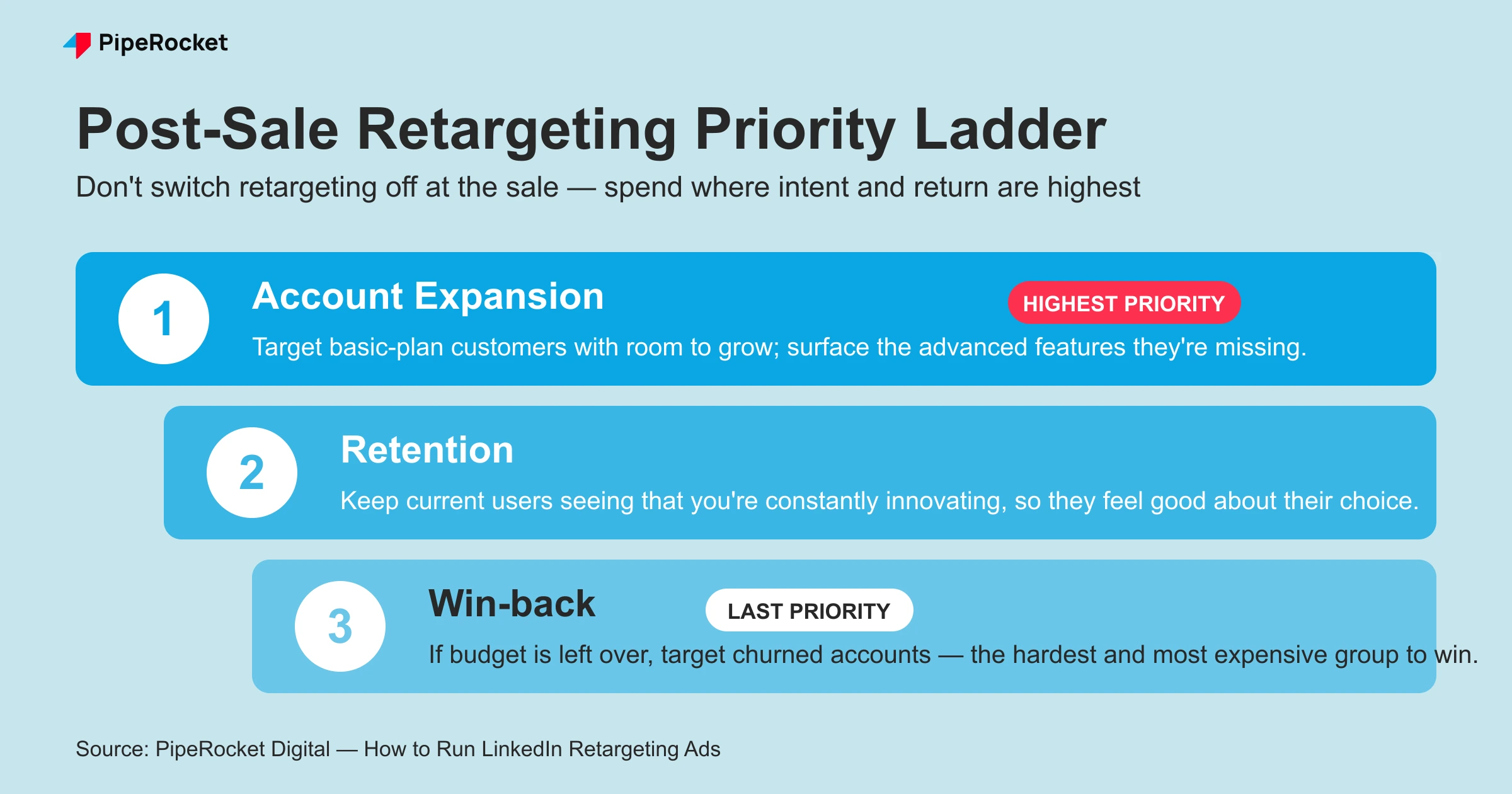
LinkedIn retargeting shouldn’t stop once someone becomes a customer, though that’s usually where most marketers turn it off. We run post-sale campaigns in a strict priority order, spending where the intent and return are highest:
- Account expansion (highest priority): Target current customers on a basic plan who clearly have room to grow. We show them the advanced features they’re missing, keeping the tone helpful rather than pushy while surfacing the extra value they’d get.
- Retention: Keep current users seeing that we’re constantly innovating and still leading the space, so they feel good about their choice to stick with us.
- Win-back (last priority): If budget is left over, target churned accounts. It’s a lot harder to win back someone who left than to keep someone who’s already there or close someone in the pipeline, so this comes last.
How do exclusion audiences and frequency capping protect your budget?
Exclusion audiences and frequency capping stop wasted spend: exclude existing customers from prospecting and top-of-funnel retargeting pools so you don’t pay to re-acquire people you already have, and cap how often one person sees an ad so you avoid ad fatigue.
Every audience you build should have a matching exclusion. Upload your current-customer list and exclude it from prospecting campaigns, and exclude closed-won and closed-lost deals from pipeline retargeting once they’re resolved. Keep those exclusion lists updated as accounts move, or you’ll quietly burn budget on the wrong people.
On frequency, the same person hitting your ad too many times slides fast into ad fatigue , where they tune you out. Cap frequency and rotate creative so a small matched audience doesn’t see the identical ad on repeat.
How do you analyze and refine LinkedIn retargeting audiences?
Analyze and refine on a set cadence: review each audience’s CTR, cost per result, and audience size, then trim low-intent sources, tighten time windows, and refresh creative that’s fatiguing. Retargeting is a living system that needs regular tuning.
Watch which sources actually convert (a pricing-page audience should out-perform a broad blog-visitor pool), shorten or lengthen the 30/90/180-day windows based on how fresh intent stays in your sales cycle, and match new creative to each intent segment as it moves down the funnel.
If I had to pick one window by default, I’d start at 90 days. Fourteen days is too soon, people are still deciding whether they like you. A hundred and eighty is usually too long, they’ve already moved on. Two habits protect the budget either way: add every one of your prospecting campaigns into the remarketing audience and update it each time you launch something new, or you’re throwing away warm leads for free, and for website-visitor retargeting specifically, don’t go broad. Homepage traffic is full of job seekers, blog readers, and competitors quietly checking up on you, so keep the audience built from the high-intent money pages only.
How do we think about LinkedIn Retargeting Ads experiments at PipeRocket Digital?
We’re always looking for new ways to push these strategies, and one thing I’ve been thinking about a lot lately is how to leverage existing communities. You look at companies like Zoho: they have these massive communities where all their ideal customers are hanging out and talking to each other.
We haven’t fully rolled this out with clients yet, but the idea is to run ads that just keep you in the periphery of those community members. You’re not trying to force a sale; you’re just becoming part of the environment. It’s a long-term play, and it might not show immediate results in your dashboard, but over six or twelve months, that kind of brand presence is what builds real market dominance. It’s about playing the long game while everyone else is just chasing the next click.
How we Approach LinkedIn Retargeting Ads at PipeRocket Digital?
Look, building a sophisticated LinkedIn retargeting ads engine takes serious work. You have to map out the audiences, filter the high-intent URLs, and perfectly time your pipeline acceleration ads. Retargeting only pays off once your prospecting and core LinkedIn ads are already feeding the funnel with the right visitors to re-engage.
Most SaaS teams simply lack the bandwidth to manage this level of granularity. We built PipeRocket Digital specifically to solve this problem. We step in, audit your entire funnel, and build out the exact remarketing frameworks I just described. Done right, retargeting is the highest-ROI layer of your PPC mix, it re-engages people who already know you, at a fraction of cold-acquisition cost.
We take over the execution so you can focus on closing the pipeline we generate. If you want to see how we can execute LinkedIn retargeting ads for you, then let’s connect !
Conclusion
Ultimately, following LinkedIn retargeting best practices means your strategy must be surgical. You can’t just throw things at the wall and hope they stick. You have to isolate the high-intent people, focus on the pricing and demo pages, and make sure you’re staying in front of the people who are actually ready to buy. When you do that, your PPC acquisition costs don’t just go down, they drop entirely, and that’s when you really start to see the growth you’re looking for.
Frequently Asked Questions
1. Can you run retargeting ads on LinkedIn?
Absolutely. You can retarget users who have previously engaged with your brand in several ways. The most common method is website retargeting, where you place a “LinkedIn Insight Tag” (a small piece of code) on your site to track visitors.
Beyond that, you can retarget based on internal actions, such as people who viewed your videos or opened a Lead Gen Form. You can even upload a CSV list of specific emails or company names to create a highly tailored “Account-Based Marketing ” (ABM) campaign.
2. How much do 1000 impressions cost on LinkedIn?
The cost per 1000 impressions (CPM ) on LinkedIn is generally higher than on platforms like Facebook or X, typically ranging between $20 and $50+. However, this varies wildly based on your target audience’s seniority and industry. Targeting C-suite executives in the tech sector will naturally command a higher premium than targeting entry-level employees in retail. Run your own audience’s numbers through our free CPM calculator before setting a budget.
Because LinkedIn’s data is professional and self-reported, you are paying for the precision of reaching a specific job title or company, rather than just raw volume. It is often more expensive, but the lead quality is usually superior.
Retargeting audiences often carry higher CPMs than cold prospecting, because a matched audience is a smaller, tighter pool competing for limited impressions. You offset that with far better conversion rates, since you’re reaching people who already know you.
Is LinkedIn ads CPC or CPM?
LinkedIn Ads supports both. You can bid CPC (pay per click) or CPM (pay per 1,000 impressions). CPC suits click-focused campaigns; CPM suits awareness and top-of-mind retargeting.
3. Are retargeting ads worth it?
Yes, they are often the highest-ROI campaigns you can run. In B2B marketing , the sales cycle is long, and a user rarely converts on their first visit. Retargeting keeps your brand top-of-mind as the prospect moves through the “marketing funnel.” It allows you to serve specific content based on their stage; for example, if they visited your pricing page, you might show them a testimonial or a case study.
Because you are reaching people who already know your brand, these ads typically see much higher click-through rates (CTR ) and lower CPA (conversion costs) than “cold” outreach campaigns.
4. What is the minimum audience size for LinkedIn retargeting?
To protect user privacy and ensure ad delivery, LinkedIn requires a minimum of 300 members in a Matched Audience before your ads can start running. However, just because 300 is the minimum doesn’t mean it’s the ideal number.
For a campaign to gather enough data for LinkedIn’s algorithm to optimize effectively, most experts recommend an audience of at least 1,000 to 2,000 members. If your audience is too small, your frequency (how often one person sees the same ad) will skyrocket, leading to “ad fatigue ” where users begin to ignore your content entirely.
5. How do retargeting ads work?
The LinkedIn Insight Tag or a matched list identifies people who already interacted with your brand, LinkedIn ties them to their profiles in a Matched Audience, and you then serve those known users ads in their feed until they convert.
6. What is the 4-1-1 rule on LinkedIn?
The 4-1-1 rule is an organic content-mix guideline: for every 6 posts, share 4 pieces from others, 1 soft self-promotion, and 1 hard sell. It governs organic posting cadence rather than paid retargeting audience setup.