Most SaaS teams treat Microsoft Ads as the afterthought. They import a Google campaign once, watch a trickle of spend, and forget the account exists. I get it. We used to treat it the same way.
But there’s one thing Microsoft Advertising can do that Google simply can’t: it lets you target searchers by their LinkedIn company, industry, and job function, right inside a Search campaign. For a B2B SaaS buyer, that changes the whole channel.
This is a walk-through of how we actually run Microsoft Ads for SaaS clients. What’s worth copying from Google, what to do differently, and the LinkedIn angle that makes the platform earn its own budget line.
TL;DR
- Microsoft earns a budget line for one reason: it’s the only search engine where you can layer LinkedIn company, industry, and job-function targeting onto a Search campaign.
- Import from Google, then treat it as a fresh account. Google Import with recurring sync saves the setup work, but the auction and audience are different enough that you’ll re-optimise from scratch.
- The LinkedIn layer is the real play. It runs as a bid adjustment on top of your keywords, so you learn who converts and then pay up to win the auction when the searcher fits.
- It wins on efficiency and B2B reach; it lags on raw volume. Use it to extend your qualified pipeline while Google keeps carrying the scale.
- Measure it on pipeline contribution. A smaller, cleaner Microsoft account can beat a bigger Google one on cost per qualified lead, so ignore the raw click count.
Why Microsoft Advertising Is Worth a SaaS Budget Line
Microsoft Advertising is worth running because it’s the only search platform that knows your searcher’s LinkedIn profile. That single capability turns a “smaller Google” into a real B2B channel. Everything else about the platform is a bonus on top of it.
Most people dismiss Bing on volume alone. Yes, it’s a fraction of Google’s search share, so if you judge it by impressions you’ll pause it in a week. That’s the wrong test for SaaS. The right test is whether it reaches the accounts and roles you sell to, at a cost per qualified lead you can live with.
Here’s the part that keeps it interesting for B2B. The Microsoft Search Network skews toward desktop, toward older searchers, and toward workplace machines, because Bing is the default engine on Windows and in Microsoft 365 environments. A lot of enterprise buyers are searching from a work laptop where nobody changed the default. That’s your ICP, sitting in a lower-competition auction.
Two things follow from that. Competition is usually thinner than Google for the same keywords, which tends to mean cheaper clicks for the same intent. And the audience is more likely to be a professional at a company, not a consumer on a phone. For a SaaS deal worth thousands a year, a slightly smaller pool of the right people beats a huge pool of the wrong ones.
Step 1: Import From Google, Then Rebuild Like It’s a New Account
Start with Google Import, then throw out the assumption that the imported campaign is done. Import gives you the scaffolding for free. It does not give you a Microsoft campaign that’s actually tuned for Microsoft.
The import itself is genuinely good now. You link your Google and Microsoft accounts once, pick the campaigns you want, and Microsoft pulls in most of your campaigns, ads, keywords, targets, extensions, and settings by default (Microsoft Advertising ). You can adjust imported budgets by a percentage on the way in, so you’re not forced to match Google’s spend.
Schedule the sync, don’t do it once
Set the import to run on a schedule instead of treating it as a one-time copy. Microsoft lets you run recurring imports on a daily, weekly, or monthly basis (Microsoft Advertising ). That keeps new Google keywords and ad copy flowing over without manual re-exports every month.
One caution: a recurring sync can overwrite the Microsoft-specific work you’re about to do. We usually set the sync to add new items but not update or delete what we’ve already changed, so our LinkedIn targeting and bid tweaks survive each pull.
Fix what import quietly leaves behind
Review the imported account before you trust it, because import is deliberately incomplete. Microsoft’s own guidance says not everything transfers, and that missing pieces don’t mean they’re unsupported (Microsoft Advertising ). So the imported account is a starting point, not a finished one.
The things we always check after an import:
- Negative keyword lists actually came across and are attached
- Bidding strategy matches the smaller data volume (more on that below)
- Ad extensions are present and not truncated
- Nothing landed paused that should be live
Step 2: Add the LinkedIn Profile Targeting Layer
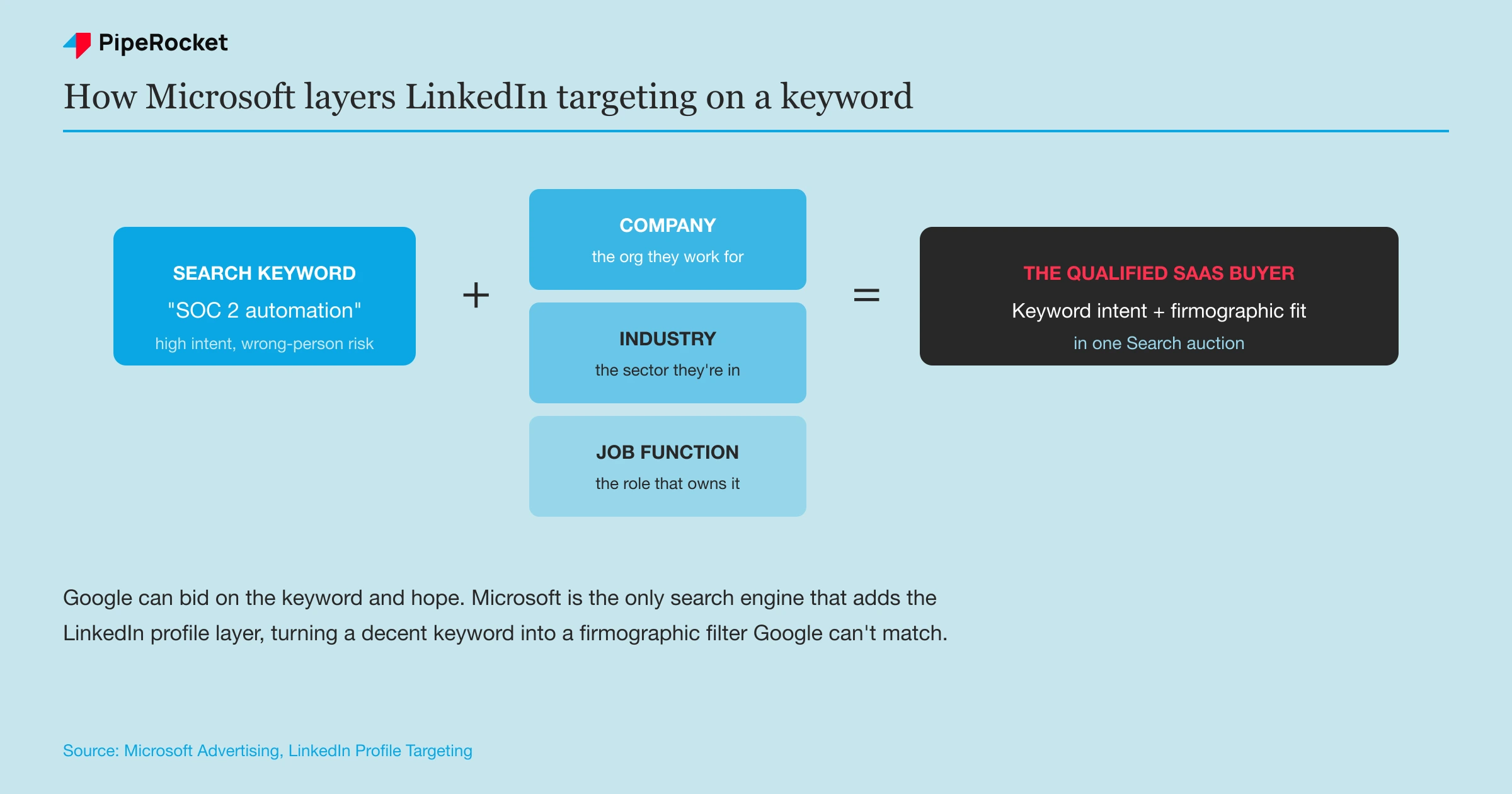
This is the reason you’re here, so build it deliberately. Microsoft Advertising is the only search engine that lets you target searchers using their LinkedIn profile data, across three dimensions (Microsoft Advertising ):
- Company: the organisation the searcher works for
- Industry: the sector they work in
- Job function: the professional role they hold
Sit with that for a second. On Google you bid on a keyword and hope the person typing it is your buyer. On Microsoft you can bid on the keyword and tell the platform you mostly care about, say, finance-industry searchers in a finance or operations job function. That’s keyword intent plus firmographic fit in one auction.
Layer it as a bid adjustment and lean on the data
Layer LinkedIn targeting as a bid boost. Microsoft runs LinkedIn profile targeting in “bid only” mode: your ads still show to everyone matching the keyword, but you pay more to win the auction when the searcher also fits the LinkedIn profile. You keep your reach and you learn who actually converts.
There’s no hard “target and bid” restriction for LinkedIn profile audiences. The lever you have is the bid modifier, not delivery.
Once you’ve got conversion data worth trusting, push the bid boost higher on the segments that pay off and pull it back on the ones that don’t. On a low-volume platform that graded approach matters, because you want to concentrate spend on the profiles that convert without cutting off the reach that’s still teaching you.
Target the role that owns the problem
Pick the job function that feels the pain, which is often not the title you’d guess. Our team has seen this constantly on the LinkedIn side of paid: for a product that repurposes content, the intuitive target is a growth or demand-gen marketer, but the person who actually cares is a Head of Content. Start from the problem your product solves, then pick the job function that owns it.
Take a compliance SaaS built for fintech teams. The keyword “SOC 2 automation” pulls plenty of intent on its own. Layer on the finance and technology industries plus a compliance or engineering-leadership job function, and you’ve turned a decent keyword into a firmographic filter that Google can’t replicate.
Step 3: Structure Campaigns Around Intent and Firmographics
Structure your Microsoft account the same way you’d structure a serious Google account, then add a firmographic dimension Google doesn’t have. The keyword discipline carries over directly. Segment by intent first.
Group keywords by where the searcher sits in the funnel:
- BOFU: “best SOC 2 automation software”, “X vs Y”, competitor terms
- MOFU: comparison and category terms where they’re evaluating
- TOFU: broad awareness terms you only fund once BOFU is maxed
Start budget on BOFU and MOFU, the same as any tight paid-search account. Microsoft’s lower volume makes this discipline even more important, because you can’t afford to spray a small budget across low-intent traffic and still gather signal.
Then add the firmographic split. Because you can attach LinkedIn audiences per ad group, you can run the same keyword theme against different job functions with tailored copy. A “workflow automation” ad group aimed at an operations leader can promise fewer manual handoffs, while the same theme aimed at a finance leader can lead with audit readiness. Same keyword, different reader, different headline.
Keep match types tight while you learn. We stick to phrase and exact with a solid negative list on a new Microsoft account, exactly as we would on Google, so the small budget buys signal instead of noise.
Step 4: Know Where Microsoft Beats Google and Where It Lags
Run Microsoft for what it’s good at, and don’t expect it to be Google. It won’t match Google on scale, and Google can’t match it on B2B targeting precision. Deciding which job each channel does is most of the work.
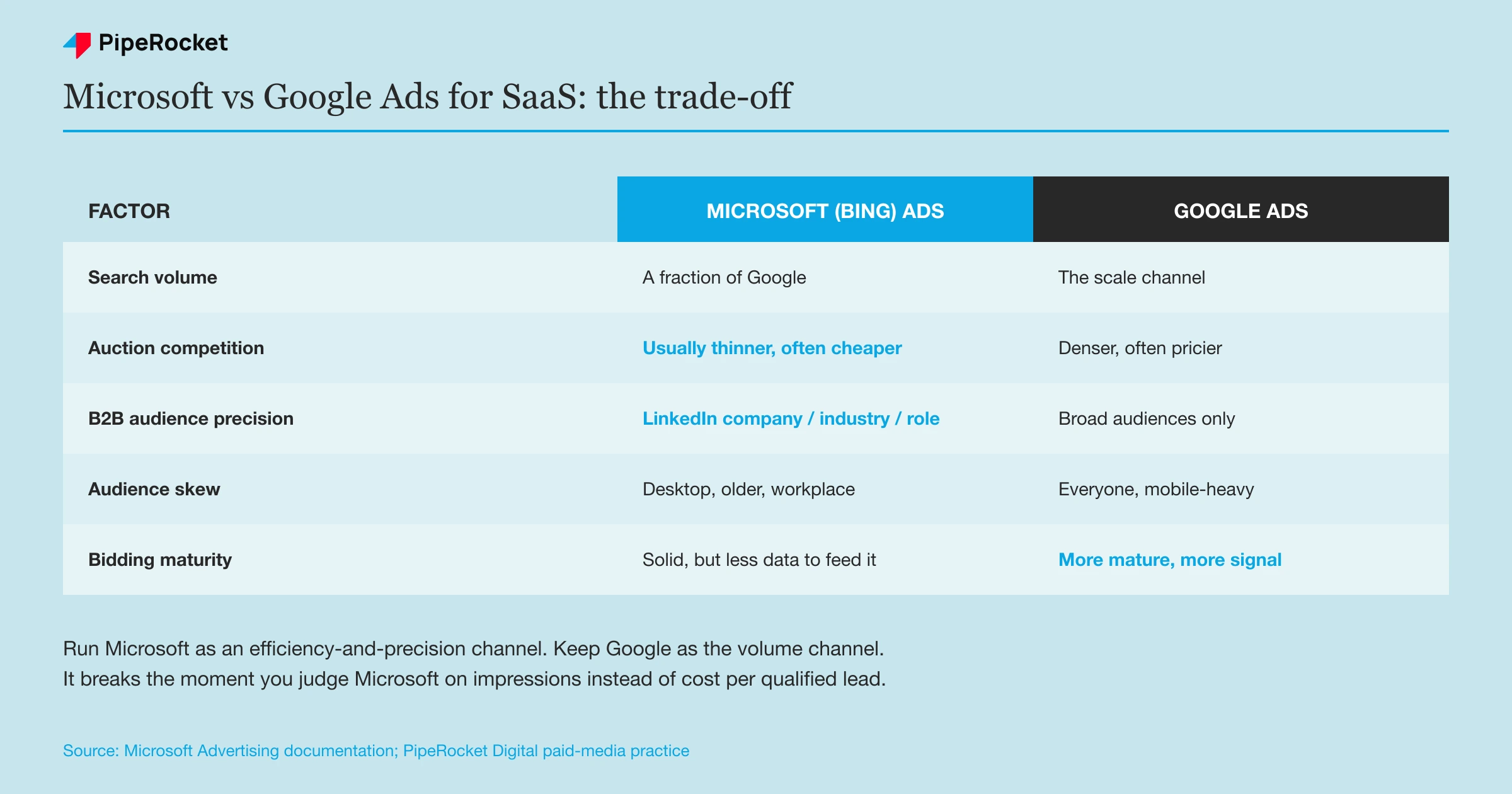
Here’s how we frame the trade-off for SaaS clients:
| Factor | Microsoft (Bing) Ads | Google Ads |
|---|---|---|
| Search volume | Much lower; a fraction of Google | The scale channel; most of your reach |
| Auction competition | Usually thinner for the same terms | Denser, often pricier per click |
| B2B audience precision | LinkedIn company, industry, job function | Broad audiences only; no LinkedIn data |
| Audience skew | Desktop, older, workplace/enterprise | Everyone, mobile-heavy |
| Automation and bidding maturity | Solid, but less data to feed it | More mature; more signal to optimise on |
The honest read: Microsoft is an efficiency-and-precision channel. It works when you want to reach a specific set of companies and roles at a good cost per lead. It breaks if you treat it as a second Google and judge it on impressions.
There’s a bidding catch worth naming. Smart bidding needs conversions to learn, and Microsoft’s lower volume means it collects them slower. On a new account we often start with manual or a capped strategy until there’s enough conversion data to trust automation, rather than handing a thin account to an algorithm that’s still guessing.
Step 5: Measure It on Pipeline, Not Volume
Judge Microsoft Ads on the quality of pipeline it contributes. If you rank it next to Google on impressions or raw conversions, it’ll always look small and you’ll kill a channel that was quietly feeding good deals.
The metrics that actually matter for a SaaS account:
- Cost per qualified lead, compared against Google for the same keyword themes
- Lead-to-MQL and MQL-to-opportunity rate from Microsoft-sourced leads
- Pipeline and revenue attributed to the channel, beyond raw form fills
There’s a measurement trap that’s easy to fall into. Because Microsoft’s volume is smaller, its last-click numbers look modest, and a first-click or influence-heavy buyer journey can hide its real contribution. “Google is for capture; LinkedIn is for influence,” as one of our team puts it, and Microsoft’s LinkedIn-targeted search sits partly in that influence zone. Read the lift, not only the last click.
Concretely, our team’s approach on channels like this is to watch whether adding the channel moves the totals. Did qualified pipeline rise, did the accounts you targeted start showing up, even when the attribution tool wants to credit “direct” or Google? That’s the read that keeps a good channel alive.
Common Mistakes to Avoid
Judging Microsoft on volume instead of fit
The fastest way to waste the channel is to compare its impression count to Google’s and conclude it’s too small. Microsoft’s value is who it reaches, not how many. A campaign that reaches 500 of the right finance-industry decision-makers at a low cost per qualified lead beats one that reaches 50,000 random searchers. Rank it on cost per qualified lead and pipeline, and it holds its own.
Skipping the LinkedIn layer entirely
Plenty of teams import from Google, let it run on keywords alone, and never touch LinkedIn profile targeting. That throws away the one thing Microsoft does that Google can’t. If you’re running the platform without the LinkedIn company, industry, or job-function layer, you’re running a worse version of Google Ads on a smaller network. Add the layer or don’t bother.
Setting the LinkedIn bid modifier and forgetting it
LinkedIn profile targeting only runs as a bid adjustment, so people set a flat boost once and never revisit it. That leaves money on the table both ways: too low and you lose the profiles you want, too high and you overpay for segments that don’t convert. Start with a modest boost so ads still serve broadly, gather conversion data, then raise the modifier on the segments that pay off and trim the ones that don’t.
Letting the Google sync overwrite your work
A recurring import is a convenience that can quietly undo your Microsoft-specific tuning. If the sync is set to update everything, the next pull can overwrite the LinkedIn targeting and bid adjustments you built. Set the sync to add new items only, and review the account after each run so your firmographic work survives.
How PipeRocket Digital Runs Microsoft Ads for SaaS
We treat Microsoft as its own B2B channel, not a Google leftover. We import to save setup time, rebuild the account for Microsoft’s auction, then layer LinkedIn company, industry, and job-function targeting so every dollar chases the roles and accounts you actually sell to. We run it alongside your Google Ads so the two channels do the jobs each is best at. If you want a paid programme that reaches the right SaaS buyers instead of just more searchers, see our Bing Ads agency page or reach out to us .
Frequently Asked Questions
Are Microsoft (Bing) Ads worth it for B2B SaaS?
For most B2B SaaS advertisers, yes, once you’re running Google well. Cheaper clicks help, but the real reason is that Microsoft Advertising is the only search platform that lets you target searchers by their LinkedIn company, industry, and job function inside a Search campaign. That firmographic precision is a genuine fit for SaaS, where you’re selling to specific roles at specific companies. Judge it on cost per qualified lead, not on volume, and it usually earns its budget line.
How is Microsoft Advertising different from Google Ads?
The mechanics are almost identical, which is why you can import a Google campaign in a few clicks. The three real differences are audience, scale, and targeting. Microsoft’s network skews toward desktop, older, and workplace searchers because Bing is the Windows and Microsoft 365 default. Its total search volume is a fraction of Google’s. And only Microsoft offers LinkedIn profile targeting. So Microsoft is a precision-and-efficiency channel, while Google remains the scale channel.
Can I import my Google Ads campaigns into Microsoft Advertising?
Yes, and it’s the recommended way to start. Google Import links your accounts and pulls in most of your campaigns, ads, keywords, targets, extensions, and settings by default. You can also schedule it to sync on a daily, weekly, or monthly basis so new Google changes flow over automatically. Just remember that import is deliberately incomplete, so review the account afterward and add the Microsoft-specific work, especially the LinkedIn targeting layer, that Google has no equivalent for.