
How to Set Up Multi-Touch Attribution for SaaS SEO
 Omar Sheriff
Last updated on
Omar Sheriff
Last updated on
Most SaaS teams turn on multi-touch attribution by flipping a setting in GA4, then trust whatever the dashboard spits out. Six weeks later the numbers don’t match the CRM, sales doesn’t believe them, and the whole thing gets quietly ignored.
The setting is the easy part. The hard part is the plumbing underneath it: what counts as a touch, where the data lives, and whether a lead’s path actually survives the trip from first click to closed deal.
Here’s how we set it up so the credit it reports is one you can defend in a pipeline review.
TL;DR
- Pick the model before the tool: The six common models credit touches differently, so choose the one that matches your sales cycle first, then make the software fit it.
- Wire the CRM as the source of truth: Attribution lives where the deal closes, so every lead has to carry its full touch history into your CRM, not just the last click.
- Standardise tracking so touches are clean: Consistent UTMs, a connected analytics layer, and one definition of a “session” are what stop the model from crediting noise.
- Choose tooling for your stage, not the demo: A small team can run usable attribution inside HubSpot and GA4; a dedicated platform earns its cost when channels and deal complexity grow.
- Validate against closed deals before you trust it: Reconcile the model’s credit against deals sales actually remembers winning, because dirty data breaks attribution faster than the wrong model does.
Don’t Start With the Tool. Start With the Model.
The most common attribution mistake is buying the software first and deciding what you’re measuring second. You end up reverse-engineering your strategy from whatever the tool defaults to, which is usually last-click.
Multi-touch attribution is just a rule for splitting credit across every touch a buyer had before they converted. The “multi-touch” part matters in SaaS because nobody buying a $30k/year platform converts on their first visit. A typical path looks like this:
- They read a blog, then leave.
- They come back through a comparison page.
- They request a demo three weeks later.
- They close two months after that.
The question every model answers differently is simple: of those four touches, which ones get the credit, and how much?
That’s a strategy decision, not a software one. Pick the model that reflects how your buyers actually move, then make the tooling serve it. Teams that do it the other way around spend months arguing about numbers that were never set up to mean anything.
The catch is that no model is “correct.” Each one is a deliberate bias about which moments you care about, and the right choice depends on whether your sales cycle is short and self-serve or long and committee-driven.
The Six Attribution Models, and When Each One Fits
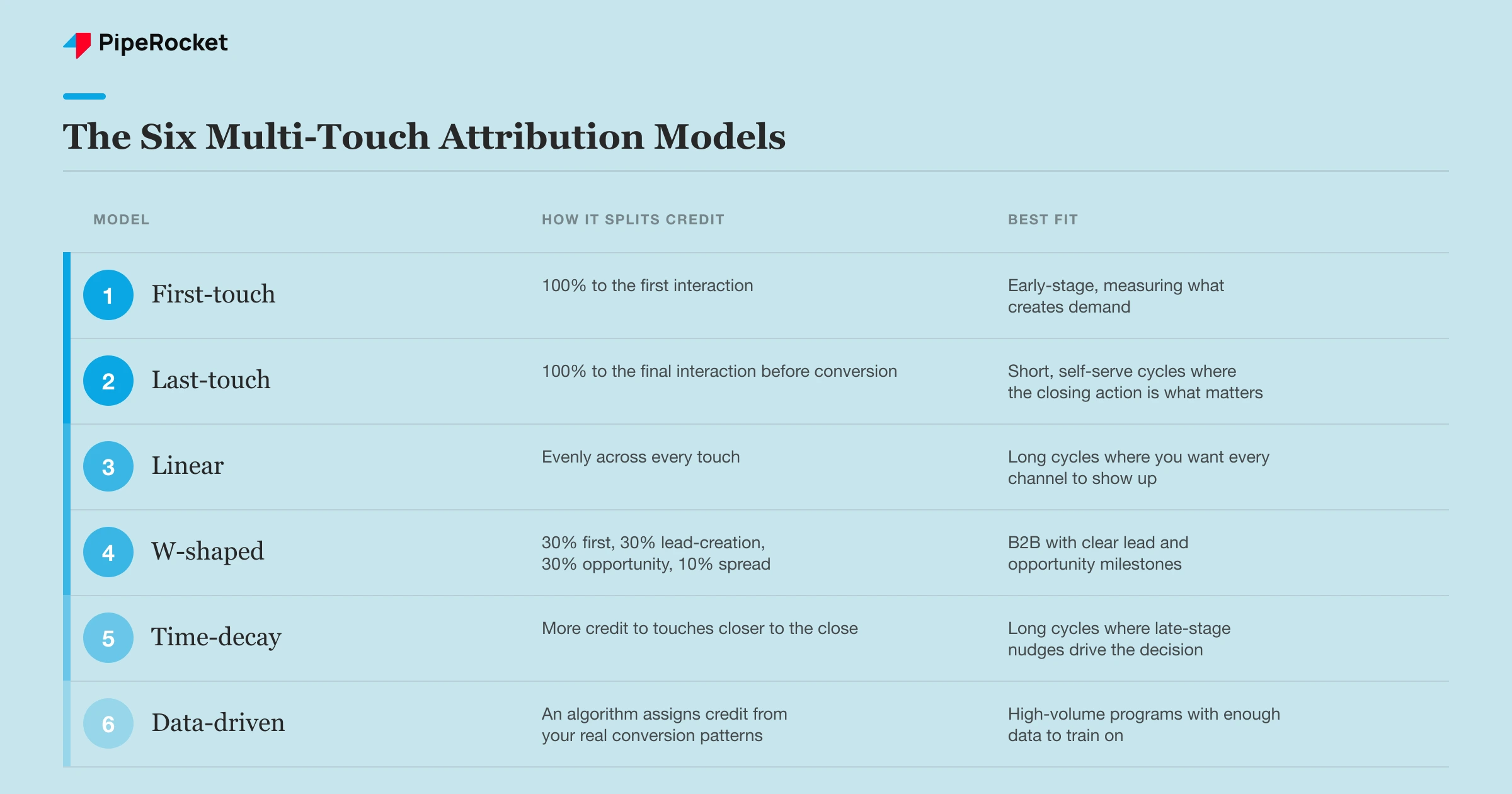
Here are the six models you’ll choose between, ordered roughly from simplest to most complex. The first two are single-touch (they’re the baseline most teams start on); the rest spread credit across the journey.
| Model | How it splits credit | Best fit |
|---|---|---|
| First-touch | 100% to the first interaction | Early-stage, measuring what creates demand |
| Last-touch | 100% to the final interaction before conversion | Short, self-serve cycles where the closing action is what matters |
| Linear | Evenly across every touch | Long cycles where you want every channel to show up |
| W-shaped | 30% first, 30% lead-creation, 30% opportunity-creation, 10% spread | B2B with clear lead and opportunity milestones |
| Time-decay | More credit to touches closer to the close | Long cycles where late-stage nudges drive the decision |
| Data-driven | An algorithm assigns credit from your real conversion patterns | High-volume programs with enough data to train on |
A few honest trade-offs the table can’t hold:
- First-touch is great for judging top-of-funnel content , but it over-credits the first blog someone ever read and ignores everything that closed the deal.
- Last-touch is simple and sales tends to trust it, but it makes your demo and pricing pages look like heroes while starving the content that fed them.
- W-shaped is the workhorse for most B2B SaaS because it rewards the three moments that genuinely matter: getting found, becoming a lead, and becoming an opportunity. It needs your lead and opportunity stages defined cleanly in the CRM, though, or the math has nothing to anchor to.
- Data-driven sounds like the obvious winner, but it’s only as good as your volume. Run it on a few dozen conversions a month and it’s guessing with confidence, which is worse than a simple model you understand.
Start with the model that maps to your easiest internal conversation. If sales lives in stages, W-shaped. If you’re a self-serve product proving what creates demand, first-touch or time-decay.
Step 1: Make Your CRM the Source of Truth
Attribution has to live where the deal closes, which means your CRM, not your analytics tool. GA4 sees sessions; it doesn’t see the closed-won number finance cares about, and it forgets the user the moment cookies expire.
So the first build step is making sure every lead arrives in the CRM carrying its history. When a form gets submitted, the original and most recent source, medium, and campaign should write into fields on the contact and the deal, not just sit in a one-time analytics event.
In practice that means three things wired in your CRM (we use HubSpot for this on most SaaS accounts):
- Touch capture on the form so first-touch and last-touch source write to the contact record automatically.
- Lifecycle stages defined cleanly (lead, MQL, SQL, opportunity) so a model like W-shaped has real milestones to anchor credit to.
- Deal-level association so when an opportunity closes, the touch history rolls up to the revenue, not just the contact.
Note: If your lifecycle stages are fuzzy, fix that before you touch the attribution model. A model that splits credit at “lead creation” and “opportunity creation” is meaningless if half your contacts skip stages or get marked SQL by hand on a Friday.
The reason the CRM wins over analytics is permanence. A deal record doesn’t get wiped when a cookie expires or when someone switches from their phone to their laptop. That’s also why purely client-side analytics attribution falls apart on long SaaS cycles, where the gap between first touch and close is measured in months.
Step 2: Standardise Tracking So the Touches Are Clean
A model can only credit the touches it can see correctly, so the next step is making every touch arrive labelled and consistent. This is the least glamorous part of the setup and the one that quietly decides whether any of it works.
Three things have to be locked down:
- A UTM convention everyone follows. One spelling, one case, one structure. “LinkedIn,” “linkedin,” and “Linked In” become three channels in your reports, and suddenly your social numbers are split across rows that should be one.
- Your analytics connected to the CRM, so session-level behaviour and lead-level outcomes describe the same person rather than two disconnected datasets.
- One definition of a session and a touch, so a bounce and a real engaged visit aren’t both counted as equal interactions the model has to weigh.
The UTM piece is where most programs leak. Build a locked template (a shared sheet or a builder tool) and make it the only way anyone creates a tagged link. Free-typed UTMs are the single biggest source of dirty attribution data we see.
Organic search is the channel that suffers most from sloppy tracking, because a lot of its real influence shows up later as branded or direct traffic that the model never connects back to the original visit. You can’t fully solve that with UTMs.
But clean tracking everywhere else at least stops you from compounding the problem. The first-touch versus last-touch question gets a lot easier to answer once the underlying touches are actually trustworthy.
Tip: Audit your channel groupings before you report anything. Open your source/medium report and look for the same channel appearing under multiple labels. If it’s split, your UTMs aren’t standardised yet, and no model will fix that.
Step 3: Choose Tooling That Matches Your Stage
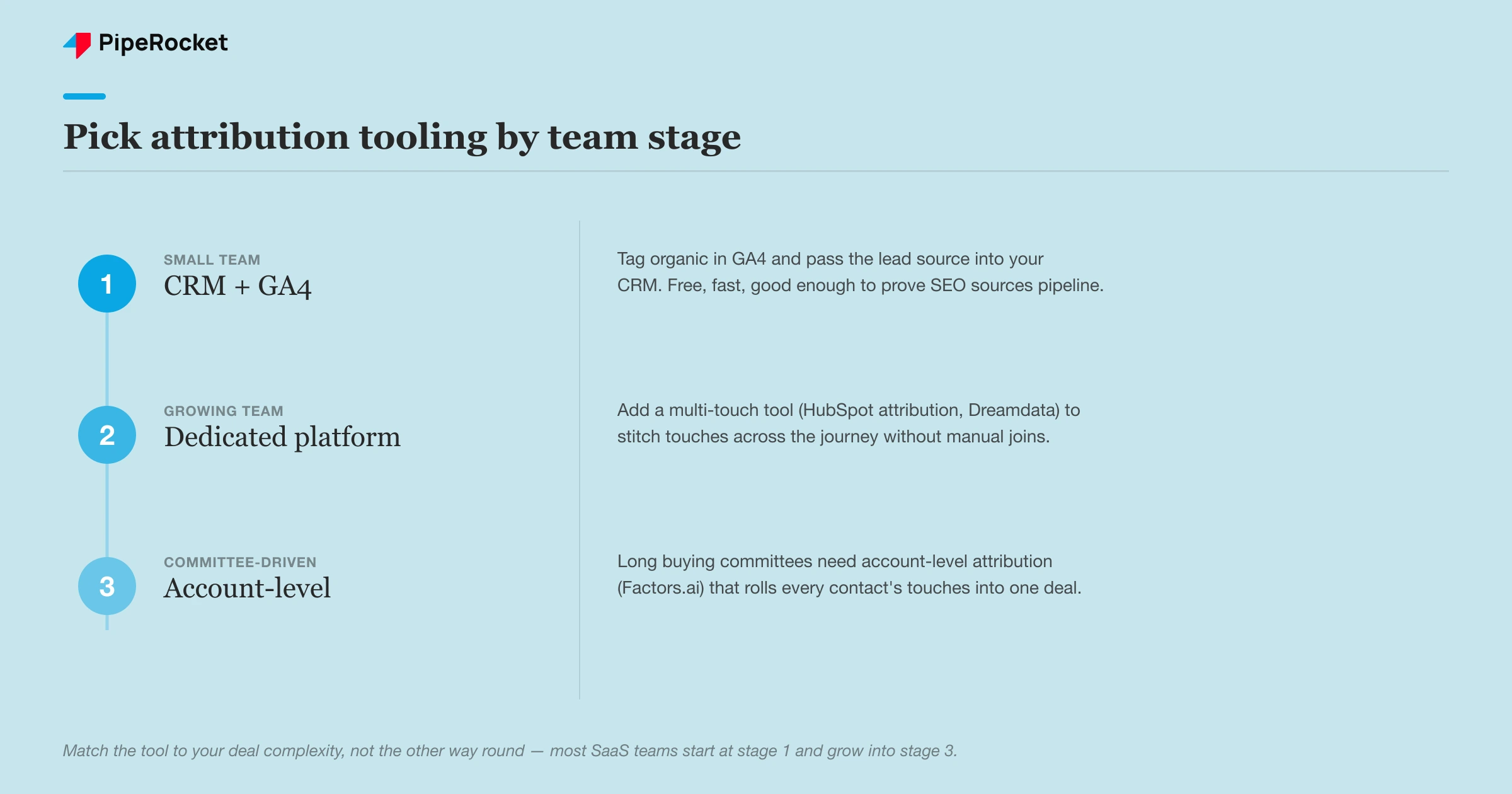
Pick attribution tooling for the complexity you actually have, not the complexity a demo promises you’ll grow into. The right answer is almost always less software than vendors want to sell you.
For a small SaaS team running two or three channels, you don’t need a dedicated platform. The combination of your CRM’s native attribution reporting plus GA4’s data-driven and model-comparison views is usually enough to get a defensible multi-touch picture. We run plenty of early-stage clients on exactly that, with HubSpot holding the deal-level truth and GA4 handling the session-level path.
A dedicated attribution platform earns its cost when the picture genuinely outgrows that. The signals that you’ve hit that point:
- You’re running enough channels that hand-stitching the journey eats real hours every week.
- You need to credit influence channels (LinkedIn, events) that rarely get last-click but clearly move pipeline.
- Your deals involve buying committees, so a single contact’s path never tells the whole story.
That last one is where reverse-IP and account-level tools come in. On accounts with that complexity we use Factors.ai to tie account-level intent and influence back to pipeline, because a committee decision can’t be reconstructed from one person’s cookie trail.
The trade-off is real. A dedicated platform gives you cross-channel and account-level clarity, but it adds cost, setup time, and another system to keep clean. If your data hygiene from Steps 1 and 2 isn’t solid, a fancier tool just produces wrong answers faster.
Step 4: Validate Against Closed Deals Before You Trust It
Before you report a single attribution number to leadership, reconcile the model against deals your sales team actually remembers winning. This is the step almost everyone skips, and it’s the one that tells you whether the setup works.
Take five or ten recently closed deals and trace what the model says drove them. Then ask the rep what really happened. If the model credits a channel the buyer never touched, or completely misses the demo that closed it, you have a data problem, not an insight.
Common mismatches and what they usually mean:
- The model credits “direct” or “unattributed” too often. Your UTMs or touch capture are leaking; go back to Step 2.
- A whole channel is missing from journeys it clearly influenced. Either it isn’t tagged, or it’s an influence channel your model under-credits by design.
- Touch counts look impossibly low. Cookie expiry or cross-device gaps are erasing early touches, which is exactly why the CRM record from Step 1 matters.
We’ve sat in a client QBR where they asked which channel actually influenced their conversions, and the honest answer was that the data couldn’t say. That’s not a failure of the model. It’s what happens when tracking decays underneath it: cookies disappearing, more buyers arriving from AI assistants without a referrer, and journeys that simply aren’t being recorded end to end.
The fix our team landed on was to stop treating attribution as a clean courtroom verdict and start treating it as directional evidence. Validate it against reality on a regular cadence, expect it to undercount the channels it can’t see, and never pause a working channel just because the model didn’t hand it last-click credit.
A Sanity Check When the Model Looks Wrong
Don’t trust an attribution number that contradicts what’s happening in the business. Multi-touch attribution is a model, and every model is wrong at the edges, so it needs a reality check sitting next to it.
The simplest check is lift. If you turn up investment in a channel and total pipeline rises even though the model isn’t crediting that channel directly, the channel is working and your attribution is just blind to it. We’ve seen this most with influence channels like LinkedIn, where the lead Googles your brand a week later and the model files it under “branded search.”
For a compliance SaaS targeting fintech teams, a buyer might first hear about you in a peer community, never click a tracked link, then search your name directly when their next audit looms. No model catches that touch. The lift in branded search is the only evidence it happened, and it’s enough to keep funding the thing that started it.
So run the model, then watch whether direct traffic, branded search, and total pipeline move with your investment.
Tip: When the model and the lift disagree, believe the lift.
How PipeRocket Sets Up Attribution for SaaS Teams
We build attribution that survives a pipeline review instead of collapsing under one question. As a SaaS SEO agency , we wire the CRM as the source of truth, standardise tracking so the touches are clean, pick the model that fits your sales cycle, and validate it against deals your team actually closed.
We’re also blunt about its limits. When tracking is too dirty to trust, we say so and fix the plumbing before reporting numbers nobody should believe. If you want multi-touch attribution set up properly, reach out to us and we’ll build it with you.
Frequently Asked Questions
What is the best multi-touch attribution model for B2B SaaS?
For most B2B SaaS teams the W-shaped model is the best starting point, because it credits the three moments that matter in a considered purchase: the first touch that created awareness, the touch that turned the visitor into a lead, and the touch that created the opportunity. It needs clean lead and opportunity stages in your CRM to work.
If your sales cycle is short and self-serve, last-touch or time-decay can be simpler and still honest. The “best” model is the one that matches how your buyers actually move, not the most sophisticated one available.
How do I set up multi-touch attribution in HubSpot and GA4?
Start in your CRM by capturing the source, medium, and campaign on every form submission and writing them to both the contact and the deal record, with clean lifecycle stages defined. In HubSpot that means turning on its attribution reporting and making sure deals carry touch history through to closed-won. GA4 then handles the session-level path with its model-comparison and data-driven reports.
Connect the two so a session and a closed deal describe the same person, and standardise your UTMs so channels don’t fragment across reports. For small teams this combination is usually enough without a dedicated platform.
Why doesn’t my attribution data match my CRM?
The usual cause is that your touches aren’t being captured cleanly or aren’t persisting long enough to survive a SaaS sales cycle. Cookies expire, buyers switch devices, and free-typed UTMs split one channel into several, so the model ends up crediting “direct” or “unattributed” for journeys it can’t fully see. Analytics tools also count sessions while the CRM counts deals, so the two will never line up perfectly.
The fix is to make the CRM the source of truth, standardise tracking, and reconcile the model against real closed deals so you know where the gaps are rather than trusting a number blindly.

