
How to Use Customer Match for SaaS (Google Ads)
 Vishnu Prasadh
Last updated on
Vishnu Prasadh
Last updated on
Most SaaS teams treat Customer Match as a retargeting afterthought. They upload one list of past leads, run a half-hearted remarketing campaign, and never touch it again. That’s a waste of the single best first-party signal you own.
Here’s how we actually use it: your CRM already knows who your buyers are, who churned, and which accounts you’re chasing. Customer Match takes those lists and turns them into targeting, exclusions, and training data for Google’s bidding. This is the exact process we run when we set up a SaaS account.
TL;DR
- Segment your CRM before you upload anything. Customer Match is only as good as the lists you feed it, so split closed-won, trials, churned, and target accounts into separate audiences first.
- Use it for exclusions as much as targeting. Excluding existing customers and free users from acquisition campaigns is where most SaaS teams find instant savings.
- Feed the algorithm your real buyers. Uploading closed-won lists as an audience signal teaches Smart Bidding what a real conversion looks like instead of who merely clicks.
- Tie it to your ABM motion. Your sales target-account list becomes a Google Ads audience, so search and demand campaigns finally point at the same accounts sales cares about.
- Watch the match rate and the mistakes. Low match rates, stale lists, and thin audiences quietly kill performance before you notice.
Why the Default Way of Using Customer Match Fails SaaS
The default use of Customer Match is a single remarketing list, and for SaaS that barely scratches what the tool can do. Most accounts we audit have one audience called something like “All Leads” sitting unused in the shared library. It gets applied to nothing, or it gets applied to everything with no bid adjustment.
The problem is that SaaS buyers aren’t one group. A closed-won customer, a free-tier user who’ll never pay, a churned account, and a target logo your sales team is chasing all need completely different treatment. Lumping them into one list means you can’t target one and exclude another.
There’s a second failure that costs real money. When you don’t exclude existing customers, your acquisition budget pays to re-acquire people who already log in every day. On a broad-match-heavy account, that waste compounds fast, because irrelevant clicks also poison the data Google uses to find your next customer.
The teams that get value from Customer Match do the boring part first: they segment. One list per intent, one job per list.
Step 1: Segment Your CRM Into Real Audiences
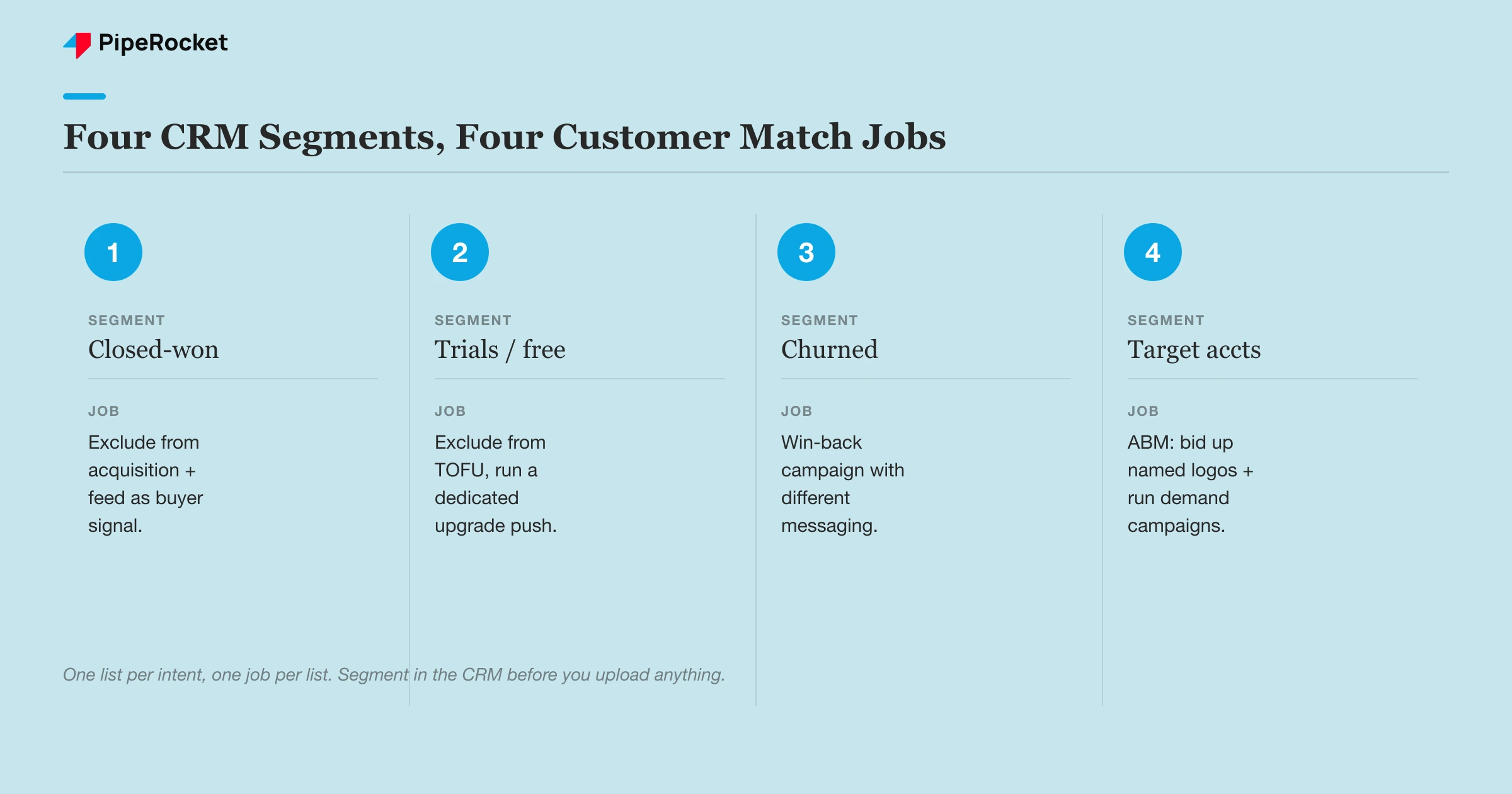
Start in your CRM. Before you export a single email, decide which segments actually map to a marketing decision. For most SaaS accounts, four segments carry the weight.
- Closed-won customers. Your paying accounts. This list is your gold standard for both exclusions and lookalike signal.
- Trials and free-tier users. People inside the product who haven’t paid. Treat this as a conversion goal, and keep it out of acquisition.
- Churned accounts. Former customers you can win back with different messaging.
- Target accounts. The named logos your sales team wants, whether or not they’re in the funnel yet.
Export each as its own file. Google Ads accepts email, phone, and mailing address, and matches on hashed data. For B2B SaaS, the work emails in your CRM are usually your strongest match key, so prioritize a clean email column over anything else.
Get the Data Clean Before You Upload
A messy export tanks your match rate, and match rate is the whole game. If Google can’t match a meaningful share of your list, the audience is too small to target or to inform bidding. We’ve seen lists come back at under 20% match simply because the export was full of personal Gmail addresses, role accounts like info@, and duplicates.
Before uploading, strip out anything that isn’t a real person’s work email where you can. Deduplicate. Fix obvious formatting issues like trailing spaces and mixed case. If your CRM stores both a personal and a work email, export both columns, because a buyer might be logged into Google with either one. A clean 5,000-row list beats a dirty 20,000-row one every time.
Step 2: Upload and Structure Your Lists in Google Ads
Once your segments are clean, upload each one as a separate Customer List under Audience Manager, and name them so anyone opening the account knows the job of each list. We run hundreds of campaigns across accounts, and clean naming conventions are the only thing that keeps segmented audiences usable six months later.
Give each list a name that states the segment and the date, so a list from January doesn’t get mistaken for a live one in July. Set a sensible membership duration too. A closed-won list can stay long, but a “recent trial signups” list should expire so it actually reflects recent behavior.
There’s a hard rule to know upfront: Customer Match has eligibility requirements and minimum list sizes. Google needs a minimum number of matched, active users before an audience can serve, currently at least 100 active users within the last 30 days across Search, Display, and YouTube. If a segment is too small on its own, that’s a signal to combine it with a related one rather than force a thin list to run.
The catch most teams miss is that upload isn’t the finish line. Match rates drift as lists age and as people change jobs, which in B2B happens constantly. Treat every list as something you refresh on a schedule instead of a one-time import.
Step 3: Use Customer Match for Exclusions First
Exclusions are where SaaS accounts find the fastest win, so set them up before you build any fancy targeting. The logic is simple: stop paying to acquire people who already pay you.
Apply your closed-won list as a negative audience on every acquisition campaign, whether that’s search, demand gen, or performance max. Someone who already has a login shouldn’t cost you a fresh click on a high-intent category keyword. That budget belongs to net-new buyers.
Free-tier and trial users need a more careful call. You usually don’t want them in your top-of-funnel acquisition campaigns, but you might want a dedicated campaign that pushes them toward a paid plan. So exclude them from acquisition and build them a separate upgrade campaign with upgrade-specific messaging.
Consider a compliance SaaS for fintech teams. Their brand search was eating budget on existing customers typing the product name to log in. Excluding the closed-won list from the brand campaign freed that spend for competitor and category terms where new buyers actually search.
One warning: exclusions only work if the list stays current. If a customer churns and your closed-won list still excludes them, you’ve locked yourself out of a warm win-back target. This is why the win-back segment and the exclusion segment have to stay in sync with your CRM.
Step 4: Feed the Algorithm Your Real Buyers
This is the step that separates Customer Match from ordinary remarketing, and it’s the one most SaaS teams skip. Your closed-won list does more than power exclusions. It’s the cleanest description of a real buyer you can hand to Google’s bidding.
Smart Bidding optimizes toward whatever conversions you feed it, and if those conversions include junk, it learns to find more junk. Across accounts we’ve audited, teams routinely let broad match and messy conversion data train the algorithm toward people who click but never buy. A clean buyer list is a way to push it the other direction.
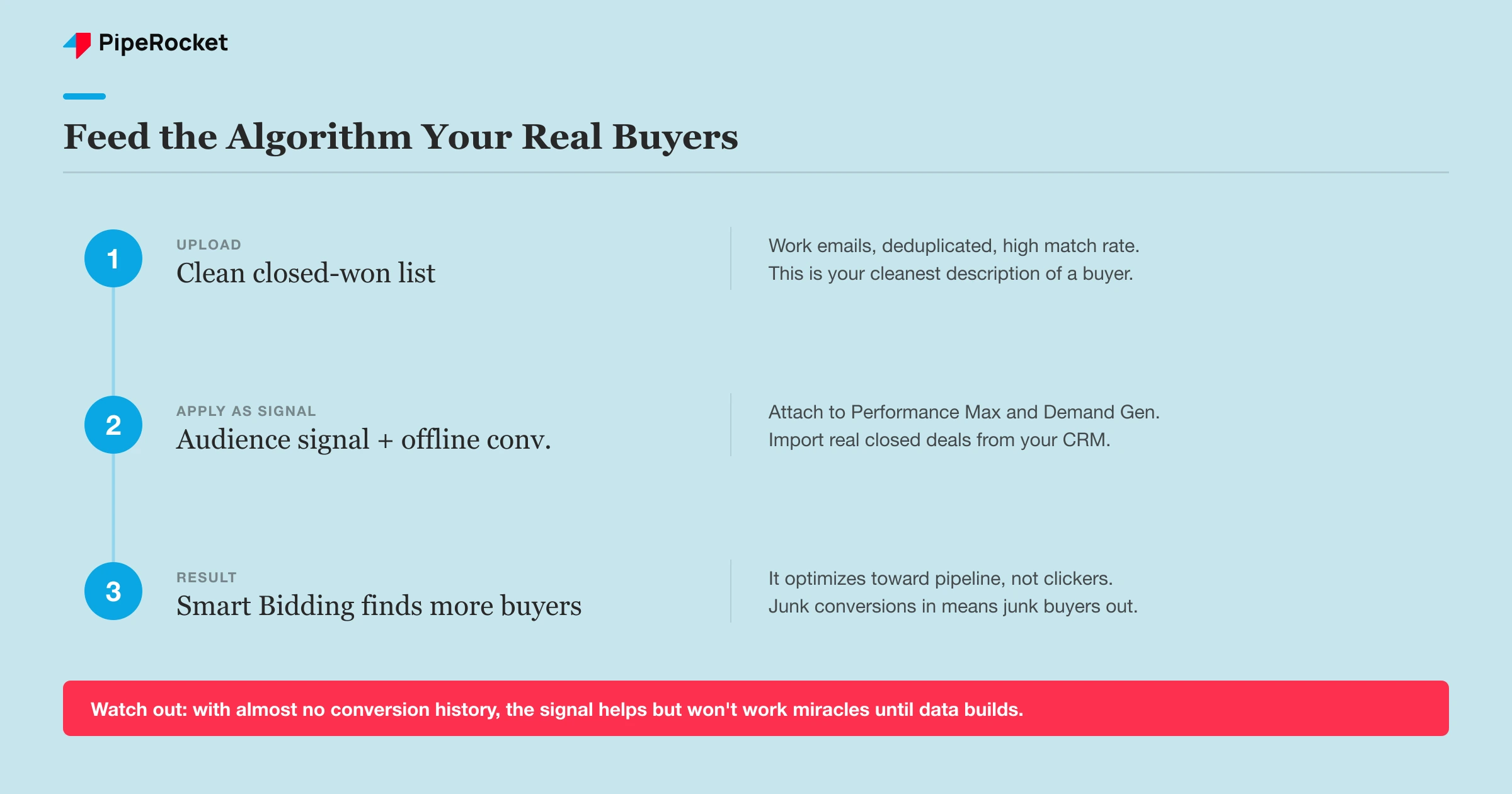
Use your closed-won and best-fit customer lists as an audience signal, on Performance Max asset groups, on Demand Gen, and as an observation audience on search. You’re telling Google “the people who convert look like this,” which sharpens who it shows ads to and how it bids.
Pair this with an offline-conversion feed if you can. When you import actual closed deals from your CRM back into Google Ads, the algorithm optimizes toward pipeline instead of form-fills. Customer Match and offline conversions work best together, because one describes your buyers and the other confirms which clicks turned into revenue.
The trade-off is honesty about data volume. This works well when you have a few hundred conversions to learn from. For a brand-new account with almost no conversion history, a customer-list signal helps, but it won’t perform miracles until real data accumulates.
Step 5: Tie Customer Match to Your ABM Motion
Customer Match is the bridge between your paid search and your account-based motion, and for B2B SaaS that’s where it earns its keep. Sales has a target-account list. Marketing usually runs ads at a completely different audience. Customer Match closes that gap.
Upload your target-account contact list as its own audience and layer it onto your campaigns as an observation, so you can bid up when someone from a named account is searching a category term. The same list can drive a dedicated demand-gen campaign that keeps your brand in front of accounts sales is actively working.
Our team runs this on the LinkedIn side constantly, targeting tiers of accounts from 1:1 whales down to a broad ICP list, and the same tiering logic maps onto Google Ads. Reserve your tightest, highest-value target list for your most aggressive bids, and use the broader ICP list to widen reach on demand campaigns.
One thing we’ve learned targeting named accounts: the obvious job title is often the wrong one. For a product that a Head of Content owns day to day, targeting generic “marketing” roles wastes money. Build your target-account contact lists around the exact person who owns the problem your product solves, not just anyone at the company.
Common Mistakes to Avoid
Treating One List as Your Whole Strategy
The most common mistake is uploading a single “all contacts” list and calling it done. That list can’t be targeted and excluded at the same time, so it ends up doing neither well. A SaaS account needs its CRM split into at least closed-won, trials, churned, and target accounts, because each one drives a different campaign decision. When everything lives in one audience, you can’t exclude paying customers from acquisition while still targeting churned accounts for win-back. Segmentation feels like busywork before you upload, but it’s the difference between an audience library that shapes spend and one that just sits in the shared audiences tab collecting dust.
Letting Lists Go Stale
A Customer Match list is a snapshot, and in B2B that snapshot ages fast. People change jobs, companies churn, and trials convert to paid, which means a list uploaded once quietly drifts out of alignment with reality. A stale closed-won list keeps excluding accounts that already left, locking you out of warm win-back targets. A stale trial list keeps pushing upgrade ads at people who already upgraded. We refresh key lists on a schedule tied to CRM changes rather than treating upload as a one-time task. If your match rate or audience size is sliding month over month, an outdated list is usually the reason, and nobody notices until performance dips.
Ignoring the Match Rate
Match rate decides whether an audience can even serve, yet most teams never check it after upload. A list that matches at 15% is often too small to target or to inform bidding, so the audience silently does nothing. The usual culprits are personal Gmail addresses, role accounts like info@, and duplicates that never had a chance to match a real Google account. Before blaming the tool, clean the export: prioritize work emails, deduplicate, and fix formatting. A smaller, cleaner list almost always outperforms a large, dirty one, because match rate, not raw row count, determines how many real people you can actually reach.
Forgetting the Minimum-Size Requirement
Customer Match won’t serve an audience until enough members match and are active, which trips up SaaS teams with narrow segments. A win-back list of 60 churned accounts sounds targetable, but it falls under the minimum and simply won’t run. The fix isn’t to pad the list with junk to hit the number, because that reintroduces the match-rate problem. Combine related small segments into one workable audience, or use the small list as a signal for bidding rather than a hard targeting layer. Know the eligibility thresholds before you plan campaigns around a segment, so you don’t build a strategy on an audience that can never leave the ground.
How PipeRocket Helps SaaS Teams Set This Up
We build Customer Match into the account structure from day one, not as a bolt-on. That means wiring your CRM segments into targeting and exclusions, feeding closed-won lists and offline conversions into Smart Bidding, and keeping every list synced so it reflects reality. Most of this lives inside how we run SaaS PPC for B2B products, where the goal is qualified pipeline and not click volume. If you want this set up properly on your account, reach out to us here and we’ll walk through your CRM data together.
Frequently Asked Questions
What’s the minimum list size for Google Ads Customer Match?
Google requires an audience to have enough matched, active members before it can serve, currently at least 100 active users within the last 30 days across Search, Display, and YouTube. A raw list often matches lower than you’d expect, so aim to upload well above the minimum to account for match rate. If a SaaS segment like churned accounts is too small on its own, combine it with a related segment or use it as a bidding signal rather than a standalone targeting layer.
Can I use Customer Match to exclude my existing customers?
Yes, and for SaaS it’s one of the highest-value uses. Upload your closed-won customer list and apply it as a negative audience on your acquisition campaigns, so you stop paying to re-acquire people who already have a paid login. This is especially useful on brand campaigns, where existing customers often search your product name just to log in. Keep the list synced to your CRM so churned accounts drop off and become eligible for win-back targeting instead of staying permanently excluded.
How is Customer Match different from regular remarketing?
Regular remarketing builds audiences from people who visited your site or engaged with your ads, based on tracking. Customer Match builds audiences from first-party data you already own, like the emails in your CRM, so you can reach known buyers even if they never triggered a pixel. The bigger difference for SaaS is intent: with Customer Match you know exactly who’s on each list, which lets you target closed-won accounts for upsell, exclude free users, or feed a clean buyer list to Smart Bidding in ways a behavioral remarketing list can’t match.

