Most ABM guides stop at the strategy slide: pick your accounts, align sales and marketing, personalise the message. Then someone hands you a budget and a LinkedIn login and the real question shows up. How do you actually put paid ads in front of a named list of companies, and how much do you spend on each one?
SaaS ABM is a strategy where sales and marketing concentrate spend on a defined list of high-value target accounts instead of chasing broad leads. This post is its paid-media execution layer, the part that runs after the strategy deck is closed. For building the ICP and the target-account list first, see our SaaS ABM strategy guide; this playbook picks up once that list exists. Here’s how we build and tier the account list, match those accounts across channels, sequence the ads, set a budget per tier, and read account engagement instead of clicks.
TL;DR
- This is the paid-execution half of SaaS ABM: it runs the ads against a named account list; the ICP and account-selection work lives in our separate SaaS ABM strategy guide.
- Build the list before the campaign: a tiered, firmographic-plus-intent account list is the input every channel reads from, so it gets built first.
- Tier by deal value: Tier 1 gets 1:1 spend, Tier 2 gets clustered spend, Tier 3 gets programmatic reach, and budget follows that split.
- Match one list across every channel: the same accounts get pushed to LinkedIn, Google and Meta, and a display/intent platform so buyers see you in more than one place.
- Sequence ads by tier and by role: awareness ads warm the account, then role-specific and retargeting ads work the champion, the economic buyer, and the blocker.
- Measure account movement: track account engagement, meetings booked, and pipeline created, because last-click misses most of what a multi-channel ABM program does.
Why Single-Channel ABM Runs Out of Road
A high-ACV SaaS deal is a committee purchase, and no single channel reaches a whole committee. So one account list pushed across several channels beats any one channel run well. That’s the trap teams fall into when they call a LinkedIn-only campaign “our ABM program.”
The reach gap is the whole point:
- One channel: the same buyer ignores your LinkedIn ad on Monday, then runs Google searches, scrolls Meta at lunch, and reads trade sites you never touch. You’re a name they half-remember.
- Three channels: you show up in search, social, and display, so by the time sales calls you’re the vendor they already trust.
So the paid layer of ABM comes down to one account list, pushed to every channel a buyer actually uses, with spend concentrated where the money is. The rest of this playbook is how we build that.
Step 1: Build and Tier the Target Account List
The account list is the input every channel reads from, so it gets built before any campaign. Get this wrong and no amount of clever bidding saves you. You’re just paying to reach the wrong companies faster.
Start with two filters that cut the most waste before you spend a cent:
- Firmographic fit: industry, headcount, and revenue range that match your ICP .
- Buying signal: funding raised recently, hiring for a relevant role, or third-party intent data showing they’re researching your category.
A company that fits your ICP but shows zero signal goes in a lower tier. A company throwing off intent signals but sitting outside your revenue band doesn’t make the list at all, however tempting it looks.
Split the List Into Three Tiers
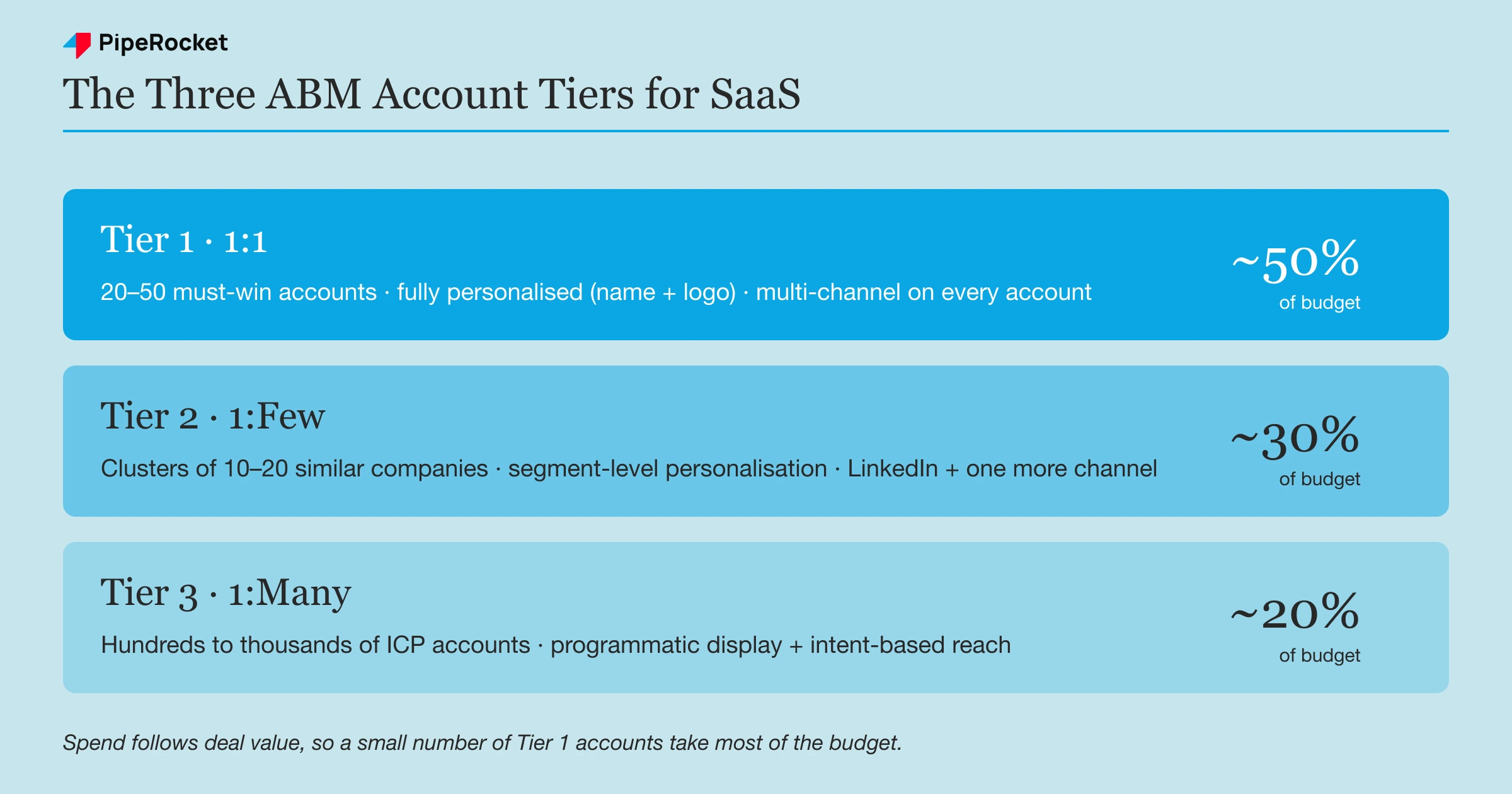
Once you have the list, tier it by deal value, because that’s what decides how much attention each account earns. We use the classic 1:1, 1:Few, 1:Many structure, mapped to real numbers:
- Tier 1 (1:1): roughly 20 to 50 must-win accounts. Fully personalised, company name and logo in the creative.
- Tier 2 (1:Few): clusters of similar companies, usually grouped by industry or use case. Segment-level personalisation.
- Tier 3 (1:Many): the broad ICP list, hundreds to thousands of accounts. Programmatic reach, no per-account customisation.
Tiering does real work here. It decides, up front, that a high-value Tier 1 whale deserves a hand-built campaign while a Tier 3 account gets swept up in a programmatic net. The budget conversation in Step 4 falls straight out of this split.
Step 2: Match the List Across Every Channel
Take the one account list and push it into each ad platform so the same companies see you everywhere. Every major channel now has a way to target a company or contact list you upload, so the list you built in Step 1 becomes the spine of the whole program.
Here’s where each account list lands, channel by channel:
- LinkedIn: upload the company list as a matched audience, then layer job-title and function filters so you reach the right roles inside each account.
- Google Ads: use Customer Match to upload contact lists, and add your account domains to display and YouTube targeting.
- Meta: build a custom audience from your contact list to catch buyers scrolling outside work hours.
- Display / intent platforms (6sense, Demandbase): serve banner ads to your account list and route spend toward accounts showing live buying intent.
You run more than one channel because a committee buy needs multiple touches from multiple angles before a name feels safe, not to chase vanity reach.
Own the List, Don’t Rent It
Upload and control your own list rather than leaning on a platform’s native “lookalike” audience, because that control is the entire point of account-based advertising. Native audiences refill themselves with whoever the algorithm thinks fits, which hands account selection back to the platform and defeats the “account-based” part.
An uploaded list keeps three decisions with you:
- Who’s in it: you pick the exact companies by hand.
- Who comes off: remove accounts the moment they close or disqualify.
- When it grows: add the next batch on your own terms.
Warning: match rates are never 100%. Upload a list of 500 companies or contacts and a platform matches only a portion, sometimes 60 to 70%. Build lists big enough that the matched audience still clears each platform’s minimum-size floor.
Step 3: Sequence the Ads by Tier and Role
Run the creative in three stages, Awareness then Consideration then Retargeting. Cold accounts get warmed before they’re asked to buy, and different committee members see different messages. Don’t blast every account with the same demo ad on day one. A buyer who’s never heard of you isn’t ready for a “book a demo” ad, and the analyst running the trial cares about different things than the CFO signing the cheque.
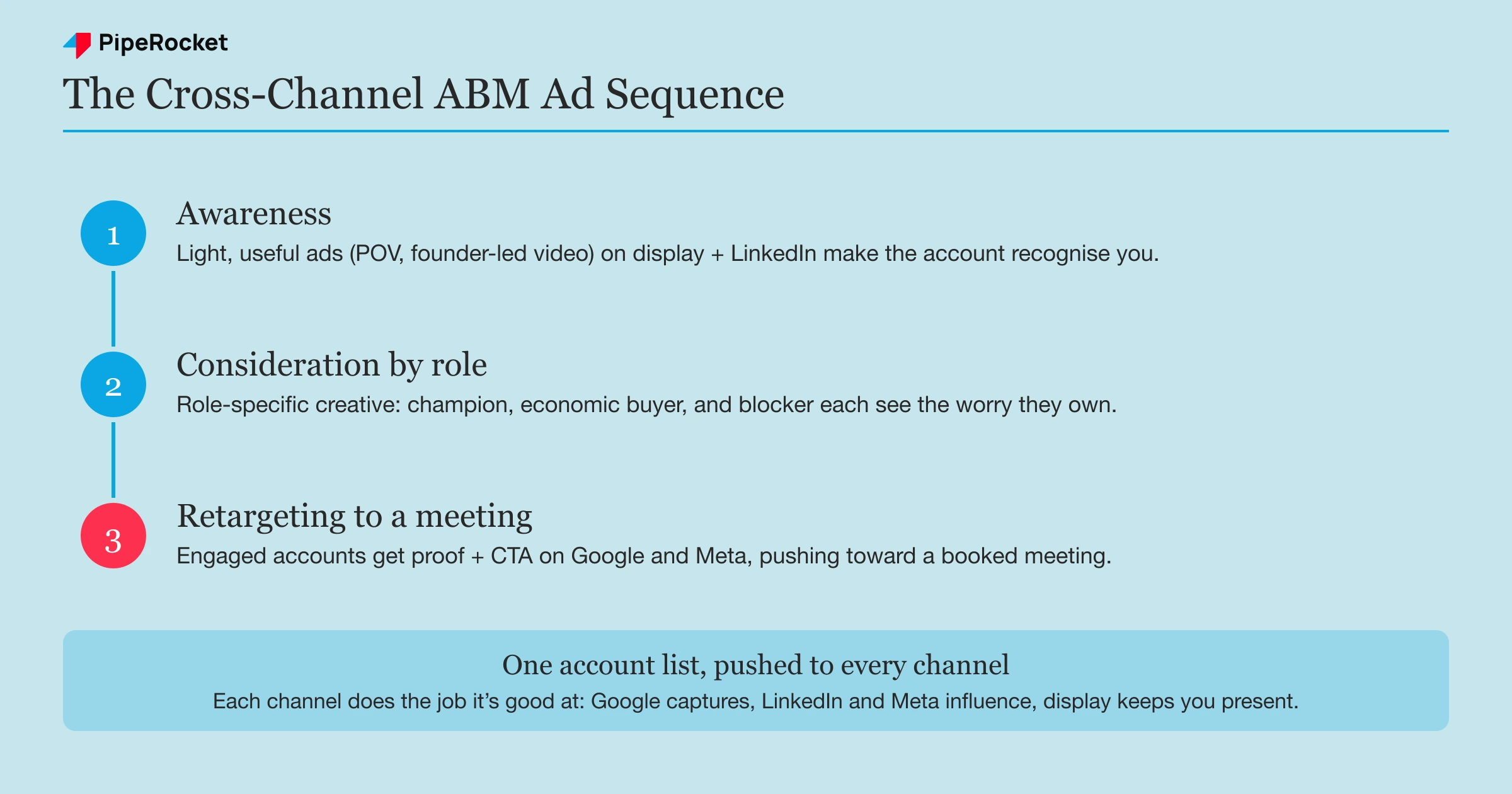
The sequence we run for most accounts looks like this:
- Awareness: a light, useful ad (a founder-led video, a strong point of view) that makes the account recognise the name.
- Consideration: role-specific creative that speaks to a committee member’s actual worry.
- Retargeting: for accounts and people who engaged, a proof-and-CTA ad that pushes toward a meeting.
Speak to Each Committee Role
Inside a single account, the champion, the economic buyer, and the blocker each need a different message, so build creative per role instead of one blended ad. A mid-market SaaS deal usually pulls in several people, and each forms an opinion of you from whatever they happen to see.
Map the message to the worry:
- The champion wants the problem solved and something to forward internally.
- The economic buyer wants proof the spend is justified.
- The blocker (security, finance, IT) wants a reason not to say no.
Aim one generic ad at all three and you speak to none of them. On LinkedIn you can split this cleanly with job-function targeting on the same account list.
Retarget High-Intent Accounts Across Channels
Retargeting is where the multi-channel setup earns its keep. A move we run constantly caught them in capture mode on Google, then keeps working them in influence mode on LinkedIn:
- Tag the Google visitors: add UTM parameters to your Google Search ads so you can identify the high-intent users who arrived from search.
- Retarget them on LinkedIn: serve those same users social proof and case studies to keep the story going.
- Add your LinkedIn engagers: fold in people who watched half a video or clicked “Learn More,” so the audience is everyone who showed intent, not just site visitors.
That builds a storytelling sequence toward a demo rather than a crude “you visited our site” reminder. The point is to move an engaged account forward, using each channel for the job it’s good at.
Step 4: Concentrate Budget on Your Top Tier
Concentrate spend where the deal value is, which means most of the budget goes to a small number of Tier 1 accounts. The instinct to spread budget evenly across every account feels fair, but it starves your whale accounts and over-invests in accounts that were never going to close.
A rough split we start from, then tune to the account list:
| Tier | Accounts | Share of budget | What the spend buys |
|---|---|---|---|
| Tier 1 (1:1) | 20 to 50 | ~50% | Personalised creative, heavy frequency, multi-channel on every account |
| Tier 2 (1:Few) | Clusters of 10 to 20 | ~30% | Segment creative, LinkedIn plus one other channel |
| Tier 3 (1:Many) | Hundreds to thousands | ~20% | Programmatic display and intent-based reach, low cost per account |
The logic is simple. A Tier 1 account might be worth $200k in ARR , so spending a few thousand dollars over a quarter to influence its whole committee is trivial next to the return. The same few thousand dollars sprayed across a thousand Tier 3 accounts influences almost nobody.
Right-size each tier’s audience to its budget, too. A wide net behind a small budget influences almost no one, because the frequency per person drops so low that nobody remembers the ad. Tighter targeting on fewer accounts, with enough budget to actually be seen, beats broad reach every time at ABM budgets.
Step 5: Measure Account Engagement and Pipeline
Judge the program on account engagement, meetings, and pipeline. This is where most paid ABM gets killed unfairly. Someone opens the dashboard, sees a low click-through rate and few form fills, and pauses a campaign that was actually working.
ABM is an influence motion, so attribution tools tend to mis-credit “direct” or “organic” for pipeline the ads actually started. Measure the lift instead. After you turn on a heavy ABM push, ask:
- Did engagement rise across your target accounts (impressions, ad clicks, site visits from those companies)?
- Did meetings booked with target accounts go up?
- Did pipeline created from the account list grow, even if no single ad claims the credit?
The read that matters is account movement over time. An account that had never heard of you, then shows up engaged across three channels, then takes a sales call, is the whole game, even when the last click before the meeting was a branded Google search. Set up the reporting to show account-level engagement, or you’ll keep pausing your best campaigns.
Common Mistakes to Avoid
Spreading Budget Evenly Across Tiers
The most common paid-ABM mistake is giving every account the same spend. It feels fair, but it guarantees your Tier 1 whales never get enough frequency to be remembered, while Tier 3 accounts soak up money they were never going to convert. Budget follows deal value, not headcount.
Running One Channel and Calling It ABM
A LinkedIn-only campaign aimed at a target list is a good start. On its own it isn’t a program, because a committee buy needs multiple touches from multiple angles, and single-channel reach leaves most of the committee forming their opinion of you from silence. Push the one list to at least two or three channels.
Letting the Account List Go Stale
An account list is a living thing. Closed and disqualified accounts should come off it, and fresh accounts should cycle in every quarter. Leave it untouched and you keep paying to re-serve ads to companies that already bought, already said no, or already left the market.
Judging It on Last-Click Leads
Reading a paid ABM program through a last-click lens is how good campaigns die early. The champion who eventually converts often arrives via a branded search that steals all the credit, while the LinkedIn and display ads that warmed the whole account get none. Measure lift and account engagement, or the numbers will lie to you.
How PipeRocket Digital Runs Paid ABM for SaaS
We build the whole paid ABM motion as one system: the tiered account list, the cross-channel match, the role-based ad sequence, and the account-level reporting that ties it to pipeline. The upstream account-selection work sits in our SaaS ABM strategy guide , and this playbook runs the paid layer on top of it. We’ve run this across SaaS PPC programs for PLG and sales-led companies at very different budget sizes.
If your account-based ads feel disconnected from your actual pipeline, that’s usually a list, budget, or measurement problem, and it’s fixable. As one of the best B2B marketing agencies working in SaaS, we’d be glad to look at it with you. You can reach out to us here .
Frequently Asked Questions
How should SaaS companies tier their target accounts for ABM?
Most SaaS teams use a three-tier model split by deal value. Tier 1 is roughly 20 to 50 must-win accounts that get fully personalised, 1:1 campaigns with the company name and logo in the creative. Tier 2 is clusters of similar companies, usually 10 to 20 per group, with segment-level personalisation. Tier 3 is the broad ICP list, hundreds to thousands of accounts reached programmatically with no per-account customisation. The tier decides how much spend and personalisation each account earns.
What’s a good budget split across ABM tiers?
There’s no universal number, but the principle is that spend follows deal value rather than account count. A common starting split is around half the budget on Tier 1, roughly a third on Tier 2, and the rest on Tier 3. That looks lopsided until you remember a single Tier 1 account can be worth many times a Tier 3 account, so concentrating spend on the whales returns far more than spreading it evenly. Tune the split to your real account list and close rates once data comes in.
What are the three types of ABM?
The three types are 1:1, 1:Few, and 1:Many. 1:1 targets a handful of must-win accounts with fully personalised campaigns, 1:Few groups similar companies for segment-level messaging, and 1:Many reaches the broad ICP list programmatically. In this playbook they map to Tier 1, Tier 2, and Tier 3, with spend concentrated on the top tier.
Which channels should you run ABM ads on for SaaS?
Run more than one, because a committee buy needs touches from several angles. LinkedIn is the usual anchor thanks to precise company and job-title targeting, and Google Ads Customer Match plus display and YouTube extend reach into search and video. Meta catches buyers outside work hours, and intent platforms like 6sense or Demandbase serve display ads weighted toward accounts showing live buying signals. The key is that all of them read from the same target-account list you built first.