
LinkedIn Ads: How to Target the Buying Committee for SaaS
 Sabarish Chandrasekar
Last updated on
Sabarish Chandrasekar
Last updated on
Most SaaS LinkedIn campaigns aim at one job title, usually the champion, and then leadership asks why the pipeline isn’t moving. The person who clicks your ad is rarely the person who signs the contract. A modern B2B software purchase is a group decision, and if your targeting only reaches one seat at the table, the deal stalls in the rooms you never advertised to.
TL;DR
- A committee closes the deal, so target the whole committee: high-ACV SaaS is a group purchase, so targeting a single job title leaves most of the decision unreached.
- Map the roles before the audience: list the champion, the economic buyer, and the blockers, then build a LinkedIn audience per role rather than one blended audience.
- Match the ABM tier to the account: 1:1 for whale accounts, 1:Few for clusters, 1:Many for the broad ICP, so budget follows deal value.
- Right-size the audience to the budget: strict seniority and firmographic filters beat a huge list, because a wide net at a small budget influences almost no one.
- Measure the committee on lift and account movement: judge campaigns on lift, meetings, and account penetration, since last-click leads under-credit an influence channel.
Why One Persona Is Never Enough for SaaS
The higher the deal size, the less any single job title matters. A cheap tool can win on one channel aimed at one role, but a high-ACV SaaS deal is a committee decision, and no single ad set reaches a whole committee. If you’re targeting only the “Head of Marketing” because that’s who owns the budget line, you’re ignoring the analyst who runs the trial, the VP who has to sponsor it, and the security or finance reviewer who can quietly kill it.
Here’s the part most teams get wrong: they treat LinkedIn like a lead form when it works more like a room full of decision-makers. The champion clicks, fills the form, and becomes your “lead,” so the dashboard looks fine. Then the deal goes dark for six weeks because three other people you never reached are the ones actually deciding, and none of them have ever seen your name.
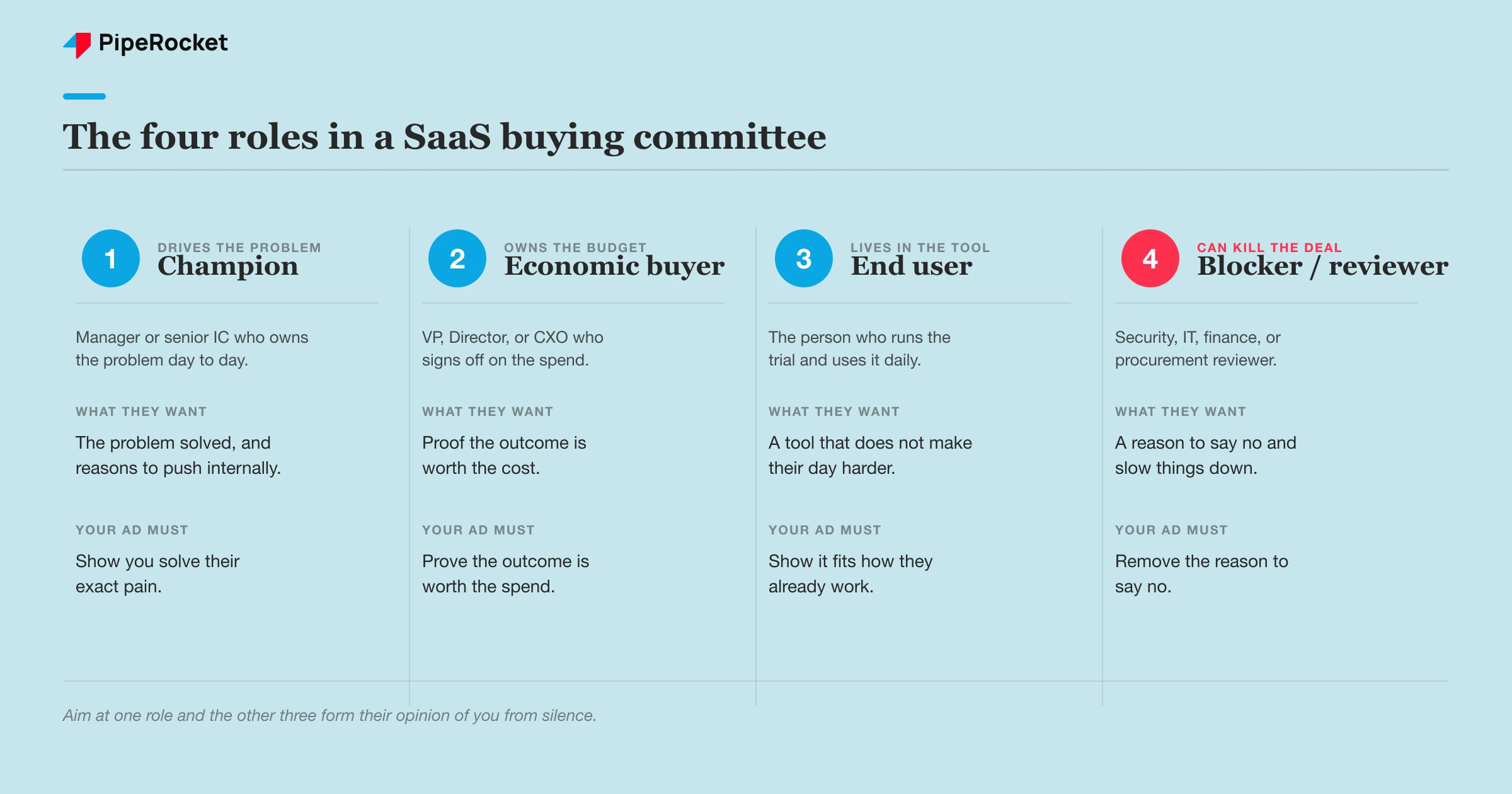
A typical mid-market SaaS purchase pulls in several distinct roles, each with a different worry:
- The champion wants the problem solved and will push internally.
- The economic buyer wants proof it’s worth the spend.
- The end user wants it to not make their day harder.
- The blocker (security, finance, IT) wants a reason to say no.
Aim at one and the other three form their opinion of you from silence. That’s the gap this article closes.
Step 1: Map the Committee Before You Open Campaign Manager
Write down who’s actually in the room before you touch targeting filters. The single biggest LinkedIn mistake we see is building the audience around the obvious title instead of the real committee, and it has nothing to do with a bidding setting. Start from the problem your product solves, then find every role that touches that problem, including the ones beyond whoever owns the budget.
Sales already knows this. Pull the last handful of closed-won deals and ask who was on the calls, who asked for a security review, and who signed. That list is your committee. It rarely matches the “target persona” slide from the pitch deck.
The obvious title is often the wrong one
The intuitive target and the right target are frequently different people. We’ve seen this repeatedly with products that don’t map cleanly to one department. On one account whose product repurposes content, the instinct was to target Demand Gen and Growth Marketers, but the person who actually cared was the Content Director or Head of Content. The winning split ended up roughly 80% content-focused titles and 20% broader marketing, with the content roles taking the larger share. Targeting the obvious “marketing” roles would have burned the budget on people who’d never champion it.
The fix is a simple rule: name the problem first, then find the exact title that owns that problem day to day. That title is your champion. Everyone else on the committee gets mapped around them.
Group the committee into three jobs
Roles blur across companies, so target by the job someone actually does rather than the label on their profile. Across most SaaS committees the seats collapse into three jobs your campaigns have to speak to:
| Committee job | Who it usually is | What your ad must do |
|---|---|---|
| Champion | Manager or senior IC who owns the problem | Show you solve their exact pain |
| Economic buyer | VP, Director, or CXO who owns the budget | Prove the outcome is worth the spend |
| Blocker / reviewer | Security, IT, finance, procurement | Remove the reason to say no |
Build one audience per job. Same account list, different targeting filters and different creative, because a VP and a security reviewer will never respond to the same message.
Step 2: Match the ABM Tier to the Account Value
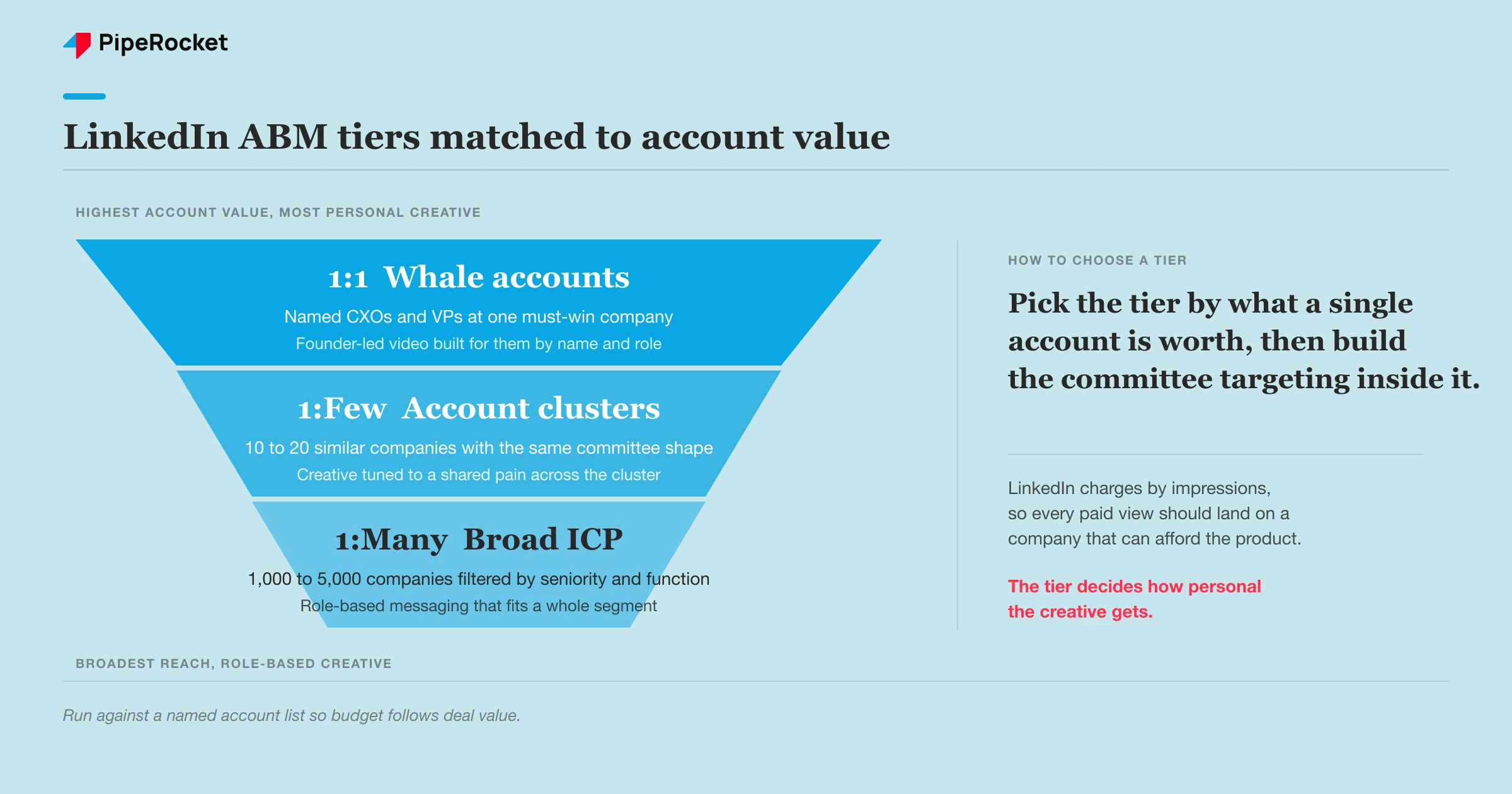
Pick your ABM tier based on how much a single account is worth, then build the committee targeting inside it. LinkedIn charges by impressions rather than clicks, so every paid impression should land on a company that can actually afford the product. Running against an account list, rather than open interest targeting, is how you stop paying to reach companies that will never buy.
We structure this in three tiers, and the committee logic sits inside each one:
- 1:1 for must-win whale accounts. Target only the specific CXOs, VPs, and directors at that named company, with creative built for them by name and role.
- 1:Few for a cluster of 10 to 20 similar companies that share the same committee shape and pain.
- 1:Many to scale across a broad 1,000 to 5,000 company ICP list, still filtered by seniority and function.
The tier decides how personal the creative gets. A whale account is worth a founder-led video that names their situation, while a 1:Many campaign runs role-based messaging that fits a whole segment.
1:1 only pays off with sales alignment
The 1:1 tier is where committee targeting earns its keep, but it dies without sales in the loop. The trap is expecting leads in a week from what’s a long-term influence play, and running generic creative to high-value accounts. We’ve watched teams point beautiful campaigns at named whales and see a depressing dashboard: low clicks, low conversions, and a founder ready to pull the plug.
Then a sales rep gets on a call and the prospect says they saw the ads. That prospect recognition is the real signal 1:1 is working, and it matters far more than the click count. Personalize by company name, the role you’re reaching, and the exact problem that role cares about. Founder-led video tends to outperform polished brand creative here, because people trust a person more than a logo. Without tight marketing-and-sales alignment, 1:1 is dead on arrival, so agree on what “working” looks like before you launch.
Step 3: Right-Size the Audience So You Actually Reach the Committee
A tight audience matched to your budget beats a huge one every time, because a wide net on a small budget influences almost nobody. This is the difference between showing an ad to a committee enough times to register and spraying it once across a crowd that forgets you instantly. The metric that exposes this is audience penetration, the share of your target audience you actually reached at meaningful frequency.
From under 2% penetration to nearly 20% with no extra budget
On one client’s LinkedIn account our team found the classic failure: the audience was too broad for the budget, so they were reaching well under 2 of every 100 people who mattered. That’s under 2% penetration, which is close to influencing no one. The ICP was right on paper (decision-makers, founders, senior roles), but the ads were showing to everyone from interns to managers who’d never buy.
We rebuilt a focused audience with strict job-function, seniority, and company-size filters, cutting it from hundreds of thousands down to thousands, added exclusions, and switched from Max Delivery to manual bidding. Penetration jumped from about 1.7% to 19.2%, a roughly 1000% increase, without spending an extra dollar. The attribution report later showed LinkedIn drove the awareness while Google Ads closed the deals, which is exactly the committee dynamic you want to see.
The lesson for committee targeting is direct: filter hard by seniority and function so your frequency is high enough to matter, then let each committee role get its own tightly-scoped audience. A blocker who sees your ad once will forget you, while a blocker who sees the right message five times over a quarter recognizes your name when the champion brings you up.
Turn off the settings quietly draining your reach
Three default settings waste the budget you need to cover a committee. LinkedIn ships them on because they spend your budget faster, even though they work worse for committee coverage:
- Audience Network: turn it off so you don’t pay premiums to appear on random third-party sites you can’t track.
- Max Delivery bidding: switch to manual, because Max Delivery optimizes for how fast it spends your budget rather than how efficiently.
- One creative: launch at least five, since LinkedIn suppresses an ad after showing it to the same person twice, so a single creative kills your own frequency.
That last one matters most for committees. If you want the same VP to see three different angles over a buying cycle, you need the creative variety to keep serving without getting suppressed.
Step 4: Measure the Committee Buy by Lift and Account Movement
Judge these campaigns on lift and account movement, because LinkedIn influences a committee it rarely gets credit for closing in a last-click report. Nobody on LinkedIn is in buying mode when your ad appears, so attribution tools often stamp the eventual conversion as “direct” or “organic.” Pause a campaign on its last-click numbers and you’ll kill the thing that was warming the committee.
What we actually watch instead:
- Lift signals: did direct traffic, brand searches, and total lead count rise after launch, even if LinkedIn isn’t claiming the credit?
- Account penetration: are multiple people from a target account now engaging, beyond the champion alone?
- Sales feedback: are reps hearing “we’ve seen your ads” on discovery calls?
A concrete read: if you were getting around 10 leads a month before LinkedIn and you’re now consistently at 13 to 15, the channel is working, regardless of what the last-click report says. For a committee buy specifically, the strongest signal is when a deal that was stuck starts moving because a second or third stakeholder finally recognizes you.
Watch the deal size too. On a $20-a-month tool sold to freelancers, LinkedIn’s high CPC will bleed you dry, so committee targeting on LinkedIn is a high-ACV play, full stop. If your average deal doesn’t justify the impression cost of reaching several roles per account, this channel isn’t your first move.
Common Mistakes That Sink Committee Targeting
Most failures here come from treating LinkedIn like a search engine instead of an influence room. A few show up on almost every audit we run.
Targeting only the budget owner
The obvious move is to aim spend at the person whose signature closes the deal, so budgets pile onto the VP or C-level economic buyer and ignore everyone below them. The problem is that the budget owner rarely discovers a tool on their own. A champion surfaces it, a reviewer pressure-tests it, and a security or finance seat can quietly veto it before it ever reaches the decision maker. When you only reach the person who signs, you are betting the whole account on internal advocates you never influenced. The fix is to build your audience from the roles that actually move a deal forward, map the full group off your closed-won accounts, and fund coverage across all of them rather than concentrating impressions on one seat.
Running one audience with one message for everyone
Blending every committee role into a single audience with a single ad feels efficient, and it quietly under-serves everyone in it. A VP cares about business outcomes and risk to their number. A security reviewer or a hands-on practitioner cares about implementation, controls, and whether the thing actually works. One creative cannot speak to both without going so generic that it lands with neither. The result is spend that touches many people and persuades none of them. The fix is to segment by role and write to each one’s real question, so the executive sees the outcome case and the reviewer sees the proof they need. Same account, different messages, timed so the group builds a shared, informed view of you.
Firing testimonial ads at cold accounts
Leading with heavy social proof to accounts that have never heard of you inverts the natural order of trust. Conviction creative, logos, quotes, and case studies works when someone already knows the category and is weighing options. Show it to a cold account and it reads as noise, because there is no relationship for the proof to reinforce yet. You burn budget establishing credibility to people who have no reason to care about it. The fix is to sequence: warm the account with problem-level and educational creative first, earn recognition across the committee, and reserve testimonial and proof-heavy ads for the mid and late stages when the group is actively considering a purchase.
Judging 1:1 campaigns on week-one performance
LinkedIn committee programs get killed early because the dashboard looks ugly before the work has had time to pay off. Judging a 1:1 or account-based effort on week-one clicks or ROAS misreads the model entirely, since influence accrues across weeks of touches before an account raises its hand. The early numbers show cost without the return, which tempts teams to cut spend right as coverage is building. The fix is to hold your nerve and read the signals that actually precede a reply: which accounts are engaging, which roles are showing up, and whether coverage across the committee is climbing. Measure movement at the account level over a realistic window, not conversions in the first few days.
The through-line: a committee forms its opinion of you across weeks and multiple touches, so build for coverage and frequency across the whole group rather than chasing a fast form fill.
How PipeRocket Helps SaaS Teams Reach the Whole Committee
We build LinkedIn programs around the entire committee, covering every role that touches the decision. As a paid social agency for B2B SaaS, we map the real decision group from your closed-won deals, structure ABM tiers by account value, and run role-specific creative at a frequency that actually registers, then measure it on lift and account movement so the influence LinkedIn drives gets counted. If your LinkedIn spend is reaching one seat at the table and the pipeline keeps stalling, talk to us and we’ll show you where the coverage gaps are.
Frequently Asked Questions
How many people are on a typical SaaS buying committee?
It varies with deal size, but most mid-market and enterprise SaaS purchases involve several distinct roles rather than one buyer. You’ll usually find a champion who drives the problem, an economic buyer who owns the budget, one or more end users, and a reviewer from security, IT, or finance who can block the deal. The higher the ACV, the larger and more cross-functional the group tends to be, which is exactly why single-persona targeting underperforms.
Should I target the whole committee in one LinkedIn audience or separate ones?
Separate audiences, using the same account list. A VP evaluating outcomes and a security reviewer looking for reasons to say no will never respond to the same message, so blending them into one audience means you under-serve both. Build one audience per committee role with its own seniority and function filters, then run creative tailored to what that role cares about. It costs more setup effort but it’s the only way to influence a group with genuinely different concerns.
How do I know LinkedIn Ads are working if the leads show up as direct or organic?
Measure lift instead of last-click attribution. After launching a committee campaign, watch whether direct traffic, branded searches, and total lead volume rise, and whether multiple people from target accounts start engaging. The clearest signal often comes from sales, when prospects mention seeing your ads on discovery calls. If your monthly lead count climbs and stuck deals start moving because a second stakeholder recognizes you, the channel is working even when the dashboard credits something else.

