Most SaaS teams have plenty of interest. Someone reads the blog, starts a trial, downloads the comparison guide, or clicks the ad. The problem shows up one step later, when that interest never turns into a contactable, qualified lead sales can actually work.
TL;DR
- A trial signup counts as a lead: in SaaS, a trial signup or freemium activation becomes a lead the moment it shows buying intent, scored alongside form-based MQLs from day one.
- Channel mix determines your capture mechanics: content/SEO, paid, product-led, and partnerships each capture demand through a different mechanism, so each gets its own capture tactic.
- Interactive tools capture by giving value first: a free calculator, grader, or assessment captures contact info by delivering a result up front and arrives partly scored, instead of blocking content behind a form.
- In-app capture earns its place: the best SaaS teams trigger capture on real usage signals and keep the feature that proves the product’s value fully out in the open.
- Scoring and routing follow the sales motion: self-serve, sales-assisted, and enterprise leads each need their own score thresholds and their own routing destination.
- Trial-to-paid nurture converts usage into a decision: once someone’s in the product, the job is turning what they’ve already done into a paid upgrade.
- The same handful of mistakes break most capture layers: over-gating content, treating every PQL like an SDR-ready MQL, and running one scoring model across every segment are the repeat offenders.
- Measure conversion by segment: trial-to-paid, PQL-to-paid, and SDR response time need to be tracked separately by motion to catch a leak a company-wide average would hide.
Why SaaS Lead Generation Isn’t the Same Job as B2B Lead Generation
In SaaS, people can experience the product before they ever talk to anyone, which changes what counts as a lead and when you’re allowed to call it one. Generic B2B lead generation assumes the funnel starts with a form, but the highest-intent action a SaaS prospect can take, using the product, produces no form at all.
Generic B2B lead gen assumes someone fills out a gated asset, gets scored, and gets called. A free trial or freemium tier breaks that assumption the moment you offer it.
This piece is deliberately scoped to that capture-and-convert layer: the mechanics of turning demand that already exists into a contactable, qualified lead. It doesn’t cover how to build category awareness or educate a market before someone’s ready to try the product, that’s a separate discipline with its own playbook. The assumption here is that people already know what your product does and are showing interest.
The distinction matters more in SaaS than in most B2B categories because the capture surface is so much wider:
- B2B capture points: a form, a phone call, or an event badge scan.
- SaaS capture points: a trial signup, a freemium account, an in-app action, or a marketplace install, often before a human on your team even knows the prospect exists.
Count a Trial Signup as a Lead From Day One
If you only count form fills as leads, you’re throwing away the signal that predicts revenue best. A trial user who invites two teammates and connects an integration in week one is a stronger buying signal than almost any downloaded whitepaper.
Treat the signup itself as a lead record from day one, then let usage data upgrade or downgrade its score as behavior comes in. Waiting until “activation” to start scoring means you miss the window where sales-assisted intervention has the most leverage, the first 48 to 72 hours.
Run MQLs and PQLs Side by Side
Most teams that add product-led motion make the mistake of replacing MQLs with PQLs instead of running both. A marketing-sourced demo request from a VP of Ops and a self-serve trial from an individual contributor are both real leads, they just need different playbooks.
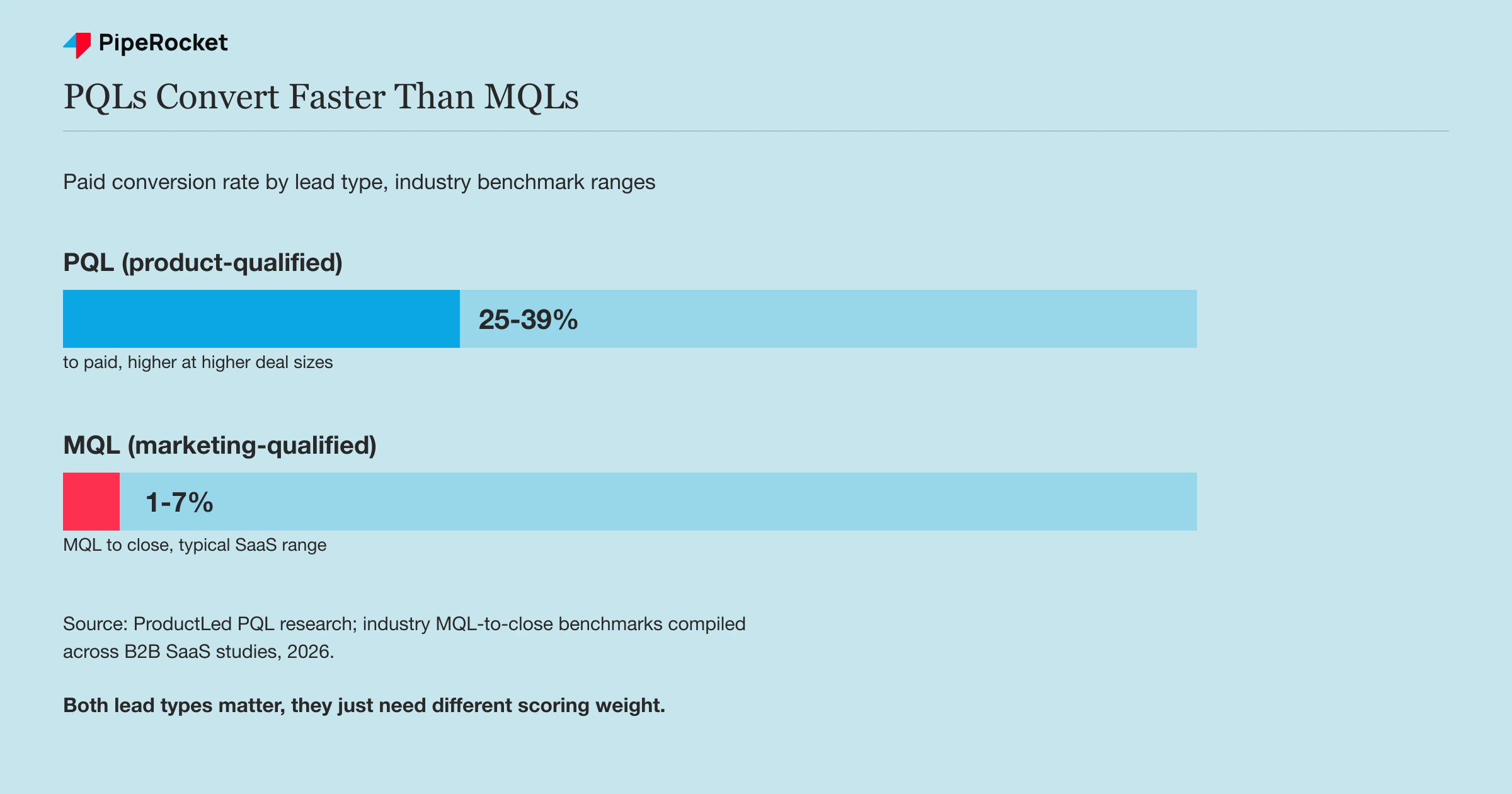
Industry benchmarks give a sense of the gap: PQLs (leads qualified by in-product usage) convert to paid at roughly 25 to 39% depending on deal size, according to ProductLed’s PQL research , while traditional MQL-to-close rates in SaaS typically run in the single digits. That doesn’t make MQLs worthless. It means a form fill and a trial signup deserve different scoring weight, and pretending they’re the same lead type is what breaks the model.
Build a Capture Mechanic for Each SaaS Channel
Content, paid, product, and partnerships each generate interest through a different mechanism, so each one needs its own capture design instead of one contact form bolted onto every page.
- Content and SEO capture: match the gate to the content’s depth. A 400-word blog post shouldn’t gate anything. A benchmark report, template, or calculator with genuine standalone value can sit behind a short form, three fields, nothing more, placed after the reader has already seen enough to trust it.
- Paid capture: build a landing page for the specific ad instead of sending clicks to the homepage. If the ad promises a comparison against a competitor, the landing page should open with that comparison and the form should sit below proof. Routing paid clicks to a generic homepage wastes spend that’s already been paid for.
- Product-led capture: trigger usage-based prompts, in-app upgrade nudges, and feature-limit walls exactly when a user hits a ceiling worth solving inside the trial or freemium product. This is covered in more depth below because it’s the mechanic most SaaS teams get wrong.
- Partnership and integration capture: lean on co-marketing pages, marketplace listings, and referral flows. A user who installs your app from a partner’s integration marketplace is already qualified by context, so the capture form can be shorter and routing can skip early nurture entirely.
- Referral and community capture: a referral program turns existing users into a capture channel, and a lead that arrives through a teammate’s invite comes pre-warmed by a trusted recommendation. A presence in the Slack, Discord, or forum communities your buyers already use captures interest at the moment a real problem surfaces, before anyone starts a formal search.
Take a compliance SaaS built for fintech teams. Its blog content stays ungated because the audience is early and skeptical, but a downloadable SOC 2 readiness checklist sits behind a three-field form because it’s the kind of asset a compliance lead would bookmark and share internally. The product itself captures a different lead entirely: a user who connects a second data source inside the trial is showing real intent, regardless of whether they ever filled out a form.
Each channel also needs its own definition of a qualified lead, not a shared one borrowed from whichever channel got funded first. A content-sourced lead who downloaded a checklist and never opened a follow-up email isn’t disqualified, they just need a slower sequence than a product-sourced lead who hit a usage limit on day four.
Turn Free Interactive Tools Into a Capture Mechanic
A free interactive tool, a calculator, a benchmark grader, or a self-serve assessment captures contact information by delivering a real answer up front, so the form feels like the price of a result rather than a toll on a blog post. This is its own inbound tactic, distinct from gating static content.
The tool does the qualifying for you. Someone who runs an ROI calculator, a pricing estimator, or a maturity assessment has told you their inputs (team size, spend, current stack), which means the lead arrives already partly scored. Ask for an email to save or send the result, not to see it, so the value lands before the ask.
Build the tool around a question your buyer is already trying to answer inside a spreadsheet. A calculator that mirrors the math your product automates does double duty: it captures a lead and previews the product’s value in the same session, which is the same product-led capture logic that makes free trials work.
Design In-App Lead Capture Without Wrecking the Trial
In-app capture works when it’s triggered by a usage signal, not a timer. A modal that fires on day 3 regardless of what the user has done treats every trial the same, and most trials aren’t the same.
Trigger capture on real signals instead, each one a moment where the user has already told you what they need:
- Hitting a plan limit
- Inviting a third teammate
- Attempting an enterprise-only feature
Match the capture prompt (book a call, unlock a feature, add billing details) to the thing they just tried to do.
Never Gate the Feature That Proves the Product Works
That single mistake kills more trials than any capture mechanic can fix. If your product’s value is the integration, the automation, or the report it generates, don’t put that specific thing behind a paywall in week one. Let the user feel the value, then capture intent around expanding it, not around unlocking it for the first time.
Match the Trial Format to the Deal Size
Card-required trials trade signup volume for quality: fewer people start the trial, but First Page Sage’s B2B SaaS benchmark data has found card-required trials converting to paid at roughly 48.8% versus about 18.2% for no-card trials. Neither approach is universally right. A high-ACV product with a longer eval cycle usually does better with a light qualifying question (company size, use case) instead of a card, since the goal there is a sales-assisted conversation, not instant self-serve revenue.
Score and Route Leads for the Sales Motion They’re In
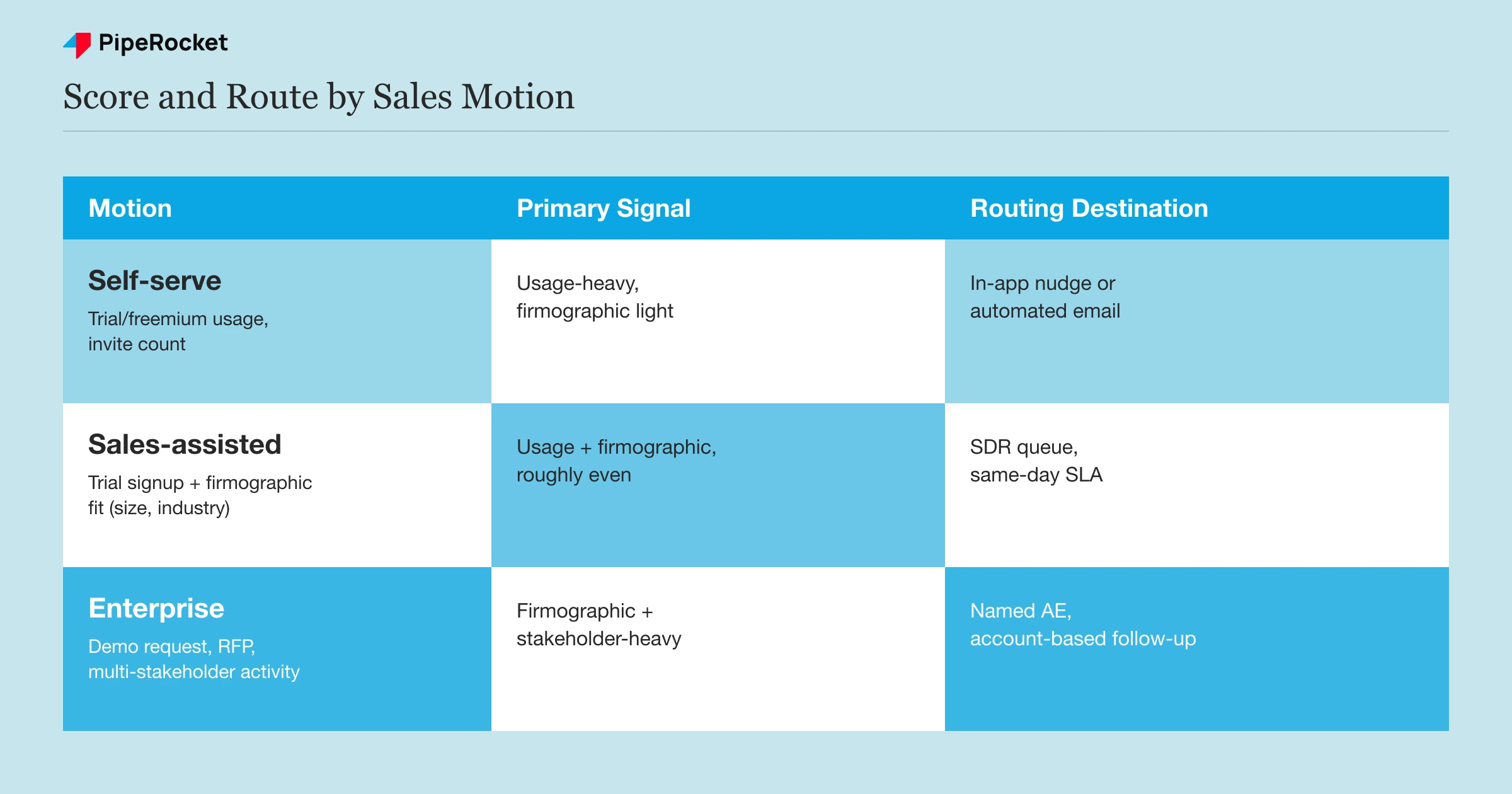
Lead scoring and routing has to split by sales motion, because a self-serve buyer, a sales-assisted mid-market buyer, and an enterprise buyer are convinced by completely different things. One universal score threshold routes half your good leads to the wrong queue.
| Motion | Primary capture signal | Scoring weight | Routing destination |
|---|---|---|---|
| Self-serve | Trial/freemium usage, feature adoption, invite count | Usage-heavy, firmographic light | In-app nudge or automated email, no human touch until upgrade intent |
| Sales-assisted | Trial signup + firmographic fit (team size, industry) | Usage plus firmographic, roughly even | SDR queue for qualification call within a set SLA |
| Enterprise | Demo request, RFP, multi-stakeholder trial activity | Firmographic and stakeholder-count heavy, usage secondary | Named AE, account-based follow-up, procurement-aware sequencing |
A trial user on a $30/month plan who invites a teammate is a strong self-serve signal but a weak enterprise signal. The same invite from a domain that matches a target account list on your enterprise tier is a completely different lead. Routing both to the same SDR queue wastes the SDR’s time on the self-serve one and loses momentum on the enterprise one.
This is where scoring models fail most often: they weight one signal type (usually firmographic data) across every deal size, when usage signals should dominate at the low end and firmographic and stakeholder signals should dominate at the high end. Build the score as a blend that shifts weight by segment, not a single formula applied everywhere.
Routing speed matters as much as the score itself. A recent Gartner sales survey found a majority of B2B buyers now want a rep-free buying path where possible, which means the self-serve lane needs to be genuinely self-serve, not a form that quietly routes to a human anyway. Reserve human follow-up for the leads where a person actually changes the outcome: mid-market deals that need a qualifying conversation, and enterprise deals that need a named contact from the first touch.
Building this out usually means three separate routing rules living in the same CRM, not one scoring field everyone reads differently. Self-serve leads route to an automated sequence with a single clear next action. Sales-assisted leads route to an SDR queue with a same-day SLA. Enterprise leads route straight to an account owner, skipping the SDR layer entirely since the qualifying work already happened through firmographic fit and stakeholder count.
Nurture Trial and Freemium Users Toward a Paid Decision
Nurture trial and freemium users by what they’ve done in the product, not by a fixed calendar day. Because the person is already using the product, the message has to focus on what they’re about to lose and the two-minute step that keeps it, not on why the category matters.
Build the nurture sequence around usage milestones instead of a fixed day-by-day drip. A user who hasn’t logged in by day 3 needs a different message than one who’s used the product daily but hasn’t touched the paid-only feature. Sending the same generic “your trial is ending” email to both wastes the one email that could have converted the active user.
Sequence the message by what’s actually happening in the account:
- Inactive by day 2-3: send a short, specific nudge tied to the one setup step they skipped.
- Active but plateaued: surface the next feature that matches what they’ve already done, framed as their next step.
- Hit a plan limit: route straight to an upgrade prompt or a sales-assisted call, this user has already told you they want more.
- Trial ending, no upgrade signal: give a real deadline with a specific reason to act now.
Freemium nurture runs longer and needs a different trigger set, since there’s no expiration forcing a decision. The signal to watch is usage growth over weeks or months. A free-tier account whose usage keeps climbing without hitting a paid feature limit is often under-provisioned on the free tier by design, and that’s the moment for a proactive upgrade conversation rather than waiting for the user to hit a wall on their own.
Common Mistakes That Break the SaaS Capture Layer
Most SaaS lead generation problems trace back to a handful of repeatable mistakes at the capture stage, not a lack of demand.
Gating Content That Doesn’t Earn a Form
Putting a lead form in front of a 500-word explainer or a basic how-to teaches visitors to bounce rather than convert. Save the gate for content with genuine standalone value, a benchmark dataset, a working template, a real calculator, and let the rest build trust for free.
Treating Every PQL Like a Sales-Ready MQL
Not every trial signup is ready for an SDR call. A PQL with strong usage but no firmographic fit (wrong company size, wrong industry) should go to automated nurture, not a queue that burns a rep’s time on a lead that was never going to close.
The fix is a second filter after the usage score: firmographic fit still has to clear a bar before a PQL reaches a human. High usage from a five-person company on your enterprise tier’s target list is worth a call. The same usage pattern from a company two sizes too small is worth a good automated sequence instead.
Running One Lead-Scoring Model for Every Segment
A single score threshold applied across self-serve, mid-market, and enterprise leads routes the wrong leads to the wrong queues in both directions. It sends low-value self-serve signups to expensive human follow-up and lets high-value enterprise activity sit in an automated nurture track meant for a $30/month buyer.
Gating the Feature That Proves the Product Works
If the trial’s whole job is to prove the product delivers value, don’t hide that specific value behind a paywall before the user has felt it once. Capture intent around expanding access, not around a first unlock.
Ignoring Self-Serve Signups Because They “Aren’t Real Leads”
Sales teams sometimes dismiss self-serve trial signups as noise because they don’t come with a phone number attached. That’s the same usage data that predicts a 25 to 39% paid conversion rate for the highest-intent PQLs, and treating it as unqualified traffic means writing off the leads most likely to close on their own.
Measure Whether the Capture Layer Is Actually Working
The right metric for a SaaS capture program is the conversion rate from each capture point to a paid or sales-qualified outcome, tracked separately by channel and motion, not one blended lead count.
Track these numbers by segment, not as a single company-wide average:
- Trial-to-paid conversion rate, split self-serve versus sales-assisted
- PQL-to-paid conversion rate compared against MQL-to-close rate
- Time from signup to first usage-based scoring event
- SDR response time on sales-assisted leads (the window that most affects conversion)
- Percentage of enterprise pipeline sourced from product usage versus a demo request
A capture layer that looks healthy on a blended average can be hiding a broken segment. If self-serve trial-to-paid is strong but sales-assisted lead response time has crept up, the blended number won’t show it, only the segmented view will. Review these numbers by motion every month, not just at the funnel level.
Set a baseline before changing anything. Pull the last two or three months of trial or freemium signups and tag each one by how it converted: self-serve upgrade, sales-assisted close, or no conversion. That baseline tells you where the capture layer is actually leaking before you touch scoring rules, routing logic, or in-app prompts.
Watch the gap between PQL volume and PQL follow-through specifically. It’s common to see plenty of usage-qualified signups sitting untouched because no one owns the handoff from product data to a sales or lifecycle action. A PQL that never triggers a next step is functionally the same as a lead that was never captured at all, it just looks better on a dashboard.
How PipeRocket Digital Helps SaaS Teams Fix Their Capture Layer
We build lead capture and scoring systems around the sales motion a SaaS company actually runs, not a generic form-and-nurture template. That means designing in-app capture triggers, blending PQL and MQL scoring by segment, and routing self-serve, sales-assisted, and enterprise leads to the right destination.
If you want a second opinion on where your capture layer is leaking qualified leads, talk to our team . We do this work as part of our SaaS SEO service and our SaaS PPC service , and you can see how we compare to other options on our list of the best SaaS marketing agencies .
Frequently Asked Questions
What’s the difference between a PQL and an MQL in SaaS?
A PQL (product-qualified lead) is scored based on in-product usage, like feature adoption, invite count, or hitting a plan limit, and typically applies to trial or freemium users. An MQL (marketing-qualified lead) is scored based on marketing engagement, like a gated content download or a webinar signup, without any product usage involved. SaaS companies with a trial or freemium motion need both models running at once, weighted differently depending on whether the lead came through self-serve product usage or a form.
Should SaaS trials require a credit card to capture better leads?
Card-required trials filter for more qualified intent but shrink your total signup pool, since a meaningful share of prospects won’t complete a card-required flow. No-card trials capture more volume but include more low-intent signups that need heavier scoring to filter out. The right choice depends on your price point and sales motion, lower-ACV self-serve products typically do better with a card requirement, while higher-ACV products with a sales-assisted motion often convert better with a lighter qualifying question instead.
How fast should a SaaS sales team respond to a sales-assisted lead?
Response time on sales-assisted leads has one of the biggest effects on whether that lead ever talks to a rep at all, since interest that isn’t acted on within the first day or two tends to fade or move to a competitor. Route sales-assisted leads to an SDR queue with a clear internal SLA, ideally same-business-day, rather than letting them sit in a shared inbox. Leads generated through in-app triggers (hitting a plan limit, requesting an enterprise feature) deserve the fastest response window of all, since the user has just told you exactly what they need.