
What Is Vector Search? How AI Engines Find Content by Meaning
 Ranjeeth Kumar
Last updated on
Ranjeeth Kumar
Last updated on
Vector search finds content by comparing meaning instead of matching exact words. It converts text, images, or queries into number arrays called embeddings, then retrieves whatever sits closest to the query in that mathematical space, even when no words overlap.
The Short Version
- Vector search retrieves results by comparing the mathematical meaning of content, not by matching the exact words a searcher typed.
- It works by converting text into embeddings, long strings of numbers, then measuring how close two embeddings sit in a shared space.
- It matters for SEO and content teams because most AI search engines and AI Overviews run a version of this alongside keyword matching, so a page that never states its topic in plain, matchable language can still get skipped.
- The practical move is to write pages that name the entity and the question directly, since that’s what makes a page retrievable by both keyword and meaning-based systems at once.
What Is Vector Search?
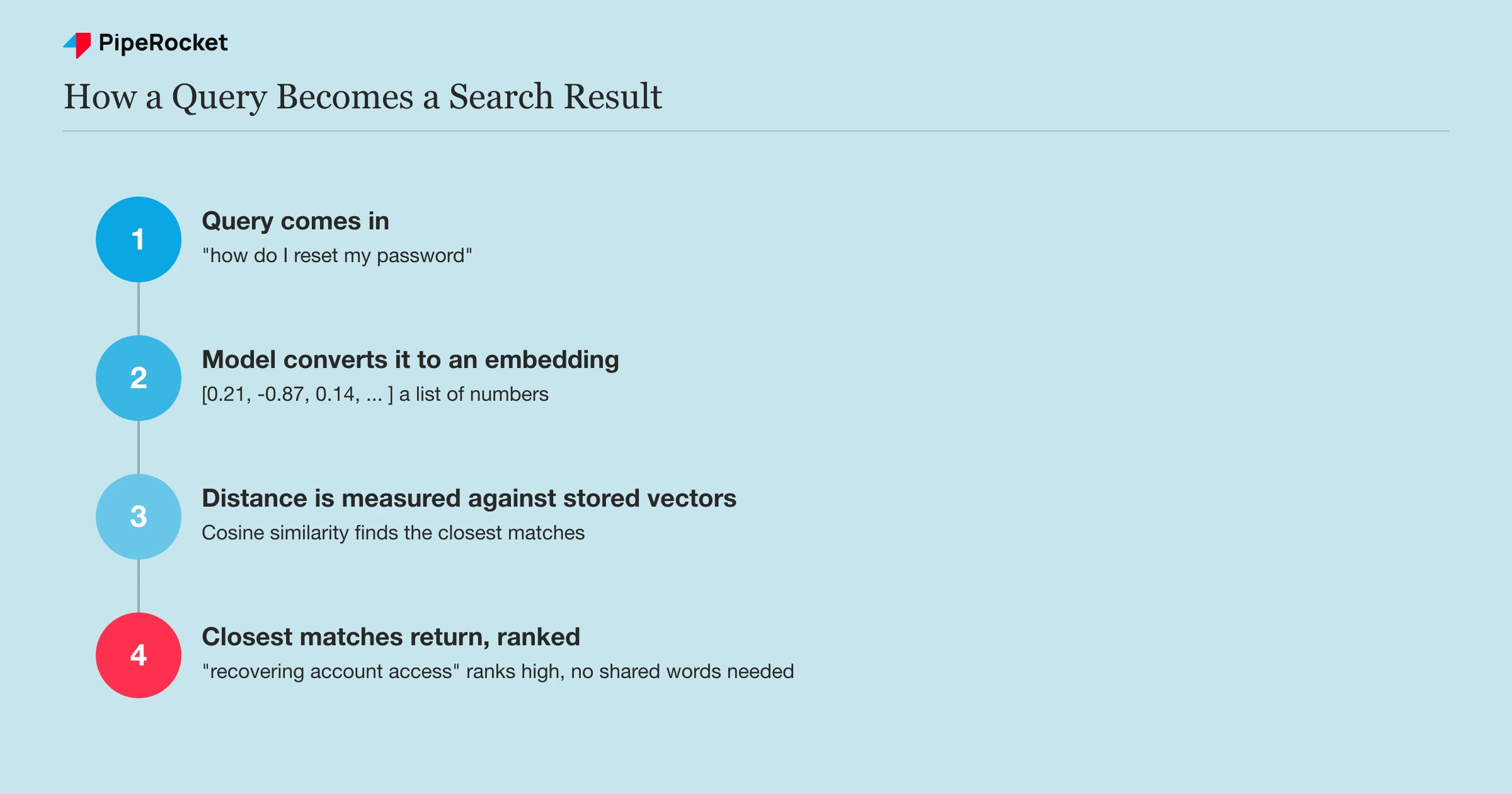
Vector search is a retrieval method that ranks results by conceptual closeness rather than shared vocabulary. A search for “how to reset a forgotten password” can surface a document titled “recovering account access” because the two phrases sit near each other in meaning, even though they don’t share a single word.
Classic keyword search, the kind that has powered most search engines for two decades, works by matching literal terms and their variants:
- Keyword search: fast and precise when the searcher’s words match the document’s words. Breaks down the moment a searcher describes something in different language than the source uses, which happens constantly in real queries.
- Vector search: fixes that specific gap by adding a second matching layer that catches the queries keyword search misses.
Most production systems today, from e-commerce search bars to AI chat assistants, run both at once rather than picking one.
How Does Vector Search Actually Work?
Vector search works by converting content into embeddings, then measuring the mathematical distance between a query’s embedding and every stored document’s embedding to find the closest matches. Three pieces make that possible.
Embeddings Turn Meaning Into Numbers
An embedding is a list of numbers, often hundreds or thousands of them, produced by a machine learning model trained to capture what a piece of text means. Two sentences with the same underlying idea end up with embeddings that sit close together, even if they use completely different words.
The model doing this conversion (OpenAI’s text-embedding models, Google’s Gecko, open models like BGE) was trained on massive volumes of text specifically to learn which concepts belong near each other. “Cardiac arrest” and “heart attack” land close together because the model saw both used in near-identical contexts across its training data.
Vector Space Is Where Distance Equals Similarity
Once content is embedded, every document becomes a point in a high-dimensional space, and items with related meaning cluster near each other. A query gets embedded using the same model, dropped into that same space, and the system looks for the nearest points.
“Nearest” is measured with a distance formula, usually cosine similarity or Euclidean distance, both of which just quantify how close two number arrays sit. The math doesn’t know what the words mean. It only knows how close the numbers are, which is precisely why it can catch synonyms and paraphrases a keyword system would miss entirely.
Search at Scale Runs on Approximate Nearest Neighbor
Comparing a query against every single embedding in a large collection doesn’t scale, so real systems use approximate nearest neighbor (ANN) algorithms to shortcut the search.
Instead of an exhaustive comparison, ANN indexes organize embeddings so the system can find very-likely-closest matches in a fraction of the time, trading a small amount of precision for speed that works at millions of documents.
This is the part vector databases (Pinecone, Weaviate, Qdrant, Milvus, and the vector features now built into Postgres and Elasticsearch) exist to handle. They store the embeddings, run the ANN index, and return ranked matches in milliseconds.
Vector Search vs. Keyword Search vs. Hybrid Search
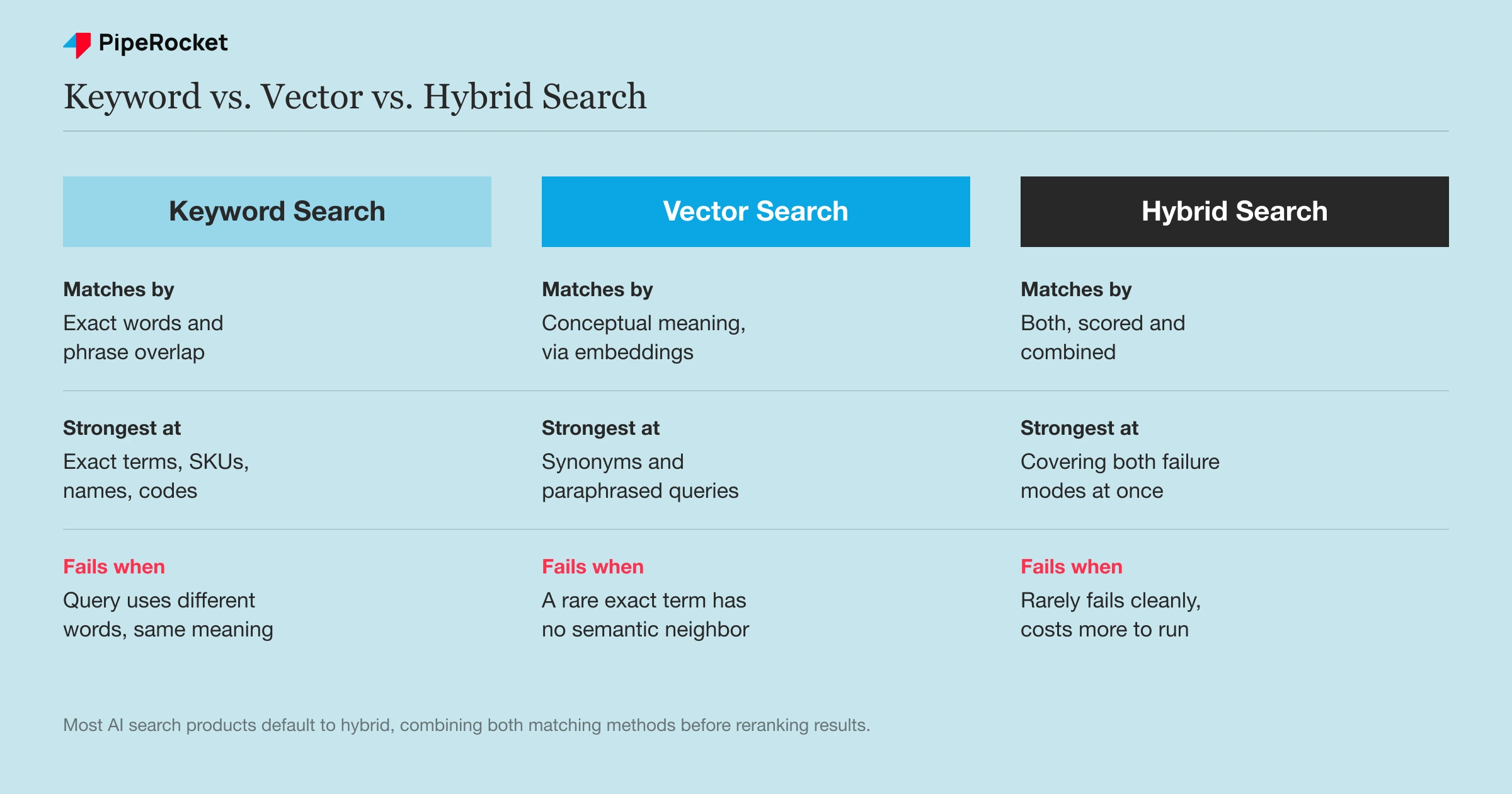
The useful comparison is which failure mode you can live with, since each method breaks in a different place.
| Feature | Keyword Search | Vector Search | Hybrid Search |
|---|---|---|---|
| Matching rule | Exact text and word overlap | Conceptual and semantic meaning | Both, scored and combined |
| Handles synonyms | Fails unless exact words match | Groups synonyms automatically | Catches synonym misses via the vector pass |
| Handles exact terms (SKUs, error codes, names) | Strong, precise | Weak, can drift toward “similar” instead of “exact” | Strong, keyword pass anchors precision |
| Data types | Structured text, exact lookups | Unstructured text, images, audio, video | Mixed, depending on weighting |
| Where it fails | Different words, same meaning | A rare model number with no semantic neighbors | Rarely fails cleanly, but costs more to run |
Hybrid search exists because the two failure modes are almost opposite. Perplexity’s retrieval pipeline is a documented example: it runs BM25-style keyword matching and dense vector embeddings in parallel, then reranks the combined results before an answer gets written. Neural embeddings are also what replaced the older, debunked idea of LSI keywords as a way to signal topical relevance.
Most AI search products now default to hybrid search for exactly this reason.
What Are Vector Search’s Most Common Use Cases?
Four use cases account for most production vector search deployments, and each one leans on the same embedding-and-distance mechanism described above.
Retrieval-Augmented Generation (RAG)
Retrieval-augmented generation (RAG) is the method most AI assistants use to pull real documents before writing an answer, and it depends on vector search to find candidate sources. Without a retrieval step like this, an AI assistant only knows what it was trained on, not a company’s own documents or current data.
Semantic Enterprise Search
Internal knowledge bases use vector search so employees can type a plain-language question, like “how do I request time off,” and get the right internal policy page back, even if that page never uses the word “request” or “time off.”
Two more use cases run on the same mechanism, just applied to different inputs:
- Recommendation engines. Product, movie, and content recommendations run on the same nearest-neighbor logic: an item a user already liked gets embedded, and the system surfaces other items whose embeddings sit close to it in the same space.
- Multimodal search. Vector search isn’t limited to text. Image, audio, and video files can be embedded into the same kind of vector space, which is how a text description can return matching images or clips without either side sharing a single word.
Why Vector Search Matters for AI Search and Content Optimization
Vector search matters to SEO and content teams because it’s the retrieval layer underneath most AI search tools. A page can rank in Google and still get skipped by an AI engine that never retrieved it in the first place, since RAG-style retrieval is what decides which sources an AI assistant even sees before it writes an answer.
That changes what “optimized” means. A page stuffed with exact-match keywords can miss the semantic pass if it never states its topic in plain, generalizable language near the top. A page that’s conceptually relevant but vague about what it actually covers can miss the keyword pass just as easily.
The pages that clear both name the entity and the question directly, in the first sentence or two, instead of building up to it through a long introduction. That structural choice affects whether the page’s embedding lands close enough to a real query to get pulled into the candidate set at all.
Chunking Decides Which Passages Get Retrieved
Chunking is the reason page structure affects retrievability, since most RAG systems don’t embed a whole page, they split it into passages and embed each one separately. A single well-structured page can produce several retrievable chunks instead of one.
A page with clear headings and one self-contained idea per section chunks cleanly. A page that spreads one idea across four paragraphs without a heading to mark it often doesn’t, which is the same technical SEO discipline that made pages crawlable and scannable long before embeddings existed, and it hurts retrievability even when the writing itself is good.
Common Mistakes When Thinking About Vector Search
Assuming It Replaced Keyword Search
Vector search added a second layer that most production systems run alongside keyword matching, rather than replacing it outright. Treating “AI search” as purely semantic and dropping exact-match language from a page removes the precision keyword matching still provides for names, model numbers, and exact phrases people actually type.
Believing Longer, Denser Pages Embed Better
A page that buries its answer under three paragraphs of context doesn’t embed as one clean, retrievable concept, it embeds as a diffuse mix of everything the page touches. Shorter, clearly scoped sections with a heading that states the topic produce sharper, more retrievable embeddings than a single sprawling page trying to cover everything at once.
Confusing Vector Search With the Vector Database That Runs It
Vector search is the technique, retrieval by embedding similarity, while a vector database (Pinecone, Weaviate, Qdrant) is the infrastructure that stores embeddings and runs the nearest-neighbor search efficiently at scale. Knowing the difference matters less for SEO purposes and more for not misreading vendor content that’s selling infrastructure, not explaining the concept.
How PipeRocket Digital Builds Content for Retrieval and Rankings
We structure content so it clears both the keyword and semantic retrieval passes at once, alongside Google’s classic ranking signals. That means answer-first sections, one scoped idea per heading, and plain-language topic naming that works whether the system doing the matching is BM25 or an embedding model.
If you want your content audited against how AI systems actually retrieve it, our SaaS SEO agency team runs that audit. See how we stack up on our list of the best SaaS SEO agencies , or talk to us about your specific setup.
Frequently Asked Questions
What is vector search in simple terms?
Vector search is a way of finding content by meaning rather than by matching words. It turns text, images, or other data into number arrays called embeddings, then finds whichever stored items have embeddings closest to the query’s. That lets it surface a relevant result even when the query uses completely different wording than the source content.
What is the difference between Elasticsearch and vector search?
Elasticsearch is a search engine platform, and vector search is one retrieval technique it (and many other platforms) can run. Classic Elasticsearch used BM25-style keyword matching, but modern versions added native vector search support, so the platform can now run keyword matching, vector matching, or both together as hybrid search within the same system.
Does Google use vector search?
Google has used embedding-based, meaning-driven ranking signals since well before AI Overviews , through systems like BERT and RankBrain that interpret query intent beyond exact keyword matching. Google’s newer AI Overviews and AI Mode lean even more heavily on retrieval methods that resemble vector search, pulling and synthesizing sources based on semantic relevance rather than keyword overlap alone.
What are the top vector databases?
The most widely used vector databases are Pinecone, Weaviate, Qdrant, and Milvus, alongside vector-search features now built into general-purpose databases like Postgres (via the pgvector extension) and Elasticsearch.
The right choice usually comes down to scale, whether the team wants a managed service versus self-hosted infrastructure, and whether vector search needs to run alongside existing keyword search in the same system.
How do I add vector search to a coding project?
Most implementations start with three choices: an embedding model to convert content into vectors (OpenAI, Cohere, or an open model like BGE), a vector database or extension to store and query those vectors (Pinecone, Weaviate, Qdrant, or pgvector on Postgres), and a chunking strategy for splitting longer content before it’s embedded. Most teams wire the embedding model and vector store together through the vector database’s own SDK rather than building the nearest-neighbor search logic from scratch.

