
How to Turn SaaS Blog Traffic Into Trials
 Ranjeeth Kumar
Published on · Last updated on
Ranjeeth Kumar
Published on · Last updated on
Turning blog traffic into trials means matching each CTA to the reader’s stage, placing offers inside the content instead of only at the bottom, and tracking signups back to the specific post that produced them.
TL;DR
- Most blogs lose the reader at the CTA. A single generic “Start Free Trial” button asks for a bigger commitment than most readers are ready to give.
- Turning readers into trials starts with reading the room. A post written for someone just learning the topic needs a lighter ask than one written for someone comparing tools.
- The trial offer belongs where the reader’s attention already is. Waiting until the end of the post to make the ask means most readers never see it.
- CTA design decides whether the offer gets noticed at all. Weak contrast, vague copy, and buried placement quietly kill offers that would otherwise convert.
- Exit-intent should catch genuine hesitation. Fire it too early or too generically and it trains readers to close it on reflex.
- If you can’t trace a trial back to a post, you’re guessing. Blog traffic and blog-to-trial conversion are two different numbers, and only one of them pays the bills.
Why Blog Traffic Doesn’t Turn Into Trials on Its Own
Publishing more posts doesn’t fix a conversion problem, because traffic and trials are answering different questions. Traffic proves people found the post. Trials prove the post convinced someone to act, and those are separate jobs that separate parts of the page have to do.
Most SaaS teams treat the blog as a lead-gen afterthought bolted onto the SEO plan. They write for rankings, drop one “Start Free Trial” button at the bottom, and assume a good post will carry the ask. It won’t, because a reader who just finished 1,500 words on a topic they were still learning isn’t in a buying moment yet.
Here’s the part teams miss: a blog reader and a pricing-page visitor are not the same person with different traffic sources. They’re at different points in the decision, and asking both of them for the same commitment is why one CTA design underperforms across an entire content library.
Content-led pages typically convert visitors to trials somewhere between 0.5% and 2%, well below the 2-5% a site sees across all traffic combined. That gap isn’t a traffic problem. It’s a mismatch between what the post earned and what the CTA demanded.
Step 1: Match the CTA to the Article’s Buying Stage
The CTA you place has to match what the reader already believes, not what you wish they believed. A post that explains a concept from scratch and a post that walks through implementation are answering different doubts, so the ask at the end of each one should be different too.
For a learning-stage post (“What is X” or “How does X work”), the honest next step is smaller: a related guide, a template, or a lighter opt-in. Asking someone still forming the problem to start a trial skips several steps they haven’t taken yet, and skipping steps is what tanks form completion.
For a comparison or how-to post where the reader already knows the category and is deciding between approaches, the trial ask fits naturally, because the reader has already done the mental work a trial assumes. That’s also the exact audience a SaaS comparison page is built to convert, so a how-to post that walks through implementation can point straight at the product without feeling like a jump.
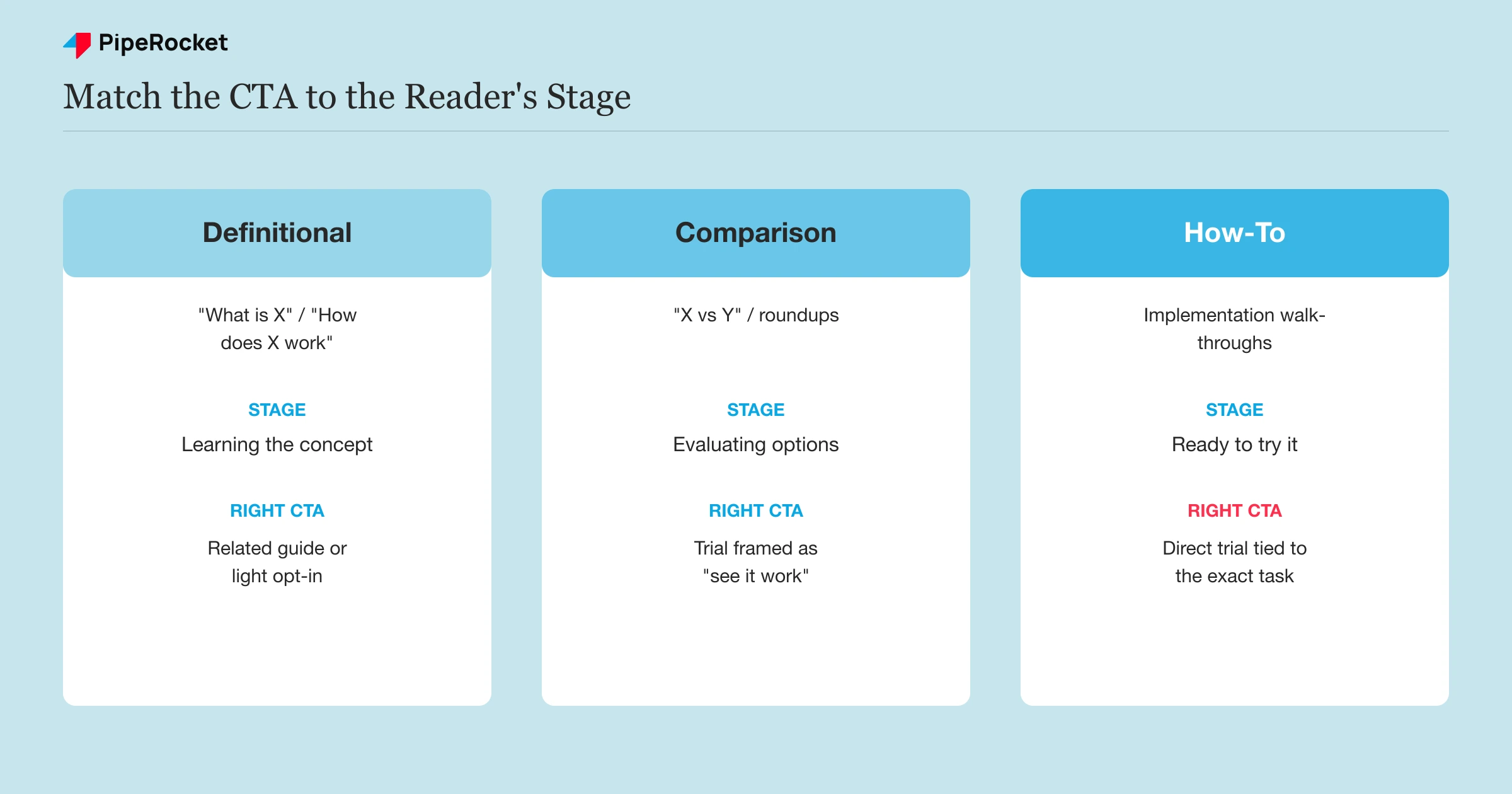
Build a Simple Stage-to-CTA Map Before You Touch a Single Post
Before editing CTAs post by post, sort the blog into three buckets so the mapping stays consistent across the whole library.
| Post type | Reader’s stage | Right CTA |
|---|---|---|
| Definitional / “What is X” | Learning the concept | Related guide or lightweight opt-in |
| Comparison / “X vs Y” | Evaluating options | Trial with a clear “see it work” framing |
| How-to / implementation | Ready to try the approach | Direct trial CTA tied to the exact task covered |
Skip this mapping and you’ll default to the same CTA everywhere, which is how a strong how-to post gets the same soft ask as a glossary entry, and a beginner post gets pushed straight into a trial form it was never going to fill.
Step 2: Put the Trial Offer Inside the Content, Not Just at the End
The strongest CTA placement is beside the paragraph that earns it, not stacked at the bottom where most readers never scroll. A reader who just read a specific claim is primed to act on it immediately, and that window closes the moment they scroll past.
We’ve watched this play out on a client’s landing page: heatmaps showed readers clicking mid-paragraph on a claim with no link attached, while the actual “Book a Demo” button sat far below, unclicked. Once a simple contextual text CTA was added right inside that paragraph, it produced two qualified leads within the following week. The fix wasn’t a redesign. It was putting the ask where the intent already existed.
Write the In-Content Hook Around the Specific Task, Not the Product
A generic mid-post CTA (“Try our product free”) reads as an interruption because it’s disconnected from what the sentence was actually about. A hook tied to the exact task the paragraph just covered reads as the natural next step instead.
If a paragraph just explained how to segment trial users by use case, the hook that follows should offer to show that segmentation inside the product, not a generic sign-up line. Specificity is what makes the ask feel earned rather than inserted.
Space Hooks by Intent Density, Not by a Fixed Word Count
Don’t drop a CTA every 500 words on a timer. Some sections build toward a decision point and deserve a hook right there; others are still setting up context and a CTA there would feel premature.
A rough guide: place one hook after the section that makes the article’s strongest claim, one after the section that resolves the reader’s main objection, and the closing CTA at the end for the reader who read the whole thing before deciding. Three well-placed hooks beat six evenly spaced ones.
Step 3: Design CTAs Readers Actually Notice
A CTA that blends into the page design gets skipped even when the offer is genuinely good. Design is not decoration here. It’s the difference between an offer a reader sees and one they scroll past without registering.
Give the CTA Enough Visual Weight to Interrupt Scanning
A button in the site’s default link color, sitting in a wall of body text, reads as just another sentence. Give trial CTAs their own visual block: a contrasting background, clear padding, and a button shape distinct from inline text links, so the reader’s eye catches it even while skimming.
Write the Button Copy Around the Outcome, Not the Action
“Submit” and “Start Free Trial” describe what happens on your end, not what the reader gets. Copy built around the outcome the reader wants (“See your data in [Product] in 2 minutes”) tells them what they’re actually getting before they click, which lowers the perceived risk of clicking at all.
Repeat the Same CTA Instead of Offering Several Different Ones
A post that offers a demo, a trial, a newsletter, and a download all in different sections asks the reader to make a decision about which action to take, and most readers resolve that friction by taking none of them. Pick one primary ask per post and repeat it, worded consistently, at every placement.
Step 4: Use Exit-Intent to Catch Readers Before They Leave
Exit-intent should catch a reader who’s already decided to leave, not interrupt one who’s still reading. Firing it the moment someone’s cursor drifts toward a link, or showing it to every visitor regardless of how they engaged with the post, trains readers to close it on reflex before they even register what it says.
Trigger it on genuine exit signals: cursor movement toward the browser chrome, a meaningful scroll depth already reached, or a set amount of time spent actually reading. A visitor who bounced in four seconds was never going to convert on a popup, and showing them one just adds a bad impression to a page they already left.
Exit-intent popups convert somewhere between 2% and 4% of the visitors who see them industry-wide, and that number depends entirely on whether the offer matches what the visitor was doing before they tried to leave. A generic newsletter popup on a bottom-of-funnel post wastes an exit moment that a well-matched trial offer could have caught.
Match the Exit Offer to the Post’s Stage, Not a Single Site-Wide Popup
The same stage logic from Step 1 applies here. A learning-stage post should offer something learning-stage readers actually want on exit, like a related resource, not a trial pitch that assumes a decision they haven’t reached. A decision-stage post can make the trial ask directly, because the reader has already shown intent by reading that far.
Step 5: Measure Blog-to-Trial Conversion, Not Just Blog Traffic
Judge the blog on trials it produces, not sessions it attracts, because those two numbers can move in completely opposite directions. A post can double its traffic and produce zero more trials if the new readers never matched the CTA that was waiting for them.
Set this up by tagging every CTA with a distinct UTM or event name tied to its source post, then connecting that event through to trial signup in your analytics or CRM. Without that link, you can report a rising pageview count and never know whether it turned into a single trial.
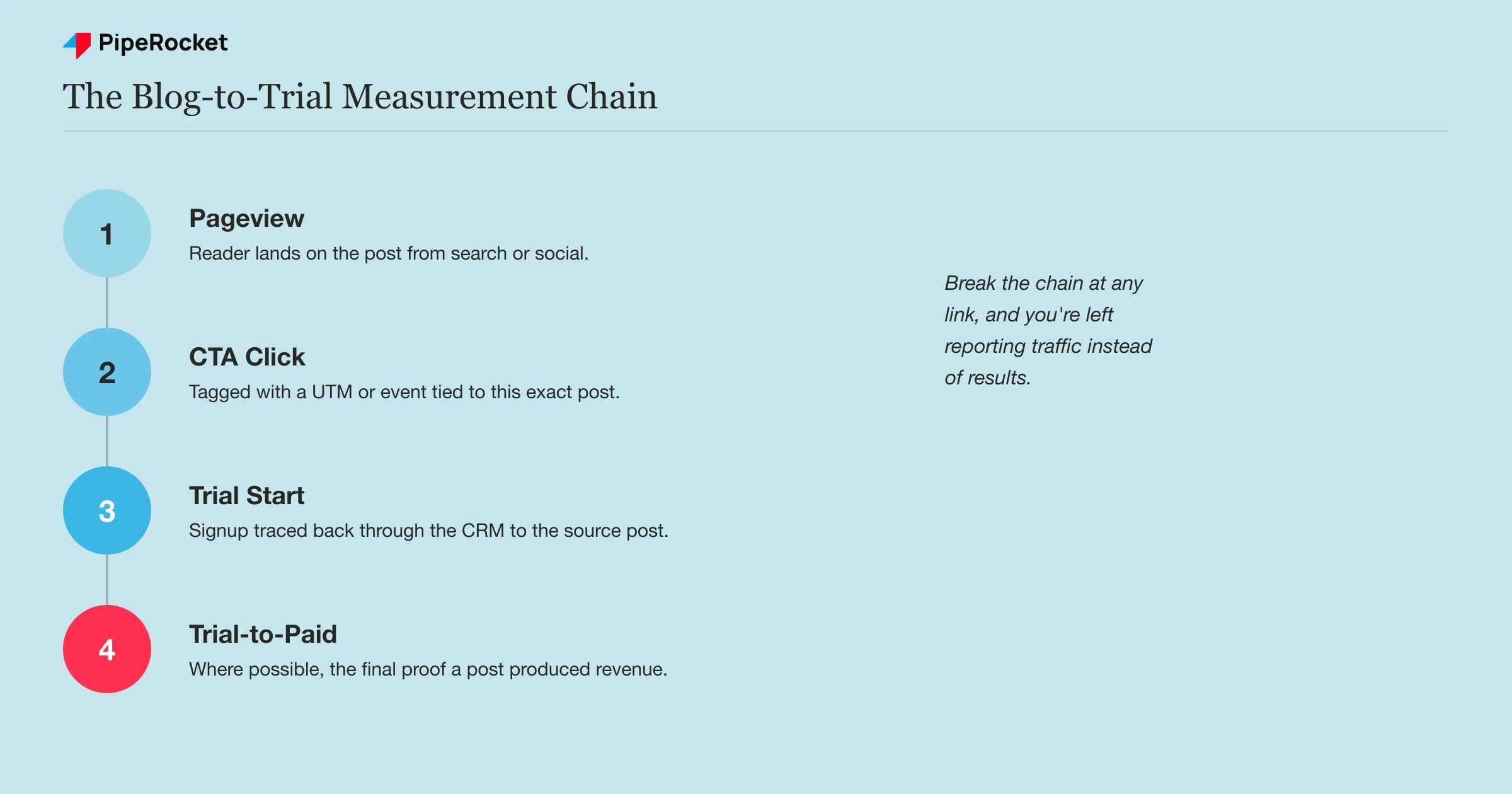
Track the Chain From Post to Signup, Not Just the Click
A CTA-click rate that’s climbing means nothing if trial starts stayed flat, so measure the full path: pageview, CTA click, trial start, and where you can, trial-to-paid. Report it by post so a strong performer and a weak one never get averaged into one misleading blog-wide number, the same way a broader CRO program benchmarks pages by their own job rather than a single site average.
Give Each Post a Fair Comparison Window
A brand-new post won’t out-convert one that’s been live for a year and already has backlinks and reader trust behind it. Compare posts against others of similar age and similar funnel stage, not against your single best-performing page, or you’ll cut posts that are actually doing fine for where they sit in the library.
Common Mistakes to Avoid
Using One CTA Across the Entire Blog
Copying the same trial button onto every post regardless of what the post covers treats a beginner reading a definition the same as a buyer comparing tools. The fix is the stage-to-CTA map from Step 1, applied consistently as new posts get published.
Waiting Until the Very End to Ask
A CTA that only appears after the full post has been read misses every reader who got their answer and left at paragraph six. In-content hooks placed at the moments of highest intent catch readers the closing CTA never reaches.
Treating Exit-Intent as a Universal Newsletter Grab
Firing the same generic popup on every exit event regardless of the reader’s engagement wastes a moment that could have carried a better-matched offer. Segment the trigger and the offer by what the reader actually did on the page.
Reporting Blog Traffic Without Reporting Blog-to-Trial Conversion
Celebrating a traffic milestone while never checking whether it produced trials hides a program that’s quietly stopped converting. Set up the tracking chain in Step 5 before scaling content output further.
How PipeRocket Helps SaaS Teams Convert Blog Readers
We build the CTA logic into the content plan itself, matching offer and placement to what each post’s reader actually needs next, then wire the tracking so every trial traces back to the post that earned it. This sits inside the broader SaaS SEO programs we run, where content is judged on trials, not just rankings. If your blog gets traffic but the trial number won’t move, talk to our team .
Frequently Asked Questions
What is the best way to turn blog traffic into trials?
Turning blog readers into trials comes down to matching the CTA to what each post’s reader already believes, placing that offer inside the content where intent is highest rather than only at the end, and measuring the result at the post level. A definitional post needs a lighter ask than a comparison or how-to post, and a single generic CTA applied everywhere underperforms because it ignores that difference. Track clicks through to actual trial signups so you know which posts are doing the work.
Why do blog posts get traffic but no trial signups?
This usually comes down to a mismatch between the ask and the reader’s stage, or a CTA the reader never actually notices. A learning-stage reader pushed straight into a trial form skips steps they haven’t taken yet, so the ask feels premature and gets ignored. Weak CTA design, a single placement buried at the bottom, and no visibility into which post produced which trial all compound the same underlying problem: the blog is optimized for traffic, not for the conversion that pays for it.
Should every blog post have a free trial CTA?
No. A learning-stage post aimed at someone still forming the problem should offer something smaller, like a related guide, because a trial ask there assumes intent the reader hasn’t shown yet. Save the direct trial CTA for comparison and how-to posts where the reader has already done the evaluation work a trial presumes. Matching the ask to the stage converts better than pushing the same trial button onto every post in the library.

