
LinkedIn SEO: How to Get Found Inside LinkedIn and in Google
 Omar Sheriff
Last updated on
Omar Sheriff
Last updated on
LinkedIn SEO means optimizing your profile, company page, and posts so they rank inside LinkedIn’s own search and are surfaced by its feed algorithm, while also structuring that same content so Google and AI answer engines can find and cite it.
TL;DR
- LinkedIn SEO covers two separate systems: LinkedIn’s internal search and feed ranking, and external visibility in Google and AI answer engines.
- Inside LinkedIn, keyword placement in your headline, About section, and company page tagline drives who shows up in search results.
- LinkedIn’s feed algorithm rewards dwell time and early engagement more than keyword density, and creator testing consistently points to the first hour or so after posting as the window that decides most of the reach.
- Getting a LinkedIn post or article indexed in Google depends on crawlability and link signals, which most personal profiles never earn on their own.
- Company pages and newsletter articles are the LinkedIn content types most likely to actually rank in Google, not personal posts.
Why LinkedIn SEO Is Actually Two Different Jobs
Most people treat LinkedIn SEO like it’s one skill. It’s not. LinkedIn runs its own internal search engine, separate from Google, with its own ranking signals for profiles, company pages, and posts. Optimizing for that system is a different job than optimizing so the same content later shows up in a Google search or gets pulled into an AI answer.
The confusion happens because both systems reward some of the same basics, like clear, specific keyword usage. But the mechanics diverge fast:
| Signal | LinkedIn’s internal search | Google / external search |
|---|---|---|
| Keyword weighting | Headline, current job title, About section | Full page text and title tags |
| Network effect | Your connections and proximity to the searcher | Ignored entirely |
| Authority signal | Profile completeness, engagement history | Backlinks and content depth |
| What “good” looks like | Terms a LinkedIn searcher would type | Terms Google’s crawler can extract and rank |
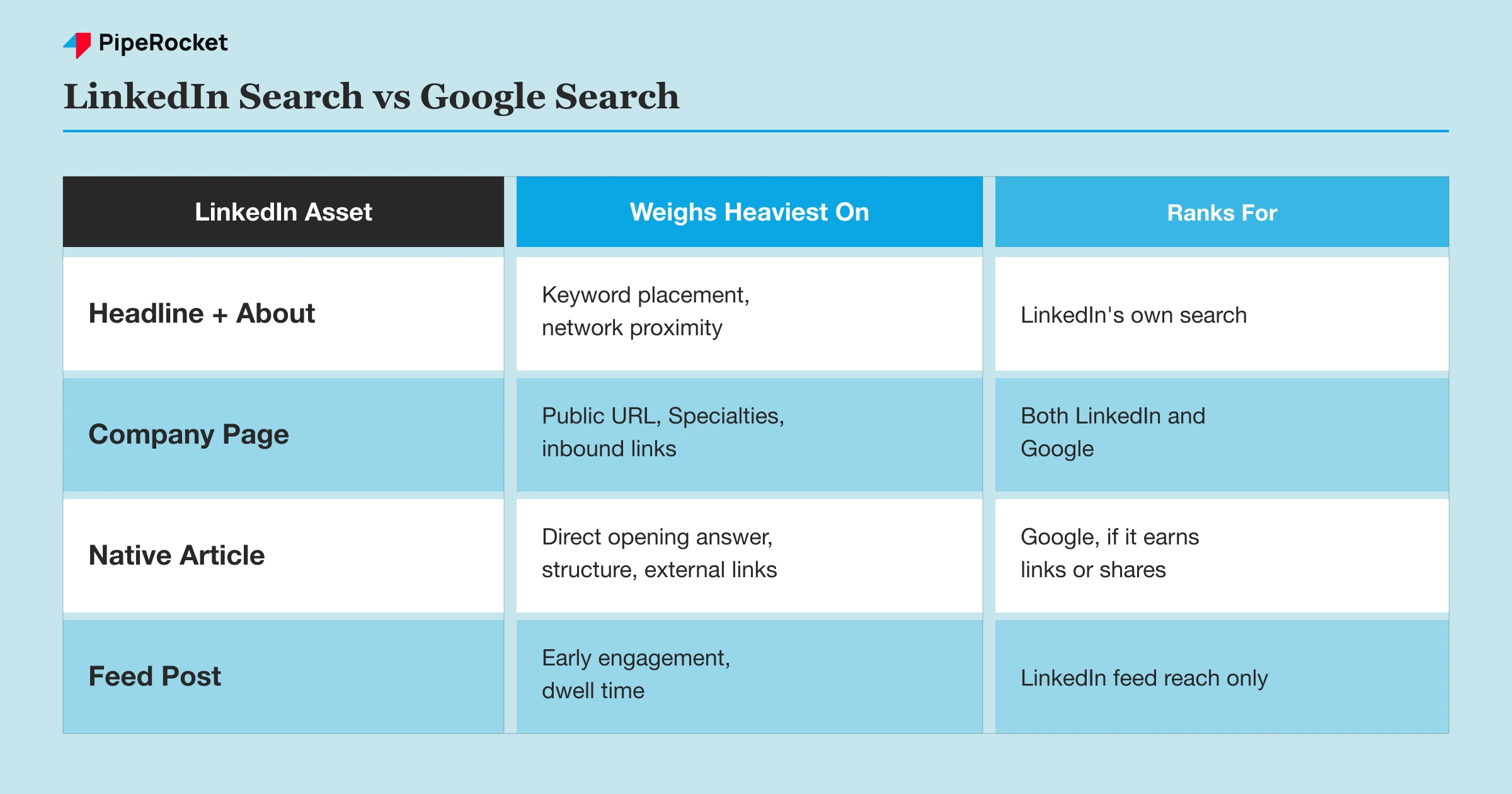
Treat them as one skill and you’ll usually get half the outcome. A profile stuffed with keywords for LinkedIn’s internal search often reads clunky enough that it never earns the external links Google actually rewards.
A post written purely for Google-style depth can undersell the punchy, scroll-stopping opener LinkedIn’s feed algorithm needs in the first two lines. This article covers both, as two separate sections, because that’s how the two systems actually work.
Optimizing for LinkedIn’s Own Internal Search
LinkedIn’s internal search decides who shows up when someone searches a job title, skill, or company name inside the platform itself, and it runs on a completely different signal set than Google.
Put Your Real Keywords in the Headline, Not Just the Job Title
Your headline is the single highest-weighted field for LinkedIn’s internal people-search. LinkedIn defaults it to your current job title, but you can and should override it with the actual terms your ICP searches for. A “Senior Account Executive” headline tells a recruiter your rank.
A headline reading “Senior Account Executive | Helping mid-market SaaS teams cut sales cycle time” tells both LinkedIn’s search index and a human reader what problem you solve, and it’s the phrase that actually gets matched against a search query.
Load the About Section With Terms Your Buyer or Recruiter Actually Types
LinkedIn indexes the About section for internal search, so it should read like a page built around real search terms, not a personal essay. Open with the two or three phrases (role, industry, specialty) someone would type into LinkedIn’s search bar to find someone like you, then explain them in plain language.
This applies the same way to company pages. A company page tagline and About section that name the actual service category (not just the brand name) show up when a prospect searches that category inside LinkedIn, which is exactly the kind of internal-search traffic a brand-name-only tagline misses entirely.
Optimize the Company Page’s Tagline, Specialties, and Showcase Pages
A company page has three internal-search-relevant fields that go underused:
- Tagline. Name the actual service category instead of relying on a brand slogan alone.
- Specialties list. Fill it with the real services or product categories you offer, since that’s what makes the page surface when someone searches that specialty on LinkedIn.
- Showcase Pages. Run a separate page for each distinct product line so each one can rank for its own searcher intent.
A B2B software company selling both a core platform and a separate analytics add-on, for example, gets found by two different searcher intents if it runs a Showcase Page for the analytics product instead of burying both under one general page.
Match Post and Article Titles to How People Actually Search
LinkedIn’s search index treats post text and native article titles as searchable content, so a title matching a real query beats a clever, vague one. “5 Thoughts on Growth” won’t surface for anyone searching a specific problem. “How to Reduce SaaS Sales Cycle Length in Mid-Market Deals” will, because it matches the phrase a searcher actually types.
Native LinkedIn newsletters carry this even further: each edition gets its own indexed title and URL inside LinkedIn, so a consistent, keyword-matched naming pattern across editions compounds your internal search footprint over time instead of resetting with every post.
Getting LinkedIn Content Found in Google and AI Search
Getting a LinkedIn page or post to surface in Google or an AI answer engine depends on the same crawlability and authority signals any other web page needs, and most personal profiles never earn them.
Understand What Google Can Actually Crawl on LinkedIn
Google can crawl and index public LinkedIn company pages, native articles, and some public post permalinks, but a personal profile’s activity feed is far less reliably indexed and often gets throttled by LinkedIn’s own robots directives and rate limits on a given page type.
That means the content type you choose matters before you write a word. A native LinkedIn article (the long-form publishing format, not a short feed post) behaves closest to a normal indexable web page: it gets its own URL, a title tag, and enough text depth to give Google something to rank.
A short feed post rarely accumulates enough standalone signal to rank for anything beyond a branded search of your own name.
Company Pages Are the Most Reliable LinkedIn Asset for Google Visibility
A company page is public by default, gets a clean canonical URL, and tends to earn more inbound links (from press mentions, partner sites, and directory listings) than any individual’s personal profile ever will. That combination is what actually lets it rank in Google for a company or brand-name search.
| LinkedIn asset | Google indexability | Best use |
|---|---|---|
| Company page | High, consistently indexed | Brand name and company category searches |
| Native LinkedIn article | Moderate, indexed if it earns links or shares | Long-form thought leadership meant to surface externally |
| Personal profile | Low to moderate, name searches only | Recruiter and personal brand searches, not topic searches |
| Standard feed post | Very low, rarely ranks | Internal LinkedIn reach, not external search |
Write Native Articles With the Same Structure a Blog Post Needs
A LinkedIn native article that’s meant to also rank in Google needs the same basics as any blog post: a clear title matching a real search phrase, a direct answer in the opening lines, and internal structure (subheadings, not one long block of text) that both a reader and a crawler can parse.
Most executives write LinkedIn articles the way they’d write a personal essay, meandering into the point instead of leading with it. That format works fine for engagement inside the LinkedIn feed. It fails for Google, which needs the article’s core claim answered in the first two or three sentences to have any shot at a snippet or an AI Overview citation.
Build the External Signals That Actually Move the Needle
A LinkedIn page ranking well in Google almost always has external signals feeding it: press coverage linking to the company page, partners embedding a LinkedIn post, or a company mentioned by name across enough of the open web that Google treats the LinkedIn presence as an authoritative destination for that brand’s information.
This is the same domain authority logic that applies to any page on the open web. A page with zero external mentions has almost nothing pulling it into Google’s index with any real ranking weight, no matter how well the on-page text is written.
If your team is already running an external content and PR program, the same authority-building the broader SaaS LinkedIn marketing strategy covers for pipeline also happens to be the fastest way to earn the external links that push LinkedIn pages into Google’s results.
What Actually Drives LinkedIn’s Feed Algorithm
LinkedIn’s feed algorithm ranks posts primarily on early engagement velocity and dwell time, which is a different lever entirely from either search system covered above. LinkedIn tests a post with a small slice of your network first, and what that slice does next decides how far it travels:
- The first hour or so sets the ceiling. Creator testing consistently shows that if the test slice comments, shares, or spends real time reading before scrolling past, the algorithm expands distribution. Get ignored or scrolled past fast, and distribution mostly stops there regardless of how well the text is written.
- Dwell time counts for more than a like. A post that takes 20 seconds to read and gets a fast reflexive like carries less algorithmic weight than a longer post that holds attention for a full minute, even with fewer total reactions.
- Comments outweigh likes. A comment signals real engagement in a way a tap doesn’t.
- Replies you send outweigh comments you ignore. Replying keeps the post active in the notification threads of everyone involved, which resets the engagement clock and can trigger a second wave of distribution hours later.
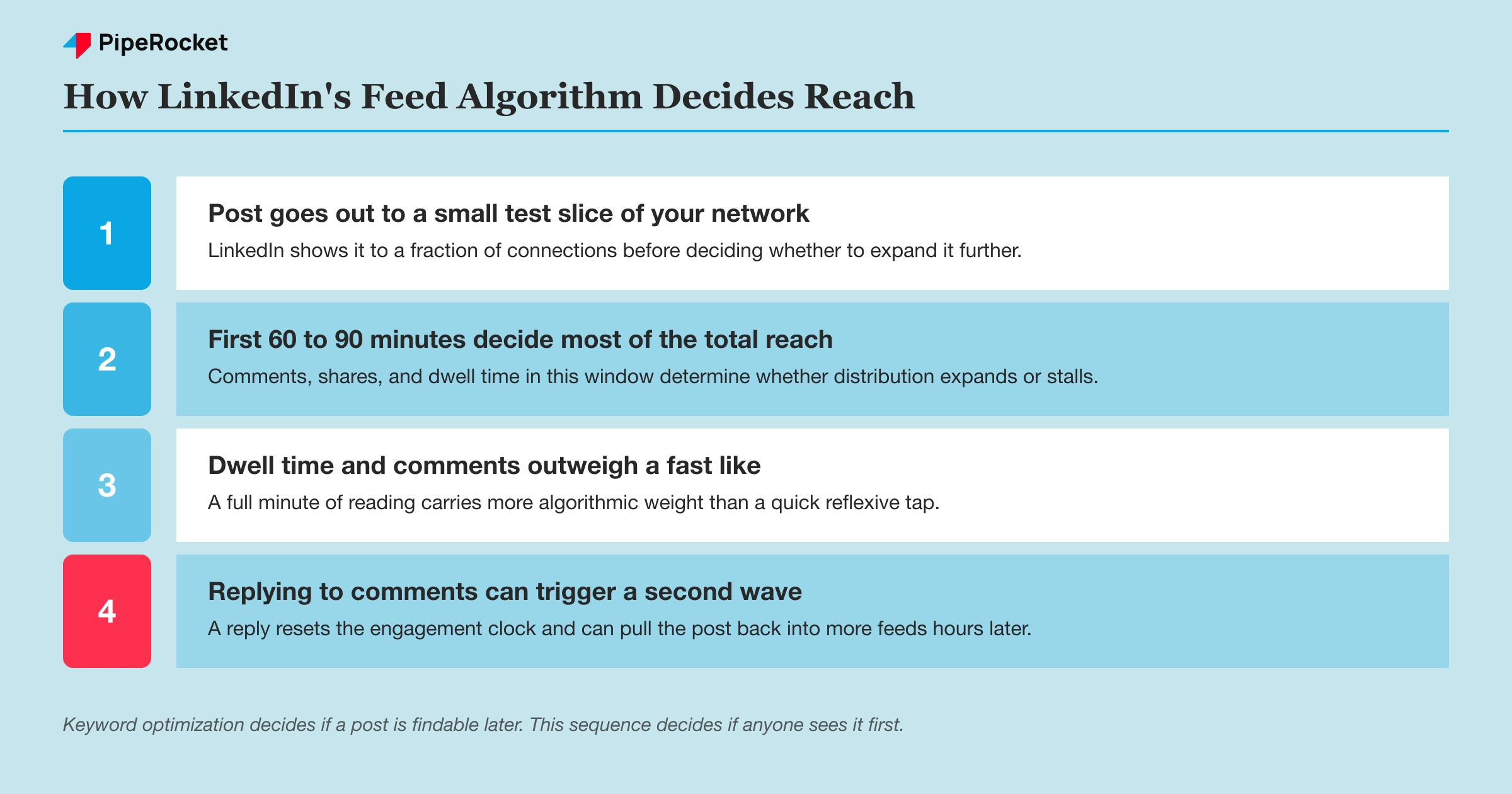
None of this is “SEO” in the traditional sense, since there’s no query being matched. But it’s the mechanism that decides whether the keyword-optimized profile and post you just built ever gets seen by anyone beyond your existing connections.
Common Mistakes to Avoid
Keyword-Stuffing the Headline Until It Reads Like Spam
Cramming five job titles and ten skills into a 220-character headline might match more search terms, but it reads as spam to an actual human, and LinkedIn’s own search relevance scoring accounts for readability, not just term presence. Pick the two or three terms that matter most and write a headline a person would actually want to read.
Treating a Feed Post Like It Will Rank in Google
A standard feed post almost never accumulates the crawl frequency or link signals needed to rank externally. Writing it with Google-style keyword structure wastes effort the post can’t cash in on. Save that structure for native articles and the company page instead.
Ignoring the Company Page While Focusing Only on Personal Profiles
Personal profiles build individual reach. But the company page is the asset most likely to actually surface in a Google search for your brand or category, so a company running five active executive profiles behind a bare-bones company page is optimizing for the wrong side of the equation if external visibility is the actual goal.
Publishing a Native Article Without a Direct Opening Answer
Lead with the answer, then build the argument underneath it. An article that spends three paragraphs building context before stating its point loses both a Google snippet opportunity and a chunk of readers who bounce before the payoff.
How PipeRocket Digital Approaches LinkedIn SEO
We treat LinkedIn SEO as two separate workstreams: getting profiles and company pages structured to win LinkedIn’s internal search, and building the external authority that gets native articles and company pages surfacing in Google. Our SaaS SEO team handles the crawlability and link-building side, while LinkedIn-specific keyword and page structure work ties directly into it.
If your LinkedIn presence is well-connected but invisible outside the platform, reach out to us and we’ll show you which side of the equation is actually broken.
Frequently Asked Questions
What is LinkedIn SEO?
LinkedIn SEO refers to optimizing your profile, company page, and posts for two distinct search systems at once: LinkedIn’s own internal search and feed ranking algorithm, and external search engines like Google that crawl and index public LinkedIn pages. The two systems reward different signals, so a genuine LinkedIn SEO approach treats them as separate tasks rather than one keyword strategy.
Does LinkedIn content actually show up in Google search results?
Yes, but inconsistently by content type. Google reliably indexes public company pages and can index native LinkedIn articles that earn enough links or shares, but personal profile activity and standard feed posts rarely accumulate the crawl and authority signals needed to rank for anything beyond a search of your own name.
How important are keywords in a LinkedIn profile for search ranking?
Keywords matter most in the headline, current job title, and About section, since those are the fields LinkedIn’s internal search weighs heaviest when matching a search query to a profile. Keyword placement matters far less for external Google visibility, which depends more on the page type (company page versus personal profile) and the external links pointing to it.
Does the LinkedIn algorithm care about SEO keywords in posts?
Not directly. LinkedIn’s feed algorithm ranks posts mainly on early engagement velocity and dwell time in the first hour or so after publishing, not keyword density in the post text. Keywords still matter for whether the post is findable later through LinkedIn’s search, but they don’t drive initial feed distribution the way engagement does.

