
Meta Ads for B2B SaaS: How to Run Them Without Wasting Budget
 Vishnu Prasadh
Last updated on
Vishnu Prasadh
Last updated on
Most B2B SaaS teams do one of two things with Meta. They write it off as a B2C channel, or they run a campaign, judge it on last-click demos, see nothing, and pause it inside a month. Both are the wrong read. Meta works for B2B SaaS, but only if you run it as an influence channel and build your audiences off people who already look like buyers rather than off broad interests.
TL;DR
- Meta is an influence channel: nobody on Facebook or Instagram is searching for your product, so it plants demand that closes later somewhere else rather than capturing it directly.
- Targeting is where B2B Meta lives or dies: the interest-and-job-title targeting most teams reach for is loose, while lookalikes off your real product users are tight.
- Pick a lead or traffic objective: you want Meta optimizing toward people who act, because an awareness objective optimizes toward the cheapest impressions instead.
- Creative has to qualify the click: name the persona and the pain on the ad itself so the wrong-fit clicks self-select out before they cost you.
- Measure Meta on incremental lift: watch whether brand searches, direct traffic, and total pipeline rise, because last-click attribution will hand its wins to another channel.
- Track through the Conversions API: feed MQL and SQL events back to Meta via CAPI and your CRM so the algorithm optimizes toward real pipeline rather than cheap clicks.
Why Most B2B SaaS Meta Campaigns Fail Before They Start
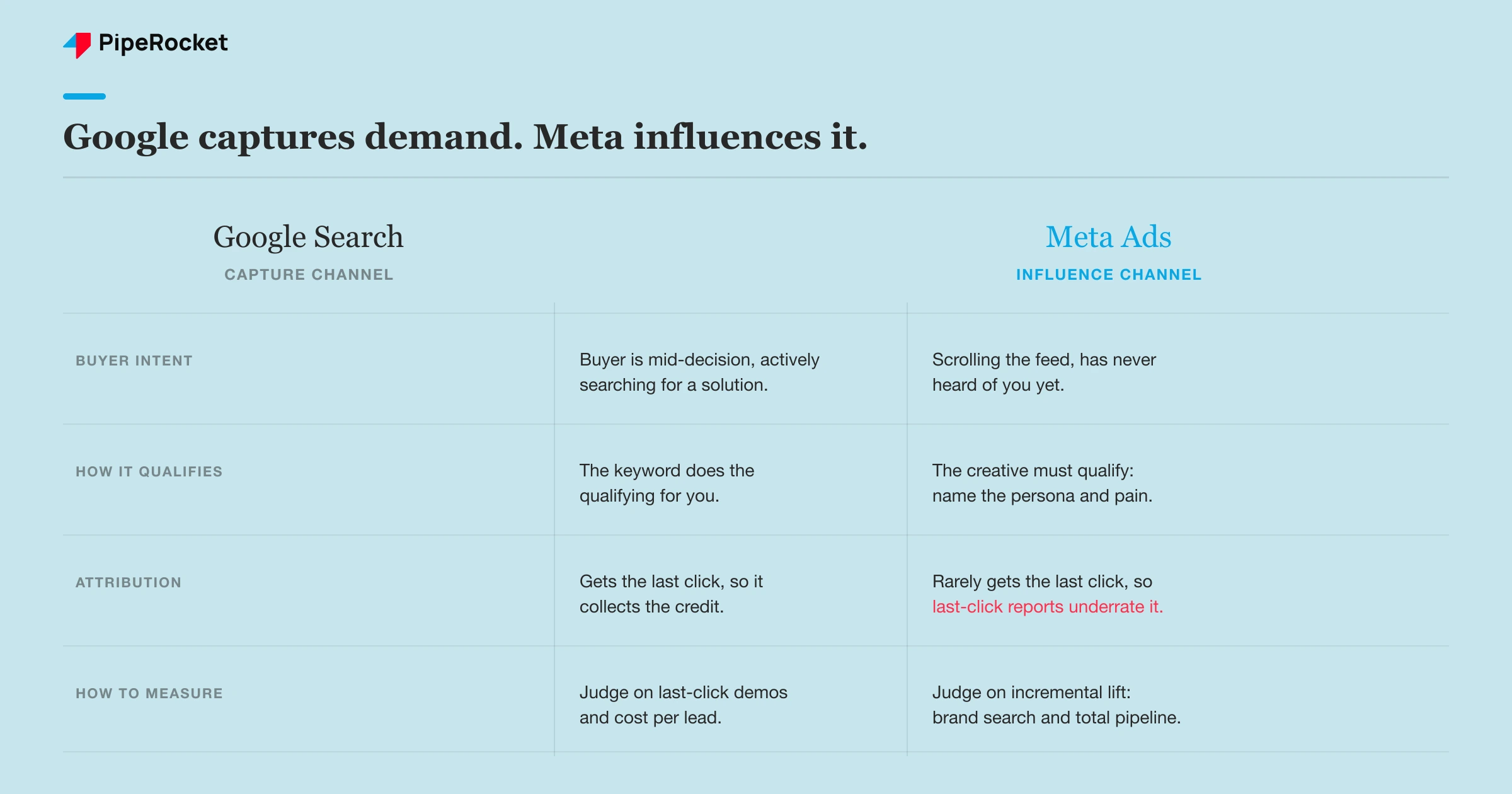
Meta plants demand instead of capturing it, so judging it like a search channel kills campaigns that are actually working. Most B2B Meta campaigns fail because the team treats Meta like Google and pauses the channel right as it starts to pay off.
On Google, someone types “invoicing software for agencies” and you catch a buyer mid-decision. On Meta, that same person is scrolling between a friend’s photos and a recipe video, and they’ve never heard of you. The ad puts your product in front of the right person so that weeks later, when the pain actually shows up, they Google your brand and convert. That later conversion gets credited to Google or direct traffic, and Meta looks dead in your report even when it fed the whole thing.
The three ideas that trip teams up:
- Google captures demand; Meta creates it. One catches intent that already exists, the other plants it for later.
- The influencing channel rarely gets the last click. A last-click view of Meta always underrates it.
- ACV is the fit test. Meta only earns its place when one closed deal pays for a lot of impressions.
There’s a hard fit test before you spend a rupee or a dollar. Meta only makes sense for B2B SaaS when the deal size can absorb the cost of influence. If you’re selling a $20-a-month tool to freelancers, the volume game can work. If you’re selling a five-figure ACV platform to a buying committee , you’re paying to warm up a small, specific set of accounts, and the math only holds when one closed deal pays for a lot of impressions.
Step 1: Build Audiences Off Your Real Users
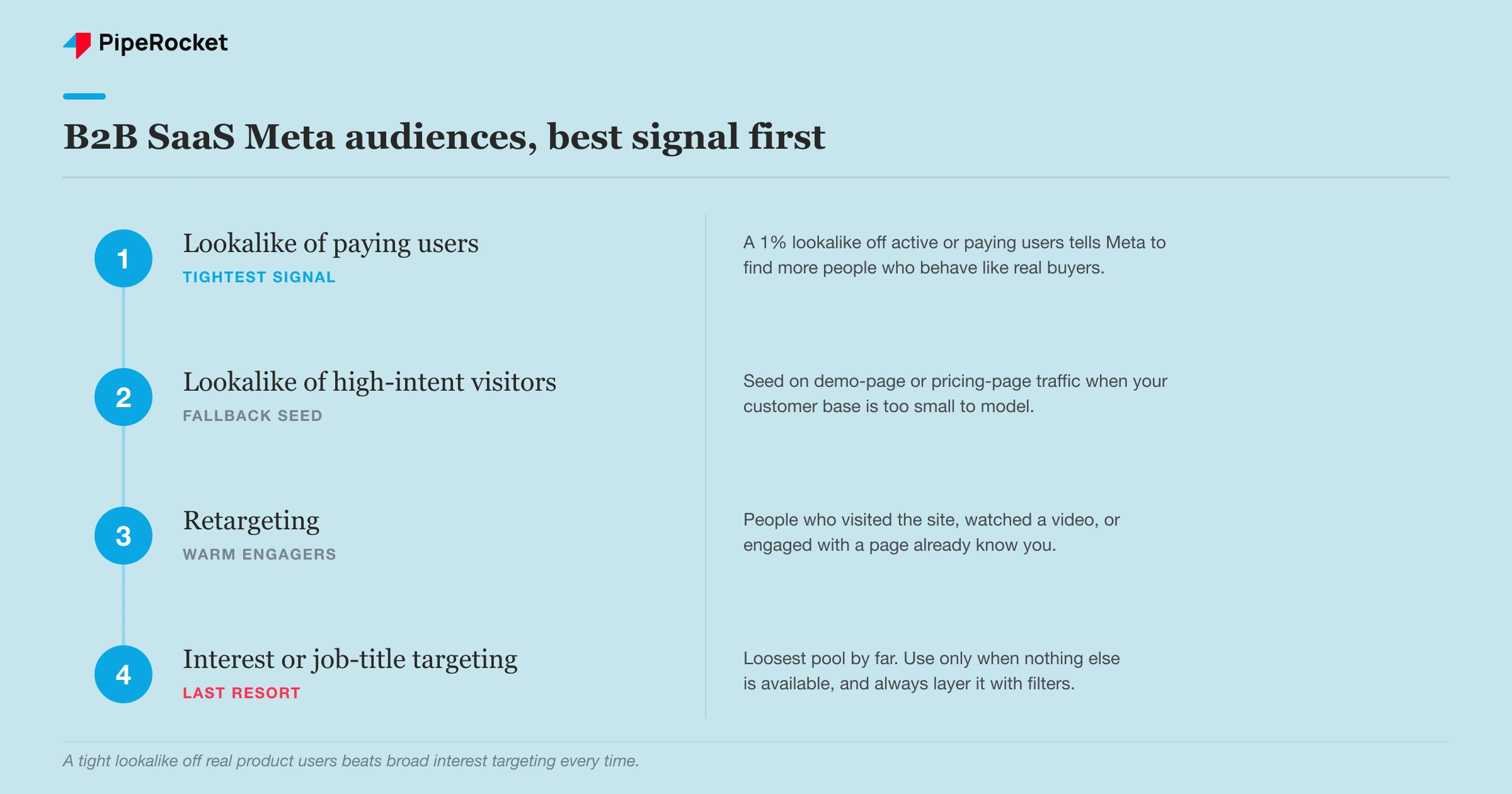
Start with a lookalike built on your actual product users, because it beats broad interest targeting every time. Meta’s interest and job-title options feel precise, but “interested in SaaS” or “job title: Marketing Manager” pulls in a huge, loose pool where most people will never buy. A lookalike off a real seed list tells Meta to go find more people who behave like your existing users, which is a far better signal than a checkbox someone ticked on their profile years ago.
The seed matters more than anything.
A 1% lookalike that hit ~15 leads a week
Here’s the audience order we work through, best signal first:
- Lookalike of active/paying users (a 1% lookalike is the tightest and usually the winner)
- Lookalike of high-intent site visitors (demo-page or pricing-page traffic)
- Retargeting (visited the site, watched a video, engaged with a page)
- Interest and job-title targeting (only as a last resort, and always layered with filters)
Note: your seed list has to be big enough for Meta to model. A lookalike off 40 users won’t work. If your customer base is small, seed on high-intent site visitors instead of paying customers until you’ve got the volume.
A word on Meta Advantage+ campaigns, the automated audience-and-placement setup Meta now pushes by default. Advantage+ hands targeting to the algorithm and lets it expand well past your defined audience. For a broad, high-volume B2C offer that can work, but for a narrow B2B lookalike it often spends into a wider, wrong-fit pool. Feed it a strong first-party seed and watch where the delivery actually lands before you let it run wide.
Step 2: Pick the Objective That Optimizes Toward Action
Choose a lead or traffic objective and steer clear of Awareness or Reach. This is a setting people get wrong on autopilot, and it quietly wastes the whole budget. Meta optimizes toward whatever objective you pick, so an awareness objective tells it to buy the cheapest possible impressions, which means it’ll happily show your ad to people who’ll never do anything. A lead or conversion objective tells it to go find people who act.
The objective you pick depends on where you’re sending traffic and what you can measure:
| Objective | Use it when | What Meta optimizes toward |
|---|---|---|
| Leads (instant form) | You want volume and low friction | People likely to submit a form in-platform |
| Conversions / Sales | You have a solid landing page and pixel tracking | People likely to convert on your site |
| Traffic | Early days, testing audiences and creative | Clicks to your site (cheaper, lower intent) |
| Awareness / Reach | Almost never for B2B SaaS | The cheapest impressions, regardless of fit |
Instant lead forms lower friction and pull more volume, which is why they look great in the dashboard. The catch is lead quality: a form that autofills someone’s details in two taps also catches a lot of people who weren’t really paying attention. If you run lead forms, add a qualifying question or two to the form and expect to do more filtering downstream. Sending traffic to a real landing page raises friction and cuts volume, but the leads tend to be more serious.
Step 3: Write Creative That Qualifies the Click
Your creative should name the persona and the pain so wrong-fit people scroll past instead of clicking. On Meta you pay to reach a broad feed, so an ad that says “streamline your workflow” invites everyone and qualifies no one. An ad that opens with “Finance teams at Series B SaaS: still closing the books in spreadsheets?” acts as a filter. The CFO who feels that stops scrolling; everyone else keeps going, and you don’t pay for their click.
That filter is the whole point of the copy. On a capture channel like Search the keyword does the qualifying for you. On Meta there’s no keyword, so the ad itself has to do it. Put the job title or the company type in the creative and let the wrong audience self-select out.
A few things that hold up in B2B SaaS creative:
- Lead with the persona or the pain ahead of the feature. The reader has to recognize themselves in the first line.
- Run more than one angle. Test speed, cost, and a specific pain as separate creatives rather than one “best” ad, since you don’t know which fear lands until the data tells you.
- Refresh before fatigue hits. A B2B audience is smaller than a B2C one, so the same people see your ad sooner and it wears out faster. Have the next batch ready.
- Match the ad to the landing page. If the ad promises a spreadsheet-to-software fix, the page has to open on exactly that, or the click bounces.
Creative angles that work for B2B SaaS
Three ad formats carry most of the weight on Meta for B2B SaaS: product-in-action, before-and-after, and social proof . Copy tone qualifies the click, but the format decides whether a scroller stops long enough to register what you do.
- Product-in-action. A short screen recording of the exact workflow your product fixes: the spreadsheet close done in three clicks, the report that used to take a day generated live. Showing the software beats describing it, because the viewer sees the pain leave.
- Before-and-after. Contrast the messy current state with the clean end state. “Twelve tabs and a Slack thread” beside “one dashboard” lets the buyer feel the gap without reading a feature list.
- Social proof. A named customer testimonial, a case-study result, or a recognizable logo. Proof that a peer company solved this with you does the trust work that a cold feed otherwise withholds.
One warning worth flagging. Because a B2B lookalike or ABM -style audience is small, creative fatigue arrives fast, and a fatigued ad quietly raises your cost per result while you’re not looking. Rotating creative is how you keep a small Meta B2B audience from tuning you out.
Step 4: Measure Meta on Incremental Lift
Judge Meta by whether your overall demand rose rather than by the demos Meta claims in the platform. This is the step that saves campaigns from getting killed. Attribution tools mis-credit “direct” or “organic” for pipeline that Meta actually started, so if you stare at Meta’s last-click column you’ll see a handful of demos and a scary spend number and pause a channel that was working.
Watch the lift signals instead. After a heavy Meta flight, look at whether:
- Brand-name searches for you on Google went up
- Direct traffic to your site rose
- Total lead count climbed, even if Meta isn’t claiming the credit
A concrete read: if you were getting around 10 leads a month before Meta and you’re now sitting consistently at 13 to 15 across all channels, Meta is doing its job even though its own report might only show two or three. The channel that influences rarely gets the last click, so total pipeline is the honest scoreboard.
Tracking and setup that makes the measurement honest
Wire up the Conversions API and a dedicated landing page before you spend, and give Meta a 30-day learning window before you judge or change anything. Lift measurement only tells the truth when the setup underneath it is clean.
- Send events through the Conversions API (CAPI). Browser pixels drop signal to blockers and cookie limits. Send events server-side through CAPI and pass your MQL and SQL stages back from your CRM, so Meta optimizes toward leads that turn into pipeline instead of cheap form fills.
- Build dedicated landing pages. Point ads at a fast, single-purpose page that matches the ad’s promise, rather than your homepage. A homepage makes the visitor hunt for the offer and wastes the intent you paid for.
- A 30-day learning window. Meta needs volume through the conversion event before delivery stabilizes. Resist editing budgets, audiences, or creative for the first 30 days unless something is clearly broken, or you reset the algorithm’s learning each time.
This is also why you fund your capture channels before you lean on Meta. High-intent Search catches the demand that already exists. Meta creates demand that shows up later. If your Search and other bottom-of-funnel spend isn’t maxed out yet, that’s the cheaper pipeline, and it should come first.
Common Mistakes to Avoid
The mistakes on B2B Meta cluster around a few repeat offenders, and most of them trace back to running the channel like a capture channel when it behaves like an influence channel.
Picking an awareness objective and expecting leads
Meta optimizes toward whatever you tell it to optimize for. Choose an awareness objective and the algorithm goes looking for the cheapest impressions it can find, which means it serves your ads to people who scroll past rather than people who act. The reach numbers look healthy, the reporting looks busy, and no qualified leads show up. This quietly costs SaaS teams because the spend feels productive while it builds nothing you can hand to sales. The fix is to match the objective to the outcome you can actually measure. If you want form fills or demo requests, run a conversion objective with a real conversion event wired up, and let Meta learn from the people who take that action.
Going broad on interest targeting with no lookalike or ABM layer
Broad interest targeting on Meta spends fast, and against a B2B product it spends fast against a pool that is mostly wrong-fit. Interest and job-title options are far looser than the labels suggest, so you end up paying to reach people who resemble your buyer on paper but sit nowhere near a purchase. For SaaS teams the damage is a burned budget with nothing to show, plus a muddied signal that teaches the algorithm the wrong idea of who converts. The fix is to anchor targeting in first-party data: build a lookalike off your active or paying users, or seed one from high-intent site visitors, and layer an account list on top when you run ABM. That gives Meta a tighter pool to expand from.
Judging Meta on last-click and pausing it early
Meta rarely wins on last-click, because the demand it creates usually converts later through a branded search or a direct visit. Teams who watch only the last-click column see a channel that looks dead, pause it a month in, and cut it right as the influence it planted starts landing elsewhere. The quiet cost is a self-inflicted wound: you kill the pipeline Meta was building and then attribute that pipeline to the channel that caught the click at the end. The fix is to measure lift across the whole funnel rather than Meta’s own last-click number, watch whether branded search and direct traffic move when Meta is on versus off, and give the channel enough runway before you decide.
Leaving one static creative running for weeks
A single static creative left running for weeks fatigues quickly, especially against a small B2B audience that sees it again and again. Frequency climbs, response drops, and your cost per result creeps up so slowly that nobody notices until the whole line item looks broken. For SaaS teams the cost is invisible waste: the account keeps spending while the creative quietly stops earning its keep. The fix is a small rotation of creatives tested against each other, refreshed on a schedule before fatigue sets in. Watch frequency and cost per result together, and when frequency rises while results soften, that is your signal to introduce new angles rather than push the same asset harder.
Selling a low-ACV tool to a broad B2B audience
Meta charges you to warm up a specific audience over time, and that cost of influence is real. Point it at a low-ACV product sold to a broad B2B crowd and the math stops working: you spend more to nurture a deal than the deal is worth once it closes. SaaS teams fall into this when they treat Meta as a cheap top-of-funnel faucet without checking whether their deal size can absorb the warming cost. The fix is to qualify the channel against your economics before you scale it. If your ACV is high enough to fund a longer influence path, Meta earns its place; if it is thin, put the budget where intent is already present and revisit Meta once the deal value supports it.
The through-line: Meta punishes teams who treat it like Google and rewards teams who treat it like the influence channel it is.
How PipeRocket Runs Meta Ads for B2B SaaS
We run Meta as one lever inside a full paid social program rather than as a standalone experiment. That means building lookalikes off your real users, matching the objective to what you can measure, writing creative that qualifies the click, and reporting on lift across the whole funnel instead of Meta’s last-click column, so the channel doesn’t get killed for pipeline it quietly created. If Meta keeps looking dead in your reports while your overall demand is flat, talk to us and we’ll pressure-test whether it’s the channel or the setup.
Frequently Asked Questions
Do Meta ads actually work for B2B SaaS?
Yes, but not the way they work for B2C or the way Google works for B2B. Meta is an influence channel: nobody on Facebook or Instagram is actively searching for your software, so the ad plants demand that converts later, often through a branded Google search or direct visit. It works best when your deal size can absorb the cost of warming up a specific audience, and when you build targeting off your real users rather than broad interests. Where it fails is when teams expect it to close deals on last-click like Search does.
What targeting should B2B SaaS companies use on Meta?
Start with a lookalike audience built on your active or paying users, since a 1% lookalike is the tightest signal and usually the best performer. If your customer base is too small to seed a lookalike, build one off high-intent site visitors like pricing-page or demo-page traffic instead. Retargeting people who already engaged with you is the next-best layer. Broad interest and job-title targeting should be a last resort, always narrowed with additional filters, because those options are far looser than they look.
How do you measure Meta ads for B2B when the leads convert later?
Measure on lift rather than last-click attribution. After running a Meta campaign, check whether brand-name searches, direct traffic, and total lead volume rose across all channels, even if Meta’s own report isn’t claiming those conversions. If you were getting around 10 leads a month and adding Meta pushes you consistently to 13 to 15, the channel is working regardless of what its last-click column shows. Attribution tools routinely credit “direct” or “organic” for pipeline that Meta actually started, so judging it on last-click alone gets working campaigns paused.
Should B2B SaaS Meta ads send traffic to a pricing page or a demo page?
Match the page to your ACV. Low-ACV, self-serve products convert on a pricing page where buyers can sign up alone. Higher-ACV, sales-led products should send traffic to a demo or booking page, since the deal needs a conversation before it closes.
Is Meta or LinkedIn better for B2B SaaS ads?
Both, for different jobs. LinkedIn’s firmographic targeting is tighter for reaching a named job title or account, but its clicks cost more. Meta reaches the same people cheaper at scale once you seed a lookalike off real users. Many SaaS teams run LinkedIn Ads for SaaS for precision and Meta for lower-cost influence, then compare cost per qualified lead.

