
How to Write LinkedIn Ad Copy That SaaS Buyers Click
 Immanual D M
Last updated on
Immanual D M
Last updated on
Here’s the thing most SaaS teams get wrong before they write a single word: they treat LinkedIn like Google. On Google, the buyer typed the problem into the search bar. On LinkedIn, nobody asked for your ad. They’re scrolling between a promotion post and a photo of someone’s conference badge, and your ad has to earn a stop it never requested.
That difference decides everything about the copy. Write a Google-style “here’s our feature, book a demo” ad on LinkedIn and it dies in the feed. This is the exact process I use to write LinkedIn ad copy that the right buyer stops for.
TL;DR
- Write for influence: nobody on LinkedIn is in buying mode, so the copy’s job is to plant a seed the buyer acts on later, well before they’re ready to close.
- Lead with the fear: figure out what actually keeps your buyer up at night, then open the ad on that, because features inform while fear stops the scroll.
- Put the job title in the copy: naming the exact role you built for works as both a magnet and a filter, so the right buyer feels seen and the wrong one scrolls past.
- Match the copy to the ABM tier: a 1:1 whale ad and a 1:many ICP ad can’t say the same thing, so write the message to the account you’re actually paying to reach.
- Ship at least five variations: LinkedIn suppresses a creative fast, so one clever ad kills your own reach; give the feed something to rotate.
- Avoid the quiet copy-killers: the same headline twice, the buried CTA, the “we’re the leading platform” open, and the ad that reads like a landing page.
Why LinkedIn Ad Copy Follows Its Own Rules
The whole channel runs on a different rule, and our team has a one-line frame for it: Google is for capture, LinkedIn is for influence. On Google, someone typed “best applicant tracking system” and is actively hunting. On LinkedIn, a VP of Talent is scrolling on a Tuesday, in no mood to buy anything. The ad’s job is to plant a seed so that weeks later, when hiring actually breaks, they Google your brand and convert.
That reframes what “good copy” even means here. A Google ad can be blunt and transactional because the intent is already there. A LinkedIn ad has to be interesting first and salesy second, or it never gets read.
Most teams miss this and judge LinkedIn on last-click attribution. So they pause campaigns that were quietly doing the work, feeding brand searches and direct traffic that some other channel got credit for. If you kill the ad because LinkedIn didn’t claim the lead, you kill the influence that created it.
One more filter before you write anything. LinkedIn charges by impressions and the CPCs are steep, so it only pays off for high-ACV B2B. If you’re selling a $20/month tool to freelancers, the math never works no matter how good the copy is.
Start With the Fear Before the Feature
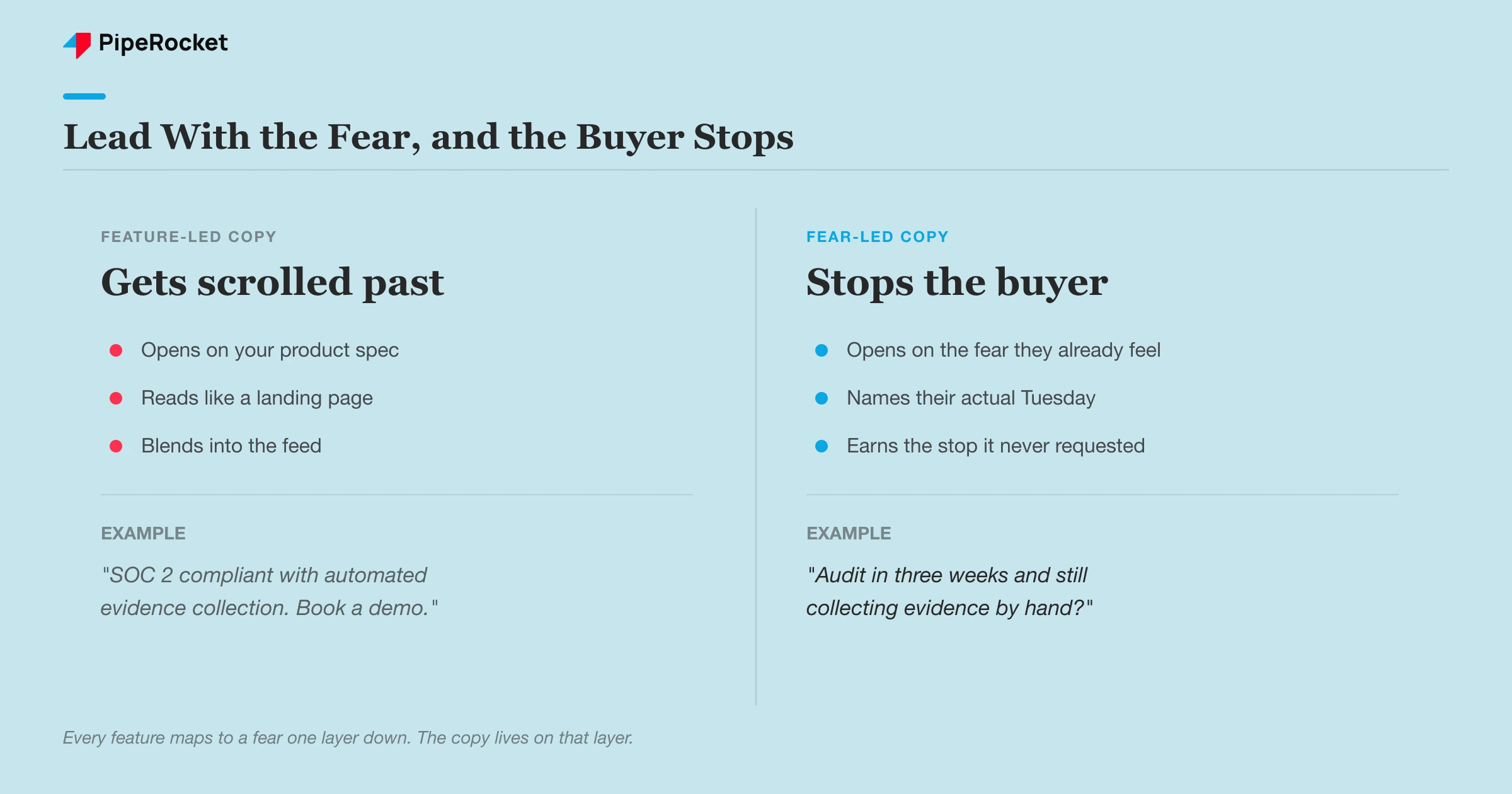
The best LinkedIn hook answers a fear the buyer already has rather than a feature you’re proud of. Before we write a line, we reverse-engineer the buyer’s psychology. What actually terrifies the person we’re targeting? A COO looking at a new ERP fears something deeper than “limited integrations.” They’re scared of implementation downtime blowing up inventory during migration. Open on that, and they stop.
A fast way to find the fear: feed the buyer’s role and situation to an AI tool and ask what scares them about this exact decision. Then ask what they’d need to see before they’d trust a vendor enough to click. You’re not asking it to write the ad. You’re using it to map the anxiety so your copy lands on the real nerve.
The feature-to-fear translation
Every feature on your product page maps to a fear if you dig one layer down, and that’s the layer the copy lives on. “SOC 2 compliant” is a feature. The fear underneath is a security lead who’ll get blamed if the vendor causes a breach. Write to the second one.
Here’s the pattern for a compliance SaaS aimed at fintech teams. The feature is automated evidence collection. The fear is a compliance officer staring down a SOC 2 audit with a spreadsheet and three weeks left. The hook writes itself once you name that: “Audit in three weeks and still collecting evidence by hand?” That’s a scroll-stopper because it describes their actual Tuesday instead of your product spec.
Put the Job Title Right in the Copy
Naming the exact role you built for is the highest-leverage move in LinkedIn copy, because it works as a magnet and a filter at the same time. “Built for Healthcare CFOs” pulls in the CFO who feels understood, and it repels the junior analyst who now knows this isn’t for them. We’ve seen a plain job-title line lift click quality more than any clever tagline.
That filter matters more on LinkedIn than anywhere else because you pay by impression. A click from the wrong title wastes more than the click itself; it burns a wasted impression you already paid for whether they clicked or not. The title in the copy pre-qualifies the audience before the click cost even hits.
The catch is you have to name the right title, and it’s often not the obvious one. Our team ran a product that repurposes content. The intuitive target was demand-gen and growth marketers. The person who actually cared was the Content Director or Head of Content, and the split that worked was roughly 80% content-focused titles to 20% broader marketing. Aim at the obvious “marketing” roles and you’d have burned the budget on people who don’t own the problem.
So don’t start from “who’s in marketing.” Start from the problem your product solves, then find the one title that owns that problem. That’s the title that goes in the headline.
Match the Copy to Who You’re Actually Paying to Reach
The same ad can’t serve every account, so write the copy to the ABM tier you’re running against. Because LinkedIn bills by impression, our team always runs against an account list, and the tier decides how personal the copy gets. A must-win whale gets a different message than a 3,000-company ICP list, and using one ad for both wastes the expensive impressions.
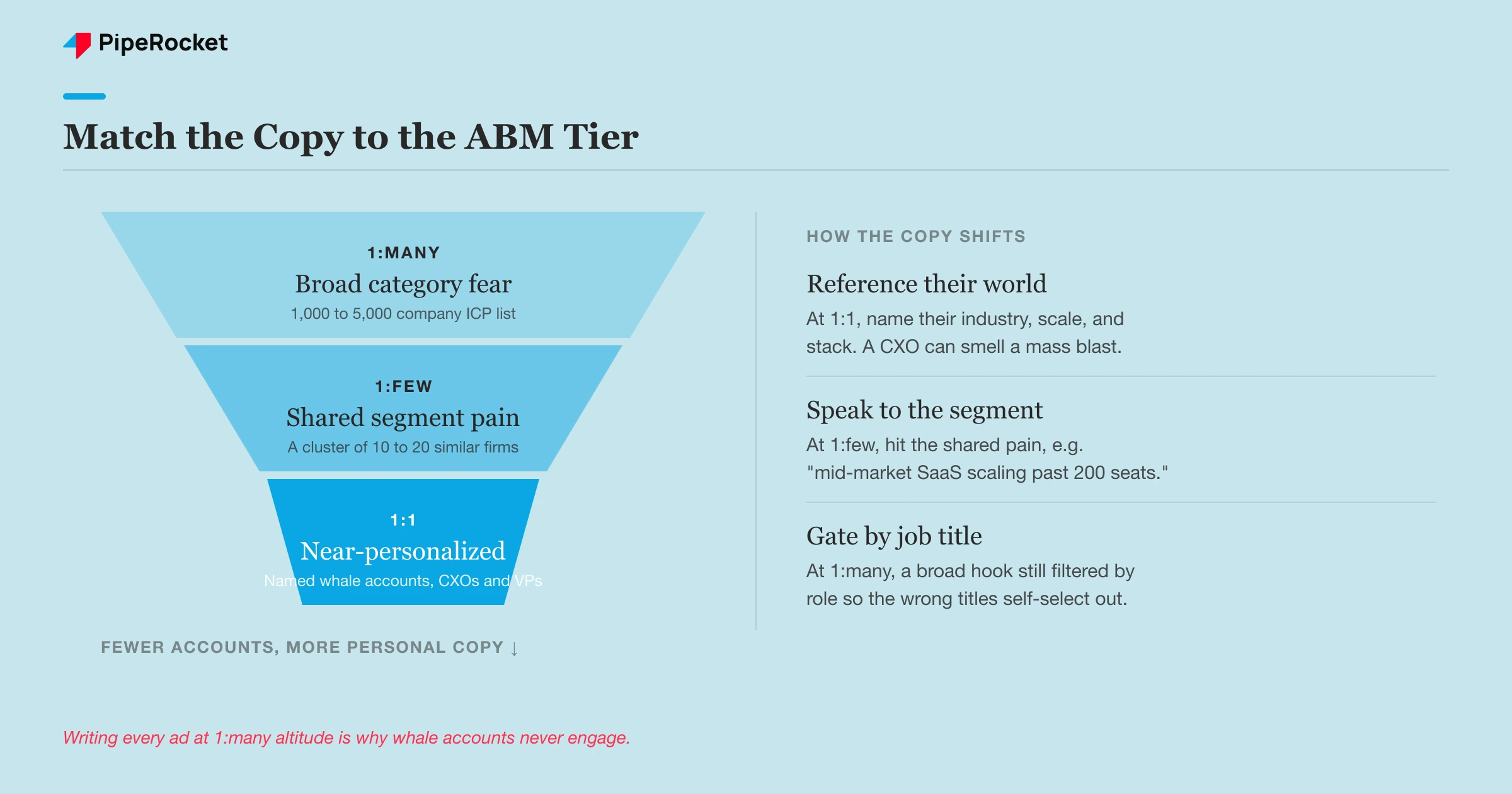
Here’s how the copy shifts across the three tiers:
| Tier | Audience | How the copy reads |
|---|---|---|
| 1:1 | Named whale accounts, target the CXOs and VPs directly | Reference their world specifically, their industry, their scale, their stack. Near-personalized. |
| 1:Few | A cluster of 10 to 20 similar companies | Speak to the shared pain of that segment, e.g. “mid-market SaaS scaling past 200 seats.” |
| 1:Many | A 1,000 to 5,000 company ICP list | Broader hook on the category-level fear, still gated by job title so the wrong roles self-select out. |
The mistake is writing every ad at the 1:many altitude because it’s easier, then wondering why the whale accounts never engaged. A CXO at a target account can smell a mass-blast ad. If you’re paying premium impressions to reach 20 dream accounts, the copy should sound like you know exactly who they are.
Ship at Least Five Ads Instead of One Perfect One
Launch a minimum of five creatives per campaign, because LinkedIn punishes a single ad harder than most people realize. The platform shows the same ad to the same person only about twice before it suppresses it. So if you launch one “perfect” ad, you’re capping your own reach inside a few days and the frequency tanks.
Five variations give the feed something to rotate and keep your audience seeing fresh angles. Vary the angle itself, going deeper than the wording. One ad leads on the fear, one on a proof point, one on the specific job title, one on a sharp question, one on the outcome. You’re testing which door the buyer walks through, and you can’t learn that from a single ad.
A common trap here is running five ads that are secretly the same ad with the comma moved. That teaches you nothing. If all five open on the same fear with the same CTA, the test has no variable. Make each one genuinely different so the winner tells you something you can build the next round on.
The one-line ad that beat the detailed one by 3% CTR
On one B2B SaaS account we ran two ads that differed in a single thing: how much the copy explained. One version laid out what the product did in detail. The other said it in a single line. Judged on click-through and engagement, the one-line ad won with about 3% higher CTR than the detailed one.
It is a lesson we keep relearning on LinkedIn: on a busy feed, less explanation earns the click. The detailed ad tried to close the sale inside the post itself, while the one-liner earned attention and left the explaining for the landing page. The copy’s only job in the feed is to stop the scroll and win the click, so write the sharpest single line you can and save the full pitch for where they land.
The LinkedIn Copy Mistakes That Quietly Cost You
Most underperforming LinkedIn ads fail on the same handful of copy mistakes, and none of them are about being clever. They’re about ignoring how the feed and the buyer actually behave.
Opening the ad by talking about yourself
The fastest way to lose a SaaS buyer is to open with a line like “We’re the leading platform for X.” It reads as a category claim, and the buyer scrolling their feed has not yet agreed there is a category worth caring about. Their attention sits on their own problem, the fire they are trying to put out this quarter, while your ranking within a market they may not even recognize means nothing yet. When the first line is about you, the reader has no reason to expand the post, so the rest of your carefully written copy never gets seen. The fix is to lead with the buyer’s fear or the job they are stuck on, and to earn the right to make a claim about yourself only after you have named their pain.
Burying the call to action at the bottom
On LinkedIn the reader decides within the first two lines whether to expand the post, and if your ask lives at the very bottom, most people never reach it. This quietly costs SaaS teams because the ad can look fine in the editor, where you see the whole thing, while the audience only ever sees the truncated preview above the “see more” cut. You end up paying for impressions that deliver no clear next step. The fix is to front-load the reason to click into those opening lines so the hook and the ask arrive together. You can still add supporting detail lower down, but treat everything below the fold as optional, because for most of your audience it does not exist.
Packing six features into one ad
A copy block that lists six features reads like a spec sheet, and a spec sheet asks the reader to do the sorting work of figuring out which capability matters to them. In the feed, nobody does that work. The ad competes with personal updates and industry chatter, so a dense feature list simply gets skipped. This quietly costs SaaS teams because each feature dilutes the others, and the one point that would have stopped the right buyer gets lost in the pile. The fix is to pick the single feature that kills the biggest fear for the account and title you are targeting, then build the whole ad around that one idea. Save the rest for the demo, where a curious buyer actually wants the full picture.
Writing an ad that reads like a landing page
The ad and the landing page have different jobs, and blurring them weakens both. The ad’s only task is to earn the click by making the right person curious enough to raise their hand. When you try to close the whole deal inside the feed, the copy gets long, the pitch gets heavy, and the reader feels sold to before they have opted into anything. That friction quietly costs SaaS teams clicks that a lighter, more focused ad would have won. The fix is to let the ad do one thing well: name the fear, promise a clear payoff, and hand the reader off to the landing page for the full case. The close belongs where the buyer chose to go, well past the moment they were first interrupted in the feed.
Shipping one creative and leaving it there
Running a single creative suppresses your own reach, because the platform has nothing to rotate as the initial audience tires of seeing the same ad. Frequency climbs, response drops, and the campaign quietly stalls even though nothing about the offer changed. This is one of the most preventable reach problems on LinkedIn, yet it is easy to fall into when a team treats the ad as a finished asset rather than a set. The fix is to ship several variations from the start, each testing a different hook or angle on the same core fear, so the system always has fresh material to serve. That keeps delivery healthy and, as a bonus, tells you which angle actually resonates with the accounts you care about.
The deeper mistake behind all of these is judging the copy by the wrong scoreboard. LinkedIn is an influence channel, so a great ad might show up weeks later as a bump in brand searches or direct traffic rather than a same-day form fill. If you were getting 10 leads a month before and a heavy LinkedIn push moves you to a steady 13 to 15, the copy’s working even when LinkedIn isn’t claiming the credit.
How PipeRocket Writes LinkedIn Ad Copy for SaaS
We write LinkedIn copy the way we run the whole channel: for influence, gated to the exact accounts and titles worth paying impressions on. That means mapping the buyer’s real fear first, naming the job title in the copy, and matching the message to the ABM tier, then shipping enough variations to keep reach alive. If you want this built and managed properly, our paid social team does it every day for high-ACV B2B SaaS. Reach out here and we’ll take a look at your account.
Frequently Asked Questions
What makes a good LinkedIn ad for SaaS?
A good SaaS LinkedIn ad stops the scroll by naming a fear the buyer already has rather than a feature you want to promote. It calls out the exact job title you built for so the right person feels seen and the wrong ones move on. The CTA is clear and early, since the reader decides within the first two lines whether to keep reading. And it’s written for influence, meaning its job is to plant a seed the buyer acts on later instead of closing the deal in the feed that day.
How long should LinkedIn ad copy be?
Front-load the hook into the first two lines, because that’s all most people see before deciding whether to expand the post. Everything that matters, the fear you’re speaking to and the reason to click, should live above the “see more” cut. You can go longer if the story earns it, but a longer ad only works when the opening line already stopped the scroll. When in doubt, cut it back to the sharpest version of the hook plus the CTA.
Why are my LinkedIn ads not converting?
The most common reason is measurement rather than the ad itself. LinkedIn is an influence channel, so leads it started often get credited to direct or organic search when the buyer converts later, which makes a working campaign look dead on last-click reports. Look at lift instead: did brand searches, direct traffic, and total lead count rise after you launched? Beyond attribution, check that the copy leads with the buyer’s fear rather than your features, that the job title is named, and that you’re running enough creatives to avoid suppressing your own reach.

