
SaaS Video Marketing Strategy: A Practitioner's Playbook
 Ranjeeth Kumar
Last updated on
Ranjeeth Kumar
Last updated on
A SaaS video marketing strategy maps specific video formats, like demo walkthroughs, sales enablement clips, and native YouTube or LinkedIn content, to the exact stage a B2B buyer is in, instead of producing generic brand videos and hoping they convert.
TL;DR
- Most SaaS teams start with a brand video when they should start with a demo video, because that’s the format buyers actually search for and share internally.
- Video needs a job tied to a funnel stage. A video with no assigned stage becomes a vanity asset that never gets watched past ten seconds.
- Sales enablement clips are the highest-leverage, lowest-cost format most SaaS teams skip entirely, even though reps forward them constantly once they exist.
- Native YouTube and LinkedIn video outperform repurposed TikTok-style content for B2B, because the platforms and the buyer’s intent are completely different.
- Measuring video on views instead of pipeline influence is why most SaaS video budgets get cut after two quarters.
Most SaaS Teams Start With the Wrong Video
I’ve watched a dozen SaaS marketing teams greenlight their first big video budget, and almost all of them start in the same place: a polished, cinematic brand video. Big music. Customer logos flashing by. A voiceover about “transforming the way teams work.”
It gets 4,000 views on YouTube. Nobody remembers it three weeks later.
Here’s the problem. A brand video answers a question nobody in a B2B SaaS buying committee is actually asking. The CTO evaluating your product doesn’t want to feel something. They want to see:
- The login screen
- The setup flow
- Whether the integration with their stack actually works
The video that gets bookmarked, forwarded to a Slack channel, and rewatched before a demo call is the one showing the actual product. Not because it’s more emotional. Because it answers a real question at the exact moment someone is trying to make a decision.
I’m not against brand video entirely. It has a place, usually much later, once you’ve already won demand and want to reinforce category leadership.
For a SaaS company without an established brand yet, though, spending the first video budget there is backwards. Start with the video that removes friction from an active buying decision, not the one that tries to create an emotion.
Map Every Video to a Buying Stage Instead of a Content Calendar
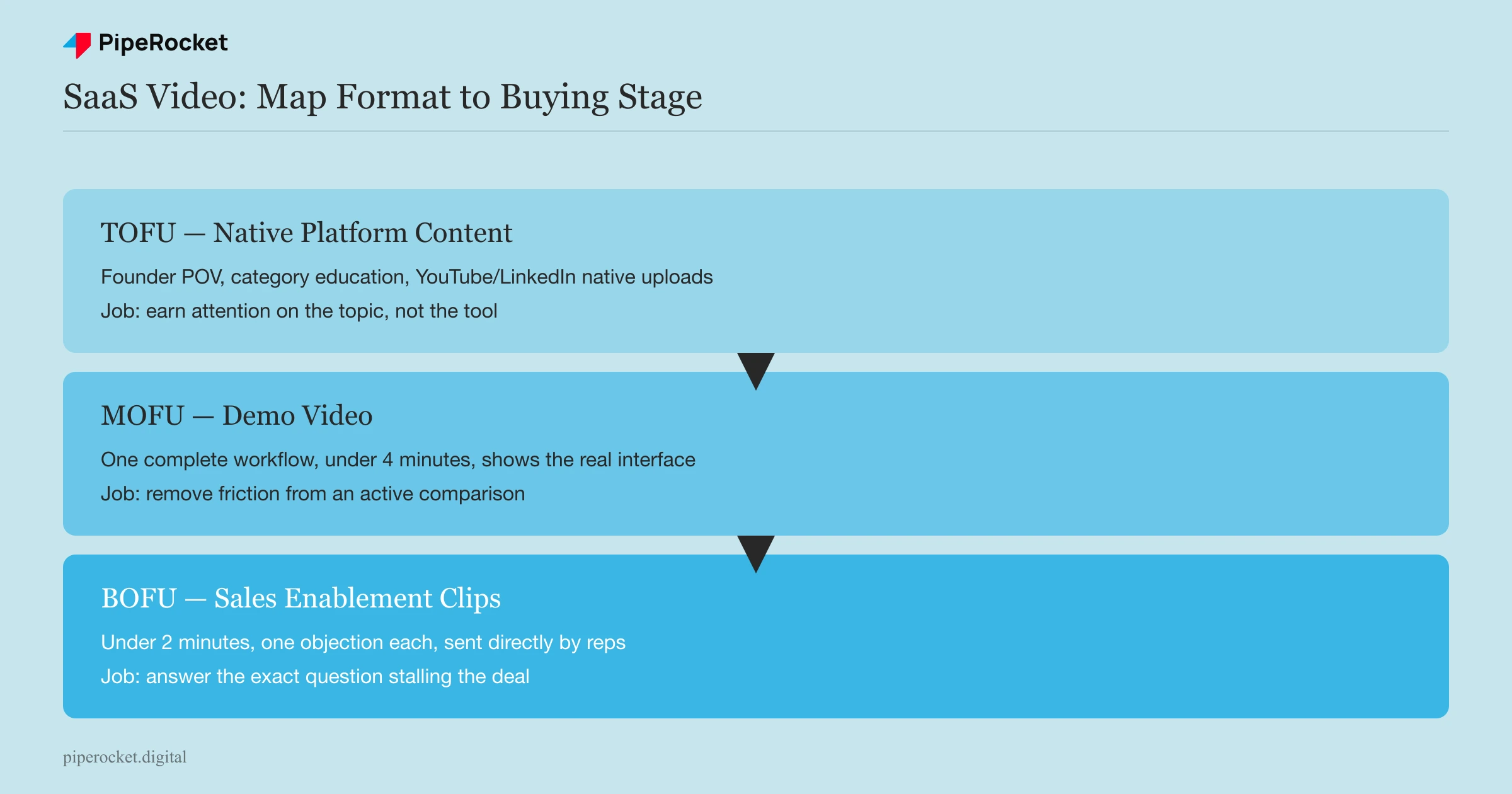
A video without an assigned funnel stage is a video nobody is accountable for. This is the single biggest structural fix I make when a SaaS team asks for help with video.
Before greenlighting a single script, I ask: who watches this, at what point in their evaluation, and what do they do right after? If nobody can answer that in one sentence, the video doesn’t get made yet.
Top of Funnel: Native Platform Content Earns Attention on the Topic
Top-of-funnel video lives on YouTube and LinkedIn as native content, meaning it’s built for the platform’s own discovery mechanics rather than repurposed from a webinar recording. This is educational or point-of-view content: a founder or product lead explaining a category problem, a short breakdown of a workflow inefficiency, a reaction to an industry trend.
This is not the place for a product pitch. A viewer at this stage doesn’t know your product exists yet, and a hard sell here just gets scrolled past. The goal is to earn attention on the topic, not the tool.
Middle of Funnel: The Demo Video Does the Heavy Lifting
The demo video is the single most important asset in a SaaS video strategy, and it’s the one most teams under-invest in. A prospect who’s actively comparing tools wants to see the actual interface, the actual workflow, and how long setup realistically takes.
Keep it under four minutes. Show one complete workflow start to finish rather than six feature highlights with no through-line. A prospect comparing three tools in one afternoon will watch the demo that respects their time, and skip the one that makes them dig for the answer.
Bottom of Funnel: Sales Enablement Clips Answer One Objection Each
This is where most SaaS video strategies stop entirely, and it’s the highest-leverage gap. Sales enablement video is short, specific clips a rep can drop into an email or a follow-up message, not a polished case study documentary. A few examples of what that looks like:
- A 90-second answer to “how does this handle SSO”
- A customer explaining one specific result in their own words
- A screen recording of the exact feature a prospect asked about on a call
We’ve seen reps forward these clips constantly once they exist, because they solve a real problem: writing a convincing follow-up email is hard, and a short video does it better than three paragraphs of text ever could.
Build the Sales Enablement Library Reps Actually Use
Most sales enablement video efforts fail for one reason: marketing builds three or four polished assets, hands them to sales, and never asks what questions actually come up on calls. Reps end up ignoring the library within a month.
The fix is building the library backwards, starting from sales instead of ending with them.
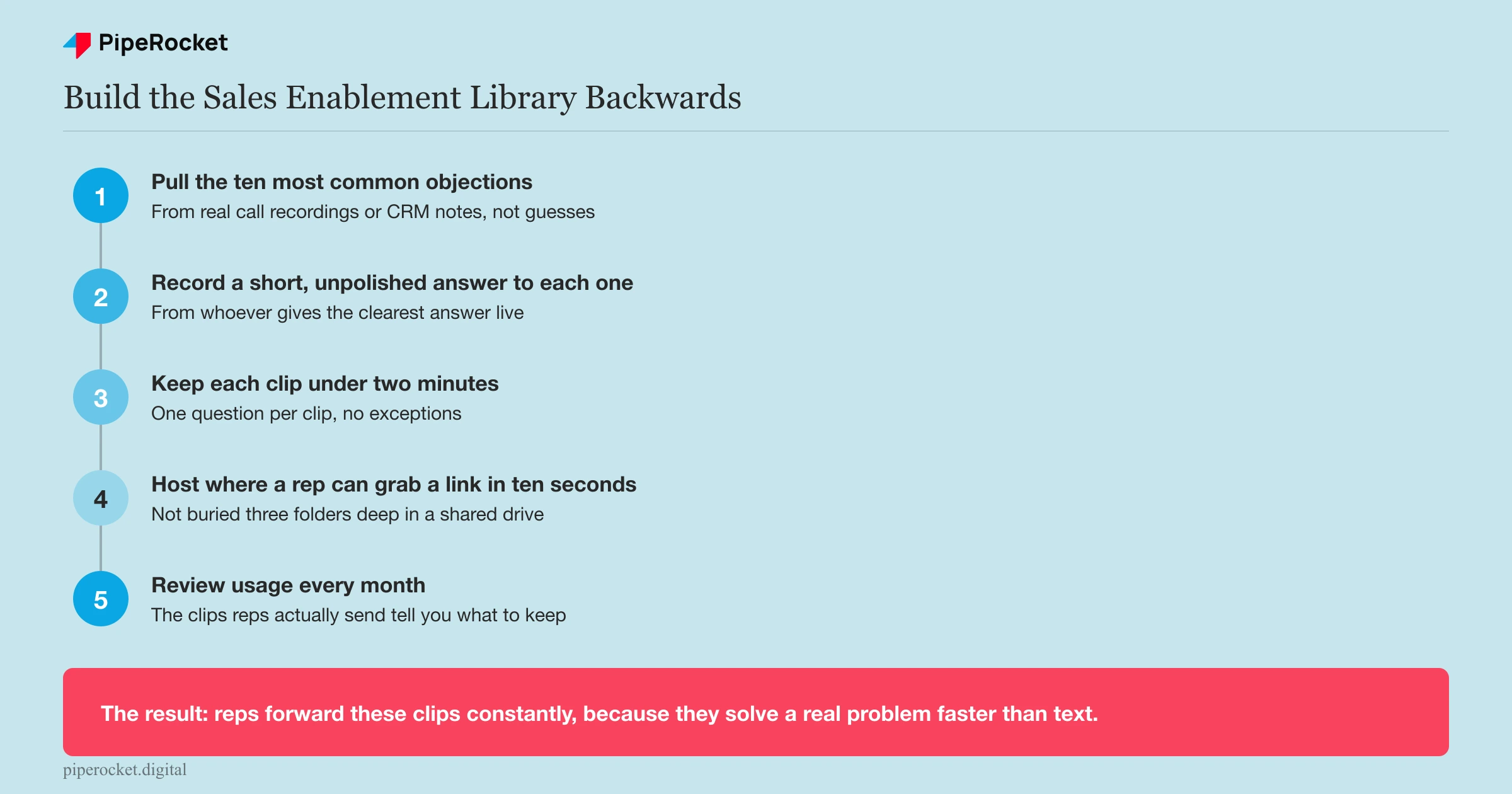
- Pull the ten most common objections or questions from actual call recordings or your CRM’s call notes.
- Record a short, unpolished answer to each one, ideally from whoever on the team gives the clearest answer live, not necessarily the CEO.
- Keep each clip under two minutes and focused on a single question.
- Host them somewhere a rep can grab a shareable link in ten seconds, not buried three folders deep in a shared drive.
- Review usage monthly. The clips reps actually send tell you which objections are real and which assets to retire.
Production value matters far less here than most marketing teams assume. A rep’s phone recording answering “does this integrate with Salesforce” in ninety seconds outperforms a studio-shot version that takes three weeks to produce and arrives after the deal already closed.
Choose the Platform Based on Buying Behavior, Not Trend
The platform decision for SaaS video comes down to where your buyer actually spends working attention, and for B2B that’s overwhelmingly YouTube and LinkedIn, not the short-form consumer platforms that dominate general marketing advice.
| Platform | What it’s good for in SaaS | What to avoid |
|---|---|---|
| YouTube | Demo videos, tutorials, category education, searchable evergreen content | Treating it as a dumping ground for repurposed webinar recordings with no edit |
| LinkedIn native video | Founder/expert POV, product announcements, short customer proof clips | Uploading a YouTube link instead of the native file; LinkedIn’s feed tends to favor native uploads over off-platform links |
| TikTok / Instagram Reels | Rarely useful unless your ICP is genuinely reached there (dev tools with a strong builder-community presence, occasionally) | Assuming consumer-platform virality tactics transfer to a buying committee evaluating a five-figure contract |
A compliance SaaS selling to fintech risk teams has no business chasing Reels trends. Their buyer is watching a LinkedIn demo clip during a lunch break between meetings, not scrolling short-form video for entertainment. Match the format to how that specific buyer actually works, not to what’s getting engagement in general marketing circles.
Common Mistakes to Avoid
Measuring Video on Views Instead of Pipeline Influence
Views tell you almost nothing about whether a video helped close a deal. A demo video watched by 200 people who were never going to buy is worth less than the same video watched by 20 people actively in an active sales cycle. Track whether a deal touched a video before closing, not how many total plays it racked up.
Producing One Long Video Instead of Several Short Ones
A 20-minute product overview tries to serve every funnel stage at once and ends up serving none of them well. Split it. The top-of-funnel viewer needs 90 seconds on the problem. The bottom-of-funnel prospect needs four minutes on one specific workflow they asked about. One video can’t be both.
Skipping Captions and On-Screen Text
Most B2B video gets watched on mute, in an office, or during a commute with headphones left at home. If the point of your video only lands through audio, most of the audience misses it entirely. Every demo and sales enablement clip needs burned-in captions and on-screen labels for what’s being clicked.
Letting Legal or Brand Review Kill the Format’s Speed Advantage
Sales enablement video’s whole advantage is speed: a rep needs an answer today, not after a three-week review cycle. If every clip has to go through the same approval chain as a paid ad, the format loses the exact thing that makes it useful. Set a lighter, faster review bar for unpolished internal-facing clips than for anything public-facing.
How PipeRocket Digital Helps SaaS Teams Build Video That Converts
We build content marketing programs for B2B SaaS teams that map every video to a specific buying stage instead of producing assets nobody’s accountable for. That means demo scripts built from actual sales call objections, sales enablement libraries reps actually use, and native YouTube and LinkedIn content built for how your buyer really evaluates a tool. If your video budget is producing views but not pipeline, reach out to PipeRocket and we’ll show you what a stage-mapped video strategy looks like for your funnel.
Frequently Asked Questions
What is a SaaS video marketing strategy?
A SaaS video marketing strategy is the plan for which video formats, such as demo walkthroughs, sales enablement clips, and native platform content, get produced for which stage of a B2B buyer’s evaluation. It differs from consumer video marketing because the audience is a buying committee researching a purchase decision, not an individual scrolling for entertainment, so the formats, platforms, and length all shift toward utility over spectacle.
How long should a SaaS demo video be?
Keep a SaaS demo video under four minutes, and ideally closer to two or three, focused on one complete workflow rather than a list of feature highlights. Prospects comparing multiple tools in the same afternoon reward the demo that gives them a clear start-to-finish path through the product. They’ll skip or abandon a longer video that makes them search for the answer they came for.
Does video actually help SaaS companies close deals, or is it just for awareness?
Video helps close deals directly when it’s built for the middle and bottom of the funnel. A demo video that answers “how does setup actually work” and a sales enablement clip that answers a specific objection both remove friction at the exact moment a prospect is deciding. That’s a different job than a top-of-funnel awareness video, and it tends to show up much faster in pipeline metrics.

