
How to Fix Crawl Errors: A Step-by-Step Troubleshooting Guide
 Vignesh Sampath
Last updated on
Vignesh Sampath
Last updated on
You can fix crawl errors by identifying broken links, updating bad redirects, and checking your site files using Google Search Console or a website audit tool, then working through each error type in order of how much crawl budget it’s actually wasting.
TL;DR
- Crawl errors get found in Search Console’s Pages report first, then confirmed with a full site crawl, not the other way around.
- 404 errors and server errors (5xx) account for most of what shows up, and each needs a different fix, not the same blanket redirect.
- Redirect chains waste crawl budget quietly, since Google follows every hop before deciding whether the destination is worth indexing.
- Robots.txt misconfigurations are rarer but far more damaging, since one bad rule can block an entire section of a site.
- Soft 404s and 403/Access Denied errors each need their own fix beyond the standard 404 and robots.txt playbook.
- Fixing crawl errors is only half the job. Confirming the fix actually resolved in Search Console closes the loop.
How to Find Your Site’s Crawl Errors
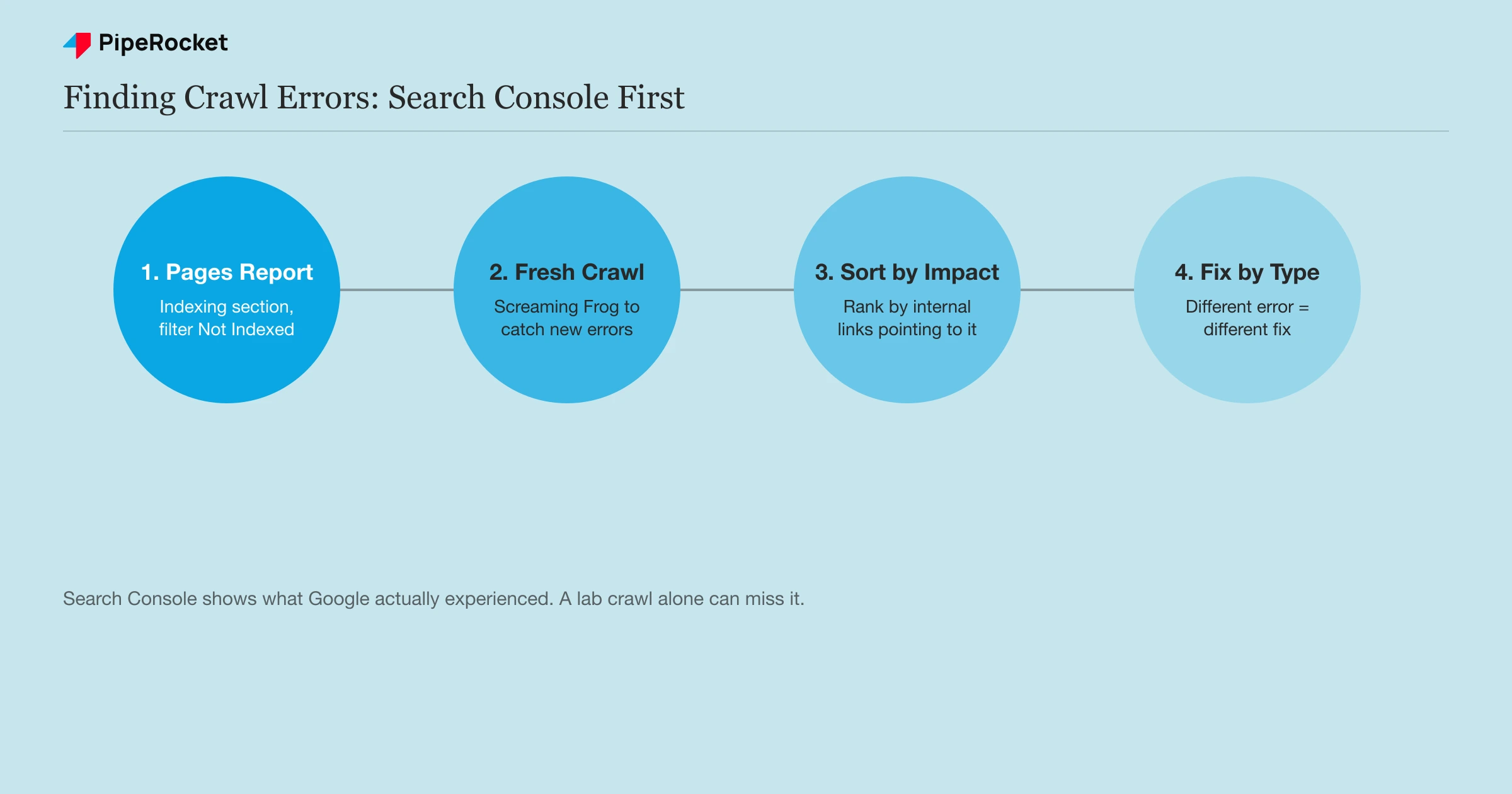
I start every crawl error investigation in Search Console, not a third-party crawler, because Search Console shows what Google actually experienced trying to reach your pages, not just what a lab tool predicts.
- Open your Google Search Console account and go to the Pages report under the Indexing section, where every excluded or error-flagged URL gets grouped by the specific reason.
- Filter for URLs marked “Not Indexed” and check the reason column, since “Not found (404),” “Server error (5xx),” and “Redirect error” each point to a different root cause. If the report says “pages couldn’t be crawled,” that same reason column tells you exactly which error type is behind it.
- Cross-reference with a full site crawl using Screaming Frog or a similar tool, since Search Console’s field data can lag your live site by days and a fresh crawl catches errors that appeared since the last Google crawl.
- Sort by how many internal links point to each broken URL. A 404 with fifty internal links pointing to it wastes far more crawl budget than one with a single stray link, so fix the highest-impact errors first.
- Submit an updated XML sitemap once you add or change pages, so Google discovers the corrected URLs on its next crawl instead of waiting to rediscover them through internal links.
One pattern worth checking specifically if a traffic drop lines up with a Google core update: the pages may not be a ranking problem at all, they may not be indexed anymore. Open the Pages report and look at “Crawled but not indexed” and “Discovered but not indexed” specifically, and if those numbers are climbing, that’s the answer. A core update isn’t necessarily a penalty; it can simply mean Google no longer considers a page worth showing. Thin, top-of-funnel content with no real point of view or depth is what tends to go quiet first, and the fix isn’t publishing more of it, it’s making the existing page worth showing (a genuine take, real depth, fresh data) before resubmitting it in Search Console.
How to Fix Each Common Crawl Error Type
Different crawl errors need genuinely different fixes. Treating every error the same way, usually with a blanket redirect to the homepage, fixes the symptom without addressing what actually broke.
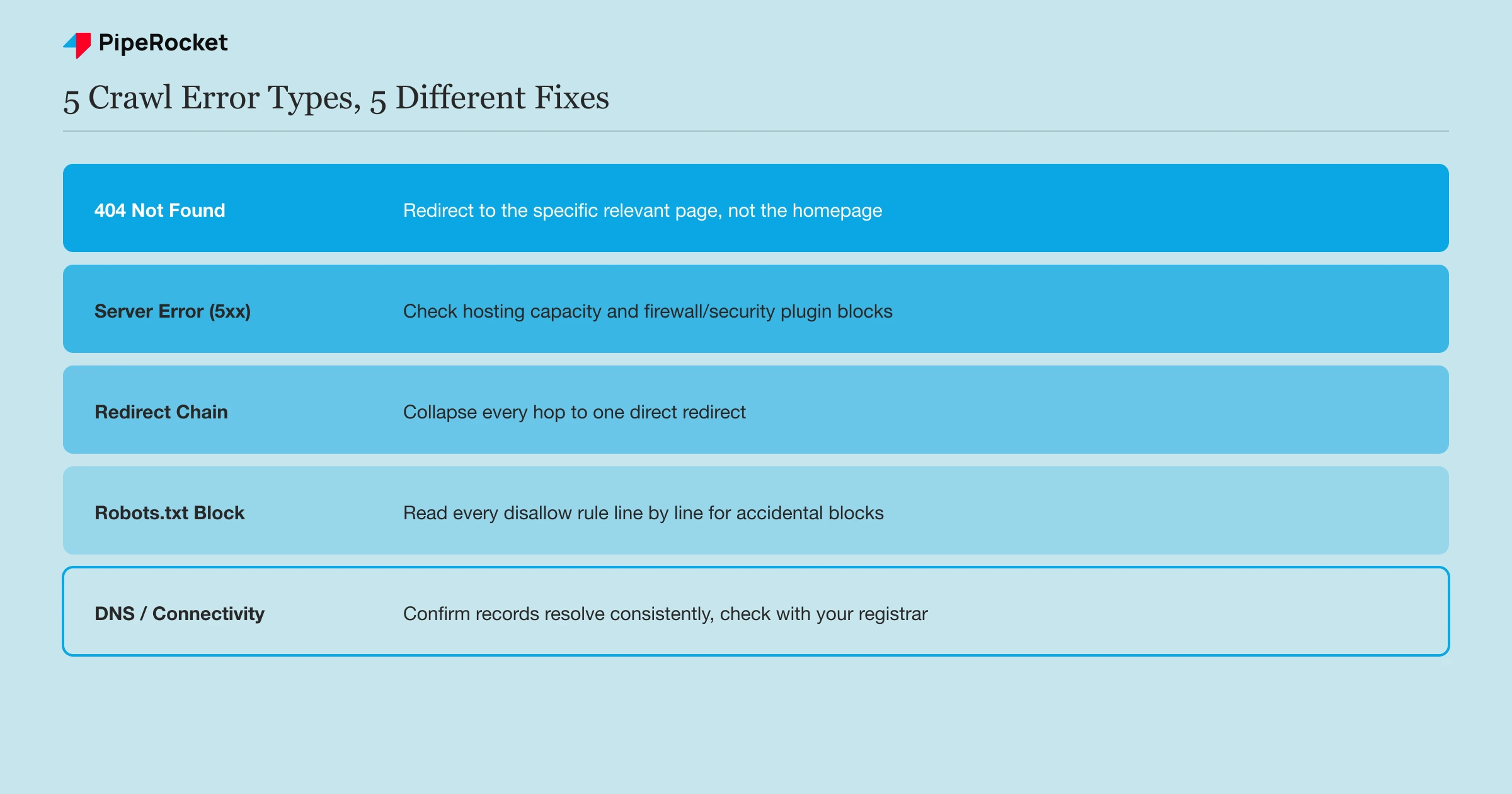
404 Not Found Errors
Update or remove every internal link pointing to the dead page first. Fixing the destination without fixing the links that point to it leaves the same problem waiting to resurface.
If the page had real value and a genuinely relevant replacement exists, set up a single 301 redirect to that specific page, not to your homepage as a catch-all.
Soft 404 Errors
Add real content back to the page or return a true 404/410 status code. A soft 404 is a thin or removed page that returns a 200 OK instead of a proper error status, so Google sees an “empty success” and flags it.
The common cause is a blanket redirect of dead URLs to the homepage, or a “no results” page that still returns 200. Give the page substantial content if it should exist, or let it return a genuine error code if it shouldn’t.
403 Forbidden / Access Denied Errors
Check for login walls, IP or geo blocks, and firewall or WAF rules that reject Googlebot’s user agent, then open the specific path Google needs instead of relaxing security across the whole site.
A 403 means the server reached the request but refused it. Confirm the page is meant to be public, then allowlist Googlebot for that path rather than loosening rules site-wide.
Server Errors (5xx)
Check whether your hosting server is slow, overloaded, or being blocked by an overzealous firewall or security plugin during Googlebot’s crawl attempts. A pattern of intermittent 5xx errors, rather than a single spike, usually points to a server capacity issue that needs your hosting provider’s attention, not just a code fix.
Redirect Chains and Loops
Fix every chain down to a single, direct redirect from the original URL straight to its final destination. A URL that redirects to another URL that redirects again forces Google to follow every hop before it decides whether the destination is worth indexing, and a long enough chain can make Google give up entirely.
Robots.txt Blocking
Read your robots.txt file line by line and confirm no disallow rule is accidentally blocking a directory you actually want indexed. This is the rarest error on this list, but the most damaging, since it can silently remove an entire site section from crawling with a single misplaced rule.
DNS and Connectivity Errors
Confirm your DNS records resolve correctly and consistently, since an intermittent DNS failure can look like a temporary crawl error in Search Console but actually points to a configuration issue with your domain’s nameservers.
How Crawl Errors Differ From Indexing Errors
A crawl error means Googlebot never reached the page (a 404, a server timeout, a blocked path). An indexing error means Googlebot reached and rendered the page but chose not to index it (a noindex tag, a canonical pointing elsewhere, or a duplicate content judgment).
| Crawl error | Indexing error | |
|---|---|---|
| What happened | Googlebot couldn’t reach or load the page | Googlebot reached the page but excluded it from the index |
| Common causes | 404, server error, robots.txt block, DNS failure | Noindex tag, canonical mismatch, duplicate content |
| Where it shows | Search Console’s error-specific labels | Search Console’s “Excluded” reasons |
| Typical fix | Fix the link, redirect, or server issue | Fix the tag, canonical, or content uniqueness |
Confusing the two wastes time. A page excluded for a canonical mismatch doesn’t need a redirect fix. It needs the canonical tag corrected, an entirely different repair than anything on the crawl error list above.
Common Mistakes to Avoid
Redirecting Every 404 to the Homepage
A blanket homepage redirect tells neither users nor Google anything about where the broken link actually intended to go, and at scale it can start looking like a soft 404 pattern Google flags on its own.
Fixing the Destination Without Fixing the Links
Redirecting a dead URL without also updating the internal links that pointed to it leaves the same 404 chain half-fixed, since new visitors following the same internal link still hit the same dead path before the redirect catches them.
Treating a Single 5xx Spike as a Pattern
A one-time server error during a deploy or maintenance window isn’t the same signal as a recurring pattern of server errors. Chasing a single spike as if it’s a systemic problem wastes time better spent confirming it doesn’t recur.
Never Confirming the Fix in Search Console
Fixing the underlying issue without requesting validation or checking back in Search Console leaves you guessing whether Google actually re-crawled and resolved the error, rather than confirming it directly.
How PipeRocket Digital Fixes Crawl Errors
We diagnose crawl errors by type first, since a 404, a server error, and a robots.txt block each need a genuinely different fix, not a one-size response. This is part of the crawlability work inside every technical SEO audit we run for SaaS SEO clients. Get in touch if Search Console is showing a growing error count you haven’t been able to trace.
Frequently Asked Questions
What are crawl errors?
Crawl errors happen when a search engine’s crawler tries to reach a URL on your site and fails, most commonly due to a 404 not found error, a server error, a robots.txt block, or a DNS failure.
They’re different from indexing errors, where the crawler successfully reaches a page but excludes it from the index for a separate reason, like a noindex tag or a canonical mismatch.
How do I check for crawl errors on my site?
Google Search Console’s Pages report under the Indexing section is the most direct source, since it shows exactly which URLs Google’s crawler couldn’t reach and why. Cross-referencing that against a fresh crawl from a tool like Screaming Frog catches errors that appeared since Google’s last visit to your site.
Do crawl errors hurt my SEO rankings directly?
A crawl error on a page you don’t care about has minimal direct impact. Errors on important pages, or a high volume of errors across your site, waste crawl budget that could otherwise go toward discovering and indexing your genuinely valuable content.
Left unaddressed, a growing pattern of crawl errors can also signal broader site health issues that affect how often Google chooses to crawl your site at all.
How to fix crawl errors in Google Search Console?
Filter the Pages report’s “Not Indexed” URLs by reason (404, 5xx, redirect, robots.txt block), fix each error type’s specific cause, then use Validate Fix to confirm Google re-crawled and resolved it.
How can I fix URL errors?
Update or remove the internal links pointing to the dead URL, then 301-redirect it to a genuinely relevant live page. Avoid a blanket homepage redirect, which can create a soft 404 pattern instead of fixing the error.
How do I force a Google crawl?
Use Search Console’s URL Inspection tool and click Request Indexing on the fixed URL. Repeated requests don’t speed up a recrawl; for many URLs, submit an updated sitemap instead.
How long does it take for Google to crawl a new website?
There’s no fixed timeline. It depends on your site’s authority and crawl demand, from days to weeks. Requesting indexing or submitting a sitemap can speed up first discovery, but it won’t guarantee immediate crawling.

