
How to Get Your Site Crawled by AI Bots (GPTBot, PerplexityBot, ClaudeBot)
 Omar Sheriff
Published on · Last updated on
Omar Sheriff
Published on · Last updated on
Getting your site crawled by AI bots means editing robots.txt to explicitly allow crawlers like GPTBot, PerplexityBot, and ClaudeBot, then confirming in your server logs that they’re actually reaching and rendering your pages, not just requesting them.
TL;DR
- Most sites already block AI bots by accident. A robots.txt inherited from a WordPress plugin or a security vendor often disallows every unrecognized user agent by default.
- Each AI company runs multiple bots for different jobs, and allowing one (like GPTBot) does nothing for a company’s other bots (like OAI-SearchBot).
- Robots.txt only grants permission. Confirming a real crawl means grepping server logs for the actual bot hits, since the rule alone proves nothing happened.
- JavaScript-rendered pages are invisible to most AI crawlers because, unlike Googlebot, they generally don’t run a rendering step.
- This is a narrower job than crawl budget work for Googlebot, since AI bots aren’t optimizing your whole index, they’re deciding whether to fetch a single page at all.
Why Most Sites Are Already Blocking These Bots
If you haven’t touched robots.txt in the last year, there’s a good chance you’re already blocking the bots you now want to let in. A lot of security plugins, CDNs, and WAF configs ship with a default rule that disallows any user agent not on an approved list, and AI crawlers usually aren’t on it.
I’ve opened robots.txt files for SaaS clients and found a blanket Disallow: / sitting under a generic bot-blocking rule someone added two years ago to stop scrapers. Nobody remembered it was there. Meanwhile the team was asking why ChatGPT never mentioned their product.
This is a different problem than traditional SEO crawl work. With Googlebot, you’re managing crawl budget, which page gets recrawled and how often, across tens of thousands of URLs. With AI bots, the question is binary: can this specific bot fetch this specific page at all? There’s no budget to optimize until access exists.
The fix starts with knowing exactly which bots exist and what each one does, because “AI crawlers” isn’t one thing. It’s a dozen-plus distinct user agents, each with its own purpose and its own robots.txt line.
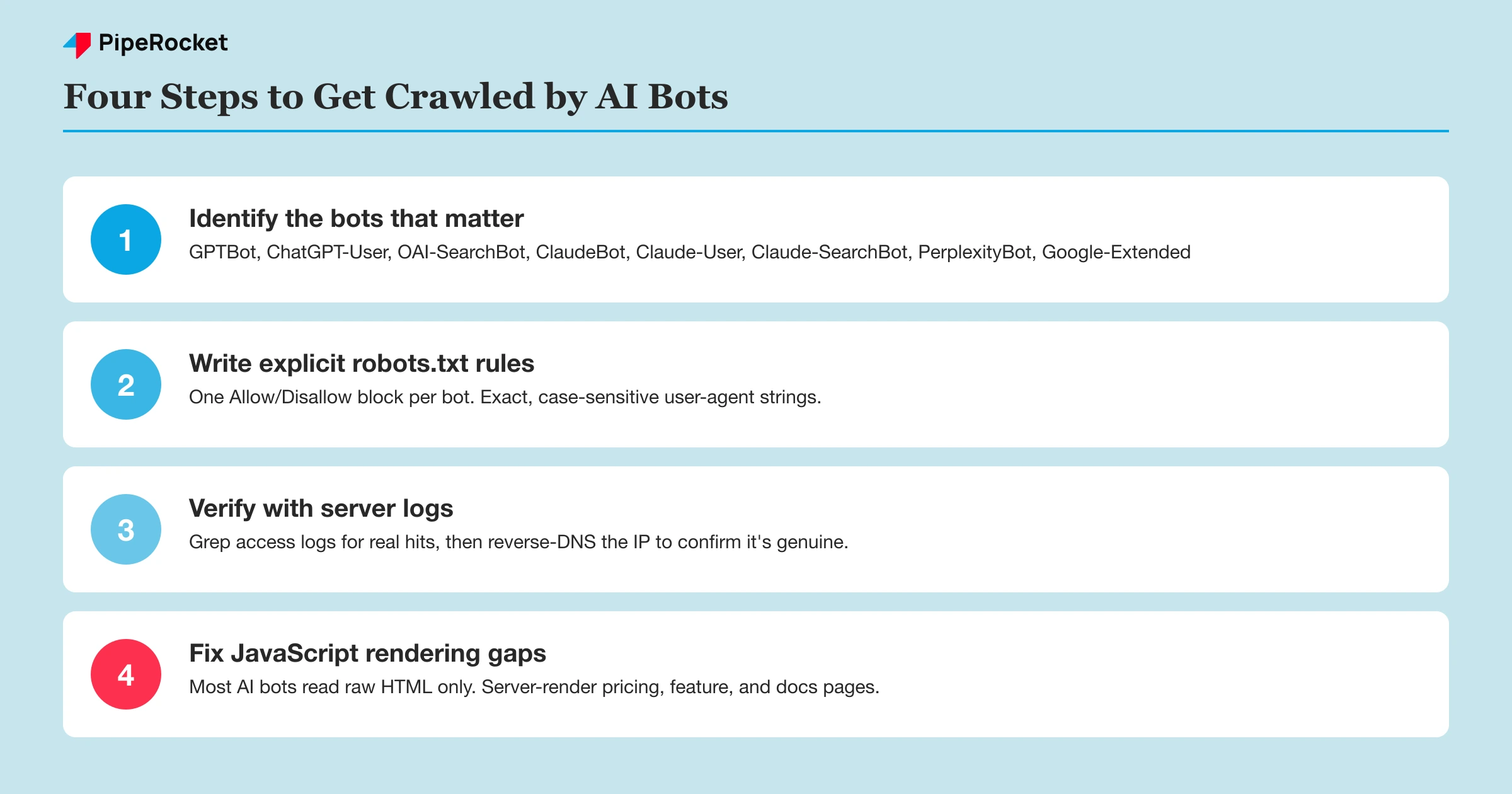
Step 1: Identify the Bots That Actually Matter
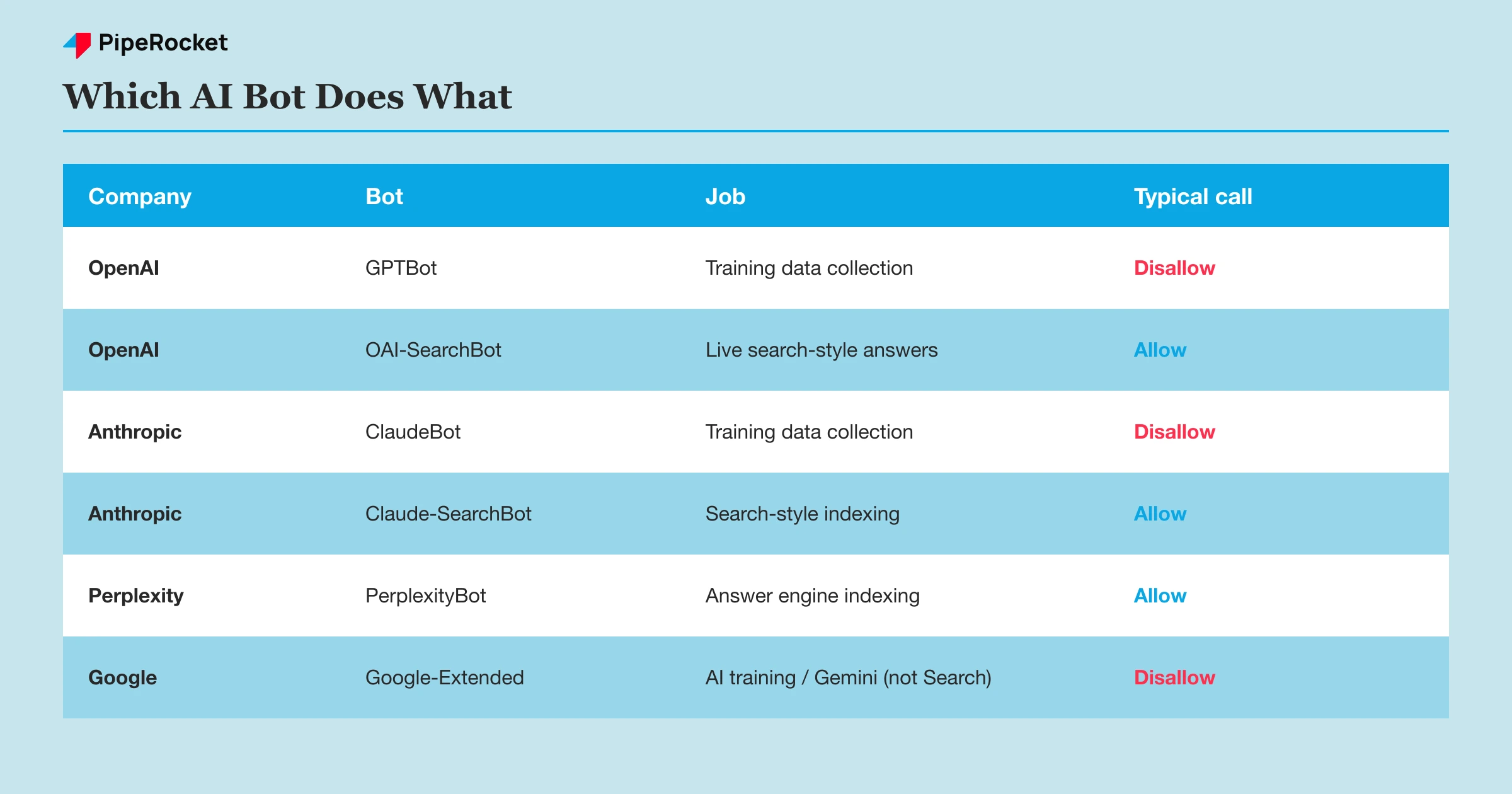
Every major AI company runs at least two kinds of bots: one that crawls for model training, and one that fetches pages in real time when a user asks a question. Confusing the two is the single most common robots.txt mistake I see.
OpenAI runs three separate bots
GPTBot is OpenAI’s training crawler, it collects content that may end up shaping future models. ChatGPT-User fires when someone pastes a URL or asks ChatGPT to browse live. OAI-SearchBot powers ChatGPT’s search-style answers and citations. Allowing GPTBot does not open the door for the other two. If you want your product cited in a live ChatGPT answer but don’t want your content used for training, you allow OAI-SearchBot and ChatGPT-User while disallowing GPTBot specifically.
Anthropic also splits by purpose
ClaudeBot collects public content for training. Claude-User fetches a page when someone asks Claude a question that requires browsing. Claude-SearchBot indexes content for Claude’s search-style results. All three respect robots.txt, but each needs its own explicit rule. Blocking ClaudeBot alone still leaves the other two free to crawl.
Perplexity and Google use a similar split
PerplexityBot handles indexing for Perplexity’s answer engine, while Perplexity-User fires on user-initiated fetches (and Perplexity has been publicly inconsistent about whether it always honors robots.txt for that one). Google’s separate crawler for its own AI training and Gemini is Google-Extended, which is distinct from regular Googlebot. Blocking Google-Extended has zero effect on your regular Google Search rankings, and you should never touch the Googlebot rule to manage AI access.
There’s also CCBot, which crawls for the Common Crawl dataset that multiple AI labs train on, and Bytespider, ByteDance’s crawler, which has a spotty history of respecting robots.txt at all. Treat both as lower-trust and verify their behavior in logs rather than assuming the rule holds.
Step 2: Write the robots.txt Rules
Once you know which bots you want in, the syntax itself is simple, plain User-agent and Disallow/Allow blocks, same as any other crawler directive.
A permissive setup that allows the retrieval and search bots but keeps training bots out looks like this:
User-agent: GPTBot
Disallow: /

User-agent: ChatGPT-User
Allow: /

User-agent: OAI-SearchBot
Allow: /

User-agent: ClaudeBot
Disallow: /

User-agent: Claude-User
Allow: /

User-agent: Claude-SearchBot
Allow: /

User-agent: PerplexityBot
Allow: /

User-agent: Google-Extended
Disallow: /

User-agent: CCBot
Disallow: /
If your goal is simpler, just get cited everywhere and you’re not worried about training data, drop every Disallow line above and allow all of them. That’s the right call for most SaaS marketing
sites, where the content is public-facing anyway and the upside of appearing in AI answers outweighs the training concern.
One thing that trips people up: robots.txt rules are matched by exact user-agent string, and they’re case-sensitive on most implementations. Gptbot or gpt-bot won’t match GPTBot. Copy the string exactly, don’t retype it from memory.
Add a wildcard fallback, then verify it doesn’t overreach
If you want a catch-all rule for AI bots you haven’t explicitly listed, some teams use a broader User-agent: * block. Be careful here: that block also governs Googlebot and Bingbot unless you give them their own explicit sections above it, since most parsers apply the most specific matching user-agent block first. Always give Googlebot and Bingbot their own named blocks so a broad AI-bot rule can never accidentally catch them.
Step 3: Verify the Bots Are Actually Crawling
A robots.txt rule is a permission slip, not proof of a visit. You confirm real access by pulling your server logs and grepping for the user-agent strings.
Run something like this against your access logs:
grep -i "GPTBot\|ClaudeBot\|PerplexityBot\|Google-Extended" access.log | awk '{print $1, $7}'
That gives you the source IP and the requested path for every hit from those four bots. Do this weekly for the first month after opening access, then monthly.
Don’t trust the user-agent string alone
Anyone can fake a user-agent header, including scrapers pretending to be GPTBot to slip past a rate limiter. Confirm real bot traffic with a reverse DNS lookup on the source IP: legitimate ClaudeBot traffic resolves back to an Anthropic-owned domain, and legitimate OpenAI bot traffic resolves to an OpenAI-owned domain. If the IP doesn’t resolve back to the provider, it’s not the real bot, block it separately.
Watch for hits that never happen
If you’ve opened robots.txt correctly but see zero hits from a given bot after several weeks, the problem usually isn’t your rule, it’s discovery. These bots crawl from links and from datasets like Common Crawl, not from a submitted sitemap the way Google Search Console works. A brand-new domain with few external links may simply not be on their radar yet, and there’s no equivalent of “request indexing” to force it.
Step 4: Fix the JavaScript Rendering Problem
Most AI crawlers don’t run a rendering step, so they only see the raw HTML your server sends, not what the page looks like after client-side JavaScript executes. Googlebot has run a full rendering pipeline for years. GPTBot, ClaudeBot, and PerplexityBot generally don’t, though the details change often enough that you should verify current behavior with a raw-HTML fetch test rather than assume.
This is the most common reason a site can have a wide-open robots.txt and still get zero AI-bot traffic on its most important pages. If your pricing page, feature pages, or docs portal render their body content through client-side JavaScript, an AI crawler fetching the raw HTML sees an empty shell and a loading spinner. There’s nothing to index and nothing to cite.
Test what the bots actually see
Pull the raw HTML with a plain fetch, no browser, no JS execution, and read it the way a crawler would.
curl -A "GPTBot" https://yoursite.com/pricing | less
If the response is mostly empty <div> tags with no visible text, your content is client-rendered and invisible to these bots. Compare that against what a browser shows you, and if the gap is large, that’s the fix to prioritize before anything else in this guide.
Server-side render the pages that matter most
You don’t need to re-architect the whole site. Prioritize server-side rendering or static generation for the pages an AI bot would actually want to cite: pricing, product/feature pages, and documentation. A single-page app dashboard behind a login was never going to be crawled anyway, so that’s not where the effort goes.
If a full SSR migration isn’t realistic this quarter, a dynamic-rendering middleware that serves a pre-rendered HTML snapshot to known bot user agents (while serving the normal JS bundle to real users) closes most of the gap without touching your frontend stack.
Common Mistakes to Avoid
Blocking the wrong bot in the pair
Teams block GPTBot thinking they’ve opted out of ChatGPT entirely, then wonder why ChatGPT’s live browsing still shows up in logs. It’s a different bot with a different job. Decide separately for the training crawler and the retrieval crawler instead of treating “OpenAI” as one line item.
Assuming the security plugin isn’t touching robots.txt
Plenty of WordPress security plugins and some CDN bot-management defaults quietly append disallow rules for “unknown” crawlers. Check the live, rendered robots.txt at your actual domain, not the theoretical one in your CMS settings, since a plugin can override what you think you configured.
Treating this like crawl budget optimization
Traditional technical SEO spends a lot of energy on crawl budget: trimming low-value URLs so Googlebot spends its limited crawl allowance on pages that matter. AI bots don’t work off a shared budget across your site the same way. The relevant question per page is simpler: is it allowed, and can the bot read it at all. Don’t import the crawl-budget mental model wholesale, since it optimizes for the wrong constraint here.
Skipping the log verification step
Editing robots.txt and calling it done skips the only step that tells you whether it worked. I’ve seen teams open access, declare victory, and never check a single log line. Three months later they’re debugging “why doesn’t ChatGPT know about us” from zero, when the real answer was sitting in an access log the whole time.
How PipeRocket Helps SaaS Teams Get This Right
This is exactly the kind of technical gap we audit before touching content strategy. We check robots.txt against the current bot list, pull server logs to confirm real crawl activity, and flag JS-rendering blind spots on pricing and docs pages. If you want the fuller playbook this sits inside, our SaaS GEO guide covers the content and authority side, and our llms.txt guide is the companion piece if you’re also weighing that file. If you’d rather have someone run this audit for you, our SaaS SEO agency team does this as part of onboarding, or just reach out directly.
Frequently Asked Questions
What is getting crawled by AI bots?
Getting crawled by AI bots means allowing crawlers like GPTBot, ClaudeBot, and PerplexityBot to fetch your pages so your content can be referenced in AI-generated answers or included in a model’s training data. It happens through robots.txt permissions plus a page’s actual technical accessibility, meaning the HTML has to be reachable and readable without JavaScript execution. Unlike traditional search indexing, there’s no dashboard confirming it happened. You verify it yourself through server log analysis.
Does blocking GPTBot hurt my Google rankings?
No. GPTBot, ClaudeBot, and the other AI training and retrieval crawlers are entirely separate from Googlebot, and blocking any of them has no effect on how Google crawls or ranks your site. The only crawler tied to Google Search rankings is Googlebot itself, which you should never disallow. Google-Extended controls AI training and Gemini access specifically, and disallowing it doesn’t touch your organic search visibility at all.
How long does it take for AI bots to start crawling after I update robots.txt?
There’s no fixed timeline, and it varies a lot by bot and by how discoverable your site already is. Some crawlers pick up a robots.txt change within days if your domain already gets frequent bot traffic, while a smaller or newer site with few inbound links might wait weeks before a bot’s crawl queue reaches it. Checking server logs weekly for the first month is the only reliable way to know, since none of these companies offer a “request crawl” tool the way Google Search Console does for Googlebot.

