
Indexation SEO: How to Get Pages Crawled and Indexed by Google
 Omar Sheriff
Last updated on
Omar Sheriff
Last updated on

Indexation SEO means making sure Google can crawl a page and choose to store it in its index, since a page has to be indexed before it can rank for anything. It covers crawl budget, conflicting robots.txt/meta robots/canonical signals, sitemap accuracy, and catching pages that got crawled but never made it into the index.
TL;DR
- Indexation and crawlability are two different checkpoints, and mixing them up is why most indexation fixes don’t work.
- Robots.txt, meta robots, and canonical tags each send Google a different signal, and when two of them disagree, indexation breaks quietly.
- A bloated or stale sitemap wastes the crawl budget Google allocates to a site instead of protecting it.
- SaaS sites lose indexation in specific, repeatable ways: app subdomains competing with the marketing site, doc portals duplicating content, and JavaScript pages that render too late for Google to bother.
- Google Search Console’s Pages report and URL Inspection tool tell you exactly which of these is happening, if you read them in the right order.
- Resubmitting a sitemap, blocking and noindexing the same path, ignoring the app subdomain, and letting the sitemap grow unpruned are the recurring mistakes that undo indexation fixes elsewhere on the site.
Crawling and Indexing Aren’t the Same Problem
A crawled page and an indexed page are not the same thing, and treating them as one problem is why so many indexation fixes fail. Crawling is Googlebot visiting a URL and downloading it.
Indexing is Google deciding that page is worth adding to the index it actually serves results from. A page can be crawled every day and never get indexed. Google visits it, reads it, and passes.
That’s usually a quality or duplication call, not a technical block. A page can also never get crawled at all, which is a completely different problem. Something is stopping Googlebot from reaching it in the first place.
I’ve watched teams “fix” an indexation problem by resubmitting a sitemap for a page that was crawled fine and simply didn’t clear the bar to get indexed. Resubmitting a sitemap doesn’t change Google’s opinion of the content. It just tells Google the URL exists, which it already knew.
The fix depends entirely on which side of the fence a page is sitting on:
- Not crawled = a technical block. Something (robots.txt, a broken link path, a redirect chain) is stopping Googlebot from reaching the URL.
- Crawled but not indexed = a quality or duplication call. Google saw the page and decided against it.
Confusing the two means chasing the wrong fix. A thin content page doesn’t need a sitemap ping. A blocked page doesn’t need a content rewrite. The rest of this piece walks through both sides, starting with the signals that control crawl access.
How Robots.txt, Meta Robots, and Canonical Tags Actually Interact
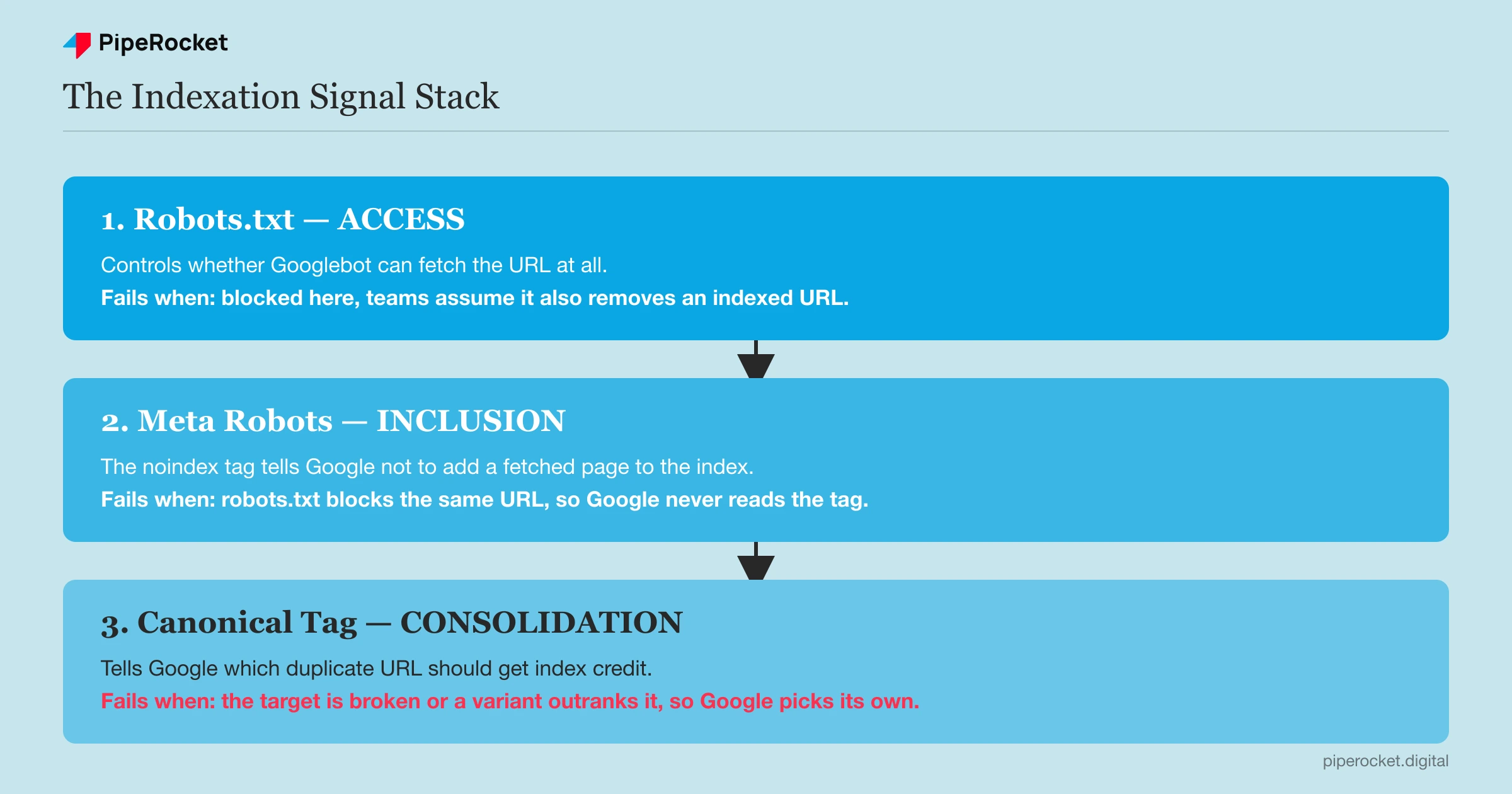
These three signals do different jobs, and Google resolves conflicts between them in a specific order that most SEO checklists skip over. Robots.txt controls access: it tells Googlebot which paths it’s allowed to request at all.
Meta robots controls inclusion: once a page is fetched, the noindex tag tells Google not to add it to the index. Canonical tags control consolidation: they tell Google which URL among several near-duplicates should be treated as the “real” one.
Robots.txt Blocks the Crawl, Not the Index
Blocking a URL in robots.txt stops Googlebot from fetching it, but it doesn’t remove an already-indexed URL from the index. If the page has external links pointing to it, Google can still show it in results with just the URL and no description, because it’s never allowed to crawl the page to see what’s on it.
This catches SaaS teams by surprise on staging subdomains and old campaign landing pages. They block the path in robots.txt assuming that’s the same as deindexing it, and months later the bare URL is still floating in search results with a “no information is available” snippet.
Meta Robots Needs the Crawl to Work
A noindex meta tag only works if Googlebot can actually fetch the page and read it. If robots.txt blocks the same URL, Google never sees the noindex instruction, because it never gets to request the page.
This is the single most common self-inflicted indexation bug on SaaS sites. Someone adds noindex to a thin feature page, then a separate robots.txt rule (often added by a different person, months apart) blocks the same directory. The noindex tag stops working, silently, because Google can’t read it anymore.
Canonical Tags Are a Hint, Not a Command
A canonical tag tells Google which version of a page should get credit when duplicates exist, but Google treats it as a strong suggestion, not a directive. If the canonical target is broken, redirects elsewhere, or points to a page that doesn’t actually match the content, Google will often ignore it and pick its own canonical.
The conflict that breaks indexation most often on SaaS sites: a page sets a self-referencing canonical, but a parameterized version of the same URL (from a tracking campaign, a filter, or a sort option) gets more external links. Google can decide the parameterized version deserves to be canonical instead, and your intended page drops out of the index in favor of a URL you never meant to rank.
| Signal | Controls | Fails silently when |
|---|---|---|
| Robots.txt | Whether Googlebot can fetch the URL | You assume it also removes an indexed URL |
Meta robots (noindex) |
Whether a fetched page gets indexed | Robots.txt blocks the same URL first |
| Canonical tag | Which duplicate gets index credit | The target is broken, redirected, or outranked by a variant |
Check these three signals together, on the same URL, before touching anything else. Fixing one in isolation is how a page ends up “fixed” on paper and still missing from the index.
Sitemap Hygiene: What Actually Protects Crawl Budget
An XML sitemap’s job is to tell Google which URLs matter enough to prioritize, and a sitemap that’s stale or bloated actively works against that goal. Crawl budget isn’t infinite, even for sites nowhere near the scale where it becomes a real constraint.
Google allocates a rough crawl frequency per site based on server response health, site size, and how often content actually changes.
A sitemap padded with redirected URLs, 404s, or noindex pages spends that budget on pages Google shouldn’t be visiting at all. Every listing that returns anything other than a clean 200 status is a wasted crawl request that could have gone to a page that actually needs (re)indexing.
Run this check quarterly, not once and forget it:
- Pull the full sitemap and check every URL’s live HTTP status. Anything that isn’t a 200 gets removed.
- Remove
noindexpages from the sitemap entirely. Listing a page you’ve told Google not to index sends a contradictory signal. - Confirm the sitemap’s
lastmoddates are real. A sitemap generator that stamps every URL with today’s date regardless of actual changes trains Google to stop trusting the field, which slows re-crawl priority for pages that genuinely did change. - Split sitemaps by content type (blog, product pages, docs) once a site passes a few thousand URLs, so Search Console’s per-sitemap indexing stats actually tell you something useful instead of one blended number.
A clean sitemap doesn’t guarantee indexation. What it does is stop Google from burning crawl requests on pages that were never going to be indexed anyway, which means more of that budget lands on pages you actually want in the index.
SaaS-Specific Indexation Traps
SaaS sites lose indexation in patterns that don’t show up on e-commerce or media sites, because the traps come from how SaaS products are built, not from how the marketing site is written.
The App Subdomain Bleeds Into the Marketing Site’s Index
Almost every SaaS product runs the marketing site on the root domain and the actual product on app.yourdomain.com, and Google can end up indexing app pages that were never meant to be public. Onboarding screens, empty dashboard states, and account settings pages sometimes render enough static HTML before the auth redirect fires that Googlebot indexes them anyway.
Once that happens, those app pages compete with actual marketing pages for the same branded and feature-related queries, and they do it with worse content, since a logged-out onboarding shell has none of the context a real landing page has.
Audit app.yourdomain.com in Search Console as its own property. If pages are indexed there that should never be public, block the whole subdomain in robots.txt and confirm with noindex on any page that still gets requested through a direct link.
Doc Portals Duplicate the Same Answer Across URLs
Documentation platforms like Zendesk, Intercom, or a self-hosted docs site generate a huge number of thin, overlapping pages, often with the same core answer restated across a “getting started” article, a FAQ entry, and a changelog note. Google crawls all of them, recognizes the overlap, and indexes none of them well, because no single URL looks authoritative enough to win.
The fix is consolidation, not deletion: pick the one page that should own a given answer, canonicalize the near-duplicates to it, and add a noindex to any doc page that exists purely for internal search inside the help center rather than for Google.
Most doc platforms let you exclude a whole documentation section from their sitemap. Use it, then rebuild a smaller sitemap covering only the doc pages actually worth ranking.
JavaScript-Rendered Pages Miss the Indexing Window
When a page’s content loads client-side, Googlebot fetches an empty HTML shell first and queues the page for a second rendering pass. That second pass usually happens within minutes on a healthy, well-established site, but it can stretch to days on lower-priority pages when the render queue backs up. If content changes again before that render happens, Google can index a version of the page that’s already stale.
This hits pricing pages and feature pages hardest, since SaaS teams update those constantly and expect the change to reflect immediately.
Server-side rendering or static generation removes the two-step delay entirely. If a full rendering migration isn’t realistic in the short term, a pre-rendering layer for just the highest-priority marketing pages closes most of the gap. Technical SEO for SaaS covers the broader JavaScript rendering architecture decision if this is a site-wide pattern rather than a handful of pages.
Diagnosing Indexation Problems in Google Search Console
Search Console’s Pages report under Indexing is the ground truth for what Google actually did with a URL, and reading it in the right order saves hours of guessing. Open it and look at the status breakdown before touching any individual URL. If indexation is just one of several things you’re checking, how to run a SaaS SEO audit covers where this step fits alongside on-page structure, content gaps, and backlink health.
Reading the Pages Report Status Buckets
Each status means a different fix, and applying the wrong fix to the wrong status is the most common wasted effort in indexation work.
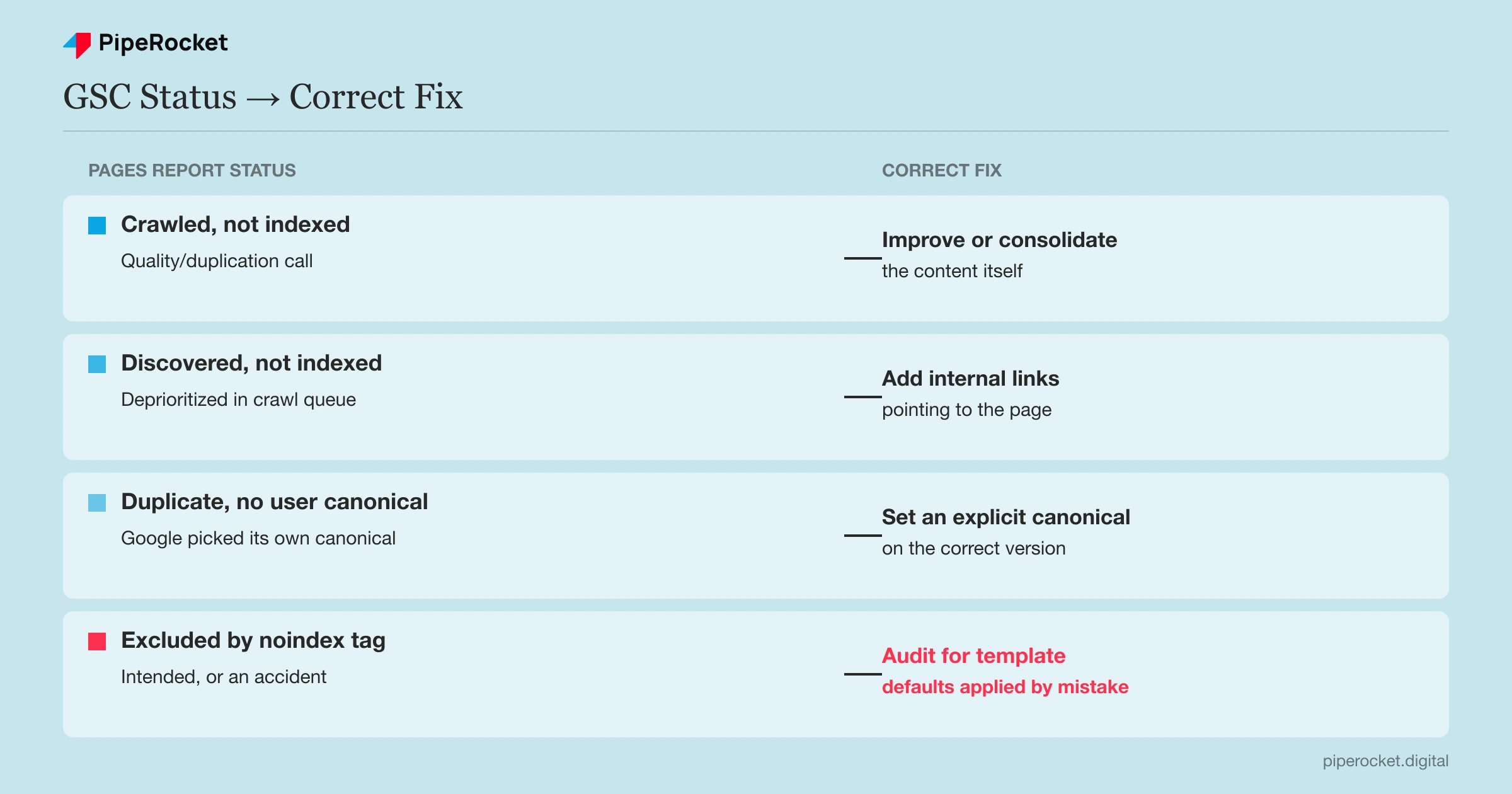
- Crawled - currently not indexed. Google fetched the page and passed on it. This is a content or duplication judgment. Resubmitting the sitemap will not change it. Improve the content or consolidate it into a stronger page covering the same topic.
- Discovered - currently not indexed. Google knows the URL exists but hasn’t crawled it yet, usually because it’s getting deprioritized in the crawl queue. Check internal linking. Pages with few or no internal links pointing to them get pushed to the back of the queue.
- Duplicate without user-selected canonical. Google found near-identical content and picked its own canonical, which may not be the URL a team actually wants ranking. Add or fix an explicit canonical tag on the correct version.
- Excluded by ’noindex’ tag. Working as intended, or a mistake. Confirm every URL in this bucket was meant to be excluded. It’s common to find pages here that picked up a
noindexby accident from a template default.
Using URL Inspection to Check One Page at a Time
The Pages report shows the pattern; URL Inspection shows the specific reason for one URL. Paste the exact URL in and check three things every time: the “Page indexing” verdict, the Google-selected canonical versus your declared canonical, and whether the “Crawled as” version rendered the content you expect.
If the declared and Google-selected canonicals don’t match, that’s the conflict from the canonical-tags section above showing up in real data. If the live test’s rendered HTML is missing content that’s visible in a browser, that’s the JavaScript rendering delay showing up. The tool tells you which failure mode you’re looking at instead of leaving it to guesswork.
Request indexing directly from URL Inspection after fixing the underlying cause, not before. Requesting indexing on a page that still has the same content problem just spends another crawl request confirming Google’s original decision.
Common Mistakes That Undermine Indexation Work
These show up on almost every SaaS site we’ve audited, and they all undo indexation fixes elsewhere on the same site.
Resubmitting a Sitemap Instead of Fixing the Cause
Resubmitting the sitemap tells Google a URL exists. It does nothing about why that URL isn’t indexed. If the actual cause is thin content, a robots.txt block, or a canonical conflict, the resubmission accomplishes nothing beyond spending a crawl request.
Blocking in Robots.txt and Adding Noindex to the Same Path
As covered above, robots.txt access and meta robots inclusion have to work together, not against each other. Blocking a directory in robots.txt while also relying on noindex tags inside that same directory means the noindex tags are never read, and the pages can still surface in results with no description.
Treating the App Subdomain as Someone Else’s Problem
Engineering usually owns the app subdomain, and marketing usually owns SEO. That split means the overlap between them falls into a gap nobody checks. A few things worth confirming ownership of directly:
- Who reviews what’s indexed under
app.yourdomain.comeach quarter - Who owns the robots.txt rules for that subdomain
- Whether marketing even has Search Console access to it
If the app subdomain is crawlable, it’s competing with the marketing site for search visibility whether or not anyone assigned ownership of that risk.
Letting the Sitemap Grow Without Ever Pruning It
Sitemaps accumulate old campaign pages, deprecated feature URLs, and redirected paths over years, and almost nobody goes back to remove them. Every dead URL still in the sitemap is a crawl request Google could have spent on a page that actually needs it.
Why/How PipeRocket Digital Fixes Indexation Issues
We run indexation audits as part of every SaaS SEO agency engagement, checking robots.txt, meta robots, and canonical signals against each other instead of one at a time, since that’s where most of these bugs actually hide. If your Pages report shows a growing “Discovered but not indexed” bucket and nobody’s touched the sitemap in over a year, get in touch and we’ll walk through what’s blocking it. You can see how we compare against other options on our list of the best SaaS SEO agencies.
Frequently Asked Questions
What is indexation SEO?
Indexation SEO is the practice of making sure Google can crawl a page and decide to add it to its index, since indexing is the prerequisite for ranking at all. It covers the technical signals that control crawl access (robots.txt), inclusion (meta robots), and duplicate consolidation (canonical tags), along with sitemap accuracy and diagnosing indexing failures in Google Search Console.
How long does it take for Google to index a new page?
Most pages on an established site with healthy crawl activity get indexed within a few days to two weeks after publishing, assuming there’s no technical block. New sites or sites with weak internal linking can take considerably longer, sometimes months. Google allocates crawl frequency based on a site’s overall authority and how often it publishes. Submitting the URL through URL Inspection can speed up the initial crawl, but it won’t override a genuine quality or duplication issue.
Why does Google Search Console show a page as “crawled but not indexed”?
This status means Google successfully fetched the page and made a deliberate decision not to include it in the index. That’s a content or duplication judgment, not a technical block. Common causes include thin content that doesn’t add value beyond a similar existing page, near-duplicate content overlapping another URL on the same site, or a page that doesn’t meet the quality bar for its topic. Fixing this means improving or consolidating the content itself, since resubmitting the sitemap won’t change Google’s original assessment.

