
A SaaS SEO audit is a full check of a software company’s website, covering its technical setup, the main pages that convert, its article pages, its backlinks and how it shows up in AI answers, to find what’s stopping it from ranking and bringing in traffic and demos/signups.
The part that’s easiest to skip is the pages that sell, like pricing, features, integrations and comparisons. A site can pass every speed and indexing check while those pages rank for nothing a buyer would search, so in this audit they get a step of their own, and every fix you find gets ranked by how close it sits to a trial or a demo.
Summary of the 7 Steps of a SaaS SEO Audit
- Step 1: Set the goal of the audit and pull a baseline from Search Console, GA4 and your CRM.
- Step 2: Check that Google can crawl, render and index the pages you care about.
- Step 3: Audit your money pages, like pricing, features, integrations and comparisons, and whether they convert.
- Step 4: Audit your content for search intent, cannibalization, on-page basics and gaps against competitors.
- Step 5: Audit your backlinks and authority against the competitors that outrank you.
- Step 6: Check whether ChatGPT, Claude and AI Overviews mention you for your buyers’ questions.
- Step 7: Rank every finding by impact and effort, fix the ones closest to pipeline first, and re-measure against your baseline.
What Is a SaaS SEO Audit?
A SaaS SEO audit is a review of how well a software company’s website ranks and converts, looking at its technical setup, content, backlinks and the path a visitor takes from reading a page to starting a trial or booking a demo.
It covers five areas:
- Technical SEO: whether Google can crawl, render and index your important pages.
- Money pages: whether your pricing, feature, integration and comparison pages exist, rank and convert.
- Content and search intent: whether each search lands on the right page, and whether your blog posts are competing with each other.
- Backlinks and authority: how your links and brand mentions compare with the competitors outranking you.
- AI search visibility: whether ChatGPT, Claude and Google’s AI Overviews mention you when buyers ask about your category.
Which SEO Audit Should You Run for SaaS?
The audit you should run depends on what’s going wrong: flat traffic points to a content and technical audit, traffic without signups points to your money pages, and a sudden drop points to indexing and recent changes on the site.
You won’t always need the full SEO audit either, so match it to where you are:
| Your situation | Where to start | How deep to go |
|---|---|---|
| Traffic has been flat for months | Content and search intent, then technical SEO | Full audit |
| Traffic is fine, but few trials or demos come from it | Your money pages and how they convert | Money pages in depth, the rest as a quick check |
| Traffic or rankings dropped suddenly | Indexing, plus anything that changed on the site or in Google around that date | Focused first, then a full audit if the cause isn’t obvious |
| A redesign or migration is coming | Every URL that ranks or earns links today, so each one gets redirected | A full crawl before launch, and a recheck after |
| Early‑stage site with under 100 pages | Technical basics, and whether your money pages exist yet | Light |
| Nothing’s wrong, it’s a routine check | Indexing, broken pages and how your money pages rank | Light, once a quarter |
If you’re starting SEO for a SaaS company from scratch, a light audit is enough to find the basics that are missing, and the rest of the work is building them.
Our team also watches for a few signs that a content audit can’t wait. Rankings sliding week after week usually means the page’s format no longer matches what Google shows for that search. Traffic that’s stopped growing often means your posts have started competing with each other, which gets more likely once a blog passes 30 to 50 posts. And if you’re about to pay for a new round of content, it’s worth fixing the posts that already underperform before you add more.
What Tools Do You Need for a SaaS SEO Audit?
For a SaaS SEO audit, you need Google Search Console and GA4 for your own data, a crawler like Screaming Frog, an SEO suite like Semrush or Ahrefs for competitor and backlink data, PageSpeed Insights, and ChatGPT and Claude for the AI visibility check.
Most of that is free, and Search Console plus one of the SEO audit tools that crawl your site covers the bulk of the technical work.
| Tool | Pricing (checked Oct 2026) | Helps you to | Alternatives |
|---|---|---|---|
| Google Search Console | Free | See which pages are indexed, what each page ranks for and how its clicks have moved | Semrush or Ahrefs, though their rankings and traffic are estimates and won’t match your exact Google data |
| GA4 | Free | See which landing pages bring in organic trials and demo requests | Your product analytics or CRM, if signups are tracked there |
| Screaming Frog | Free up to 500 URLs, then £199 a year | Crawl your site for blocked pages, 404s, redirect chains, orphan pages and duplicates | Sitebulb, Semrush Site Audit |
| Semrush | From $117.33/mo billed annually ($139 monthly). 7‑day free trial | Compare your keywords and backlinks with competitors, and run a recurring site audit | Ahrefs, SE Ranking |
| Ahrefs Webmaster Tools | Free for your own site. Paid Ahrefs plans from $29/mo | Audit your own site and see its backlinks without a paid plan | Semrush, Moz Pro |
| PageSpeed Insights | Free | Check Core Web Vitals on your money pages, on mobile and desktop | Lighthouse in Chrome DevTools, GTmetrix |
| ChatGPT and Claude | Free plans are enough for manual checks | Ask your buyers’ questions and see which brands get mentioned | Perplexity, Gemini, Google’s AI Mode |
How to Do a SaaS SEO Audit in 7 Steps
To do a SaaS SEO audit, set a goal and pull a baseline, check technical SEO, audit your money pages, content, backlinks and AI visibility, then turn what you find into a ranked fix list.
If you’ve got a team, the five middle steps can be split up, since technical fixes, content and links usually sit with different people anyway. Setting the goal still has to come first, though, and the fix list has to wait until everything else is done.
| Step | What to check | How to fix | Tools needed |
|---|---|---|---|
| 1. Set the goal and pull a baseline | Your goal, the last 3 to 6 months of clicks, signups and demos, and which pages should bring in buyers | Write the goal down as a number and list your money pages | Search Console, GA4, your CRM |
| 2. Check technical SEO and indexation | Indexing, crawl errors, duplicates, JavaScript content, speed, schema and internal links | Fix anything keeping money pages out of the index first, then broken pages, redirects, duplicates and speed | Search Console, Screaming Frog or Sitebulb, PageSpeed Insights, Rich Results Test |
| 3. Audit your money pages | Whether they exist, rank for their own searches and convert | Build missing feature, integration and comparison pages, put the right page type where a blog post ranks, and fix CTAs and forms | Search Console, GA4, Google search |
| 4. Audit content and search intent | Format, search intent, cannibalization, on‑page basics and gaps against competitors | Refresh, merge, prune or leave each post, and match the format Google shows | Search Console, Screaming Frog, Google search, a spreadsheet |
| 5. Audit backlinks and authority | Referring domains against competitors, where your links point, spammy and broken links, directory profiles | Build links to money pages from your gap list, redirect broken backlinks, update directory profiles | Semrush or Ahrefs, Search Console |
| 6. Audit AI search visibility | Mentions in ChatGPT, Claude and AI Overviews, AI crawler access, how quotable your pages are | Get listed on the sources AI answers cite, unblock AI crawlers, open key pages with a direct answer | ChatGPT, Claude, Google, your robots.txt |
| 7. Prioritize issues and fix them | Each finding’s impact, effort and owner | Do the high‑impact, low‑effort fixes first, then re‑measure against your baseline | A spreadsheet, plus Search Console, GA4 and your CRM |
Step 1: Set the Goal and Pull a Baseline
Every SEO audit for SaaS should start with a goal you can count and a record of where your numbers are today.
So what are you actually trying to fix? Write it down as something like getting 10 more organic demo requests or signups a month, or taking weekly traffic from 500 to 1,000. Pick the one that matches why you’re running the audit, because if you set out to get more demos and only end up with more traffic, the audit hasn’t done the job you started it for.
Then you need a before picture. I’d pull the last three to six months from three places, so you’ve got something to hold the results up against later:
- Search Console: clicks, impressions and average position for each page, plus the queries each one shows up for.
- GA4: organic sessions, trial signups and demo requests, by landing page.
- Your CRM: how many leads and deals came from organic search, if your team tracks the source.
And lastly, list the pages that should be bringing in buyers. It’s usually a short list: the homepage, pricing, your main feature and use‑case pages, integrations, and any comparison or alternatives pages. These are your money pages, and I’ll keep coming back to them, because every check after this looks at them first.
Step 2: Check Technical SEO and Indexation
Technical SEO comes first in a SaaS SEO audit, because if Google can’t crawl, render and index your money pages, nothing you fix on them will show up in search.
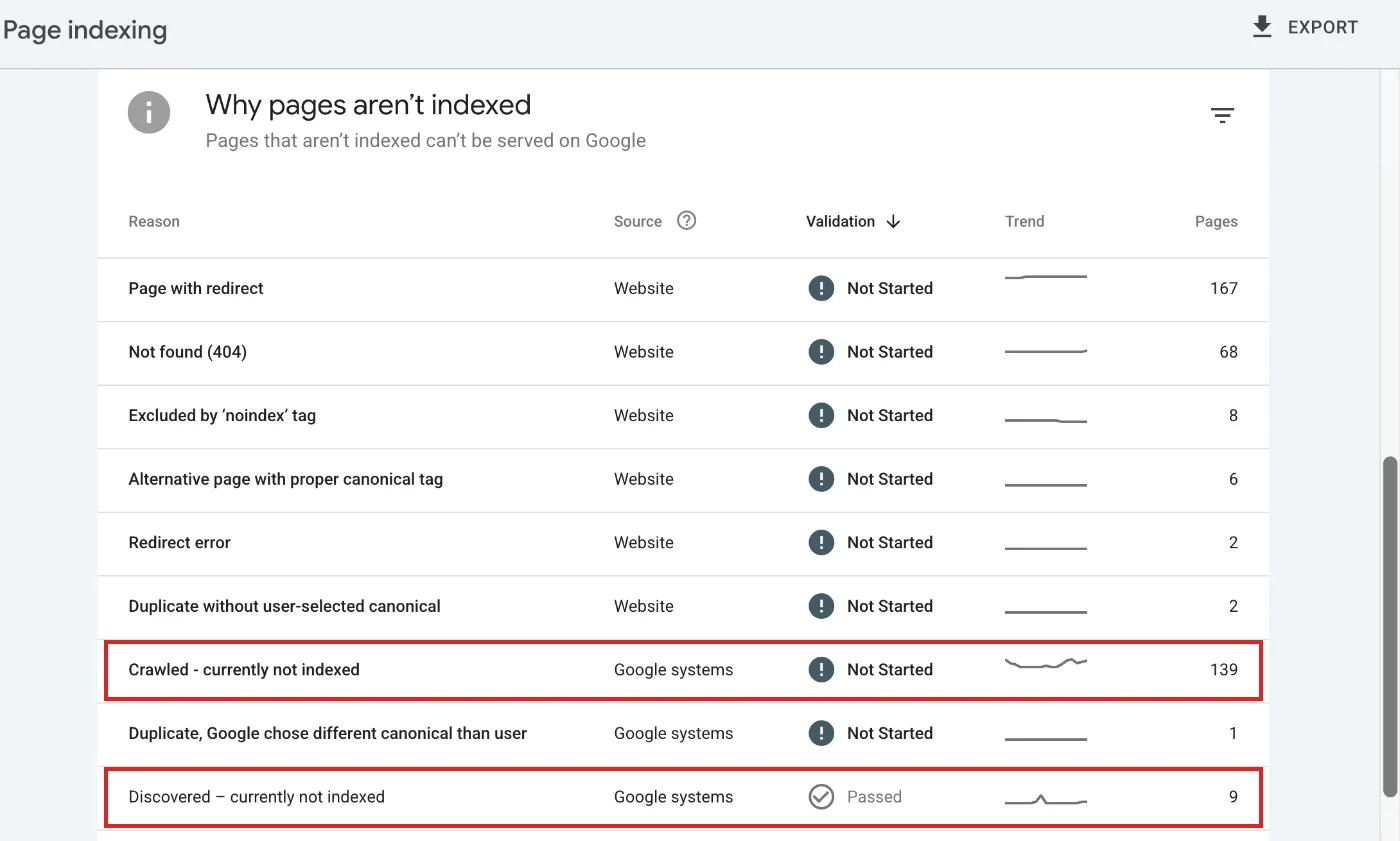
I’d open Search Console’s Pages report first, since it shows your site’s indexation, meaning which URLs Google has indexed and why it left the others out. Scroll down to the reasons table and look for “Crawled - currently not indexed” and “Discovered - currently not indexed”, which are pages Google found and decided not to index. If one of your money pages is in either list, that’s the first thing you fix.
This is what that table looks like. On this site, 139 pages sit under “Crawled - currently not indexed” and 9 under “Discovered - currently not indexed”, so those two rows are where you’d start checking for money pages:
After that, run a crawl with Screaming Frog or Sitebulb (Screaming Frog is free up to 500 URLs) and go through the technical SEO problems that turn up most often:
| What to check | Where to look |
|---|---|
| Pages blocked by robots.txt or a noindex tag | The crawl’s indexability column, and robots.txt itself |
| Broken pages (404s) and redirect chains | The crawl’s response codes |
| Orphan pages, and pages more than three clicks from the homepage | Crawl depth, and your sitemap compared with the crawl |
| Duplicate pages and wrong canonical tags | The crawl’s canonicals, especially on docs versions and filter URLs |
| Content that only loads through JavaScript | URL Inspection in Search Console, then “View crawled page” |
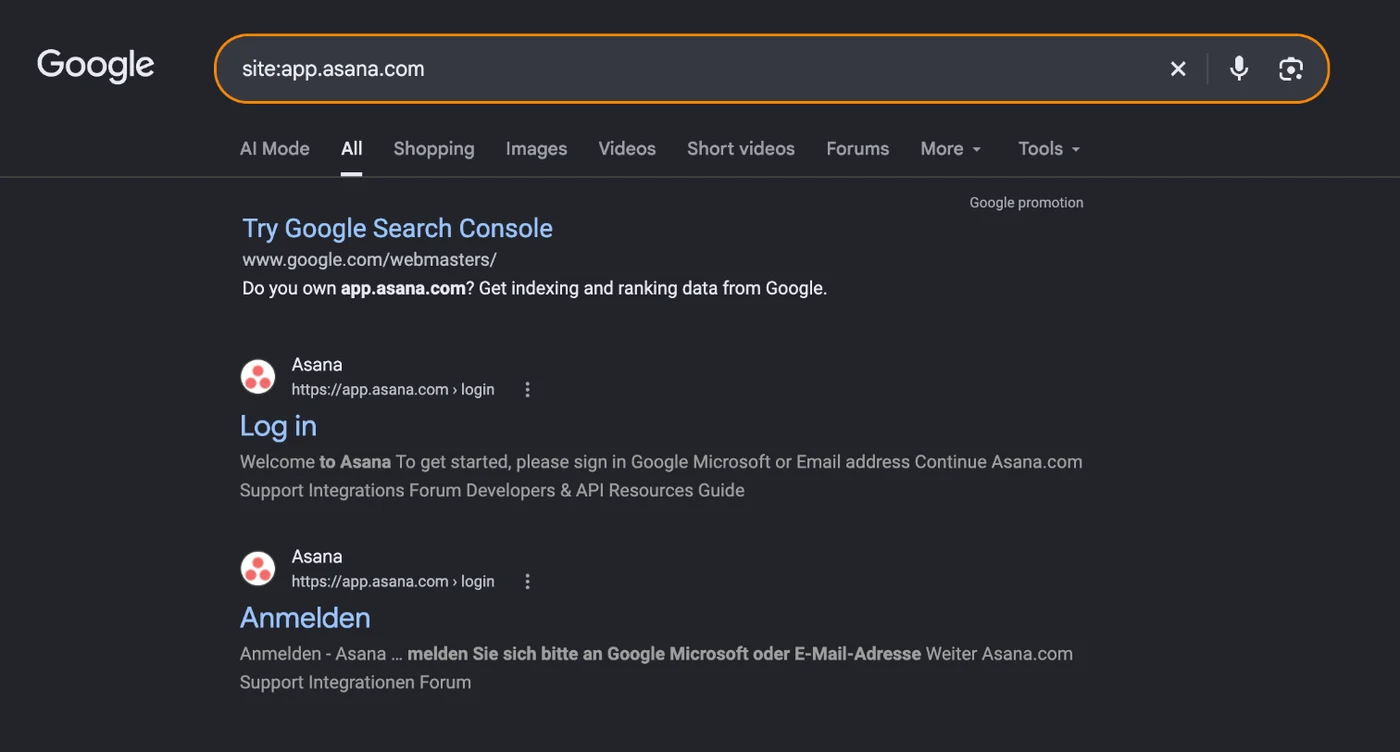
| App, login or staging URLs showing up in Google | A site: search on your app subdomain |
| Slow or jumpy pages on mobile | PageSpeed Insights and the Core Web Vitals report |
| Missing or broken schema | Google’s Rich Results Test |
The app subdomain check takes a few seconds. Search “site:” followed by your app’s domain, and everything that comes back is a page Google has indexed from inside your product. Asana’s is about as clean as it gets, with just the login page and its German version:
While you’re in the crawl, look at how many internal links each of your money pages gets. If your pricing or comparison page is only linked from the footer, Google gets a much weaker signal that it matters than it does for a blog post linked from 40 other posts, and that’s one of the easier fixes you’ll find.
Don’t stop to fix anything yet, just write down each problem with the URLs it affects and move on to your money pages.
Step 3: Audit Your Money Pages
Your money pages need to exist for every way buyers search, rank for the searches they’re built for, and turn visitors into trials and demos, so this step checks all three.
Do Your Money Pages Exist?
Buyers search for features, use cases and integrations, and they compare you with other tools before they buy. So check that each core feature, main use case and important integration has a page of its own, and that you’ve built SaaS comparison pages for “[your product] vs [competitor]” and “[competitor] alternatives”, because if the page doesn’t exist, someone else’s page answers that search for you.
Do Your Money Pages Rank for the Right Searches?
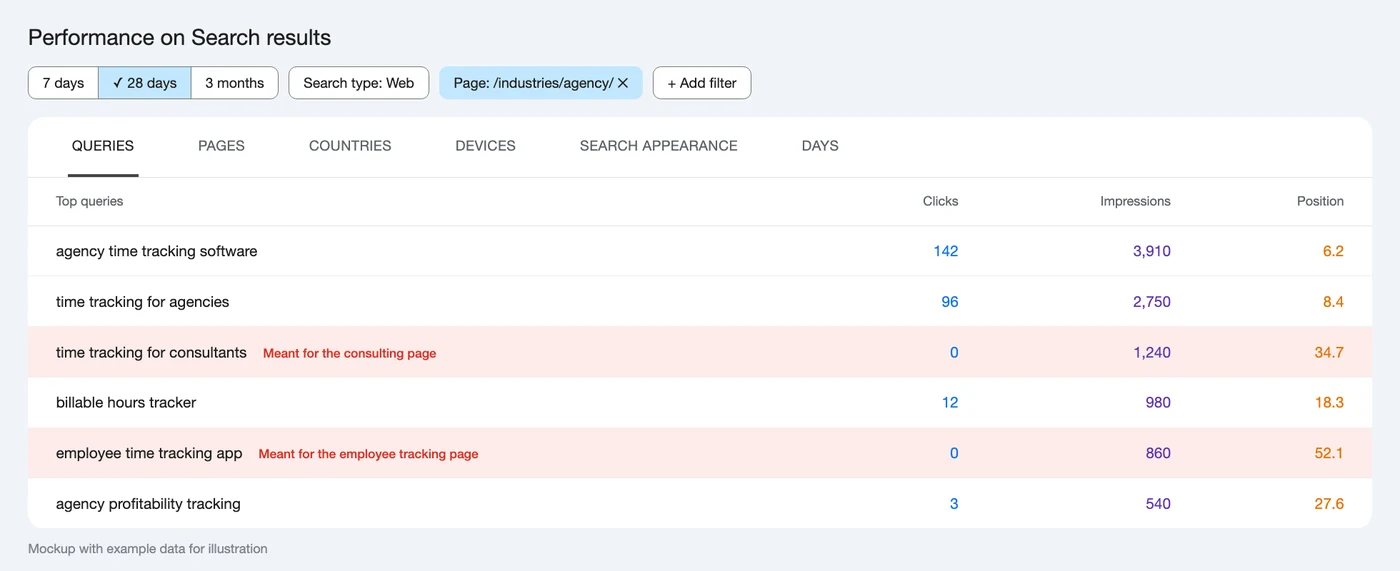
Open each money page in Search Console’s Performance report, filter by that page and look at the queries it shows up for. Here’s a mockup of what that could look like for an agency page on a time tracking site like Toggl’s. It ranks for its own searches, but it’s also showing up for “time tracking for consultants” and “employee time tracking app”, which other pages on the site are built for:
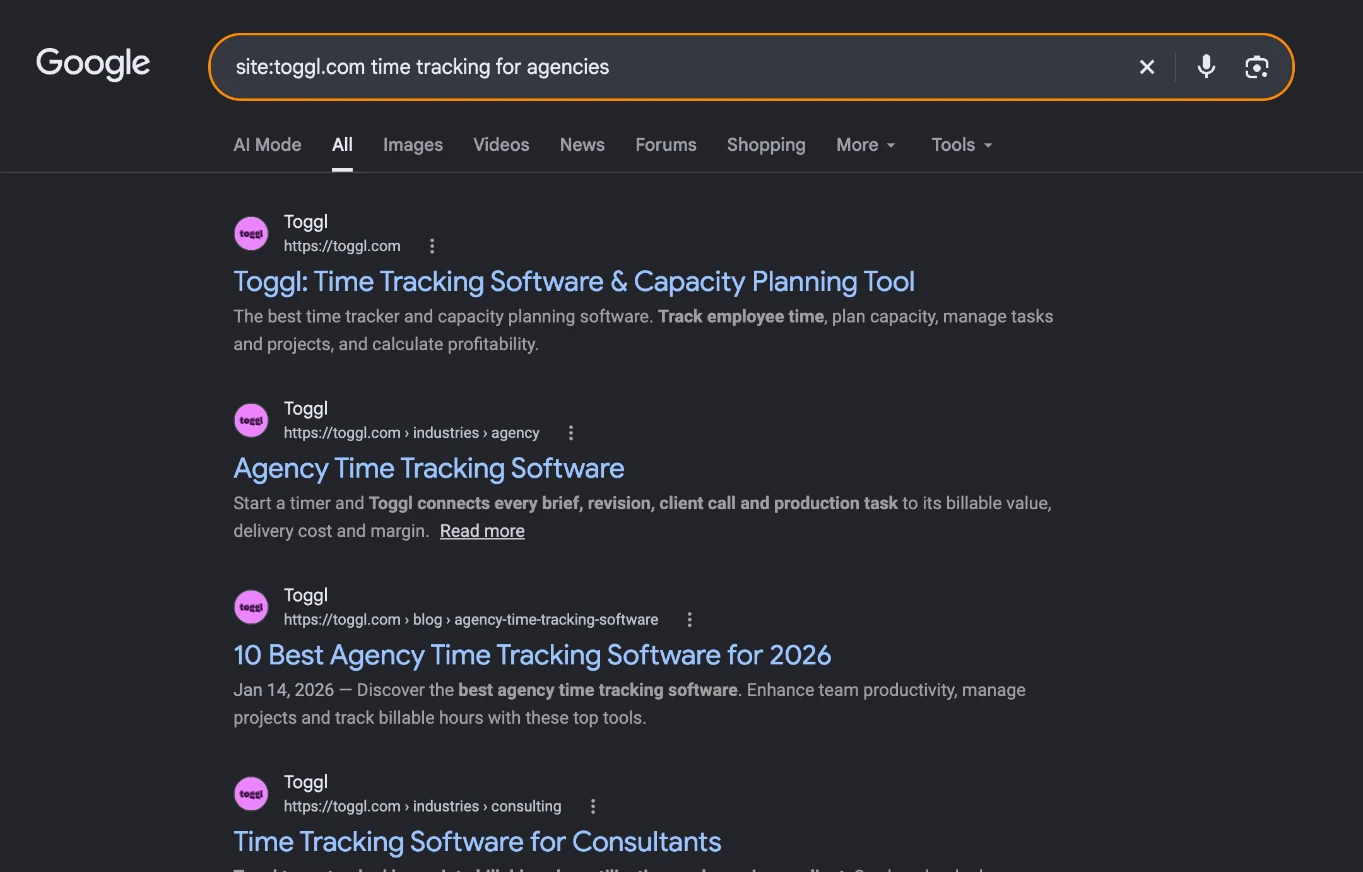
Then search the page’s main keyword with site: and your domain in front of it, and see which of your pages Google picks first. Here’s Toggl for “time tracking for agencies”. Google puts the homepage first, even though Toggl has a page built just for agencies, which comes second:
This is where our team finds one of the most expensive problems in a SaaS SEO audit. We had a client ranking in the top three for high‑intent searches while demos still weren’t moving, because the pages ranking were blog posts and the people searching by then wanted a product or comparison page. Visits like that don’t turn into anything, so if you see a blog post sitting where a feature page should be, put it near the top of your fix list.
While you’ve got each page open, check the basics too:
- Do the title tag and H1 match the main search?
- Is there a meta description that gives someone a reason to click?
- Do your related blog posts link to the page?
Do Your Money Pages Convert?
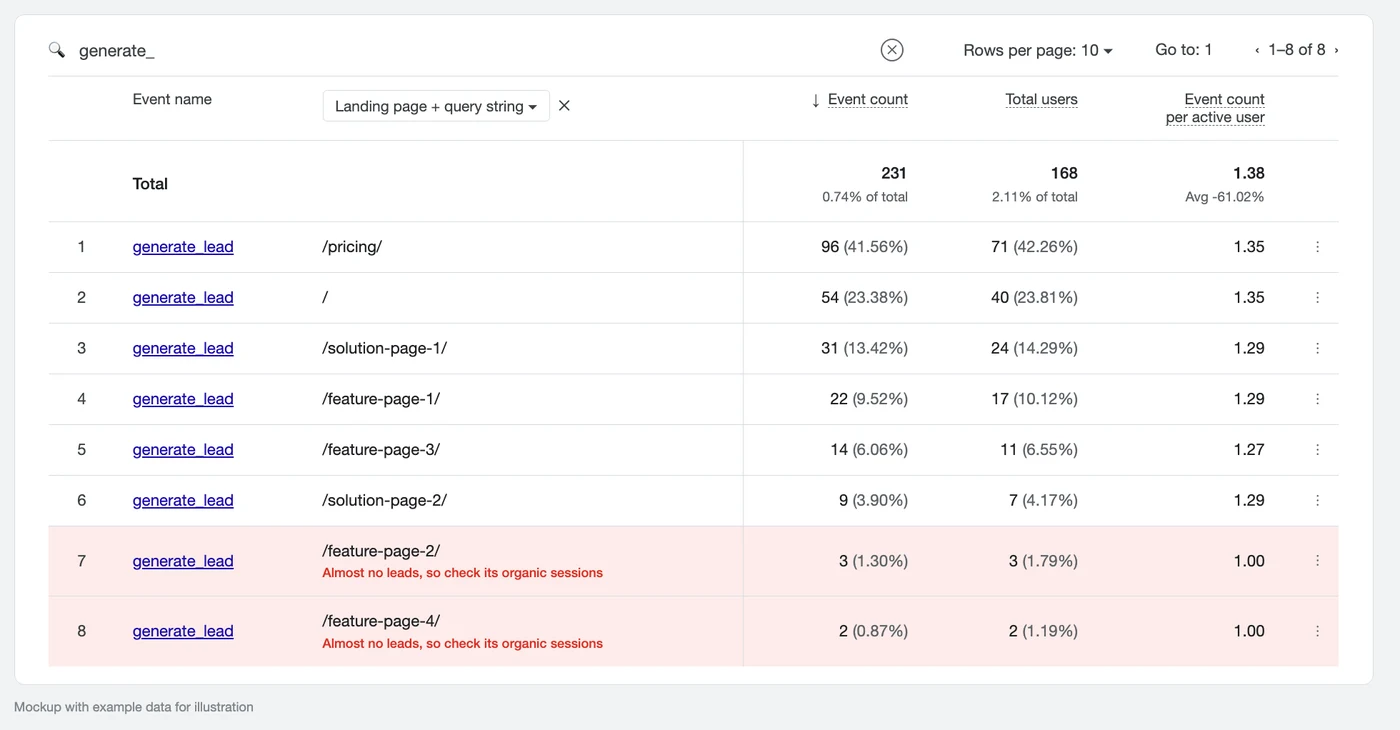
In GA4, pull your lead events, like generate_lead, by landing page, and hold them up against each page’s organic sessions. A page that brings in a lot of organic visits but sits near the bottom of this list is where qualified traffic is leaking out. In this example, two feature pages have brought in just 3 and 2 leads, so the next thing to check is how many organic visits each of them gets:
Open those pages as if you’d never heard of the product, and ask yourself:
- Can you find the demo button without scrolling three screens?
- Does the pricing page show a price, or just “contact sales”?
- Does the signup form ask for a card before you’ve seen anything?
Step 4: Audit Content and Search Intent
The content part of a SaaS SEO audit checks that each blog post targets one search, matches the format Google shows for it, is good enough to rank, and covers what your competitors cover.
Does Each Search Have One Page?
Open Search Console, set the date range to the last 3 to 6 months, filter by a search you care about and open the Pages tab. If two of your pages show up with similar impressions, they’re competing with each other, which is keyword cannibalization:
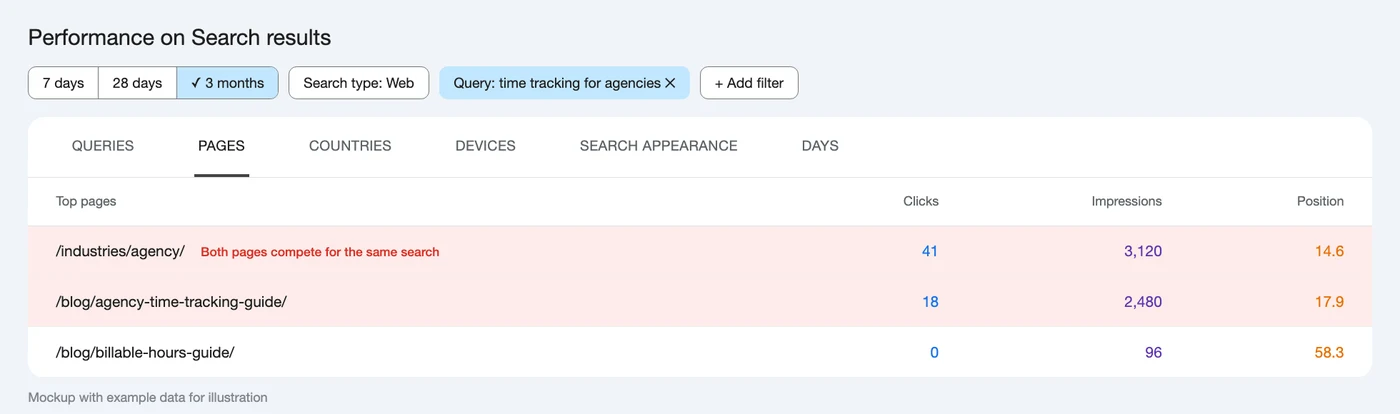
You fix it by merging them into one stronger page, or by giving one of them a different search to target.
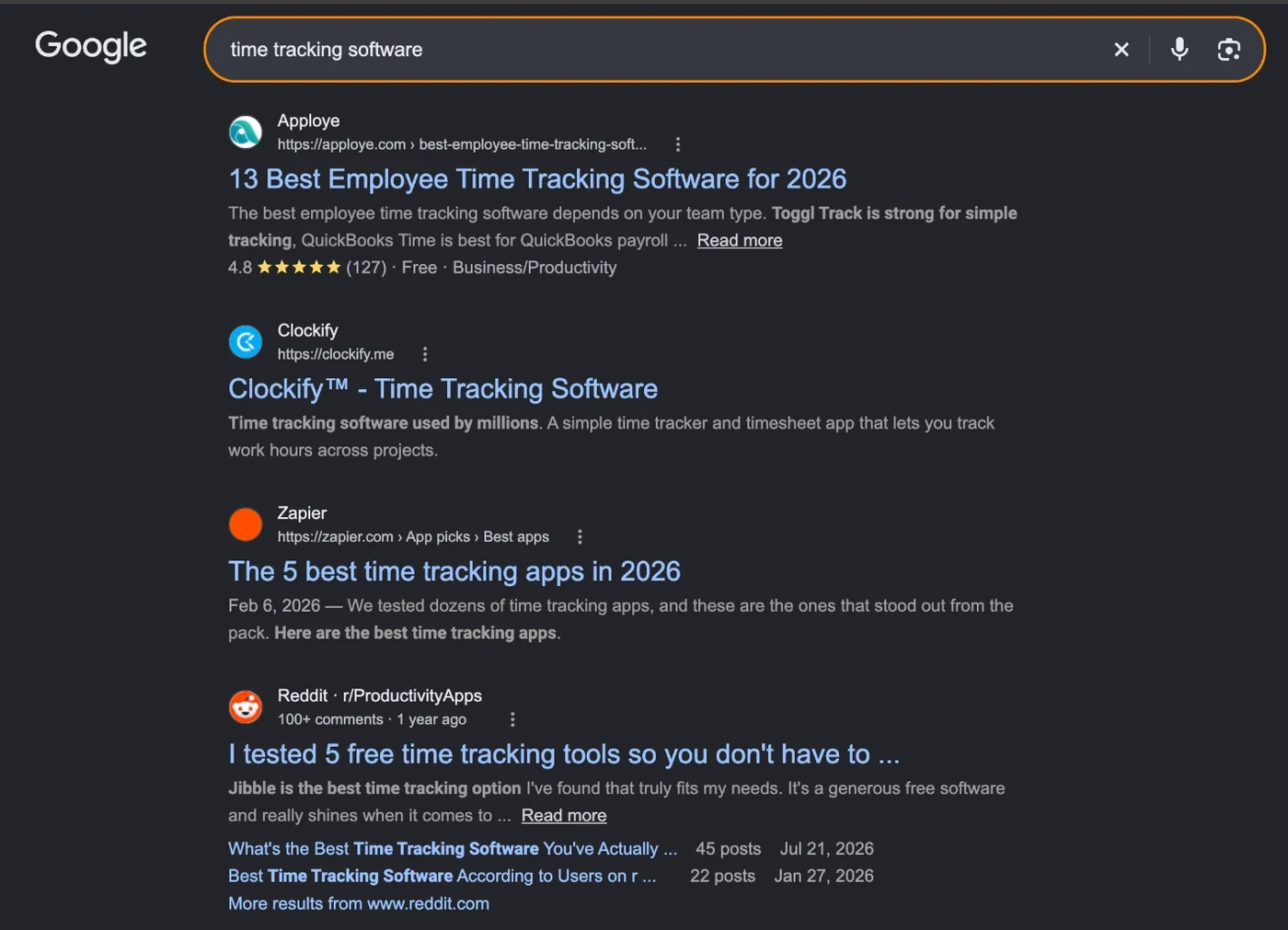
Two of your pages ranking for the same search isn’t always cannibalization, though. Some searches have mixed intent, like “[x] software”, where both product pages and listicles rank, so your product page and your listicle can both rank there too.
Here’s what a mixed‑intent results page looks like for “time tracking software”, with Clockify’s product page ranking between two listicles:
Does the Format Match the Search?
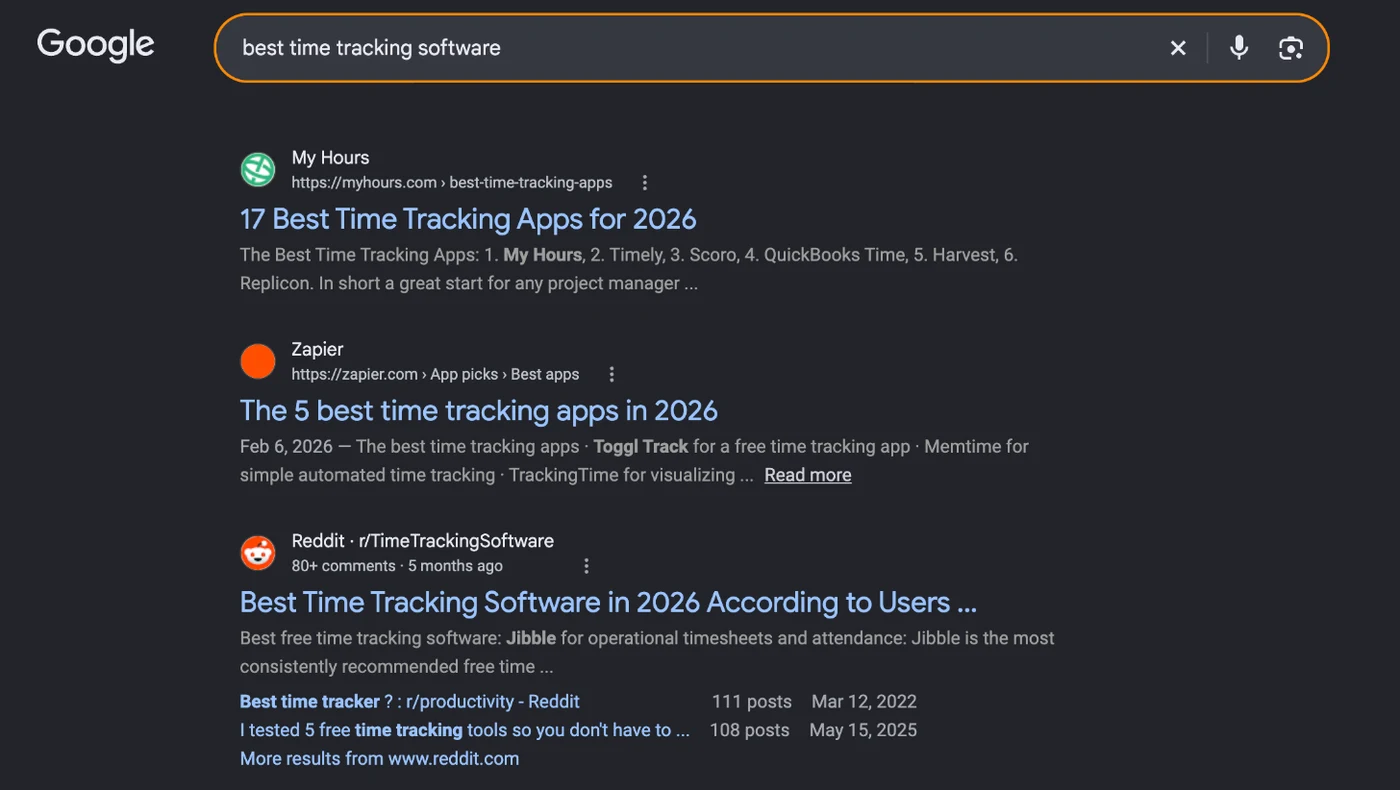
Format is the fix I’d look at first, because in our experience it moves rankings faster than anything else in this step. A lot of posts stuck between positions 8 and 20 are there because they’re the wrong shape for the search. So Google the keyword and look at page one. If it’s all lists and yours is a long essay, or it’s all step‑by‑step guides and yours is a definition, changing the format usually does more than rewriting the copy.
Take “best time tracking software”. The top results are numbered lists, and My Hours, a time tracking tool itself, ranks first with a list of 17 apps instead of a page about its own product:
Is the Post Good Enough to Rank?
For the posts that matter most, our team runs through a short set of questions:
- Does it match both what Google shows for the search and what the searcher actually wants?
- Does it answer the question in its first few lines?
- Do its internal and external links still work?
- Is it easy to read, with short paragraphs, plain words and light images?
- Does it have the right schema, like Article and FAQ?
- Does it show who wrote it and real results from real work?
- Does it cover the related searches people make around the main one?
- Are its FAQs built from questions people really ask, like People Also Ask and Reddit threads?
Your crawl already has the on‑page basics for every page, so filter it for missing or duplicate title tags, missing meta descriptions, pages with more than one H1, long messy URLs and heavy images without alt text.
What Do Competitors Cover That You Don’t?
Open the top three pages for a search you should own and read them start to finish. What do they have that yours doesn’t? It’s usually one section, table or example, which you can add without rewriting the whole post.
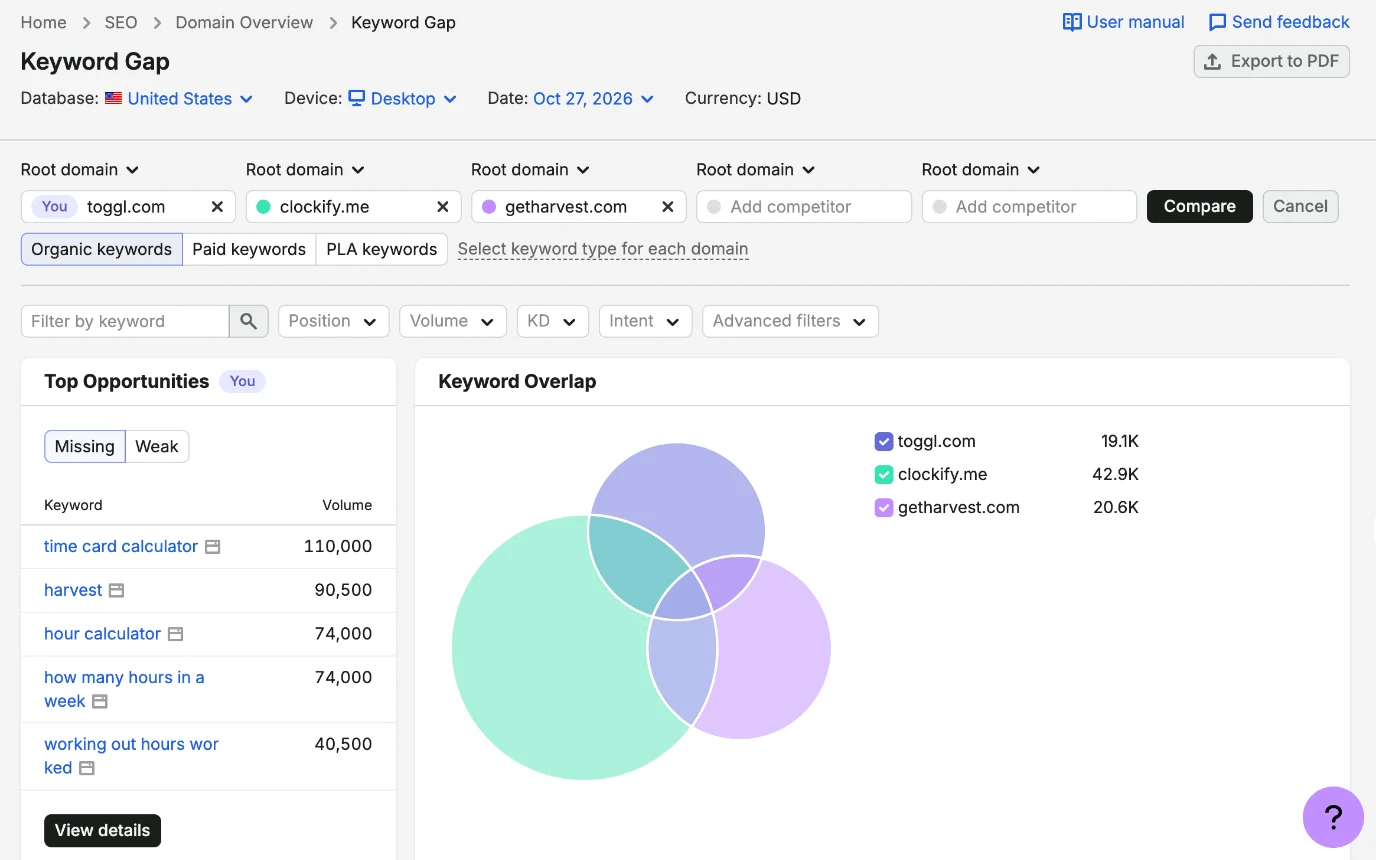
For topics you haven’t covered at all, Semrush’s Keyword Gap lists the searches your competitors rank for and you don’t. Here’s Toggl against Clockify and Harvest, where the biggest missing searches are calculator searches like “time card calculator” at 110,000 a month and “hour calculator” at 74,000:
What Should You Do With Each Post?
Once you’ve been through everything, each post gets one of four calls, the same ones a full SaaS content audit makes across a whole library:
| Call | When to make it |
|---|---|
| Refresh | The page ranks on page one or two but has slipped, or its format or facts are out of date |
| Merge | Two or more pages target the same search, so you combine them and redirect the weaker URLs |
| Prune | The page gets no traffic, has no links and has no search worth targeting, so you redirect it or remove it |
| Leave | It ranks, its content needs little to no updates and it does its job |
Step 5: Audit Backlinks and Authority
The backlink part of an SEO audit for SaaS shows how your authority stacks up against the competitors outranking you, and whether anything in your own link profile could hurt you.
How Do Your Backlinks Compare With Competitors?
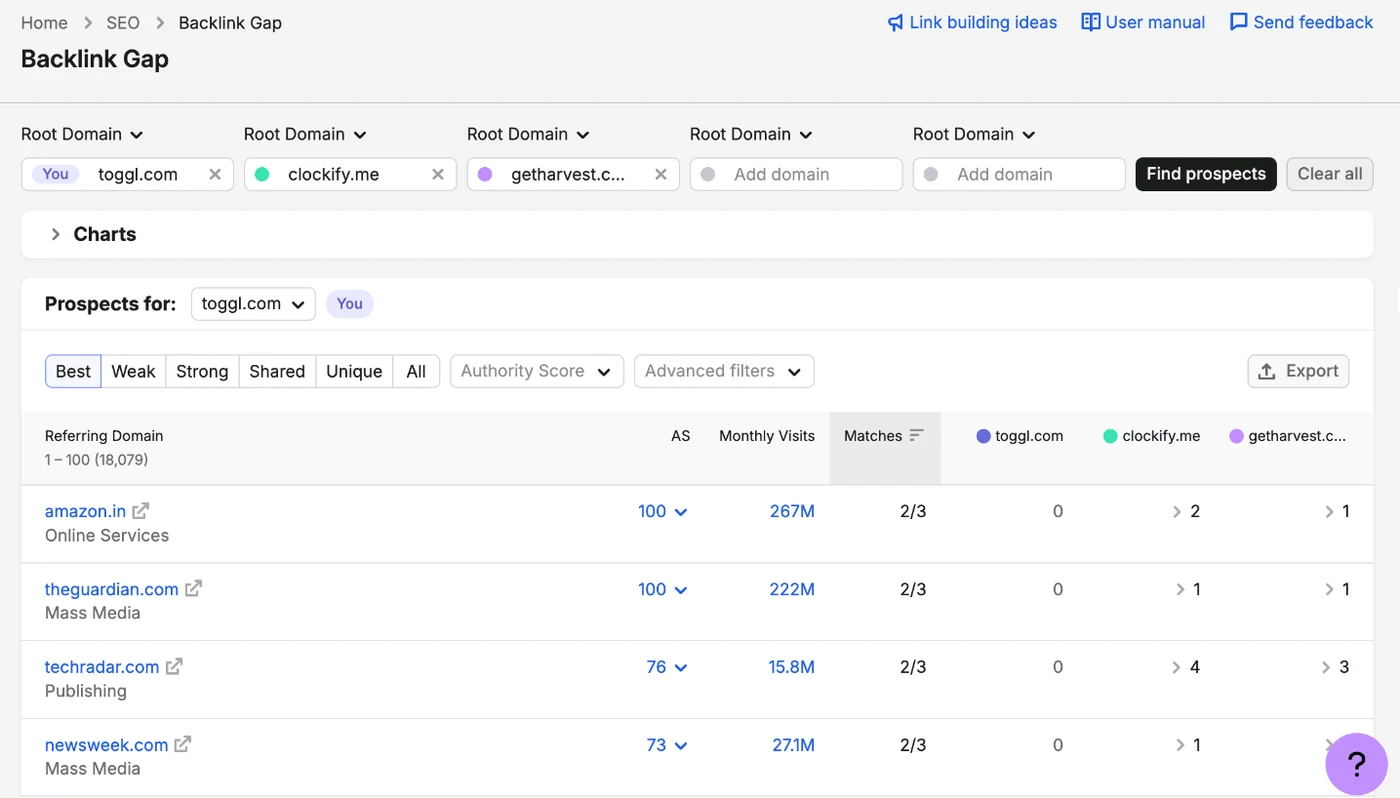
Pick the two or three competitors who beat you on the searches your money pages target, and compare referring domains, meaning the number of different sites linking to each of you, since that says more than the total link count. Semrush’s Backlink Gap or Ahrefs’ Link Intersect will list the sites that link to them and not to you, and that list becomes your outreach list once you start on SaaS link building.
Here’s Toggl compared with Clockify and Harvest. The Guardian, TechRadar and Newsweek all link to at least one of those two competitors and not to Toggl at all, and the full list runs past 18,000 sites:
Where Do Your Links Point?
Semrush’s Indexed Pages report shows how many sites link to each of your pages. Here’s Toggl, where the homepage has links from 16,935 domains and most of the top of the list is other versions of the homepage:
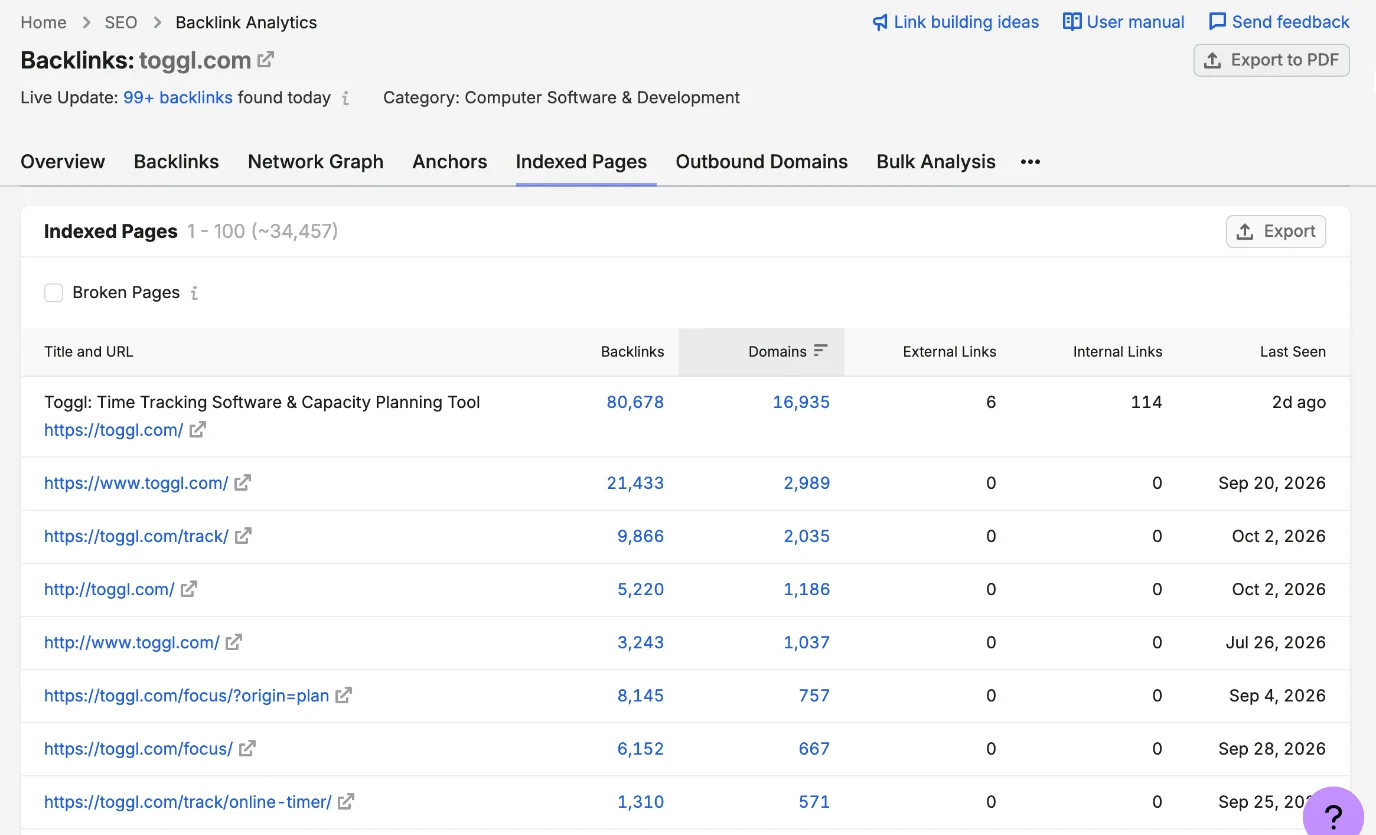
If almost all of your links land on the homepage and a few blog posts while your pricing, feature and comparison pages have none, those are the pages to build links to next.
Is Anything in Your Link Profile Hurting You?
- Spammy links: a sudden jump in links from unrelated or low‑quality sites, or lots of links with the exact same commercial anchor text, can look manufactured. You can check for spam links in Semrush or Ahrefs.
- Broken backlinks: links pointing at pages that now return a 404 are wasted, so redirect each old URL to the closest live page.
- Unlinked mentions: sites that name your product without linking to it are easy asks, since they already know who you are.
What Do Other Sites Say About You?
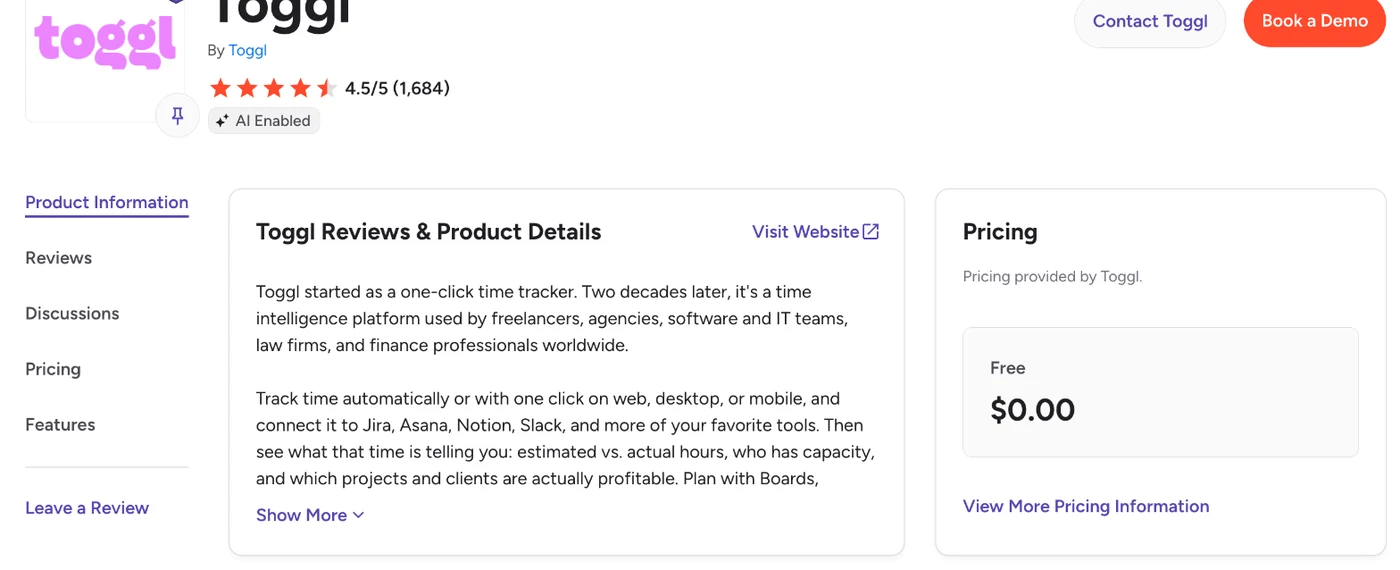
Is your G2 and Capterra profile complete and current? Do the main software directories in your category list you, with the same name, category and core features you use on your own site? Google and AI tools both lean on brand mentions, so a stale or mismatched description on a big directory can confuse both. Toggl’s G2 profile is a good example of a complete one, with its rating, a product description and pricing provided by Toggl, and a link to its site:
Step 6: Audit AI Search Visibility
A quick AI search visibility audit checks two things: whether ChatGPT, Claude and Google’s AI Overviews mention you when buyers ask about your category, and whether AI crawlers can read your pages.
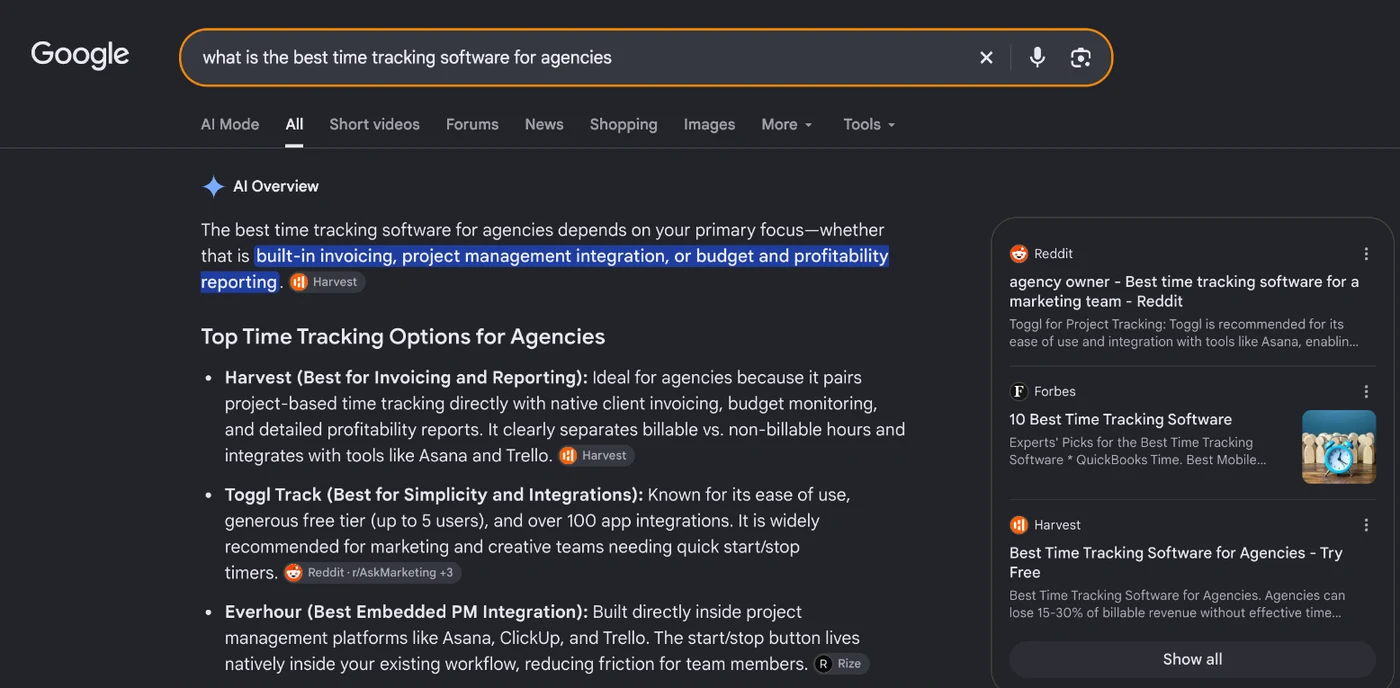
Write down 10 to 15 questions a buyer would ask before picking a tool like yours, like “best [category] software for [use case]”, “[your product] vs [competitor]” and “[category] pricing”. Run each one in ChatGPT, Claude and Google, and note who gets mentioned, which sources get cited, and whether you’re there at all. If one competitor keeps coming up in every answer, look at the sources cited next to it, because those are usually the review sites, listicles and comparison pages you need to be on too.
Here’s Google’s AI Overview for “what is the best time tracking software for agencies”. It names Harvest, Toggl Track and Everhour, and the sources beside it are a Reddit thread, a Forbes list and Harvest’s own page for agencies:
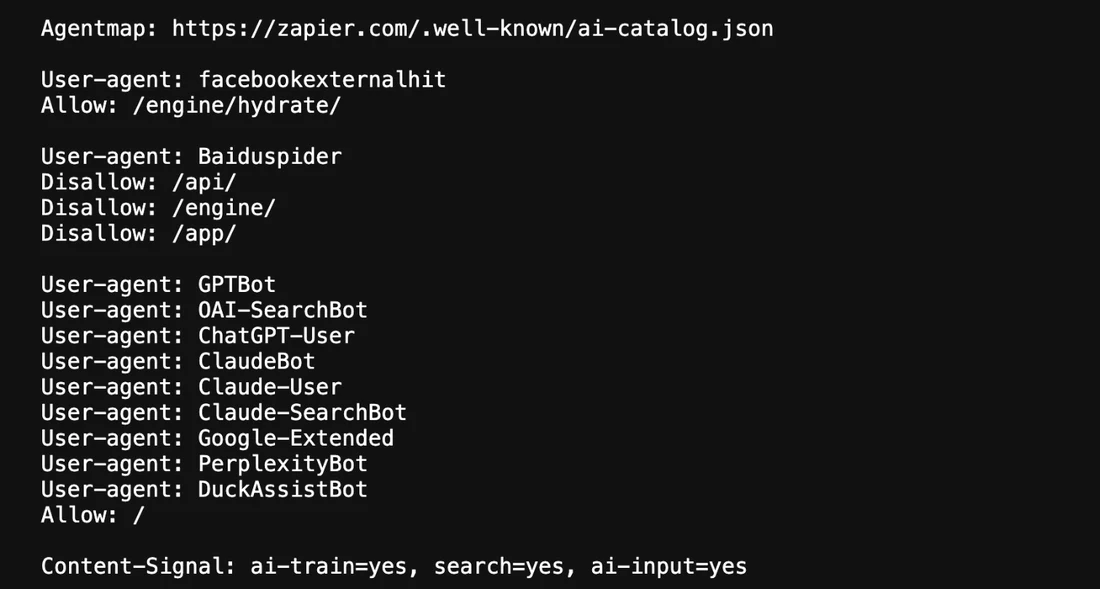
Then check that AI crawlers can get to your pages. Open your robots.txt and make sure it doesn’t block GPTBot, ClaudeBot or PerplexityBot unless you’ve decided to. And remember the JavaScript check from the technical step, because many AI crawlers don’t run JavaScript and will miss anything that only loads that way.
Zapier’s robots.txt shows what deliberately letting them in looks like, with each AI crawler named and allowed across the whole site:
Finally, look at how easy your pages are to quote. AI answers tend to lift a sentence that answers the question directly, a table or a short list, so your money pages and key guides should open with a direct answer and keep facts like pricing and features in line with what third‑party sites say.
Step 7: Prioritize Issues and Fix Them
The last step turns everything you’ve found into one list, ranked by how close each fix sits to a trial or demo and how much work it takes.
Put every finding into one sheet as a checklist with the URLs it affects, how much impact fixing it would have, how much effort it takes and who owns it.
Here’s how the common findings from a SaaS SEO audit usually rank:
| Finding | Impact | Effort | Usually owned by |
|---|---|---|---|
| A money page isn’t indexed | High | Low | Developer or SEO |
| A blog post ranks where a feature or comparison page should | High | Medium | SEO and content |
| A money page gets organic traffic but few trials or demos | High | Medium | Marketing and design |
| Missing comparison, integration or use‑case pages | High | High | Content and product marketing |
| Money pages have few links compared with competitors | High | High | SEO and outreach |
| App, login or staging URLs show up in Google | Medium | Low | Developer |
| Two posts compete for the same search | Medium | Low | Content |
| Money pages are slow or jumpy on mobile | Medium | Medium | Developer |
| You’re missing from AI answers for buyer questions | Medium | High | Content and PR |
| Blog posts are missing schema | Low | Low | Developer or SEO |
Before anything goes on the list, make sure you’ve found the cause and not just the symptom. A page with thin content and a page with a canonical tag pointing somewhere else can both look like “not ranking”, but the fixes are completely different, and fixing the wrong one changes nothing.
Once the first fixes have been live for a few weeks, pull the same Search Console, GA4 and CRM numbers you started with and hold them up against your baseline. That’s how you’ll know whether the audit moved the goal you set.
How Long Does a SaaS SEO Audit Take, and What Does It Cost?
A SaaS SEO audit takes anywhere from a couple of days on a small site to two or three weeks on a large one, and you can run most of it for free with Search Console, GA4 and the free version of Screaming Frog.
The time mostly depends on how many pages you have and how many of them are docs, programmatic or app pages:
| Site size | Time to run it yourself | Tools you’d pay for |
|---|---|---|
| Under 100 pages | 2 to 3 days | None, the free tools cover it |
| 100 to 500 pages | About a week | None for the audit itself, plus a Semrush trial if you want competitor and backlink data |
| 500+ pages, with docs or programmatic pages | 2 to 3 weeks | Screaming Frog (£199 a year) and Semrush (from $117.33/mo billed annually) or Ahrefs |
If you’d rather have an agency run it, prices vary a lot with site size and depth, so ask for a fixed‑scope quote. And check that what you get back includes a ranked fix list with owners, because a tool export on its own won’t tell your team what to do first.
How PipeRocket Runs SaaS SEO Audits
We run this audit as part of our SaaS SEO engagements, starting from your money pages and ending with a ranked fix list your team can work through. If you’d rather have us run it than do it yourself, get in touch and we’ll walk you through what we find. It’s the same process our SaaS SEO agency work is built on.
Frequently Asked Questions
What is a SaaS SEO audit?
A SaaS SEO audit refers to an evaluation of a software company’s website, including its technical setup, content, backlinks and conversion paths, to improve its organic visibility and turn more visits into signups and trials.
How do you do a SaaS SEO audit step by step?
To do a SaaS SEO audit step by step, set a goal and pull a baseline, check technical SEO and indexation, audit your money pages, audit your content and search intent, audit your backlinks and authority, check your AI search visibility, then prioritize the issues and fix them, starting with the ones closest to a trial or demo.
How do you check AI search visibility in a SaaS SEO audit?
You check AI search visibility by asking ChatGPT, Claude and Google the questions your buyers ask, noting which brands and sources get mentioned, and making sure your robots.txt doesn’t block AI crawlers like GPTBot and ClaudeBot. If you’re missing from those answers, the sources cited next to your competitors are usually the review sites and listicles you need to be on.
How often should you run a SaaS SEO audit?
Run a light check every quarter and a full SaaS SEO audit once or twice a year, plus an extra one after a sudden traffic drop or before a redesign. SaaS sites change fast, with new feature pages, docs sections and app releases, and any of them can quietly add duplicate pages or block something that used to be crawlable.
Can ChatGPT do an SEO audit?
ChatGPT can do part of a SaaS SEO audit, like reviewing page copy, headings and FAQs you paste in, but it can’t crawl your site or see your Search Console, analytics or backlink data. Use it to speed up the content checks in Step 4, and use a crawler and your own data for the rest.
What should a SaaS SEO audit report include?
A SaaS SEO audit report should include the goal and baseline numbers, the findings for each area with the URLs they affect, and a ranked fix list with impact, effort and an owner for each item. Without the ranked list, the report tells your team what’s wrong but not what to do first.
What’s the difference between an SEO audit and a technical SEO audit?
A technical SEO audit checks whether search engines can crawl, render and index your site, whereas a full SaaS SEO audit also covers your content, backlinks, money pages and AI visibility. Step 2 of this audit is a short version of a technical SEO audit, and on a large site it’s worth running the full one on its own.