
SaaS Technical SEO: What Actually Matters (and What the Checklists Miss)
 Kamaraj Mathiarasan (Kim)
Last updated on
Kamaraj Mathiarasan (Kim)
Last updated on
Most SaaS companies run through the same technical SEO checklist: fix 404s, improve page speed, submit an XML sitemap. Three months later, rankings have not moved. The checklist was not wrong. It just missed the issues that actually cost SaaS sites rankings.
React apps rendering content client-side. Marketing sites leaking authority to app subdomains. Authentication walls that make entire URL paths invisible to Googlebot. These are SaaS-specific technical SEO failures. They are what separates a real SaaS technical SEO audit from a generic site health check.
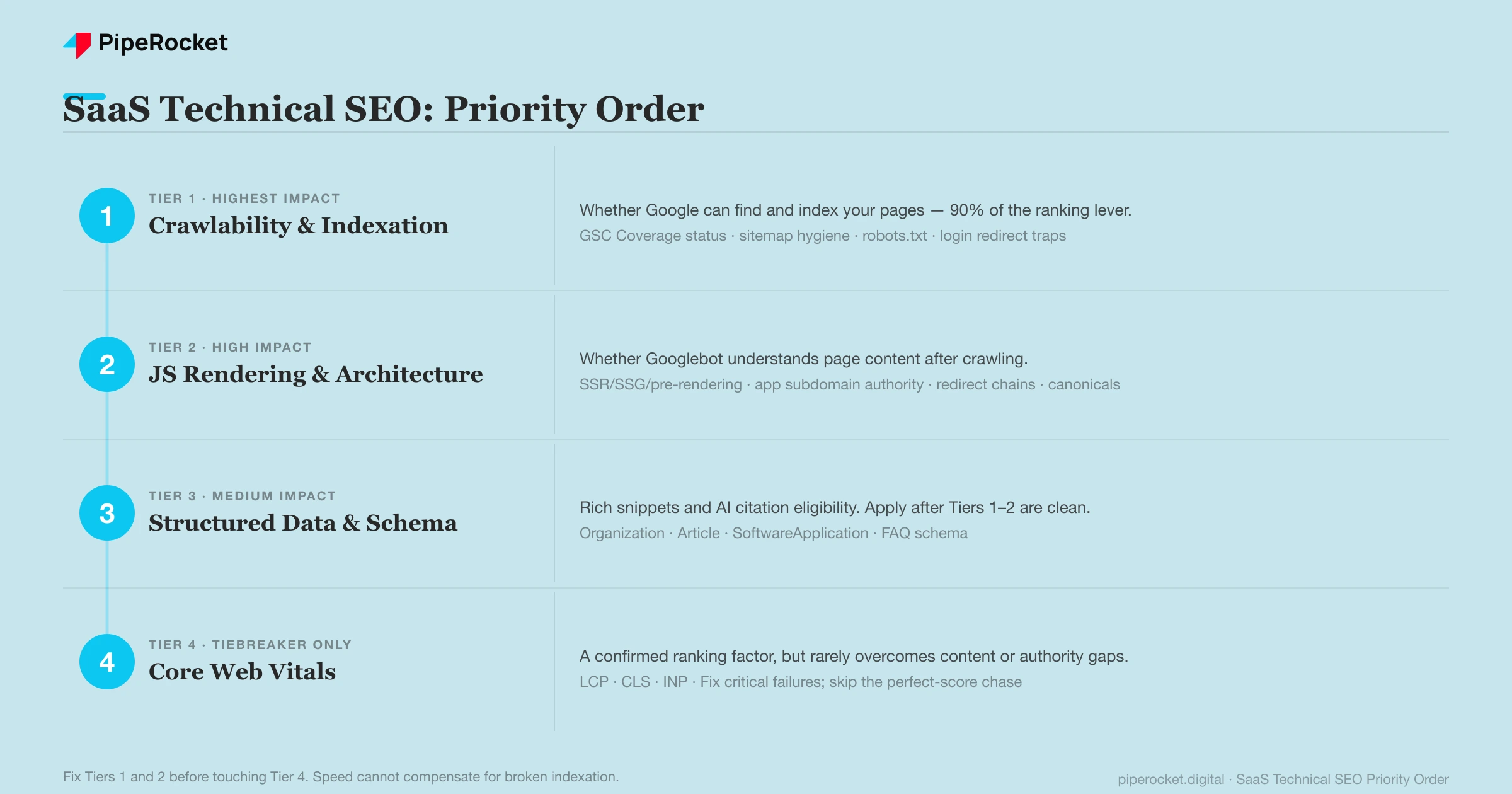
This guide covers SaaS technical SEO in the order that produces results: crawlability and indexation first, JavaScript rendering and architecture second, structured data third, and Core Web Vitals last. It also covers how to run an audit without spending three months on the wrong problems.
TL;DR
- Crawlability drives 90% of technical ranking gains: Fixing crawlability and indexation consistently produces more ranking impact than any other technical fix. Speed improvements rarely move the needle until Tier 1 is resolved first.
- SaaS has unique technical SEO problems: JavaScript rendering, app subdomain authority leaks, and auth-gated URL paths are SaaS-specific failures that standard audits routinely miss or underestimate.
- GSC Coverage is the primary diagnostic tool: The four status categories (Valid, Crawled but not indexed, Discovered but not indexed, Excluded by noindex) describe different problems with different solutions.
- Structured data multiplies results once the basics work: Schema improves rich snippet eligibility and AI citation odds, but only delivers return after crawlability and architecture are clean.
- Core Web Vitals act as a tiebreaker in tight SERPs: Fix critical failures. Do not over-invest in improving a passing score when Tier 1 or Tier 2 issues remain unresolved.
- AI crawlers need explicit access: GPTBot, PerplexityBot, and ClaudeBot must be allowed in robots.txt separately from Googlebot, or AI answer engines cannot crawl and cite your content.
Why SaaS Technical SEO Is Different
SaaS technical SEO differs from standard technical SEO because of three structural issues: JavaScript frameworks rendering content client-side, an app subdomain that does not share link authority with the marketing site, and commercial URL paths hidden behind authentication.
Standard technical SEO advice was designed for content sites: WordPress blogs, media publications, e-commerce catalogs. It is effective there. For SaaS marketing sites, it is incomplete because it treats every page as a static HTML document served from a web server.
A SaaS marketing site built on React or Next.js is not a static HTML document. It is a JavaScript application that generates HTML at runtime. Googlebot processes these differently from traditional static pages, and the consequences are not obvious in most audit tools.
Three structural differences define SaaS technical SEO and separate it from a standard content site audit:
JavaScript rendering at the framework level
SaaS marketing sites are almost always built on JavaScript frameworks: React, Angular, Vue, Next.js. When content renders client-side, the HTML Googlebot receives on the first request can be nearly empty. The actual content loads after JavaScript executes in a browser environment. Google handles this with a two-stage crawl: fetch the raw HTML first, queue the page for rendering, process the rendered version later.
This delay can range from hours to days depending on crawl budget and page authority. Indexation lags behind publishing in a way that standard audit tools do not surface.
The app subdomain split
Almost every SaaS product separates the marketing site from the logged-in application: yourdomain.com for marketing, app.yourdomain.com for the product. This is a practical engineering decision. It has real SEO
consequences. Subdomains are treated as separate entities for crawl allocation and link authority. The link equity accumulated by the marketing domain does not flow to the app subdomain.
Authentication walls
Large portions of a SaaS product’s URL structure live behind login: feature dashboards, account settings, gated documentation. Googlebot follows internal links to these URLs, hits a redirect to a login page, and stops. Internal links pointing to auth-gated pages waste crawl budget without delivering SEO value.
These are not edge cases. They are the default state of most SaaS marketing sites. Any SaaS technical SEO audit that does not address all three is working from the wrong starting point.
Priority Tier 1: Crawlability and Indexability
Crawlability and indexability account for about 90% of available technical ranking improvement on most SaaS sites. Fix whether Google can reach and index your pages before anything else, because no other technical fix moves rankings until this is clean.
I do not obsess over perfect PageSpeed or Lighthouse scores. Top-ranking pages for competitive SaaS keywords rarely score above 80, and the correlation between speed and ranking position at that tier is weak.
SaaS sites typically have 1,000 to 2,000 pages, not the millions that make crawl budget a survival issue for large e-commerce properties. That is why crawlability, not raw speed, is where the work is.
The primary diagnostic tool for this work is Google Search Console’s Coverage report.
Reading GSC Coverage Status Correctly
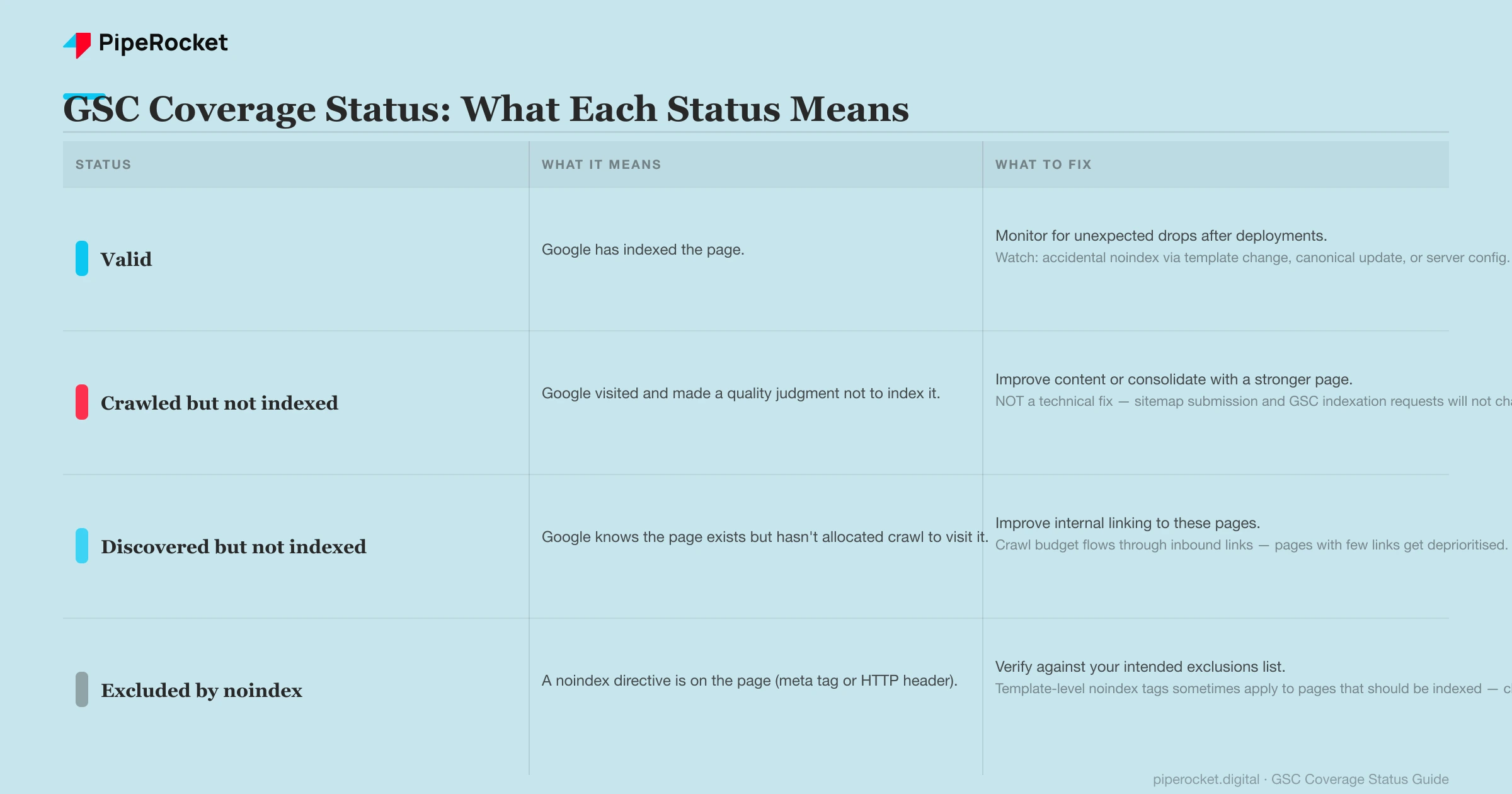
The Coverage report divides all known pages into four status categories. Each describes a different problem; the fix differs by which status dominates.
| Status | What it means | What to fix |
|---|---|---|
| Valid | Google has indexed the page. | Monitor for unexpected drops after deployments. Common causes of leaving Valid: accidental noindex in a template change, a canonical update pointing elsewhere, or a server config change. |
| Crawled but not indexed | Google visited and made a quality judgment not to index it. | Content improvement or consolidation with a stronger page on the same topic. Sitemap submission and GSC indexation requests will not change this status; it is a content problem rather than a technical one. The most misdiagnosed status in SaaS technical SEO. |
| Discovered but not indexed | Google knows the page exists but has not crawled it. | Improve internal linking to the affected pages. Crawl budget flows through inbound links; pages with few internal links get deprioritized in the crawl queue. |
| Excluded by noindex | A noindex directive is on the page (meta tag or HTTP header). | Verify this list against your intended exclusions. Template-level noindex tags sometimes apply to pages that should be indexed, particularly after CMS updates or product launches. |
The Hidden Indexation Problems on SaaS Sites
Beyond the four Coverage statuses, four patterns appear repeatedly on SaaS sites and hurt indexation without triggering alerts in standard crawling tools.
- Redirect chains. SaaS marketing sites accumulate redirects over years of product rebranding, domain migrations, and CMS changes. A chain of three or more redirects loses link equity at each hop and slows crawl throughput. A Screaming Frog crawl filtered for chains longer than two hops identifies these quickly.
- Canonical inconsistency. When a site has both
wwwand non-wwwversions, HTTP and HTTPS variants, or inconsistent trailing slash behavior, canonical directives can create loops. Google resolves these, but the resolution may not match your intent. After any major infrastructure change, verify that canonicals on highest-priority pages point where you intend. - Blocked resources. If CSS or JavaScript files are blocked in robots.txt, Googlebot may not render your pages correctly. The pages still return 200 status codes, so standard uptime monitoring misses this. The rendering failure only surfaces in GSC’s URL Inspection tool under “View Crawled Page.”
- The login redirect trap. Internal links to auth-gated pages return a 302 redirect to a login or signup URL. Googlebot follows the redirect, crawls the login page, and records the destination as inaccessible. This pattern wastes crawl budget on nearly every SaaS site with an app subdomain. Export your internal link structure and filter for destination URLs that redirect to authentication endpoints.
- Robots.txt and XML sitemap mismatch. A robots.txt rule that disallows a directory the sitemap still lists, or a sitemap full of noindexed or redirected URLs, sends Google contradictory signals and wastes crawl budget. The sitemap should list only canonical, indexable 200-status URLs, and robots.txt should block only what you never want crawled. Faceted filters and internal-search result URLs are the usual crawl-waste culprits and belong in the disallow list.
- Staging, preview, and app URLs indexed by accident. Staging and preview environments are often not auth-gated, so a stray link or an early sitemap entry lets Google index
staging.or preview-branch URLs that duplicate production. Searchsite:for staging and preview subdomains, then apply noindex plus HTTP authentication so these environments stay out of the index.
Do AI crawlers need separate robots.txt access?
Yes. AI answer engines use their own crawlers, and allowing Googlebot does not allow them. GPTBot (OpenAI), PerplexityBot , ClaudeBot (Anthropic), and Google-Extended each read robots.txt separately, so a rule that blocks one does not block the others.
If your goal is to be cited in AI Overviews
and answer engines, audit robots.txt for these user agents explicitly. A blanket Disallow on an unfamiliar bot, or a security tool that blocks non-Google crawlers by default, quietly removes your content from AI training and retrieval. Decide per bot: allow the crawlers whose citations you want, block the ones you do not, and confirm the rules with a live fetch rather than assuming Googlebot access covers them.
Priority Tier 2: JavaScript Rendering and SaaS Architecture
Tier 2 covers whether Googlebot can understand a page once it arrives: how your JavaScript framework renders content, how the app subdomain contains link authority, and how your URL structure routes crawlers to commercial pages. For SaaS sites, these architecture decisions decide indexation as much as crawlability does.
The Client-Side Rendering Problem
When a page renders content client-side (the default for React and Angular apps without server-side rendering), Googlebot receives an HTML document with very little visible content on the first request. Text and body content load only after JavaScript executes in a headless Chromium environment. Google defers this: the page enters a rendering queue, JavaScript runs, and the rendered version is indexed later.
That delay can range from hours to several days for lower-authority pages, creating visible lag between publishing and ranking. Content that depends on JavaScript-loaded API data may not be indexed reliably at all.
The fix hierarchy, in order of preference:
- Server-side rendering (SSR): The server generates full HTML before sending the response. Googlebot receives complete content on the first request. No rendering queue required. This needs engineering work but eliminates the problem entirely.
- Static site generation (SSG): Pages are pre-built as complete HTML files at deploy time. Effective for content that does not change in real time. Next.js, Nuxt, and SvelteKit all support this as a build mode.
- Pre-rendering / dynamic rendering: A service intercepts Googlebot’s user agent and serves pre-rendered HTML snapshots. Lower engineering effort than SSR but adds infrastructure complexity and a maintenance dependency.
The App Subdomain Problem
The app.yourdomain.com architecture creates an authority containment problem that most SaaS companies underestimate.
All link equity accumulated by the marketing site through backlinks
, content, and domain age stays on yourdomain.com. It does not flow to pages on app.yourdomain.com. Googlebot allocates separate crawl budgets for each subdomain. External backlinks pointing to the main domain do not benefit app subdomain pages.
In practice, a significant amount of commercially valuable content ends up on the app subdomain by default:
- Integration landing pages
- Feature tour pages
- In-product help documentation aimed at prospects
- Use-case galleries
If these pages were on the main domain, they would benefit from the marketing site’s accumulated authority. On the app subdomain, they start from zero.
The fix: identify all publicly indexable content currently on app. and migrate it to equivalent pages on the main domain. Keep only content that genuinely requires authentication to function on the app subdomain.
Blog subdomain vs. subfolder
Host your blog and resource content as a subfolder (yourdomain.com/blog), not a subdomain (blog.yourdomain.com). A subfolder inherits the main domain’s authority directly; a subdomain is treated as a separate entity and has to build authority from scratch, the same containment problem the app subdomain creates.
This decision often predates the SEO team because the blog was set up on a separate CMS or hosting platform. If your content already lives on blog. or a third-party subdomain, a reverse-proxy migration to a subfolder consolidates authority onto one domain and usually lifts rankings across the whole content library.
URL routing and taxonomy
Give commercial pages a shallow, predictable URL structure so crawlers reach them within about three clicks of the homepage. Group by intent (/features/, /integrations/, /use-cases/, /blog/) and keep the path readable, stable, and free of session IDs or tracking parameters.
A scalable taxonomy matters more as a SaaS site grows into hundreds of feature, integration, and use-case pages. Flat or inconsistent routing buries commercial pages deep in the crawl path, which is a common cause of the “Discovered but not indexed” status from Tier 1.
Should documentation and changelogs be indexable?
Keep help docs and changelogs indexable, but manage them so they do not compete with your bottom-of-funnel pages for the same query. Documentation earns real search traffic and supports E-E-A-T, so blocking it wastes an asset. The risk is that a help article and a commercial feature page target the same keyword and Google ranks the docs page.
Control this without noindexing docs. Point each documentation cluster at its own distinct queries (setup, troubleshooting, API reference), keep commercial-intent keywords on marketing pages, and use canonical tags where a doc and a marketing page genuinely overlap. A large docs subdomain also consumes crawl budget, so a clean docs sitemap and internal-linking structure keeps Google focused on revenue-driving pages first.
Priority Tier 3: Structured Data for SaaS
Structured data does not fix broken indexation. Apply it after Tiers 1 and 2 are resolved. Once those are clean, schema does two things that standard technical fixes cannot: it creates rich snippet eligibility in Google’s SERP and increases citation eligibility in AI-powered answer engines.
For B2B SaaS sites, four schema types provide the clearest return on investment. For a deeper walkthrough of each type and how they feed both rich results and AI citation, see our schema markup for SaaS breakdown.
| Schema type | What it does | Where it helps |
|---|---|---|
| Organization | Establishes brand identity in Google’s knowledge graph and AI citation systems: name, URL, logo, contact info, social profiles. | Every page, JSON-LD in <head>. AI answer engines use it to verify who you are before attributing content to your brand. |
| Article | Signals editorial content and activates datePublished + dateModified freshness signals. |
All blog and editorial pages. Makes a measurable difference for time-sensitive content covering AI search, product updates, or competitive pricing. |
| SoftwareApplication | Tells Google a page describes a software product. Can generate star-rating displays and app category signals. | Core product and feature pages. Most SaaS teams skip this, and it is a missed opportunity in competitive category SERPs. |
| FAQ | Targets the People Also Ask feature box. Expands SERP real estate without requiring a ranking change. | Content pages with structured Q&A sections. Reliably captures the PAA box for B2B SaaS content where it appears. |
For AI engine citation specifically, the most impactful structured data elements are: dateModified on Article schema, the author property pointing to a named person with a verifiable URL, and Organization schema with a consistent canonical URL. These are the signals that LLM
-based citation systems use to assess content authority and recency.
Manually maintaining these four schema types across hundreds of pages doesn’t scale. Our best schema markup tools for SaaS roundup covers which ones actually save engineering time versus which just add another dashboard.
Priority Tier 4: Core Web Vitals and Page Speed
Core Web Vitals are a confirmed Google ranking factor. They are also the most consistently overprioritized area in SaaS technical SEO work.
The realistic picture: Core Web Vitals function as a tiebreaker in tight SERPs, not as a primary ranking driver. For most B2B SaaS keywords, the difference between a PageSpeed score of 65 and 92 will not move a page from position 8 to position 3. Content quality, link authority, and topical relevance determine ranking position at that level. CWV rarely overcomes those gaps.
That said, CWV failures create genuine user experience problems. An LCP above 4 seconds means visitors wait long enough to notice a delay. A CLS score above 0.25 means elements shift visibly during page load. Both hurt conversion rates independent of rankings.
The right level of investment: fix critical CWV failures because they hurt conversions and create a poor brand impression. Do not spend engineering time chasing the gap between a passing and a near-perfect PageSpeed score. That time produces a better return when applied to Tier 1 and Tier 2 issues.
Common CWV failures on SaaS marketing sites:
- Large hero images served in JPEG or PNG without WebP conversion
- Third-party scripts (chat widgets, analytics, A/B testing
tools) loaded synchronously in the document
<head> - Layout shifts from font loading delays or dynamically injected UI components
- Render-blocking JavaScript placed before visible content elements
Most SaaS engineering teams can resolve critical CWV failures within a single sprint.
How to Optimize Technical SEO for AI Search
Technical SEO for AI search rests on three things: letting AI crawlers reach your pages, serving them fully rendered HTML, and marking up content so answer engines can attribute it. AI answer engines cite pages they can crawl, parse, and trust, and each of those depends on the technical work in the tiers above.
Access comes first. GPTBot, PerplexityBot, ClaudeBot, and Google-Extended read robots.txt separately from Googlebot, so confirm each is allowed if you want to be cited (covered under AI Bot Access in Tier 1). Rendering comes next: LLM crawlers are less tolerant of client-side JavaScript than Googlebot, so server-side rendering or static generation matters even more for AI retrieval than for classic indexing.
Attribution comes last. The structured-data signals that matter most for AI citation are dateModified on Article schema, an author property pointing to a named person with a verifiable URL, and Organization schema with a consistent canonical URL. Clear headings, front-loaded answers, and clean HTML make a page easy to extract, which is what an answer engine looks for before it quotes you.
Internal Linking for SaaS Technical SEO
Internal links do two jobs: they distribute link equity from established pages to newer or less-linked pages, and they signal to Googlebot which pages are important enough to prioritize for crawl.
For SaaS sites with large blog archives, feature pages, use-case pages, and integration landing pages, internal linking is frequently inconsistent. A small number of pages collect most of the inbound internal links. Many commercially important landing pages sit near-orphaned with two or three inbound links from the entire site.
Hub and Spoke Architecture
The internal linking structure that works best for SaaS marketing sites follows a hub-and-spoke model. Hub pages are broad, commercially important landing pages: the pricing page, the main feature overview, the ICP category landing page. Spoke pages are supporting content: blog posts, use-case articles, glossary entries, comparison pages , and integration landing pages.
Every spoke page covering a topic related to a hub page should link to that hub with contextually relevant anchor text placed naturally in the content body. Footer and navigation links pass equity, but in-content links from relevant pages carry more contextual weight.
Finding Orphan Pages
An orphan page has no inbound internal links. It appears in your sitemap. It may have external backlinks. Without internal links, Googlebot deprioritizes it for crawl, and it frequently surfaces as “Discovered but not indexed” in GSC.
Common sources of orphan pages on SaaS sites:
- Integration landing pages added during product launches without being linked from the integrations hub
- Feature pages created by the product team without coordination with SEO or content
- Blog posts from older campaigns that were never linked from topical cluster hub pages
- Comparison or alternative pages created as standalone SEO plays without internal linking from related content
Run a Screaming Frog or Sitebulb crawl. Export pages with zero inbound internal links. Cross-reference against your GSC “Discovered but not indexed” bucket. The overlap on most SaaS sites is significant.
How to Run a SaaS Technical SEO Audit
Run a SaaS technical SEO audit in six steps and in this order: GSC Coverage, JavaScript rendering, subdomain structure, internal links to auth-gated pages, structured data, and Core Web Vitals last. The sequence is what turns a findings list into ranking progress.
SaaS technical SEO audits stall because they generate 200-item reports with no clear priority order. Scope is rarely the problem; sequence is. The right SEO audit tools will surface the issues, and the order that follows is how you turn that list into ranking progress.
- Start with GSC Coverage. Export all non-indexed pages and sort by status. Identify whether the dominant category is “Crawled but not indexed” (content quality issue) or “Discovered but not indexed” (internal linking issue). These require completely different responses.
- Audit JavaScript rendering. Use Google’s URL Inspection tool on your five most important landing pages and click “View Crawled Page.” If the rendered version shows missing content, loading indicators, or empty sections where text should appear, you have a client-side rendering problem that needs SSR, SSG, or pre-rendering.
- Map your subdomain structure. Document all pages on
app.versus the main domain, and identify publicly indexable content sitting on the app subdomain. These are migration candidates. - Audit internal links to auth-gated pages. Export your internal link structure and filter for destination URLs that return a redirect to a login or signup page. Remove or update these links.
- Validate structured data. Run core landing pages through Google’s Rich Results Test, or one of our best SERP and rich-results testing tools if you need to check more than a handful of URLs at once. Fix validation errors before adding new schema types.
- Check Core Web Vitals last. Run PageSpeed Insights on highest-traffic pages, fix critical failures, and move on.
Each step informs the next. Starting with page speed first, as most generic audits suggest, produces score improvements without addressing the crawlability issues blocking real ranking progress.
Why PipeRocket Handles SaaS Technical SEO Differently
Our team runs technical SEO audits built for B2B SaaS marketing sites. We see the same JS rendering failures, app subdomain authority leaks, and auth-gated crawl waste in almost every engagement.
Our SaaS technical SEO work starts with crawlability and architecture, not PageSpeed scores. If your site has indexation issues that standard checklists are not catching, start at our technical SEO agency page or reach out via our contact page .
Frequently Asked Questions
How is SaaS technical SEO different from standard technical SEO?
SaaS sites have three structural issues content sites do not face at the same scale: JavaScript frameworks rendering content client-side, a separate app subdomain that does not share link authority with the marketing domain, and URL paths behind authentication that Googlebot cannot access.
Standard technical SEO checklists were designed for content-heavy websites and do not address these patterns. A SaaS technical SEO audit needs to cover JavaScript rendering architecture, subdomain authority containment, and auth-gated URL mapping alongside the standard crawlability and indexation checks.
What does “Crawled but not indexed” mean in Google Search Console?
“Crawled but not indexed” means Google visited the page and decided not to index it. This is a content quality judgment, not a technical crawling problem.
Adding the page to a sitemap, requesting indexation via GSC, or adjusting robots.txt will not change this status. The page needs meaningful content improvement or consolidation with a stronger page on the same topic. This status is commonly misdiagnosed as a technical problem when it is a content problem.
What is the difference between SEO and technical SEO?
Technical SEO is the crawlability, indexation, and rendering layer of SEO. SEO overall also includes content, keyword targeting, and link building. On SaaS sites, technical issues like JavaScript rendering and auth walls often block the other layers entirely.
What does SaaS SEO mean?
SaaS SEO is the practice of ranking a software company’s marketing site in organic search. SaaS technical SEO, covered on this page, is the subset dealing with crawlability, rendering, and architecture. See our SaaS SEO guide for the full discipline.
Does using a JavaScript framework hurt SaaS technical SEO?
JavaScript frameworks (React, Angular, Vue, Next.js) do not inherently hurt SaaS technical SEO, but they require server-side rendering, static site generation, or pre-rendering to avoid the two-stage crawl delay.
When content renders client-side only, Googlebot sees an empty HTML shell on the first fetch and returns later to render the JavaScript. This delay can range from hours to several days, creating visible indexation lag after publishing. The fix is SSR, SSG, or a pre-rendering layer, not abandoning the framework.

