
How to Build a Brand Entity Google's Knowledge Graph Recognizes
 Vignesh Sampath
Published on · Last updated on
Vignesh Sampath
Published on · Last updated on
Building a brand entity Google’s Knowledge Graph recognizes means giving Google a verifiable, consistent set of facts about your company across your site and third-party sources, tied together through Organization schema and sameAs links, so Google can confidently connect every mention to one real entity.
TL;DR
- Organization schema on your homepage is the first fact Google reads about who you are, and it needs to be complete, not decorative.
- The sameAs array is what actually links your site to Wikidata, Wikipedia, Crunchbase, and LinkedIn as one confirmed entity, not four separate guesses.
- Your name, description, and founding facts have to match word-for-word everywhere they appear, because conflicting details are what stall entity recognition the longest.
- A Knowledge Panel isn’t something you build directly. It’s the visible reward once Google trusts the entity enough to display it, and you can claim and correct one once it appears.
Why Most SaaS Sites Never Get Recognized as an Entity
Most SaaS companies exist to Google as a URL, not a company. Google can rank your homepage for your brand name without ever concluding that “Acme Analytics” refers to one real organization with a founding date, a headquarters, and a LinkedIn page. That distinction between ranking and recognition is the entire subject of this article.
Ranking is about relevance to a query. Entity recognition is about whether Google’s Knowledge Graph has built a confident, structured record of who you are, separate from any single page or keyword. A site can rank position one for its own brand name and still have zero entity in the graph.
That gap matters more now than it did five years ago. Generative engines and AI Overviews increasingly answer “who is this company” by pulling from the graph, not by reading your about page fresh. If the graph has nothing on you, or worse, has conflicting facts pulled from three different sources, you’re either invisible or misrepresented in exactly the answers you’d want to win.
The stakes are specifically about category-first, not brand-first, discovery. Across the 53 B2B SaaS brands in our AI SEO statistics , only 11.8% of AI-referred sessions carried brand-name search intent, versus 28.1% for organic — AI surfaces categories before brands in 88.2% of its sessions. An unresolved entity is exactly what keeps a brand out of that category-level answer, since the model has no confident record to cite by name.
This is the mechanical half of the entity work that our GEO for SaaS playbook covers as one line item, “lock your entity.” Our GEO vs SEO and AEO vs GEO breakdowns also mention entity consistency as one bullet among several other AI search levers. This post is the full standalone build, start to finish.
Step 1: Put a Complete Organization Schema on Your Homepage
Organization schema is the structured-data block that tells Google, in a format it can parse without guessing, who your company is. It belongs in JSON-LD on your homepage, and it needs to carry more than a name and a logo.
At minimum, include:
name: your exact legal or trading name, matching what appears everywhere elseurl: your canonical homepage URLlogo: a stable, high-resolution image URLdescription: one or two sentences matching your other profilesfoundingDate: the year or full date you were foundedaddress: your registered or headquarters addresscontactPoint: a real customer service or support contactsameAs: the array covered in the next step
Skip the fields that don’t apply. numberOfEmployees and founder help if you can back them with a public source, but a placeholder or estimated value does more harm than leaving it out, since Google cross-checks these against other pages when it can.
Where the schema actually lives
Put it on the homepage, not buried three levels deep on an about page. Google’s disambiguation starts at the domain root, and that’s where it expects to find the primary Organization declaration. You can repeat a lighter version elsewhere, but the full block belongs on the page that represents the whole company.
A minimal, working example
{
  "@context": "https://schema.org",
  "@type": "Organization",
  "name": "Acme Analytics",
  "url": "https://acmeanalytics.com",
  "logo": "https://acmeanalytics.com/logo.png",
  "description": "Acme Analytics builds usage analytics software for B2B SaaS teams.",
  "foundingDate": "2019",
  "address": {
    "@type": "PostalAddress",
    "addressLocality": "Austin",
    "addressRegion": "TX",
    "addressCountry": "US"
  },
  "sameAs": [
    "https://www.linkedin.com/company/acme-analytics",
    "https://www.crunchbase.com/organization/acme-analytics",
    "https://www.wikidata.org/wiki/Q000000"
  ]
}
Validate it with Google’s Rich Results Test before you ship it. A schema block with a typo in a property name doesn’t throw an error, it just gets silently ignored, and you won’t know until you notice nothing changed.
Step 2: Build the sameAs Chain Across Wikidata, Wikipedia, Crunchbase, and LinkedIn
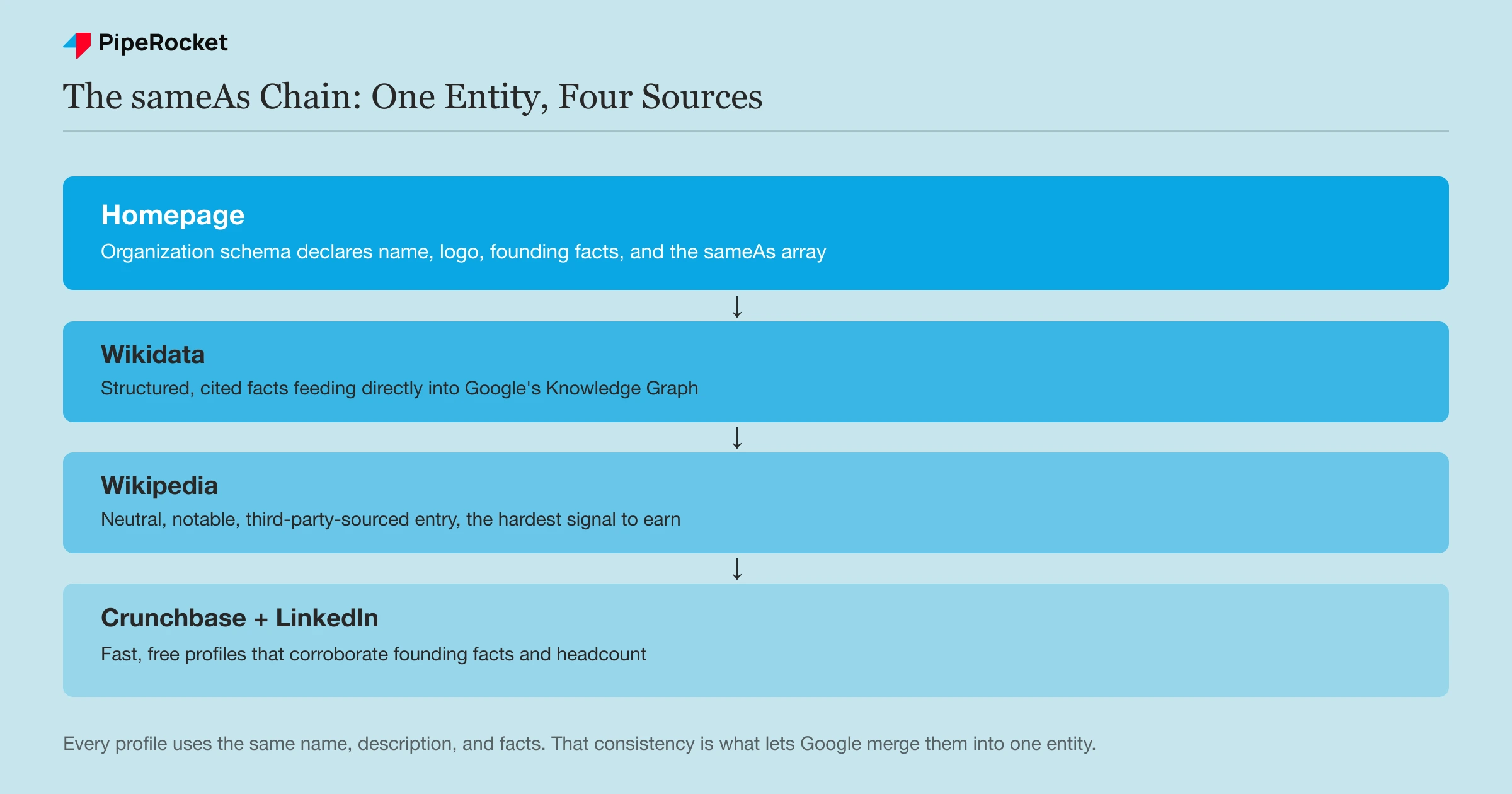
The sameAs property is the mechanism that tells Google your homepage, your LinkedIn page, and your Wikidata entry are the same organization, not three separate ones it has to guess are related. Without it, Google infers the connection from context, which is slower and a lot less reliable.
Not every sameAs target carries equal weight. Here’s how they stack up.
| Source | Why it matters | How to get one |
|---|---|---|
| Wikidata | Feeds directly into Google’s Knowledge Graph as a structured data source | Create an item yourself with verifiable public facts and citations |
| Wikipedia | Heavily weighted for entity trust, and frequently cited by AI engines | Requires notability and neutral, third-party-sourced writing, not a marketing page |
| Crunchbase | A recognized business-data source Google already trusts for funding and founding facts | Free profile claim through Crunchbase’s own verification flow |
| LinkedIn Company Page | Confirms headcount, industry, and leadership as a live, maintained source | Create or claim the page, keep it active |
Start with LinkedIn and Crunchbase, they’re the easy wins
Claim or create your LinkedIn Company Page and your Crunchbase profile first. Both take under an hour, both are free, and both are widely trusted enough that Google treats them as legitimate corroborating sources on day one. Make sure the name, description, founding date, and HQ match your Organization schema exactly.
Wikidata is the highest-leverage single move
Wikidata is a structured, editable database that feeds Google’s Knowledge Graph more directly than almost any other source. Creating an item takes an hour if you have your facts and citations ready.
Go to Wikidata, create a new item, and set:
- The label (your exact company name)
- Instance-of (typically “business” or a more specific type)
- Official website (property P856)
- Founding date, headquarters location, and industry, each backed by a citation to a real source like a press release or news article
- Any relevant identifiers, including your LinkedIn and Crunchbase URLs
Every claim needs a citation. Wikidata rejects or flags unsourced facts, and an entry with no citations carries far less weight than one backed by three.
Wikipedia is the hardest and the most valuable
A neutral, properly sourced Wikipedia page is the strongest single entity signal you can earn, and it’s also the one you can’t shortcut. Wikipedia requires notability, meaning independent, reliable sources have already written about you, not that you wrote about yourself.
We’ve tried this directly with client entities and failed three or four times before one stuck. Every version has to read as neutral, third-party reporting with no promotional language, and it gets rejected fast if it reads like marketing copy dressed up as an encyclopedia entry. If you don’t have independent press coverage yet, that’s the actual prerequisite, not the writing itself.
Step 3: Make Every Fact About Your Company Match, Everywhere
A messy entity is one where your name, description, or founding facts read differently depending on which profile Google finds. That inconsistency is what stalls recognition longer than almost anything else in this process, because Google’s disambiguation logic treats conflicting facts as a reason to hedge rather than merge.
Run the same-fact audit
Pull up your homepage, LinkedIn page, Crunchbase profile, G2 or Clutch listing, and any directory you’re on, side by side. Check that these four fields match exactly, not approximately:
- Company name (including punctuation, “Inc.”, capitalization)
- One-line description
- Founding date
- Headquarters city and country
A one-word difference, like “Austin, TX” on one profile and “Austin, Texas” on another, is not what breaks this. Google’s disambiguation tolerates normal phrasing variance. What breaks it is a genuine conflict, like two different founding years or two different headquarters cities across your own properties.
Fix the conflicts you actually find
Where you find a real conflict, correct the older or less-visible source rather than leaving both live. If your Crunchbase profile still lists a founding year that’s wrong, or an acquired product still has a live directory listing under an old name, those are the specific fixes that move the needle, not a full rewrite of every profile’s tone.
Step 4: Verify or Request Your Knowledge Panel
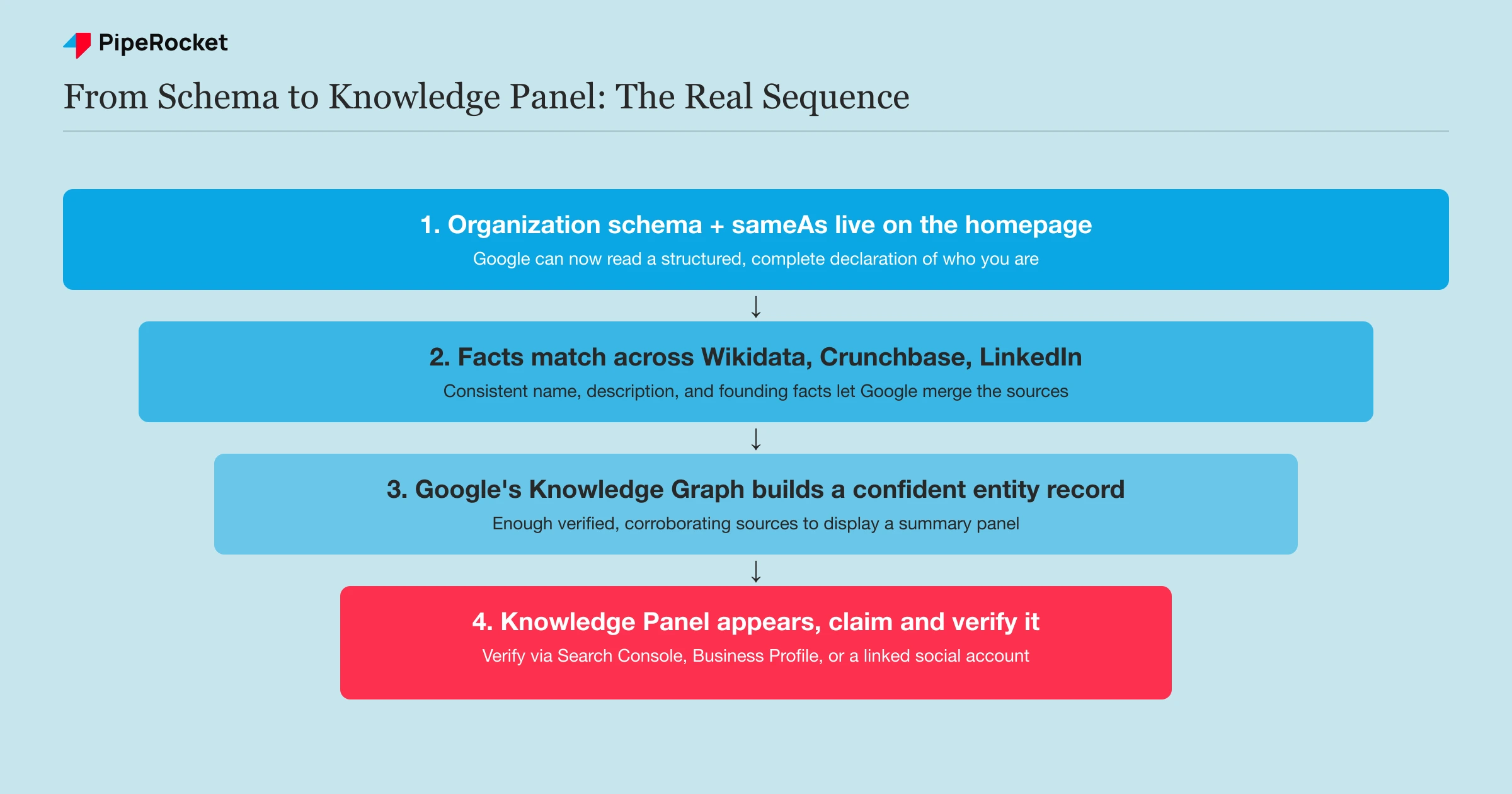
A Knowledge Panel isn’t something you build. It’s what Google displays once its Knowledge Graph has enough confirmed structured data to be confident showing a summary for your brand name. Getting one is a byproduct of steps 1 through 3, not a separate task you can force with a request alone.
Check if you already have one
Search your exact brand name in Google and look at the right-hand panel on desktop, or the panel below the results on mobile. If it’s showing outdated logos, the wrong founding date, or a description that doesn’t match your current positioning, that’s your evidence the underlying schema and sameAs facts need cleanup, not that the panel itself is broken.
Claim it once it appears
Once a panel shows up, sign into the Google account tied to your business, search your brand name, scroll to the bottom of the panel, and select “Claim this Knowledge Panel.” Google will ask you to verify your connection to the entity, typically through Google Search Console ownership of the domain, a connected Google Business Profile, or an official social account tied to the same entity.
Have these ready before you start the claim flow:
- Search Console access to the verified domain
- Admin access to any social profile you’ll use for verification
- A screenshot showing that admin access, since Google frequently asks for it
Review can take anywhere from a few days to a few weeks. If it’s rejected, the most common reason is a mismatch between what you’re claiming and what the underlying sources (schema, Wikidata, LinkedIn) actually say, which loops straight back to steps 1 through 3.
Common Mistakes to Avoid
Filling sameAs with low-authority profiles just to pad the array
A sameAs array with ten low-authority directory links doesn’t out-rank one with three high-authority ones. Google weights the sources it trusts, and stuffing the array with weak profiles can dilute rather than reinforce the entity. Prioritize Wikidata, Wikipedia, LinkedIn, and Crunchbase over volume.
Writing your Wikipedia draft like marketing copy
A promotional tone is the single fastest way to get a Wikipedia draft rejected, no matter how accurate the facts are. It has to read as neutral, third-party reporting backed by independent sources, which usually means you need real press coverage first, not just a well-written page.
Letting an old profile keep a stale fact alive
A single outdated Crunchbase entry or an old directory listing with a wrong founding year can be the one conflicting fact that keeps Google’s disambiguation from merging your entity cleanly. Audit and fix these instead of assuming a newer, correct profile will simply outweigh them.
Treating the Knowledge Panel request as the starting point
Requesting a panel before the underlying schema, sameAs links, and consistent facts exist almost always fails, because there’s nothing for Google to confirm yet. The panel is the last step in this sequence, not the first thing to chase.
How PipeRocket Digital Builds Entity Recognition for SaaS Brands
We treat entity work as part of the SEO and GEO retainer, not a one-off schema fix. That means auditing your Organization schema, building out the sameAs chain across Wikidata and Crunchbase, and running the fact-consistency audit across every profile that mentions you. If your brand isn’t showing up cleanly (or at all) in Google’s Knowledge Graph, our AI SEO services cover this exact work, or talk to our team and we’ll show you where the gaps sit.
Frequently Asked Questions
What is a brand entity Google’s Knowledge Graph recognizes?
It’s a brand whose facts, name, description, founding details, and links to other verified profiles are consistent enough across the web that Google’s Knowledge Graph can confidently treat every mention as the same real organization. Without that consistency, Google still knows your website exists, but it hasn’t connected it to a structured, verified entity, which limits how you show up in Knowledge Panels and AI-generated answers alike.
How long does it take to build entity recognition?
Most sites see measurable movement within 60 to 90 days of completing the Organization schema, sameAs links, and fact-consistency audit, since Wikidata and Crunchbase updates typically get crawled within weeks. A Wikipedia entry, if you pursue one, takes longer and depends entirely on whether you already have independent press coverage to cite. A Knowledge Panel claim, once one appears, adds another few days to a few weeks for Google’s review.
Do I need a Wikipedia page to get a Knowledge Panel?
No. Many companies have a Knowledge Panel built entirely from Organization schema, Wikidata, LinkedIn, Crunchbase, and consistent on-site facts, with no Wikipedia entry at all. A Wikipedia page strengthens the entity considerably and is one of the signals AI engines cite most, but it’s the hardest one to earn and isn’t a hard requirement for a panel to appear.

