
How to Run an Enterprise SEO Audit Across Thousands of Pages
 Ranjeeth Kumar
Last updated on
Ranjeeth Kumar
Last updated on

An enterprise SEO audit is a structured review of technical health, content quality, and crawl efficiency across a site with thousands to millions of URLs, run through sampling and log data instead of page-by-page review, so findings scale to the whole site instead of just the pages someone happened to click on.
TL;DR
- A standard audit checklist breaks during an enterprise SEO audit because it assumes someone can manually look at every page, and nobody can look at 200,000 of them.
- The first move is mapping every subdomain and CMS the site runs on, since most enterprise sites are three or four systems wearing one skin.
- Log file analysis shows what Googlebot is actually crawling, which is a different picture than what a crawler tool shows you.
- Sampling by template and URL pattern replaces manual review, and it only works if the sample is built correctly.
- The audit has to route findings to the teams that can fix them, or the report just sits in a shared drive.
- Fixes get prioritized by how many URLs a single template change touches, not by how broken one page looks.
- Index bloat and low-value duplicate pages get pruned at the template level, the same way technical fixes do.
- A complete audit also covers backlinks, Core Web Vitals, schema, hreflang, and content decay, each checked by pattern.
- Screaming Frog and Lumar handle the crawl-scale side, and Google Search Console confirms what is actually indexed.
- A site this size gets a full re-audit once or twice a year, with lighter pattern checks running continuously.
Why a Standard SEO Audit Checklist Breaks at This Scale
A standard checklist breaks at enterprise scale because you stop reviewing pages and start reviewing systems. A template, a URL pattern, a subdomain, or a content type becomes the unit of an enterprise SEO audit instead of an individual URL, because fixing the system fixes every page built on it at once.
The checklist assumption holds for a 200-page marketing site. It falls apart completely once a site crosses into the tens of thousands of URLs that most enterprise properties run:
- Checklist assumption: someone can open each flagged page, check it by eye, and mark it fixed.
- Scale reality: at 40,000 URLs a page-by-page team reviews maybe 2% in three weeks before giving up.
- The method that survives: sample by template, read the logs, and fix the pattern once instead of the page 30,000 times.
We’ve watched teams try the page-by-page approach on a site with 40,000 URLs and stall three weeks in. The checklist wasn’t wrong. It just wasn’t built for this volume, and nobody caught that before the sprint started.
For the audit that walks through this same process at a smaller, single-CMS scale, our SaaS SEO audit guide is the SaaS-scale version of this walkthrough, and it’s worth reading first if your site still fits in the hundreds or low thousands of pages.
Step 1: Map Every Subdomain and CMS Before You Audit Anything
Map the full site footprint before the enterprise SEO audit starts, because an enterprise property is rarely one CMS. It’s usually the marketing site on one platform, a help center on another, a blog on a third, and a handful of regional or product subdomains nobody centrally tracks.
We start every enterprise audit with a subdomain inventory before opening a single crawler. Pull the list from DNS records, SSL certificate transparency logs, and Search Console’s domain property view, since none of those three sources alone gives you the complete picture.
Find the Systems Nobody Remembers Own SEO
Every enterprise site has at least one subdomain that marketing forgot exists. It might be a legacy support portal, an acquired company’s old blog that never got redirected, or a careers page built on a completely separate platform by HR.
These forgotten systems still get crawled, still compete for the same queries as your main site, and still carry technical debt nobody has patched since launch. Finding them is often where an enterprise audit finds its first real win, before you’ve even opened a crawl report.
Document Which CMS Owns Which URL Pattern
Once you have the subdomain list, map which CMS generates which URL patterns. A single enterprise domain can have Contentful driving /resources/, a legacy WordPress instance still serving /blog/, and a headless commerce platform generating /products/.
This matters because a fix that works on one system, like adding a canonical tag through a plugin, might need a completely different implementation path on another. Skipping this step means your fix recommendations assume a level of technical uniformity the site doesn’t actually have.
Map the International and Regional Setup Too
Note every regional folder, ccTLD, and language variant during the footprint pass, because hreflang problems hide inside the multi-system sprawl you just mapped. An enterprise site running /en-gb/, /de-de/, and a separate .fr domain will almost always have mismatched or missing hreflang tags where two of those systems meet.
Check for return-tag errors (page A points to B, but B doesn’t point back), regional folders serving the wrong language, and duplicate content across markets that no canonical or hreflang signal resolves. These are template-level issues, so one fix in the international routing logic usually clears them across every localized page at once.
Step 2: Read the Log Files, Not Just the Crawler Report
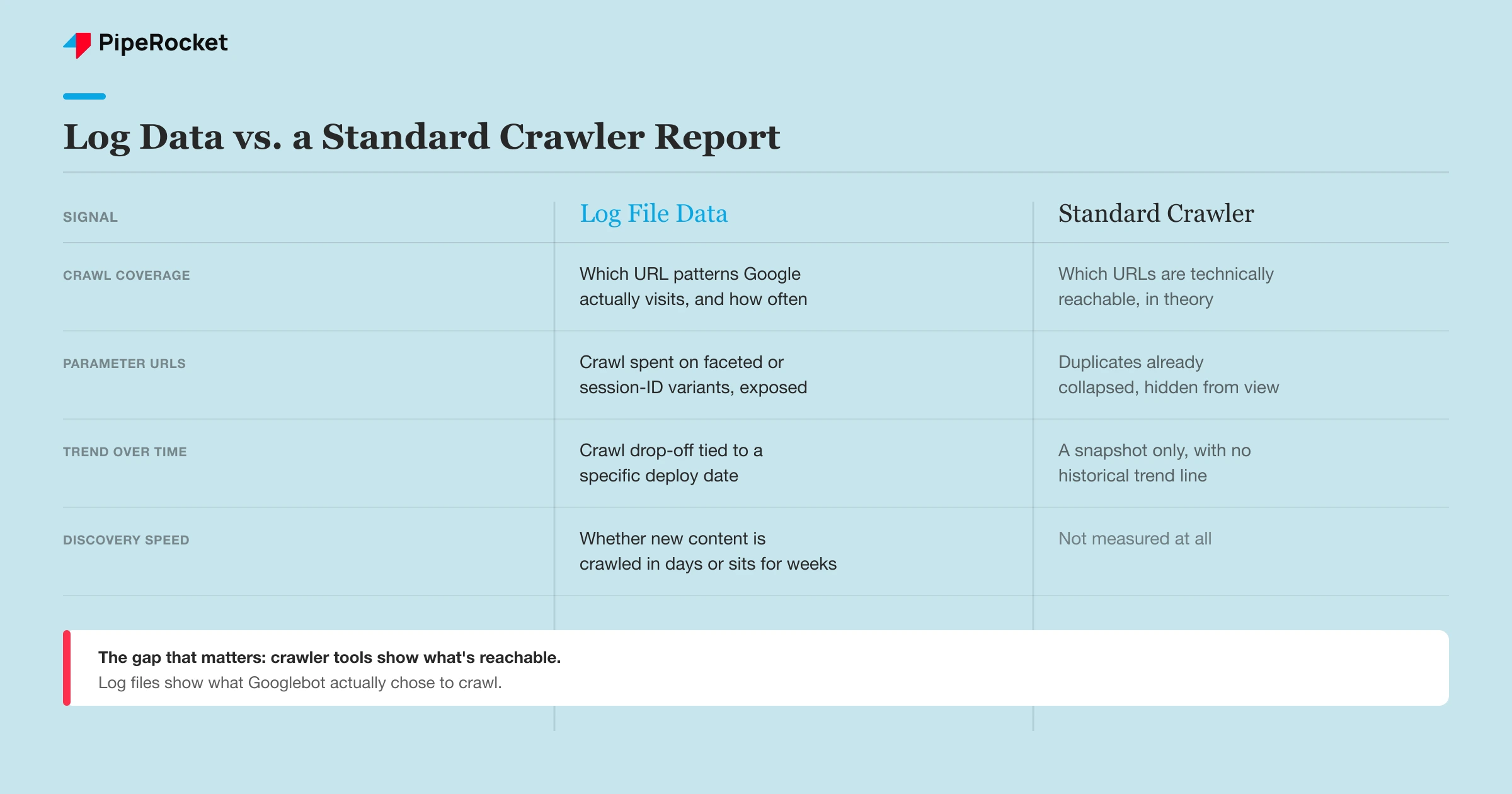
Log file analysis shows what Googlebot actually crawled, and it’s the step that separates an enterprise SEO audit from a scaled-up small-site checklist. A standard crawler tool tells you what’s crawlable in theory. Server logs tell you what Google chose to crawl in practice, and at this scale those two pictures diverge fast.
Pull at least 30 days of raw server logs, filtered to verified Googlebot user agents, and look at crawl frequency by URL pattern rather than by individual page. A pattern that gets a few thousand hits a month while another comparable pattern gets a few hundred is telling you something about crawl budget allocation that a crawler tool can’t show.
| What log data reveals | What a standard crawler shows instead |
|---|---|
| Which URL patterns Google actually visits, and how often | Which URLs are technically reachable from the current site structure |
| Crawl spent on parameter or session-ID variants | A clean list of canonical URLs, with duplicates already collapsed |
| Sudden crawl drop-off tied to a specific deploy date | A snapshot of current site health with no historical trend |
| Whether new content gets crawled within days or sits for weeks | Nothing. Crawlers don’t measure discovery speed |
Most enterprise crawl budget waste we’ve found traces back to parameter-driven URLs, like faceted search or session tracking, that a crawler tool doesn’t flag as a problem because each variant technically returns a valid page. Log data shows Googlebot burning thousands of crawls a month on those variants instead of the pages you actually want indexed. Put that crawl split near the top of the enterprise website SEO audit report, since a crawler-only review never surfaces it.
Step 3: Sample Instead of Trying to Review Everything
Sampling replaces manual page review in an enterprise SEO audit once the URL count makes full review impossible, and the sample only holds up if you build it around templates and patterns instead of pulling a random handful of URLs. A random sample of 50 pages out of 100,000 tells you almost nothing, because it’s statistically likely to miss whatever pattern is actually broken.
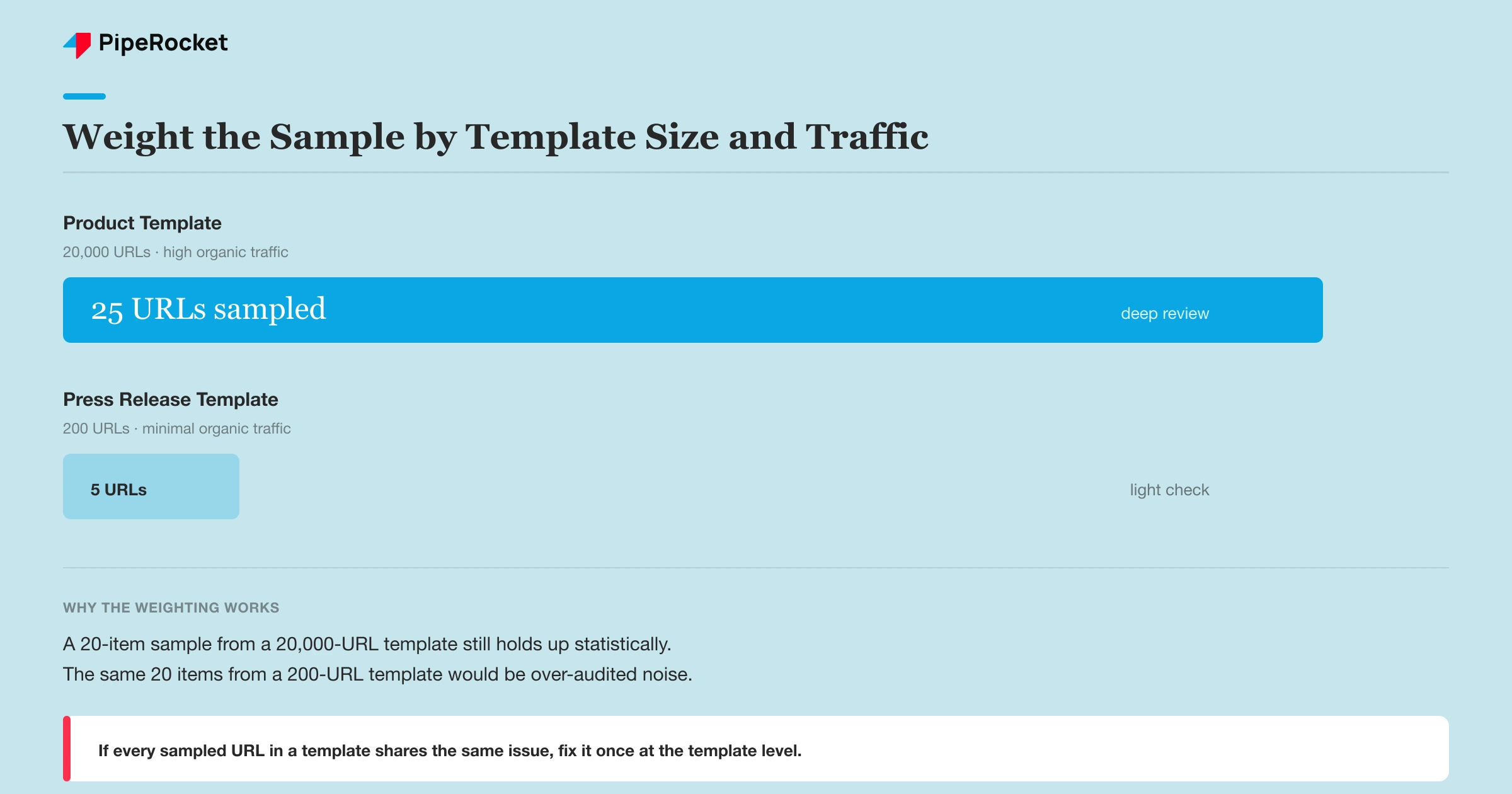
Group every URL into its generating template first: product pages, category pages, blog posts, doc pages, location pages, whatever the site’s actual taxonomy is. Then pull a sample from inside each template group, weighted toward the templates that carry the most organic traffic or revenue.
A template with 20,000 URLs and a template with 200 URLs both deserve a sample, but they don’t deserve the same sample size or the same audit depth. We typically pull 15 to 25 URLs per high-traffic template and check them against the same rubric: title tag logic, indexation status, internal link count, and schema presence.
If every sampled URL in a template shares the same issue, you’ve found a systemic problem you can fix once at the template level instead of one page at a time.
Weight the Sample Toward What Actually Drives Pipeline
Not every template deserves equal audit attention. A product template that drives demo requests needs a deeper sample than an archived press release template that gets almost no traffic and never will.
Rank templates by organic sessions and conversion contribution before deciding sample size. This is the same pipeline-distance logic that governs prioritization in a smaller audit, just applied one layer up, at the template level instead of the page level. Our broader enterprise SEO guide covers the strategic framing behind this kind of prioritization if you want the fuller picture beyond the audit process itself.
Step 4: Build the Audit Around the Teams That Have to Fix It
An enterprise SEO audit only creates value if it routes findings to whoever can actually act on them, and that’s rarely one person. We structure every audit report by owner before we structure it by issue severity, since a template-level fix usually touches more than one team:
- Developers: a two-line canonical or redirect fix, or a deeper template-level code change
- Design: layout adjustments the fix affects, especially on template-wide changes
- Content: copy updates once the structure shifts, like rewriting 40 category descriptions on one template
Set up a short kickoff call with each team’s lead before the audit starts, not after the findings land in their inbox. Ask what their sprint cycle looks like and how they usually receive technical requests, because a finding delivered as a vague ticket with no context gets deprioritized behind whatever the team already had planned.
Sabari Rohith, our Sr. SEO Specialist, has run enough cross-team enterprise SEO audits to notice the same pattern every time. The audit that gets acted on is the one where dev, content, and design each got a filtered version of the findings that only shows what’s theirs to fix.
A single 80-page PDF sent to everyone gets read by no one, and the fixes stall for months while the report sits in a shared drive.
The delay isn’t always technical, either. On one enterprise engagement, our team submitted a set of competitor-term pages for approval in October and got told those terms needed a business-critical justification before legal would clear them. Once that cleared, the content team had higher-priority work queued, so the pages sat untouched. Design and dev were backed up next, so the SEO team ended up building the pages directly. They went live in December, two months end to end, and almost none of that timeline had anything to do with an audit finding or an SEO tactic. It was approval queues, one after another.
Step 5: Prioritize by Template Reach, Not by How Broken One Page Looks
Rank fixes by how many URLs a single change touches, not by how severe an individual page’s issue looks in isolation. A broken canonical tag on one high-traffic landing page matters. But a template-level indexation bug affecting 30,000 product pages matters more, even if that single deindexed page looked more dramatic on the page.
This works when you’ve already grouped findings by template and system, which is why steps 1 through 4 have to happen in order. Skipping straight to prioritization without the mapping and sampling work means you’re prioritizing off a spreadsheet of symptoms instead of a real picture of scale.
Prune Index Bloat and Fix Architecture at the Template Level
Index bloat is the mass of low-value, duplicate, or thin URLs an enterprise site accumulates until Google spends its crawl budget on pages nobody should ever land on. You cut it the same way an enterprise SEO audit fixes everything else: by pattern, not page by page.
The bloat almost always traces back to a handful of generators. Faceted navigation spinning up a URL for every filter combination, paginated archives with no consolidation, tag pages that duplicate category pages, and expired product or event pages that never got a plan. Each of those is a template or a rule, so each is one fix that clears thousands of URLs.
Group the offending URLs by their generating pattern first, then decide the treatment per pattern: noindex the ones that should exist for users but not search, canonicalize the near-duplicates, redirect the dead ones, and flatten the parts of the URL hierarchy that bury real pages five clicks deep. The architecture goal is simple, get every page that earns traffic within a few links of the homepage and stop Google from crawling the rest.
Audit the Categories a Process Checklist Skips
A complete enterprise SEO audit covers backlinks, Core Web Vitals, schema, and content decay alongside the crawl and indexation work, because each one degrades at scale in ways a linear process pass misses. Run each as a pattern-level check, not a page-level one.
Evaluate Backlink and Link Equity Distribution
Check where the site’s link equity actually lands, because on a large property most external authority pools on the homepage and a few hub pages while thousands of money templates get almost none. Pull the backlink profile, map linked-to URLs against your traffic-and-revenue template ranking, and flag high-value templates that no internal or external links reach. Reclaim lost equity by fixing internal links into those templates and redirecting any linked pages you retired.
Check Core Web Vitals by Template, Not by Page
Sample Core Web Vitals per template, since page speed on an enterprise site is a property of the template, not the individual URL. If one product page loads slowly, every page on that template loads slowly. Pull field data from the Search Console Core Web Vitals report, which already groups URLs into pattern-based buckets, then hand the worst-scoring templates to the dev team as a single fix each.
Review Schema and Structured Data Coverage
Confirm structured data is present and valid on every template that qualifies for it, because schema is generated by the template and either every page has it or none do. Check product, article, FAQ, breadcrumb, and organization markup against the current schema.org spec, and flag templates throwing validation errors in Search Console’s enhancement reports. One template fix corrects the markup across every page built on it.
Assess Content Quality and Decay
Audit content by template for decay, keyword alignment, and E-E-A-T signals, because at this scale content problems are systemic too. Rank templates by traffic trend and flag the ones sliding quarter over quarter, since decay usually hits a whole content type at once rather than one post. Confirm each template still targets the intent it was built for, and that pages carry the author, sourcing, and depth signals the query deserves. This is where the content team’s routed findings from Step 4 turn into a rewrite plan.
The Essential Enterprise SEO Audit Tools
Three tools carry most of an enterprise SEO audit: Screaming Frog for deep crawls, Lumar for very large data sets, and Google Search Console for what Google actually indexed and served. Each one maps to a step already in this process.
| Tool | What it handles | Which step it powers |
|---|---|---|
| Screaming Frog | Deep template crawls, canonical and redirect checks, schema validation | Sampling (Step 3), index bloat, schema review |
| Lumar | Crawling and monitoring sites too large for a desktop crawler | Full-site coverage on million-URL properties |
| Google Search Console | Real indexation status, Core Web Vitals field data, query performance | Indexation checks, CWV, GSC query analysis |
| A log file analyzer | Verified Googlebot crawl frequency by URL pattern | Log file analysis (Step 2) |
No single tool runs the whole audit. The crawl tools tell you what exists and what’s broken by pattern, and Search Console tells you what Google did with it, and the log analyzer tells you where crawl budget went. You need all three views to see the full picture at this scale.
How Often to Re-Audit at Enterprise Scale
Run a full enterprise audit once or twice a year, and keep lighter pattern-level checks running continuously in between. A site this large changes constantly as teams ship new templates, launch regional folders, and retire product lines, so an annual snapshot alone goes stale within a quarter.
Set up ongoing monitoring on the patterns most likely to break: indexation counts by template, crawl frequency shifts tied to deploys, and Core Web Vitals regressions. Treat any deploy that touches a high-traffic template as a trigger for a scoped mini-audit of that template, rather than waiting for the next full pass. Governance is the part that keeps the audit’s fixes from quietly undoing themselves the next time a template ships, and it’s where a repeatable audit connects back to your wider enterprise SEO strategy rather than living as a one-off report.
Common Mistakes to Avoid
Running a Small-Site Checklist at Enterprise Scale
A checklist built for manual page review doesn’t become an enterprise SEO audit just because you assign more people to it. Adding headcount to a broken method still produces a broken audit, just slightly faster. The method has to change to sampling and template-level review, not just the team size.
Skipping the Subdomain Inventory
Teams that jump straight to crawling the main domain miss the subdomains and legacy systems that quietly compete for the same rankings. We’ve seen enterprise audits declare a site “healthy” while an old acquired-company blog on a forgotten subdomain sat there cannibalizing the exact terms the main site was trying to rank for.
Building a Random Sample Instead of a Template-Weighted One
A random sample across a huge site is statistically likely to miss the exact template where the real problem lives. Weight the sample by template and by traffic contribution, or the audit gives you false confidence instead of real coverage.
Delivering One Report to Every Team
An audit findings document written for everyone gets acted on by no one. Each team needs its own filtered version, scoped to what’s actually theirs to fix, delivered with enough context that it doesn’t get treated as a low-priority backlog item.
How PipeRocket Helps Enterprise Teams Run This Audit
We run enterprise-scale SEO audits as part of our engagements, covering subdomain mapping, log file analysis, and template-weighted sampling instead of a manual checklist that can’t survive the page count. If you’d rather we run the audit and hand your teams a filtered, owner-ready report, get in touch and we’ll walk you through the findings.
You can see how we stack up against other options on our list of the best enterprise SEO agencies.
Frequently Asked Questions
What is an enterprise SEO audit?
An enterprise SEO audit is a review of a large site’s technical health, content quality, and crawl efficiency built to work across thousands to millions of URLs, using log file analysis and template-weighted sampling instead of manual page-by-page review. It differs from a standard SEO audit mainly in method: the unit of review is a template or URL pattern, not an individual page.
How long does an enterprise SEO audit take?
A full enterprise audit typically takes four to eight weeks, depending on how many subdomains and CMS platforms the site runs and how much log data is available going in. Sites with clean log access and a small number of systems move faster. Sites where the subdomain inventory itself takes a week to build run longer.
How is an enterprise SEO audit different from a technical SEO audit?
A technical SEO audit usually focuses on one layer, like crawlability or Core Web Vitals, across a defined set of pages. An enterprise SEO audit covers technical health plus content quality plus stakeholder routing across an entire multi-system site, and it has to solve the sampling and scale problem before any single-layer technical check can even run.
What are the top 5 SEO audit tools?
The core enterprise audit tools are Screaming Frog for deep crawls, Lumar for very large sites, Google Search Console for real indexation and Core Web Vitals data, a log file analyzer for Googlebot crawl patterns, and a backlink tool for link equity. Each maps to a specific audit step.
Can ChatGPT do an SEO audit?
No, ChatGPT cannot crawl a site, read server logs, or check indexation, so it can’t run the audit itself at enterprise scale. It is useful for drafting findings, summarizing patterns you feed it, and explaining fixes, but the crawl, sampling, and log analysis need real tools.
What is an SEO audit?
An SEO audit is a structured review of a site’s technical health, content, and search performance to find what limits its rankings. A standard audit reviews pages directly, while an enterprise audit reviews templates and patterns because the URL count is too large for page-by-page review.

